For most buyers, I’d start with the Sysracks 22U 35-Inch Deep Server Rack Cabinet: its floor-standing format and deeper enclosure suit a growing mix of rack equipment. The StarTech.com 22U 4-Post Cabinet is a strong alternative for buyers prioritizing a familiar four-post layout, while the VEVOR 18U Network Cabinet adds a built-in PDU, fans, and an LED light. The main tradeoffs are floor space versus wall mounting, enclosed security versus open access, and compact dimensions versus room for deeper hardware. Cabinet capacity alone does not tell you whether your servers, cables, and cooling setup will fit. Read on for the full breakdown and guidance on matching a cabinet to your equipment and room.

Get business pricing on networking and server gear
- Business-only prices and quantity discounts
- Tax-exempt purchasing
- Multiple users, one account, clear invoices
Key Takeaways
- Depth can matter more than rack-unit count: the 35-inch Sysracks and 33-inch StarTech.com floor cabinets are better starting points for deeper equipment than the shallow DeskPi mini racks.
- Wall cabinets serve a different job from floor enclosures: the 22U VEVOR wall cabinet offers substantial rack space, but buyers must check wall structure and loaded weight before mounting.
- Integrated extras vary: the Sysracks 37U includes fans, a PDU, and casters, while the VEVOR 18U adds a PDU, two fans, and lighting; those features can reduce separate purchases but do not replace fit checks.
- Open-frame racks favor access over containment: the AxcessAbles 12U and Tecmojo 12U make cabling and equipment access easier, while cabinets with doors offer more enclosure and controlled access.
- Small-format racks have specific limits: the DeskPi 4U and 12U models use 10-inch formats, so buyers should confirm device width and rail compatibility rather than assume standard 19-inch equipment will fit.
| Sysracks 22U 35-Inch Deep Server Rack Cabinet with Glass Door |  | Best Overall Enclosed Rack | Rack size: 22U | Depth: 35 in | Dimensions: 35 x 24 x 45 in (D x W x H) | VIEW LATEST PRICE | See Our Full Breakdown |
| AxcessAbles 12U Open Frame Network Rack with Locking Wheels, 18-Inch Depth |  | Best for Heavy, Accessible Setups | Capacity: 12U | Mounting: 19-inch rack mount | Dimensions: 18 in D x 20 in W x 27.5 in H | VIEW LATEST PRICE | See Our Full Breakdown |
| GeeekPi DeskPi RackMate T0 4U Mini Server Rack, 10-Inch Wide, 7.87-Inch Deep |  | Best Compact Mini Rack | Rack height: 4U (7 in) | Dimensions: 7.87 in D x 10 in W x 7 in H | Weight: 6.9 lb | VIEW LATEST PRICE | See Our Full Breakdown |
| VEVOR 22U Wall-Mount Network Cabinet, 23.6-Inch Depth, 300 lb Capacity |  | Best Flexible-Mount Enclosure | Capacity: 22U | Dimensions: 23.6 x 23.6 x 45.87 in (D x W x H) | Weight: 66.1 lb | VIEW LATEST PRICE | See Our Full Breakdown |
| EXKRAEFT 6U Wall-Mount Network Cabinet with Lockable Tempered Glass Door |  | Best Small Lockable Cabinet | Capacity: 6U | Compatible equipment: Standard 19-inch IT and A/V equipment | Dimensions: 23.6 in W x 17.7 in D x 14.5 in H | VIEW LATEST PRICE | See Our Full Breakdown |
| VEVOR 6U Wall-Mount Network Server Cabinet, 14.8-Inch Deep |  | Best Compact Enclosed Wall Rack | Capacity: 6U | Maximum depth: 14.8 inches | Dimensions: 17.8 × 23.6 × 13.8 inches (D × W × H) | VIEW LATEST PRICE | See Our Full Breakdown |
| StarTech.com 22U 4-Post Server Cabinet, 33-Inch Deep |  | Best Adjustable-Depth Mid-Size Cabinet | Rack height: 22U | Mounting standard: 19-inch EIA/ECA-310-E | Mounting depth: 5.7–33 inches | VIEW LATEST PRICE | See Our Full Breakdown |
| GeeekPi DeskPi RackMate T2 12U Mini Network Rack, 10-Inch |  | Best for 10-Inch Home-Lab Gear | Rack height: 12U | Equipment width: 10 inches | Dimensions: 11.02 × 10.23 × 23.22 inches | VIEW LATEST PRICE | See Our Full Breakdown |
| Sysracks 37U Server Rack Cabinet – 19″ Floor Standing, 32″ Deep with Cooling Fans, PDU, and Casters |  | Best Ready-to-Deploy Cooling Package | Rack size: 37U | Dimensions: 32 × 24 × 74 inches (D × W × H) | Weight: 68 pounds | VIEW LATEST PRICE | See Our Full Breakdown |
| Tripp Lite SR42UB 42U Server Rack Enclosure Cabinet |  | Best for Maximum Rack Capacity | Rack height: 42U | Equipment compatibility: 19-inch equipment | Dimensions: 78.5 × 23.63 × 43 inches (H × W × D) | VIEW LATEST PRICE | See Our Full Breakdown |
| Tecmojo 12U Open-Frame Network Rack with Two Shelves | 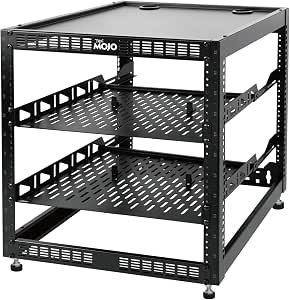 | Best Flexible Open-Frame Pick | Capacity: 12U | Material: Cold-rolled steel | Dimensions: 20.15 × 20.47 × 21.02 in (D × W × H) | VIEW LATEST PRICE | See Our Full Breakdown |
| Tecmojo 9U Wall-Mount Server Cabinet with Lockable Glass Door |  | Best Mid-Size Secure Wall Cabinet | Rack size: 9U | Mounting type: Wall mount | Dimensions: 17.7 in D × 21.7 in W × 19 in H | VIEW LATEST PRICE | See Our Full Breakdown |
| OCEANHUG 12U Wall-Mount Server Cabinet with Cooling Fans and Two Rack Shelves |  | Best Wall Cabinet for Included Cooling and Shelves | Rack size: 12U | Depth: 450 mm (17.7 in) | Dimensions: 17.7 × 23.6 × 25.2 in (D × W × H) | VIEW LATEST PRICE | See Our Full Breakdown |
| Tecmojo 6U Wall-Mount Server Cabinet with Lockable Glass Door |  | Best Compact Lockable Cabinet | Capacity: 6U | Dimensions: 17.7 in D × 21.7 in W × 13.8 in H | Maximum mounting depth: 14.2 in | VIEW LATEST PRICE | See Our Full Breakdown |
| VEVOR 18U Network Cabinet Server Rack with Built-In PDU, Two Fans, and LED Light |  | Best Feature-Rich Floor Cabinet | Rack capacity: 18U | Compatible equipment: Standard 19-inch equipment | Installation depth: 18 in | VIEW LATEST PRICE | See Our Full Breakdown |
| rackmount server cabinet | Dimensions | Warranty |
|---|---|---|
| Sysracks 22U 35-Inch Deep Serv | 35 x 24 x 45 in (D x W x H) | 2 years |
| AxcessAbles 12U Open Frame Net | 18 in D x 20 in W x 27.5 in H | 1 year |
| GeeekPi DeskPi RackMate T0 4U | 7.87 in D x 10 in W x 7 in H | 6 months |
| VEVOR 22U Wall-Mount Network C | 23.6 x 23.6 x 45.87 in (D x W x H) | 1 year |
| EXKRAEFT 6U Wall-Mount Network | 23.6 in W x 17.7 in D x 14.5 in H | 1 year |
| VEVOR 6U Wall-Mount Network Se | 17.8 × 23.6 × 13.8 inches (D × W × H) | 1 year |
| StarTech.com 22U 4-Post Server | — | Lifetime |
| GeeekPi DeskPi RackMate T2 12U | 11.02 × 10.23 × 23.22 inches | — |
| Sysracks 37U Server Rack Cabin | 32 × 24 × 74 inches (D × W × H) | 2 years |
| Tripp Lite SR42UB 42U Server R | 78.5 × 23.63 × 43 inches (H × W × D) | 5 years |
| Tecmojo 12U Open-Frame Network | 20.15 × 20.47 × 21.02 in (D × W × H) | 3 years |
| Tecmojo 9U Wall-Mount Server C | 17.7 in D × 21.7 in W × 19 in H | 3 years |
| OCEANHUG 12U Wall-Mount Server | 17.7 × 23.6 × 25.2 in (D × W × H) | — |
| Tecmojo 6U Wall-Mount Server C | 17.7 in D × 21.7 in W × 13.8 in H | 3 years |
| VEVOR 18U Network Cabinet Serv | 23.6 × 23.62 × 38.39 in (D × W × H) | — |
More Details on Our Top Picks
Sysracks 22U 35-Inch Deep Server Rack Cabinet with Glass Door
For a buyer who needs a full-depth, enclosed rack rather than a compact network cabinet, the Sysracks 22U is the most balanced choice in this group. Its 35-inch depth accommodates equipment that may not fit the shallower VEVOR 22U Wall-Mount Network Cabinet, while the locking glass door keeps gear behind a barrier without hiding status lights. Thermostat-controlled dual fans, a PDU, fixed shelf, and cable brush panels also reduce the number of separate pieces to source. The tradeoff is its 220 lb static capacity, which leaves less room for heavy equipment than the AxcessAbles open-frame rack’s stated 550 lb capacity. At 68 lb, it also takes more effort to position than a small wall cabinet. I’d choose it for a mixed, enclosed floor setup, not an unusually heavy server stack.
Pros:- 35-inch depth accommodates deeper rack equipment than the VEVOR 22U cabinet
- Thermostat-controlled dual fans provide active cooling
- Locking glass door and cable brush panels help protect and organize equipment
- Includes a PDU, fixed shelf, casters, leveling feet, and mounting hardware
Cons:- 220 lb static load capacity may be restrictive for a heavy equipment stack
- The 68 lb cabinet can be difficult to move and position during installation
Best for: Small-business and home-lab operators who need a lockable, actively cooled floor cabinet with room for full-depth rack equipment.
Not ideal for: Buyers with especially heavy equipment, limited installation help, or a need to mount the cabinet on a wall.
- Rack size:22U
- Depth:35 in
- Dimensions:35 x 24 x 45 in (D x W x H)
- Material:Alloy steel
- Weight:68 lb
- Load capacity:220 lb static
- Cooling:Thermostat-controlled dual fans
- Included accessories:PDU, fixed shelf, casters, leveling feet, mounting hardware
- Warranty:2 years
Our verdict“Choose the Sysracks for a full-depth, lockable 22U floor rack with cooling and useful included accessories, provided your equipment stays within its load limit.”
AxcessAbles 12U Open Frame Network Rack with Locking Wheels, 18-Inch Depth
The AxcessAbles is the practical pick when load capacity and access matter more than enclosing equipment. Its open 12U frame makes cabling and airflow more accessible than in the glass-door Sysracks 22U cabinet, and the stated 550 lb capacity is higher than either enclosed floor cabinet in this batch. Four casters make the rack easier to reposition, with two locking for use in place. The shorter 18-inch depth and open sides suit network, audio, and AV equipment, but they leave less room for deep servers and offer little physical protection from dust or casual contact. There is also a capacity discrepancy: the title says 500 lb, while the description says 550 lb. I’d confirm the supported load before building a heavy stack. The included screws and tool help, but this is not a secure cabinet.
Pros:- Open frame offers direct access to equipment and cabling
- Description lists a 550 lb load capacity
- Four 3-inch casters make repositioning easier, and two lock
- Includes rack screws, a blank panel, and an assembly tool
Cons:- Open construction provides less protection and security than the Sysracks enclosed cabinet
- Capacity is inconsistent between the title and description
- 18-inch depth may not suit deeper server equipment
Best for: AV installers, network administrators, and home-lab builders who need a rolling, high-capacity 19-inch frame with easy access to cabling.
Not ideal for: Buyers who need a lockable enclosure, protection from dust, or space for deep server chassis.
- Capacity:12U
- Mounting:19-inch rack mount
- Dimensions:18 in D x 20 in W x 27.5 in H
- Frame material:Alloy steel
- Frame thickness:1.5 mm
- Listed load capacity:550 lb in description; title states 500 lb
- Casters:Four 3-inch casters; two locking
- Item weight:18.03 kg
- Warranty:1 year
Our verdict“Pick the AxcessAbles for a mobile, accessible rack with a high stated capacity, but verify the load rating and skip it if you need an enclosure.”
GeeekPi DeskPi RackMate T0 4U Mini Server Rack, 10-Inch Wide, 7.87-Inch Deep
The DeskPi RackMate T0 serves a different purpose from the full-size cabinets here: it is a 4U mini rack for small-format gear, not a substitute for a standard 19-inch server cabinet. At just 10 inches wide and 7.87 inches deep, it takes up far less space than the AxcessAbles 12U rack, making it a better fit for a desk or compact home-office setup. Its open frame and perforated sides give equipment easy access to air and cabling, though they provide less protection than the locking glass doors on the Sysracks or EXKRAEFT cabinets. The narrow, shallow format also sharply limits equipment compatibility, and the provided data does not state a load capacity. I’d choose it for small network, audio, or video components that fit its dimensions—not for standard-depth servers or a growing rack installation.
Pros:- 10-inch width and 7.87-inch depth suit tight desk or office spaces
- Open frame gives convenient access to equipment and cabling
- Perforated side panels support airflow
- Aluminum alloy and acrylic construction keeps the rack at 6.9 lb
Cons:- Limited depth and width rule out many standard or full-depth rack components
- Open construction offers less protection than the enclosed Sysracks and EXKRAEFT cabinets
- Product data does not specify a load capacity
Best for: Home-office and maker users organizing compact, compatible network, audio, or video equipment in a very small footprint.
Not ideal for: Server builders with standard 19-inch or deep equipment, buyers needing a lockable enclosure, or anyone who needs a stated load rating.
- Rack height:4U (7 in)
- Dimensions:7.87 in D x 10 in W x 7 in H
- Weight:6.9 lb
- Enclosure material:Aluminum alloy and acrylic
- Color:Silver
- Mounting type:Rack mount
- Model:DeskPi RackMate T0 (DP-0047)
- Warranty:6 months
Our verdict“Choose the RackMate T0 only for compact equipment that fits its mini-rack dimensions; it is not a replacement for a standard server cabinet.”
VEVOR 22U Wall-Mount Network Cabinet, 23.6-Inch Depth, 300 lb Capacity
The VEVOR 22U stands out for buyers who want an enclosed rack that can be used as a wall-mount or floor-mount cabinet. Its 300 lb capacity exceeds the Sysracks 22U’s 220 lb rating, while the locking tempered-glass door and side panels provide a more enclosed setup than the AxcessAbles open frame. Adjustable square-hole rails and multiple cable-routing holes help accommodate varied equipment and cleaner wiring. The compromise is depth: at 23.6 inches, it offers less clearance for deep chassis than the Sysracks’ 35-inch cabinet. Its 45.87-inch height and 66.1 lb weight also make installation a substantial task, particularly if wall mounting. Ventilation openings are included, but the product data does not specify fans, unlike the Sysracks’ thermostat-controlled pair. I’d favor it for protected, mid-depth network gear, not long servers or solo installation.
Pros:- 300 lb capacity exceeds the Sysracks 22U cabinet’s 220 lb rating
- Locking tempered-glass door and side panels enclose equipment
- Adjustable rails and multiple cable-routing holes support flexible setup
- Can be used as a wall-mount or floor-mount cabinet
Cons:- 23.6-inch depth may not fit deeper equipment that suits the Sysracks
- At 66.1 lb and nearly 46 inches tall, installation can be cumbersome
- Ventilation openings are listed, but fans are not specified
Best for: Small-business IT teams that need a 22U lockable cabinet, more stated load capacity than the Sysracks, and the option to choose wall or floor placement.
Not ideal for: Buyers with deep server chassis, a need for included active cooling, or a wall installation without suitable structural support and help.
- Capacity:22U
- Dimensions:23.6 x 23.6 x 45.87 in (D x W x H)
- Weight:66.1 lb
- Weight capacity:300 lb
- Material:Alloy steel
- Mounting:Wall mount or floor mount
- Door:Locking tempered glass
- Ventilation:Ventilation openings
- Warranty:1 year
Our verdict“Choose the VEVOR for a higher-capacity, lockable 22U cabinet with flexible placement, provided its depth suits your equipment.”
EXKRAEFT 6U Wall-Mount Network Cabinet with Lockable Tempered Glass Door
For a small installation that needs an enclosure, the EXKRAEFT’s 6U capacity is a better match than the much taller Sysracks and VEVOR 22U cabinets. It fits standard 19-inch IT and AV equipment, has adjustable rails, and can be wall-mounted or used floor-standing. The reversible glass door and removable lockable side panels provide more access options than a basic open rack, while cable ports help keep a compact installation organized. Its load rating changes with placement: 100 lb on a wall, compared with 200 lb on the floor, so buyers need to plan around the mounting method. Unlike the actively cooled Sysracks, this cabinet has no included fans; its top accepts two fans that must be supplied separately. The side-panel lock cylinders and keys are also excluded. I’d choose it for modest, protected installs, not a heat-heavy rack.
Pros:- Fits standard 19-inch IT and AV equipment in a compact 6U enclosure
- Reversible locking glass door and removable lockable side panels support access and security
- Can be wall-mounted or floor-standing, with different stated load limits
- Cable-routing ports and perforated ventilation panel support organized installation
Cons:- Cooling fans are not included, unlike the Sysracks 22U cabinet’s dual fans
- Wall-mounted capacity is limited to 100 lb
- Side-panel lock cylinders and keys are excluded
Best for: Home-network owners and small offices with a few standard 19-inch devices who want a compact, lockable cabinet and can match the load to the mounting setup.
Not ideal for: Buyers needing included active cooling, more than 6U of space, or a wall-mounted cabinet for equipment exceeding the 100 lb wall load limit.
- Capacity:6U
- Compatible equipment:Standard 19-inch IT and A/V equipment
- Dimensions:23.6 in W x 17.7 in D x 14.5 in H
- Adjustable rail depth:13.8 in
- Load capacity:100 lb wall-mounted; 200 lb floor-standing
- Material:Cold-rolled steel frame
- Door:Reversible, lockable tempered glass
- Ventilation:Perforated bottom panel; top accepts two fans, not included
- Warranty:1 year
Our verdict“Choose the EXKRAEFT for a compact, lockable 19-inch cabinet when 6U is enough and you are prepared to supply any needed fans.”
VEVOR 6U Wall-Mount Network Server Cabinet, 14.8-Inch Deep
For a small network closet that needs a door and sides rather than an open frame, this 6U wall-mount cabinet keeps a modest amount of equipment enclosed without taking floor space. Its 14.8-inch maximum depth is the defining limit: it suits shallow networking and A/V gear, but not deeper servers. Adjustable rails and several cable-routing openings give installers some flexibility, while ventilation openings help air move through the enclosure. Compared with the StarTech.com 22U 4-Post Server Cabinet, this VEVOR is a much smaller, wall-oriented choice, not a substitute for a full equipment rack. The glass door and side panels add a layer of access control, but wall mounting is capped at 100 pounds; heavier installations need another support plan.
Pros:- Locking glass door and side panels enclose equipment.
- Adjustable rails and cable-routing openings ease installation.
- Ventilation openings support airflow.
- Can be wall-mounted or ground-mounted.
Cons:- 14.8-inch maximum depth rules out many deeper devices.
- Wall-mounted load capacity is limited to 100 pounds.
- Six rack units offer limited room for future expansion.
Best for: Home or small-office installers with shallow network or A/V equipment who need a lockable enclosure mounted off the floor.
Not ideal for: Buyers with deep servers, heavy equipment, or a need to expand beyond 6U; its depth and 100-pound wall-mount limit constrain those setups.
- Capacity:6U
- Maximum depth:14.8 inches
- Dimensions:17.8 × 23.6 × 13.8 inches (D × W × H)
- Wall-mounted load capacity:100 pounds
- Ground-mounted load capacity:200 pounds
- Material:Alloy steel
- Door:Locking glass
- Warranty:1 year
Our verdict“Choose this VEVOR for a shallow, compact installation that needs an enclosed wall rack, but skip it for deep or heavy hardware.”
StarTech.com 22U 4-Post Server Cabinet, 33-Inch Deep
The StarTech.com RK2236BKF is a practical middle ground for buyers who need a real 19-inch, four-post cabinet but do not need the height of a 42U enclosure. Its standout is the 5.7-to-33-inch adjustable mounting depth, which lets the rails accommodate a broad range of equipment rather than locking the buyer into one chassis length. Vented doors, removable side panels, casters, and leveling feet make access and placement more manageable once assembled. Compared with the Tripp Lite SR42UB, it takes less vertical space and arrives flat-packed instead of assembled; compared with the VEVOR 6U wall cabinet, it offers far more rack capacity and depth. The tradeoff is the assembly work, and its 800 kg load rating applies when stationary, not while rolling.
Pros:- Adjustable mounting depth spans 5.7 to 33 inches.
- Lockable front and rear doors with removable side panels support access control and maintenance.
- Casters and leveling feet allow repositioning and stable placement.
- Vented doors and top panel support airflow.
Cons:- Ships flat-packed and requires assembly.
- The 800 kg load capacity is specified for stationary use.
- At 22U, it offers less vertical capacity than the Tripp Lite 42U enclosure.
Best for: Small IT teams or serious home-lab builders who need standard 19-inch equipment support, flexible rail depth, and moderate rack height.
Not ideal for: Buyers who need a ready-to-use cabinet out of the box, a taller rack, or a load rating that applies while the cabinet is moving.
- Rack height:22U
- Mounting standard:19-inch EIA/ECA-310-E
- Mounting depth:5.7–33 inches
- Stationary load capacity:800 kg (1,764 lb)
- Height:46.6 inches
- Doors and panels:Lockable front and rear doors; removable side panels
- Included accessories:Casters, leveling feet, keys, assembly and mounting hardware
- Warranty:Lifetime
Our verdict“Pick the StarTech.com when adjustable depth and a mid-size 19-inch cabinet matter more than avoiding assembly or maximizing rack height.”
GeeekPi DeskPi RackMate T2 12U Mini Network Rack, 10-Inch
The DeskPi RackMate T2 fills a niche that full-size server cabinets cannot: a compact 12U rack for 10-inch equipment in a home office or small workspace. Its aluminum frame and open construction keep installation and maintenance accessible, while translucent acrylic side panels let the equipment remain visible. That open format also means less enclosure than a cabinet with locking doors, so it is better for orderly, low-risk setups than shared spaces where physical access needs to be restricted. Unlike the StarTech.com 22U cabinet or the Tripp Lite 42U, this rack does not accept standard 19-inch hardware. That incompatibility is the key buying boundary, not a minor detail: check the width of every device before choosing it. Its compact footprint and easy access come at the cost of enterprise-rack flexibility and protection.
Pros:- 12U capacity in a compact footprint.
- Designed for 10-inch equipment used in small setups.
- Open frame gives easy access for installation and maintenance.
- Translucent acrylic side panels provide a view of the interior.
Cons:- Not compatible with standard 19-inch equipment.
- Open-frame design provides less enclosure and access control than closed cabinets.
- The compact form factor limits it to compatible small-rack hardware.
Best for: Home-lab hobbyists and small-office users building around compatible 10-inch switches, routers, and other compact rack equipment.
Not ideal for: IT teams with standard 19-inch servers or buyers who need a lockable, fully enclosed cabinet for equipment security.
- Rack height:12U
- Equipment width:10 inches
- Dimensions:11.02 × 10.23 × 23.22 inches
- Frame material:Aluminum alloy
- Side panels:Translucent acrylic
- Design:Open frame
- Compatibility:10-inch form factor; not compatible with standard 19-inch equipment
Our verdict“Choose the RackMate T2 for a tidy 10-inch home lab, but choose a standard 19-inch cabinet if you have conventional server hardware.”
Sysracks 37U Server Rack Cabinet – 19″ Floor Standing, 32″ Deep with Cooling Fans, PDU, and Casters
For an IT room that needs substantial capacity plus built-in cooling and power distribution, this 37U Sysracks cabinet bundles several setup components into one floor-standing enclosure. The 32-inch depth accommodates larger servers and storage gear, while the roof-mounted quad-fan module, thermostat, and LCD provide active airflow control rather than relying only on perforated panels. Its included 8-outlet PDU, fixed shelf, casters, and leveling feet also reduce the separate hardware a buyer must source. Compared with the StarTech.com 22U cabinet, this offers considerably more rack space and integrated cooling, but it occupies a taller, deeper footprint. The 1,600-pound capacity suits heavy installations; still, the 68-pound cabinet itself may take assistance to position, and buyers should plan for power and airflow needs around the fan module.
Pros:- 37U capacity and 32-inch depth accommodate substantial server and storage installations.
- Quad-fan roof module includes a thermostat and LCD.
- Includes an 8-outlet PDU, fixed shelf, casters, and leveling feet.
- Alloy-steel frame supports up to 1,600 pounds.
Cons:- Its 74-inch height and 32-inch depth require considerable floor space.
- The 68-pound cabinet may need help during initial placement.
- Active cooling and included accessories add features a small, lightly loaded setup may not need.
Best for: Small data rooms and growing businesses installing multiple servers or storage devices that benefit from active cooling and included power distribution.
Not ideal for: Home offices or compact closets with limited floor space, and buyers seeking a shallow or wall-mounted rack.
- Rack size:37U
- Dimensions:32 × 24 × 74 inches (D × W × H)
- Weight:68 pounds
- Maximum load capacity:1,600 pounds (725 kg)
- Material:Alloy steel
- Cooling:Quad-fan roof module with thermostat and LCD
- Included accessories:8-outlet PDU, fixed shelf, locking casters, leveling feet, cable entry brushes
- Warranty:2 years
Our verdict“Choose this Sysracks model when you need a deep, high-capacity cabinet with active cooling and included power distribution in one package.”
Tripp Lite SR42UB 42U Server Rack Enclosure Cabinet
When the priority is fitting a large standard 19-inch installation into one enclosed rack, the Tripp Lite SR42UB offers 42U of capacity and a 3,000-pound stationary rating. It arrives assembled, which separates it from the flat-packed StarTech.com 22U cabinet, and its perforated doors support airflow without relying on a listed integrated fan system. Locking, removable, reversible front and rear doors, adjustable rails, and cable-routing ports make the enclosure practical for ongoing access and equipment changes. The tradeoff is scale: at nearly 79 inches tall, about 43 inches deep, and over 127 kg in item weight, it demands a suitable delivery path and a permanent location. Compared with the 37U Sysracks, it provides more rack space but does not list a bundled PDU or active cooling package.
Pros:- 42U capacity fits a large standard 19-inch equipment installation.
- Rated for 3,000 pounds stationary and 2,250 pounds rolling.
- Ships assembled, unlike the flat-packed StarTech.com 22U cabinet.
- Locking, removable, reversible doors and removable side panels support access and maintenance.
Cons:- Large dimensions and 127.46 kg item weight make delivery and placement demanding.
- No integrated fan system or PDU is listed, unlike the Sysracks 37U package.
- Its 42U capacity is excessive for small equipment collections.
Best for: Organizations building a large standard 19-inch server or network installation that need high rack capacity, a strong stationary load rating, and an assembled enclosure.
Not ideal for: Home labs, compact offices, or buyers who need integrated fans and a bundled PDU rather than a large enclosure with perforated doors.
- Rack height:42U
- Equipment compatibility:19-inch equipment
- Dimensions:78.5 × 23.63 × 43 inches (H × W × D)
- Weight capacity:3,000 lb stationary; 2,250 lb rolling
- Item weight:127.46 kg
- Doors and panels:Locking, removable, reversible front and rear doors; four side panels
- Included components:Locks, keys, screws, washers, cage nuts, and owner’s manual
- Warranty:5 years
Our verdict“Choose the SR42UB for a large, assembled 19-inch installation when capacity and stationary load support matter more than compact size or bundled cooling.”
Tecmojo 12U Open-Frame Network Rack with Two Shelves
I’d choose this Tecmojo when easy equipment access and flexible placement matter more than enclosing the rack. Its 12U capacity and two ventilated shelves give it more room for mixed networking and AV gear than the compact 6U Tecmojo cabinet, while the option to mount it on a wall or stand it on the floor can suit changing room layouts. The tradeoff is protection: unlike the lockable Tecmojo 9U cabinet, this open-frame design does not secure gear behind a door or shield it from dust and casual contact. Its stated load limit also changes with installation—130 lb on a wall versus 260 lb on the floor—so I’d match the mounting method to the equipment load. It’s a practical rack, but not the pick for a shared or unsecured space.
Pros:- Can be wall-mounted or used as a floor-standing rack
- Includes two ventilated shelves, shelf stops, and Velcro straps
- Steel frame has stated load limits for both mounting configurations
- 12U capacity suits a broader equipment mix than a 6U enclosure
Cons:- Open sides leave equipment exposed to dust, contact, and unauthorized access
- Wall-mounted capacity is lower than the floor-standing capacity
- Does not provide the enclosed cable and equipment protection of the Tecmojo 9U cabinet
Best for: Home-lab builders and small offices with mixed 19-inch networking or AV equipment who want a rack that can be wall-mounted or floor-standing.
Not ideal for: Buyers who need lockable, enclosed equipment protection or plan to wall-mount a load near the floor-standing capacity.
- Capacity:12U
- Material:Cold-rolled steel
- Dimensions:20.15 × 20.47 × 21.02 in (D × W × H)
- Item weight:28.6 lb
- Mounting:Wall-mounted or floor-standing
- Load capacity:130 lb wall-mounted; 260 lb floor-standing
- Included accessories:Two ventilated shelves, four shelf stops, four Velcro straps, and mounting screws
- Compatibility:19-inch networking, audio, and video equipment
- Warranty:3 years
Our verdict“Choose this rack for accessible, mixed-use gear and flexible placement, but pick an enclosed model if security or dust protection matters.”
Tecmojo 9U Wall-Mount Server Cabinet with Lockable Glass Door
This 9U Tecmojo is a sensible middle ground for buyers who need enclosed, lockable storage but do not have floor space for a standing cabinet. Numbered U positions and adjustable rails make equipment placement easier to plan, and the reversible glass door can be oriented around the room. Compared with the smaller Tecmojo 6U cabinet, the extra rack height leaves more room for expansion; compared with the OCEANHUG 12U, this model is more compact but does not list included fans or shelves. Its 14.2-inch maximum mounting depth is the main fit constraint, so I’d check the full depth of equipment and connectors before buying. Assembly is required, and the 110 lb capacity calls for a properly secured wall mount rather than treating it like a floor rack.
Pros:- Lockable glass door and side panels add a layer of access control
- Adjustable rails and numbered U positions simplify equipment layout
- 9U capacity offers more expansion room than the Tecmojo 6U cabinet
- Wall mounting keeps the equipment off the floor
Cons:- Maximum mounting depth of 14.2 inches excludes many deeper devices
- Requires assembly before use
- No fans or rack shelves are listed as included
Best for: Small offices or home networks that need a lockable wall cabinet with more room than a 6U rack but have shallow 19-inch equipment.
Not ideal for: Buyers with deep servers, a need for included active cooling, or equipment that exceeds the 14.2-inch mounting depth.
- Rack size:9U
- Mounting type:Wall mount
- Dimensions:17.7 in D × 21.7 in W × 19 in H
- Maximum mounting depth:14.2 in
- Weight:35.4 lb
- Weight capacity:110 lb (50 kg)
- Door and side panels:Lockable glass door; lockable side panels
- Compatibility:19-inch IT equipment and A/V devices
- Warranty:3 years
Our verdict“Pick this cabinet for a lockable, space-saving 9U setup, provided your equipment fits within its shallow mounting depth.”
OCEANHUG 12U Wall-Mount Server Cabinet with Cooling Fans and Two Rack Shelves
The OCEANHUG earns its place for buyers who want a ready-to-equip enclosed 12U rack with useful accessories in the package. Two cooling fans, a vented door, removable vented side panels, and two full-size shelves address airflow and non-rackmount devices without requiring separate shelf purchases. Compared with the Tecmojo 9U, it offers three more rack units and listed active cooling, while the VEVOR 18U adds a PDU and more capacity for a larger installation. OCEANHUG’s tradeoff is handling: at 23.59 kg, this cabinet is substantial to lift onto a wall, even though it can also be placed on the floor. Its 132 lb capacity is useful for a compact setup, but I’d plan the mounting and installation around the cabinet’s weight as well as the equipment load.
Pros:- Includes two cooling fans and vented enclosure panels
- Two full-size shelves support equipment that cannot mount directly to rails
- Lockable front door and removable side panels balance access and security
- Can be wall-mounted or placed on the floor
Cons:- At 23.59 kg, installation can be difficult without help
- 132 lb capacity is below the VEVOR 18U cabinet’s stated 660 lb static load
- The listing does not specify temperature-controlled fan operation
Best for: Small offices or network installers building a 12U wall-or-floor setup that needs included fans and shelves for mixed rackmount and shelf-based gear.
Not ideal for: Solo installers who need to lift a heavy cabinet onto a wall, or buyers who need the larger capacity and integrated PDU of the VEVOR 18U.
- Rack size:12U
- Depth:450 mm (17.7 in)
- Dimensions:17.7 × 23.6 × 25.2 in (D × W × H)
- Item weight:23.59 kg
- Weight capacity:132 lb
- Material:Alloy steel
- Mounting:Wall mount or floor mount
- Cooling and access:Two cooling fans; lockable vented front door; removable vented side panels
- Included:Two full-size rack shelves and mounting hardware
Our verdict“Choose the OCEANHUG for a compact enclosed rack with cooling and shelves included, if you can accommodate its installation weight.”
Tecmojo 6U Wall-Mount Server Cabinet with Lockable Glass Door
For a small network closet where every inch of floor space matters, this Tecmojo keeps the footprint modest while adding a lockable glass door and side panels. Numbered positions and adjustable rails help make a short rack easier to configure, and removable punch-out panels provide routes for cables. It shares the 110 lb capacity and 14.2-inch maximum depth of the Tecmojo 9U, but cuts the rack height to 6U; that makes it a better fit for a fixed, small equipment set, not a growing installation. The 9U version gives more room to add devices, while the OCEANHUG 12U includes fans and shelves for a more accessory-rich setup. This cabinet requires assembly, and its shallow depth rules out deeper equipment, so I’d measure devices and cable clearance before choosing it.
Pros:- Compact 6U size helps preserve floor space
- Lockable glass door and side panels protect installed equipment
- Adjustable rails and numbered U positions aid setup
- Door can be installed to swing either direction
Cons:- 14.2-inch maximum mounting depth limits device compatibility
- Only 6U of space leaves less room to expand than the Tecmojo 9U
- Requires assembly and does not list included fans or shelves
Best for: Home-network owners and small offices with a short list of shallow 19-inch devices who want a lockable wall-mounted enclosure.
Not ideal for: Buyers planning to expand beyond 6U, installing deep equipment, or seeking included cooling fans and shelves.
- Capacity:6U
- Dimensions:17.7 in D × 21.7 in W × 13.8 in H
- Maximum mounting depth:14.2 in
- Weight:28.6 lb
- Weight capacity:110 lb (50 kg)
- Mounting type:Wall mount
- Compatible equipment:19-inch IT and AV equipment
- Door and cable access:Lockable reversible glass door; removable punch-out panels
- Warranty:3 years
Our verdict“Choose this cabinet for a small, shallow, lockable wall installation; move up to the 9U model if you expect to add equipment.”
VEVOR 18U Network Cabinet Server Rack with Built-In PDU, Two Fans, and LED Light
This VEVOR is the most equipment-heavy option in this group, pairing 18U of rack space with a built-in PDU, two temperature-controlled fans, a temperature display, lighting, and an installation tray. That package suits a small server or network room better than the Tecmojo open-frame rack, which is easier to access but offers neither an enclosure nor these integrated utilities. Its stated 660 lb static load also far exceeds the OCEANHUG 12U’s 132 lb capacity, making the VEVOR the stronger choice for a heavier floor setup. The main compromise is fit: 18 inches of installation depth may not accommodate deeper equipment or leave much room for connectors. At 75.8 lb, it is also cumbersome to reposition, so I’d settle its location before loading it. Verify wall support before using the wall-mount option.
Pros:- 18U capacity and 660 lb stated static load suit larger, heavier installations
- Built-in PDU, temperature display, and LED light reduce the need for separate accessories
- Two temperature-controlled fans support active airflow
- Locking casters and leveling feet offer different positioning options
Cons:- 18-inch installation depth may exclude deeper equipment or limit cable clearance
- At 75.8 lb, the cabinet is cumbersome to move before equipment is added
- Its many integrated features make it a less simple choice than the Tecmojo open-frame rack
Best for: Small server-room operators who want an enclosed 18U cabinet with integrated power, temperature-controlled airflow, lighting, and mobility features.
Not ideal for: Buyers with deep servers, a lightweight or frequently relocated setup, or limited wall support for a 75.8 lb cabinet.
- Rack capacity:18U
- Compatible equipment:Standard 19-inch equipment
- Installation depth:18 in
- Dimensions:23.6 × 23.62 × 38.39 in (D × W × H)
- Maximum static load:660 lb (299 kg)
- Item weight:75.8 lb
- Cooling:Two temperature-controlled fans and ventilation
- Integrated features:Built-in PDU, LED light, temperature display, installation tray
- Mounting and mobility:Floor mount or wall mount; four locking casters and leveling feet
Our verdict“Pick the VEVOR for a feature-rich 18U installation with substantial load needs, after confirming equipment depth and placement.”

How We Picked
I ranked these rackmount server cabinets by how clearly each format serves a real installation: floor-standing cabinets for larger systems, wall-mounted enclosures for space-constrained network gear, and open or mini racks for access-focused or compact setups. I weighed usable rack space alongside equipment depth, mounting method, enclosure style, and stated load capacity, since a cabinet can have enough U space yet still fail to fit a device or a safe location.
I also compared practical ownership details, including airflow provisions, access and security, mobility, included accessories, and setup flexibility. Higher-ranked picks offer a broader fit for common server or network builds; focused options rank well for their intended use but lower for buyers outside that use. Product descriptions do not settle every compatibility question, so I call out where measurements, wall strength, or included hardware should be confirmed before purchase.
Factors to Consider When Choosing Rackmount Server Cabinets
Before choosing from these rackmount server cabinets, start with the equipment and the installation site—not the advertised U count. The right cabinet depends on device dimensions, service access, floor or wall capacity, and how you plan to route power and data cables. These checks can prevent the common mistake of buying a cabinet that fits on paper but cannot be installed or maintained comfortably.
Measure equipment depth, rails, and cable clearance
Measure each device from its front mounting ears to the furthest point at the rear, including power plugs and cable bends. Then compare that figure with the cabinet’s usable mounting depth, not just its exterior depth, because doors, rails, and rear accessories take up space. Leave extra room for cables and airflow rather than choosing a fit that only works with connectors pressed against the back. Check rail spacing and whether your devices use a standard 19-inch rack format; the 10-inch DeskPi racks are intended for a different equipment footprint. If your hardware list may grow, plan for the deepest likely future device now.
Choose wall mount or floor standing by loaded weight
A wall cabinet can free floor space, but its stated capacity is not proof that any wall can safely carry the assembled system. Add the cabinet, equipment, shelves, and accessories, then check the mounting instructions and the wall’s framing and fasteners. Heavy servers and batteries may make a floor-standing cabinet the safer or easier service choice. Also account for how far a loaded enclosure projects into a walkway and whether you can reach its rear. A wall rack is most useful when the equipment is light enough for the installation and the location provides practical access.
Match rack units to usable capacity and growth
Rack units describe vertical mounting space, not the number of devices a cabinet can hold. Servers, switches, shelves, blanking panels, and cable managers all use space, and some equipment requires more than one U. Make a simple layout before buying and reserve room for future additions or airflow separation. A compact 6U or 9U wall cabinet may suit a small network installation, while a 22U or taller floor rack offers more room to expand. Avoid paying for unused height if the cabinet would occupy valuable space, but do not fill every U on day one if that leaves no room to work.
Plan airflow around the actual equipment load
Fans can help move air, but they cannot correct blocked intakes, poorly arranged gear, or a hot room. Check where each device draws and exhausts air, then verify that the cabinet’s vents and fan placement support that direction. Glass doors and enclosed sides can make a tidier, more controlled installation, yet they also make ventilation planning more important than with an open-frame rack. Leave room for cable paths that do not cover vents, and consider whether noise or dust control matters in the installation area. Treat included fans as part of a cooling plan, not a guarantee that every configuration will stay within operating limits.
Decide whether included accessories fit your setup
Bundled shelves, PDUs, fans, casters, and lighting can simplify a build, but only when their specifications match your equipment and electrical plan. Confirm the PDU’s outlet type, mounting position, and power requirements before relying on it; a built-in unit may not replace the power distribution you need. Shelves are useful for non-rackmount devices, though they consume rack space and can affect airflow. Casters help reposition some floor cabinets, but they do not make a tall, loaded rack easy or safe to move over every surface. Compare the convenience of included accessories with the flexibility of selecting each component separately.
Balance access, security, and the room layout
Doors and locks can limit casual access and keep equipment enclosed, while an open-frame rack makes hands-on work and cable changes easier. Neither format is automatically better: choose based on who can reach the equipment, how often it needs service, and how much dust or accidental contact is a concern. Check door swing, removable panels, and clearance around the cabinet before committing to a location. In a shallow closet or narrow office, a door can obstruct nearby furniture even when the cabinet itself fits. For shared spaces, plan both physical access control and a way to label cables and equipment clearly.
Frequently Asked Questions
Will a 19-inch rackmount server fit in every cabinet on this list?
No. The DeskPi RackMate T0 and T2 are 10-inch-wide mini racks, so they are not interchangeable with standard 19-inch cabinets. For a standard rackmount server, verify the cabinet’s usable width, rail spacing, mounting hardware, and depth before ordering. Also check whether the server’s ears and rails are compatible with the cabinet’s mounting posts. A product’s rack-unit count alone does not confirm device compatibility.
Is a wall-mounted cabinet suitable for a server, or only network equipment?
It depends on the server’s weight and depth, the cabinet’s stated capacity, and the wall installation. Many wall cabinets are a practical fit for switches, patch panels, and compact equipment, but a full server can create a heavy, awkward load. Add the weight of all installed gear and accessories, then confirm the cabinet’s mounting requirements against the wall structure. Check usable depth as well, since some servers need more room for rails, power plugs, and cable bends than a wall enclosure provides.
How much extra rack space should I leave for future equipment?
There is no single U allowance that suits every build, but reserving a few open units can make maintenance and expansion easier. First map the equipment you already own, including shelves and cable-management hardware, then list likely additions such as a switch, UPS, or storage device. Keep in mind that a UPS can be both heavy and tall, so it may affect cabinet choice and placement. If future growth is uncertain, a larger floor rack may offer more flexibility than filling a small wall cabinet immediately. Avoid buying extra height without checking that the room can accommodate the cabinet.
Do built-in fans and a PDU mean I do not need additional cooling or power gear?
Not necessarily. Fan presence does not show whether airflow capacity and placement match the heat output or intake direction of your equipment. A PDU’s outlet types, electrical rating, and mounting location also need to match your devices and circuit. Confirm those details before treating bundled accessories as a complete setup. Depending on the load and room, you may need additional power distribution, cooling, or temperature monitoring.
Should I choose an open-frame rack or a cabinet with doors?
Choose an open frame when frequent access, easy cable work, and unobstructed airflow matter more than enclosing the equipment. A cabinet with doors is a better fit when you want a more contained installation or a lockable access point, provided its depth and ventilation suit the hardware. Open racks expose gear to more dust and accidental contact, while enclosed cabinets call for more attention to heat and door clearance. Consider who shares the room and how often equipment needs service. The AxcessAbles and Tecmojo open-frame options favor access, while the glass-door cabinets prioritize enclosure.
Conclusion
For the best overall balance, I’d choose the Sysracks 22U 35-Inch Deep Cabinet when a floor-standing enclosed rack fits the room and equipment. The best value in practical flexibility is the AxcessAbles 12U open-frame rack for buyers who want accessible mounting space without needing a closed enclosure; skip it if dust control or locked access is a priority. For a best premium, large-system direction, consider the Tripp Lite SR42UB 42U enclosure, while checking its dimensions and installation needs before committing. The best option for beginners is a compact wall cabinet such as the Tecmojo 9U when the equipment is light, compatible, and the mounting location is suitable. For specific needs, choose a DeskPi mini rack for compatible 10-inch gear, a deeper floor cabinet for full-size servers, or a wall enclosure when floor space is limited. Match the cabinet to measured equipment and the site first; the right choice is the one that fits both safely and leaves room to work.