
Among these rack mount server cabinets, I’d choose the VEVOR 18U cabinet as the best overall for buyers who want an enclosed rack with a built-in PDU, fans, and LED lighting. The StarTech.com 22U 4-post cabinet is a stronger fit for adjustable equipment depth, while the Sysracks 42U cabinet suits larger deployments that need room to grow. The main tradeoffs are enclosed security versus open access, wall-mounted space savings versus floor-standing capacity, and compact dimensions versus equipment depth and airflow needs. I compare all 13 options by intended setup, capacity, access, and practical installation constraints. Continue reading for the full breakdown and guidance on choosing a cabinet that fits your gear and space.

Get business pricing on networking and server gear
- Business-only prices and quantity discounts
- Tax-exempt purchasing
- Multiple users, one account, clear invoices
Key Takeaways
- The VEVOR 18U enclosed cabinet leads on integrated convenience: its listed PDU, fans, and LED light reduce the need to source those pieces separately, though buyers should confirm the connections suit their equipment.
- Depth and mounting style are bigger decision points than U count alone: the 14.8-inch-deep VEVOR 6U is aimed at shallow wall installations, while the 35- and 39-inch-deep Sysracks floor cabinets target deeper equipment.
- Wall cabinets trade floor space for load and access limits: the 22U VEVOR wall cabinet offers much more listed capacity than the 6U and 9U choices, but wall strength, mounting method, and service access become more demanding.
- Open frames prioritize access over containment: the Tecmojo and VEVOR 12U open-frame racks make cabling and equipment access easier, but they do not provide the same lockable enclosure as glass-door cabinets.
- The lineup serves distinct scales rather than one universal setup: compact wall cabinets suit small network installations, adjustable 4-post and open-frame designs favor flexible equipment layouts, and the 32U and 42U Sysracks cabinets fit larger floor-standing systems.
| VEVOR 18U Server Rack Cabinet with Built-In PDU, Fans, and LED Light |  | Best Accessory Package | Rack size: 18U | Equipment compatibility: Standard 19-inch equipment | Dimensions: 23.6 in D × 23.62 in W × 38.39 in H | VIEW LATEST PRICE | See Our Full Breakdown |
| Sysracks 9U Wall Mount Server Rack, 24″ Deep Network Cabinet with Fan, Locking Glass Door, and PDU |  | Best for Compact Small Offices | Rack size: 9U | Standard: 19-inch equipment | Depth: 24 in cabinet depth; 15 in usable equipment depth | VIEW LATEST PRICE | See Our Full Breakdown |
| Tecmojo 12U Wall-Mount Server Rack Cabinet, 23.6-Inch Deep, Glass Door |  | Best Wall-Mount Capacity | Rack size: 12U | Equipment compatibility: Standard 19-inch rackmount equipment | Dimensions: 23.6 in D × 23.6 in W × 25.1 in H | VIEW LATEST PRICE | See Our Full Breakdown |
| Tecmojo 6U Wall-Mount Server Cabinet with Lockable Glass Door |  | Best for Shallow Equipment | Capacity: 6U | Dimensions: 17.7 in D × 21.7 in W × 13.8 in H | Maximum mounting depth: 14.2 in | VIEW LATEST PRICE | See Our Full Breakdown |
| Sysracks 18U 19-Inch Server Rack Cabinet, 35-Inch Deep |  | Best for Deep Rack Servers | Capacity: 18U | Dimensions: 24 in W × 35 in D × 37 in H | Rack width: 19 in | VIEW LATEST PRICE | See Our Full Breakdown |
| StarTech.com 22U 4-Post Server Rack Cabinet, Adjustable Depth, 33 in |  | Best for Adjustable Equipment Fit | Rack capacity: 22U | Mounting standard: 19-inch EIA/ECA-310-E | Adjustable mounting depth: 5.7–33 inches | VIEW LATEST PRICE | See Our Full Breakdown |
| Tecmojo 12U Open-Frame Network Rack with Two Shelves | 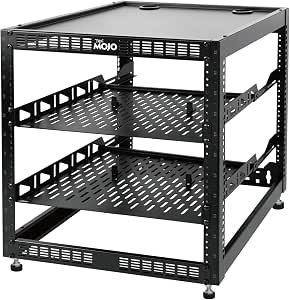 | Best for Flexible Wall or Floor Placement | Rack capacity: 12U | Compatible equipment: 19-inch networking, audio, and video devices | Dimensions: 20.15 D × 20.47 W × 21.02 H inches | VIEW LATEST PRICE | See Our Full Breakdown |
| VEVOR 12U Open Frame Server Rack with Adjustable 23–40 in. Depth |  | Best for Deep Equipment on an Open Frame | Rack capacity: 12U | Adjustable depth: 23–40 inches | Dimensions: 23 D × 20.1 W × 24.6 H inches | VIEW LATEST PRICE | See Our Full Breakdown |
| VEVOR 6U Wall Mount Network Server Cabinet, 14.8″ Deep, Locking Glass Door |  | Best Compact Enclosed Cabinet | Rack capacity: 6U | Depth: 14.8 inches | Dimensions: 17.8 D × 23.6 W × 13.8 H inches | VIEW LATEST PRICE | See Our Full Breakdown |
| Sysracks 32U Home Server Rack Cabinet, 32-Inch Deep |  | Best for a Turnkey Home Lab | Rack capacity: 32U | Compatible equipment width: 19 inches | Depth: 32 inches stated; listed dimensions specify 24 inches | VIEW LATEST PRICE | See Our Full Breakdown |
| Tecmojo 12U Wall-Mount Server Cabinet with Lockable Glass Door |  | Best for Compact Wall-Mount Setups | Rack capacity: 12U | Mounting type: Wall mount | Dimensions: 24.25 × 21.65 × 17.72 inches (H × W × D) | VIEW LATEST PRICE | See Our Full Breakdown |
| VEVOR 22U Wall-Mount Network Cabinet, 23.6-Inch Depth |  | Best High-Capacity Wall-Mount Pick | Rack capacity: 22U | Mounting type: Wall mount | Cabinet dimensions: 23.6 × 23.6 × 45.87 inches (D × W × H) | VIEW LATEST PRICE | See Our Full Breakdown |
| Sysracks 42U 19-Inch Server Rack Cabinet, 39-Inch Deep |  | Best for Full-Size Server Rooms | Rack capacity: 42U | Mounting type: Floor mount | Dimensions: 24 W × 39 D × 84 H inches | VIEW LATEST PRICE | See Our Full Breakdown |
| rack mount server cabinet | Dimensions | Material | Warranty | Rack capacity |
|---|---|---|---|---|
| VEVOR 18U Server Rack Cabinet | 23.6 in D × 23.62 in W × 38.39 in H | Corrosion-resistant steel | — | — |
| Sysracks 9U Wall Mount Server | — | Steel | 3 years | — |
| Tecmojo 12U Wall-Mount Server | 23.6 in D × 23.6 in W × 25.1 in H | — | — | — |
| Tecmojo 6U Wall-Mount Server C | 17.7 in D × 21.7 in W × 13.8 in H | Cold-rolled alloy steel | 3 years | — |
| Sysracks 18U 19-Inch Server Ra | 24 in W × 35 in D × 37 in H | Steel, 2.0 mm thick | — | — |
| StarTech.com 22U 4-Post Server | — | — | Lifetime | 22U |
| Tecmojo 12U Open-Frame Network | 20.15 D × 20.47 W × 21.02 H inches | Cold-rolled steel | 3 years | 12U |
| VEVOR 12U Open Frame Server Ra | 23 D × 20.1 W × 24.6 H inches | Q235 carbon steel | 2 years | 12U |
| VEVOR 6U Wall Mount Network Se | 17.8 D × 23.6 W × 13.8 H inches | Alloy steel | 1 year | 6U |
| Sysracks 32U Home Server Rack | — | — | 2 years | 32U |
| Tecmojo 12U Wall-Mount Server | 24.25 × 21.65 × 17.72 inches (H × W × D) | Cold-rolled alloy steel | — | 12U |
| VEVOR 22U Wall-Mount Network C | — | Alloy steel | 1 year | 22U |
| Sysracks 42U 19-Inch Server Ra | 24 W × 39 D × 84 H inches | — | 2 years | 42U |
More Details on Our Top Picks
VEVOR 18U Server Rack Cabinet with Built-In PDU, Fans, and LED Light
The VEVOR stands out among these five for combining 18U capacity with a built-in PDU, temperature-controlled fans, LED lighting, and locking casters. That package can simplify a home lab or office setup where separate cooling and power accessories would add clutter. Its 660 lb capacity is also well above the Sysracks 18U cabinet’s listed 220 lb static load, though the VEVOR’s 18-inch installation depth is much shorter than that model’s 35-inch depth. That makes fit the main dividing line: it suits shorter network, NAS, and AV gear, not deep enterprise servers. The cabinet weighs 75.8 lb before equipment, so moving and positioning it calls for help. I’d choose it for a dense, accessory-ready setup only after checking every device’s mounting depth.
Pros:- 18U space accommodates more equipment than the 9U Sysracks wall cabinet.
- 660 lb stated capacity supports substantial equipment loads.
- Includes a PDU, temperature-controlled fans, LED light, locking casters, and leveling feet.
- Top and bottom cable openings help route connections through the enclosure.
Cons:- 18-inch installation depth excludes many deeper rack servers.
- 75.8 lb cabinet weight makes initial setup and relocation harder.
- The many included features may be unnecessary for a basic network cabinet.
Best for: Home-lab and small-office owners building a short-depth 19-inch setup who want cooling, power distribution, lighting, and mobility in one cabinet.
Not ideal for: Buyers installing deep enterprise servers or anyone who needs a light cabinet that one person can easily reposition.
- Rack size:18U
- Equipment compatibility:Standard 19-inch equipment
- Dimensions:23.6 in D × 23.62 in W × 38.39 in H
- Installation depth:18 in
- Weight capacity:660 lb (299 kg)
- Item weight:75.8 lb
- Material:Corrosion-resistant steel
- Features:Built-in PDU, two temperature-controlled fans, LED light, locking casters, leveling feet
Our verdict“Choose the VEVOR for a well-equipped, high-capacity short-depth setup, but skip it if your servers need more than 18 inches of mounting depth.”
Sysracks 9U Wall Mount Server Rack, 24″ Deep Network Cabinet with Fan, Locking Glass Door, and PDU
This Sysracks is the space-saving choice for a small office that needs an enclosed rack but has little room for a floor cabinet. Its 9U wall-mount format is more compact than the 12U Tecmojo wall cabinet, while the included shelf, PDU, fan, and legs give buyers several setup options. The headline 24-inch depth needs a closer look: usable equipment depth is 15 inches once room for cabling and airflow is accounted for. That limits the server choices more than the VEVOR 18U’s 18-inch installation depth, despite the Sysracks’ greater stated cabinet depth. It supports up to 160 lb and has a locking glass door with removable panels. I’d pick it for switches, routers, and shallow equipment, not a growing server rack.
Pros:- Compact wall-mount design preserves floor space.
- Includes an active fan, PDU, shelf, legs, and mounting hardware.
- Locking glass door and removable panels provide enclosed equipment access.
- 24-inch listed cabinet depth offers more enclosure room than shallow wall cabinets.
Cons:- Usable equipment depth is limited to 15 inches for cabling and airflow.
- 9U capacity can constrain future additions.
- 160 lb load limit is lower than the Tecmojo 12U’s stated floor-mounted capacity.
Best for: Small-office administrators and home-network owners who need a lockable enclosure for switches, routers, and other shallow 19-inch devices.
Not ideal for: Buyers with deep rack servers, heavier equipment loads, or plans to expand beyond a compact 9U setup.
- Rack size:9U
- Standard:19-inch equipment
- Depth:24 in cabinet depth; 15 in usable equipment depth
- Load capacity:160 lb
- Material:Steel
- Cooling:Active fan and perforated glass door
- Included accessories:PDU, shelf, legs, hardware
- Warranty:3 years
Our verdict“Choose this Sysracks for a compact, lockable small-office network cabinet if your equipment fits within its 15-inch usable depth.”
Tecmojo 12U Wall-Mount Server Rack Cabinet, 23.6-Inch Deep, Glass Door
The Tecmojo earns its place as the wall-mount pick for buyers who need more rack space than a 6U or 9U cabinet provides. At 12U, it offers three more units than the Sysracks 9U while retaining a lockable glass door and side panels. Two top-mounted fans add active ventilation, and the 21.3-inch maximum mounting depth accommodates deeper equipment than the Sysracks’ 15-inch usable depth. Its load rating changes with installation: 176 lb on a wall and 350 lb on the floor. That floor figure makes it more flexible than a wall-only capacity might suggest, but a 65.7 lb cabinet is still a substantial item to mount, and wall loading requires careful planning. I’d favor it for a growing network closet; the smaller Tecmojo 6U is easier to fit when capacity needs are modest.
Pros:- 12U capacity offers more room than the Sysracks 9U wall cabinet.
- Maximum mounting depth of 21.3 inches fits deeper equipment than several compact wall cabinets.
- Dual top-mounted fans provide active ventilation.
- Lockable front and side panels secure access to installed equipment.
Cons:- The 65.7 lb cabinet is heavy to lift and mount.
- Wall-mounted capacity is limited to 176 lb, below its 350 lb floor-mounted rating.
- Equipment deeper than 21.3 inches will not fit its mounting rails.
Best for: IT administrators with a suitable wall or floor location who need 12U for a mix of standard-depth servers, switches, and network equipment.
Not ideal for: Buyers who need a lightweight cabinet, equipment deeper than 21.3 inches, or a wall installation that cannot support the loaded rack.
- Rack size:12U
- Equipment compatibility:Standard 19-inch rackmount equipment
- Dimensions:23.6 in D × 23.6 in W × 25.1 in H
- Maximum mounting depth:21.3 in
- Weight capacity:176 lb wall-mounted; 350 lb floor-mounted
- Item weight:65.7 lb
- Material and finish:Cold-rolled steel with black powder-coated finish
- Cooling and panels:Two top-mounted fans; lockable front and side panels; glass door
Our verdict“Choose the Tecmojo 12U when you need more wall-cabinet capacity and depth than the smaller Sysracks, provided the mounting surface can bear the load.”
Tecmojo 6U Wall-Mount Server Cabinet with Lockable Glass Door
For a small group of switches, patch panels, or AV components, this Tecmojo 6U keeps the installation contained without taking up floor space. Its 14.2-inch maximum mounting depth is the key limitation and the reason it suits shallow gear better than the 12U Tecmojo, which accepts equipment up to 21.3 inches deep. Adjustable rails, numbered U positions, and cable-access punch-outs help with a tidy installation, while the reversible lockable glass door offers flexibility when choosing how the cabinet opens. The 110 lb capacity is reasonable for a compact enclosure but below the larger wall cabinets in this lineup. Assembly is required, and this cabinet cannot grow into a server-heavy setup without a replacement. I’d choose it when a few shallow devices are all that need a secure home.
Pros:- Wall-mounted enclosure saves floor space.
- Lockable glass door and side panels restrict access while keeping equipment visible.
- Adjustable rails and numbered U positions help organize installation.
- Top and bottom cable-access panels provide routing options.
Cons:- 14.2-inch maximum mounting depth excludes deeper equipment.
- 6U capacity leaves limited room for expansion.
- Assembly is required before installation.
Best for: Home-network owners or AV installers securing a few shallow 19-inch devices in a room with limited floor space.
Not ideal for: Buyers with deep rack servers, heavy equipment, or plans to add more than six rack units.
- Capacity:6U
- Dimensions:17.7 in D × 21.7 in W × 13.8 in H
- Maximum mounting depth:14.2 in
- Weight capacity:110 lb (50 kg)
- Item weight:28.6 lb
- Material:Cold-rolled alloy steel
- Compatibility:19-inch IT equipment and AV devices
- Door and side panels:Reversible lockable glass door; lockable side panels
- Warranty:3 years
Our verdict“Choose this Tecmojo for a secure, space-saving home for a few shallow devices, but move to the 12U model if you need more depth or rack space.”
Sysracks 18U 19-Inch Server Rack Cabinet, 35-Inch Deep
Among these five cabinets, the Sysracks 18U is the clearest fit for buyers whose equipment needs a full-depth floor enclosure. Its 35-inch depth is far more accommodating than the VEVOR 18U’s 18-inch installation depth, making it the better match for deeper rack servers and telecom gear. It also includes a thermostat-controlled dual-fan module, PDU, fixed shelf, cable-entry brushes, and adjustable rails, so the basic setup needs fewer add-ons. The published load data needs attention: the listing gives a 220 lb static load capacity and also states a 330 lb minimum weight capacity. I would not treat those figures as interchangeable; confirm the applicable rating before loading the cabinet. The deeper footprint also takes more floor space than any wall-mount option here.
Pros:- 35-inch depth suits deeper equipment better than the VEVOR 18U’s 18-inch installation depth.
- 18U capacity provides substantial room for rack-mounted systems.
- Includes thermostat-controlled dual fans, PDU, fixed shelf, cable-entry brushes, and leveling feet.
- Lockable glass front door and side panels secure the enclosure.
Cons:- The stated 220 lb static capacity and 330 lb minimum weight capacity are inconsistent and need clarification.
- 35-inch depth occupies substantial floor space.
- A fixed shelf offers less positioning flexibility than an adjustable shelf.
Best for: IT teams and serious home-lab builders fitting deeper 19-inch servers who want an enclosed 18U floor cabinet with included cooling and power accessories.
Not ideal for: Small offices with limited floor area, short-depth equipment owners, or buyers who need an unambiguous load rating before selection.
- Capacity:18U
- Dimensions:24 in W × 35 in D × 37 in H
- Rack width:19 in
- Item weight:55 lb
- Material:Steel, 2.0 mm thick
- Load specifications:220 lb static load capacity; listing also states 330 lb minimum weight capacity
- Mounting type:Floor mount
- Cooling:Thermostat with dual-fan module and passive airflow
- Included accessories:PDU, fixed shelf, leveling feet, locks, cable-entry brushes, mounting hardware
Our verdict“Choose this Sysracks for deep servers and a fully equipped floor cabinet, but confirm its load rating before installing heavy gear.”
StarTech.com 22U 4-Post Server Rack Cabinet, Adjustable Depth, 33 in
The StarTech.com 22U cabinet is a strong fit when a rack needs to accommodate equipment of varying depths without giving up enclosed, lockable storage. Its rails adjust from 5.7 to 33 inches, a much broader fit range than the fixed 14.8-inch VEVOR 6U Wall Mount Network Server Cabinet, and its vented glass front and mesh rear support airflow while keeping equipment behind doors. Casters help with positioning; leveling feet provide a steadier setup once it is in place. The tradeoff is assembly: it ships flat-packed, so setup takes more effort than a compact wall cabinet. Its 1,764-pound rating applies only while stationary, so I would not treat that figure as a rolling load limit. Choose it for a flexible, floor-standing 22U enclosure, not a ready-to-use or space-saving rack.
Pros:- Adjustable 5.7–33-inch rail depth fits a broad range of rackmount equipment.
- Lockable doors and removable side panels balance access control with service access.
- Vented glass front and mesh rear support airflow.
- Casters and leveling feet support repositioning and stable placement.
Cons:- Flat-packed shipping means assembly is required.
- The 1,764-pound load rating applies only when stationary, not while rolling.
- At 22U and 46.6 inches tall, it takes more floor space than compact wall-mount options.
Best for: Small offices and home labs combining rack gear with different chassis depths that need a lockable, floor-standing enclosure.
Not ideal for: Buyers who need a rack ready to use with minimal assembly, or anyone who needs a deep enclosure with clearly specified room beyond 33 inches.
- Rack capacity:22U
- Mounting standard:19-inch EIA/ECA-310-E
- Adjustable mounting depth:5.7–33 inches
- Stationary load capacity:1,764 lb (800 kg)
- Height:46.6 inches (118.3 cm)
- Doors:Lockable vented glass front; mesh rear
- Panels and mobility:Removable side panels, casters, and leveling feet
- Warranty:Lifetime
Our verdict“Choose this cabinet if you need adaptable rail depth and lockable 22U floor-standing storage, and can handle assembly.”
Tecmojo 12U Open-Frame Network Rack with Two Shelves
The Tecmojo 12U open-frame rack suits buyers who want one rack that can be wall-mounted or set on the floor, with two shelves included for equipment that lacks rack ears. That makes it more adaptable for mixed networking, audio, and video gear than the enclosed VEVOR 6U Wall Mount Network Server Cabinet, though the VEVOR offers a locking door and a more cabinet-like form. Tecmojo supplies shelf stops, Velcro straps, and mounting hardware, which helps organize smaller devices and cables without sourcing those basics separately. The limits are capacity and protection: wall mounting is rated for 130 pounds, and the open frame leaves equipment exposed to dust, casual contact, and access. I’d pick it for an accessible, moderate-size setup, not for a secure or concealed server installation.
Pros:- Supports either wall-mounted or floor-standing installation.
- Includes two ventilated shelves and shelf stops for non-rackmount devices.
- Velcro straps and mounting hardware support basic setup and cable organization.
- Open construction allows access to equipment and wiring.
Cons:- Wall-mounted capacity is limited to 130 pounds.
- Open-frame design does not provide the security or coverage of an enclosed cabinet.
- At 12U, it offers less rack space than the StarTech.com 22U cabinet.
Best for: Home-network and A/V installers who need a 12U rack with shelves and the choice of wall or floor placement.
Not ideal for: Buyers needing lockable, dust-shielded storage or planning to wall-mount a load above 130 pounds.
- Rack capacity:12U
- Compatible equipment:19-inch networking, audio, and video devices
- Dimensions:20.15 D × 20.47 W × 21.02 H inches
- Wall-mounted load capacity:130 lb
- Floor-standing load capacity:260 lb
- Material:Cold-rolled steel
- Included accessories:Two ventilated shelves, four shelf stops, four Velcro straps, and mounting hardware
- Warranty:3 years
Our verdict“Pick the Tecmojo for a flexible 12U networking or A/V setup where access matters more than enclosure.”
VEVOR 12U Open Frame Server Rack with Adjustable 23–40 in. Depth
Among these open-frame choices, the VEVOR 12U rack is the one to favor when chassis depth is the main fit challenge. Its rails adjust from 23 to 40 inches, extending farther than the Tecmojo 12U Open-Frame Network Rack and making room for deeper servers or storage gear. The frame can stand on the floor or mount to a wall, and casters make floor placement easier to change. That flexibility comes with a meaningful capacity distinction: the stated load rating is 500 pounds on the ground but only 150 pounds when wall-mounted. Unlike the StarTech.com 22U cabinet, this is not an enclosed, lockable cabinet, so equipment remains exposed. It makes sense for buyers prioritizing deep, accessible rack space; skip it if security, dust control, or a compact footprint matters more.
Pros:- Adjustable 23–40-inch depth accommodates deeper equipment than the Tecmojo 12U open rack.
- Can be used free-standing or wall-mounted.
- Casters support movement when used on the floor.
- Includes mounting hardware, cage nuts, and a grounding wire.
Cons:- Wall-mounted load capacity is limited to 150 pounds, well below its ground-standing rating.
- Open-frame construction offers no door or side panels for security and dust protection.
- Its 40-inch maximum depth can require more room than compact networking racks.
Best for: Home labs and small IT rooms with deeper rackmount equipment that benefit from adjustable rails and open access.
Not ideal for: Buyers needing a lockable enclosure, or anyone planning a wall-mounted load above 150 pounds.
- Rack capacity:12U
- Adjustable depth:23–40 inches
- Dimensions:23 D × 20.1 W × 24.6 H inches
- Ground-standing load capacity:500 lb
- Wall-mounted load capacity:150 lb
- Material:Q235 carbon steel
- Mounting and mobility:Free-standing or wall-mounted; four casters included
- Warranty:2 years
Our verdict“Choose the VEVOR when deep, adjustable rack space and open access matter more than a protective enclosure.”
VEVOR 6U Wall Mount Network Server Cabinet, 14.8″ Deep, Locking Glass Door
When a network closet, classroom, or retail back room has little spare room, the VEVOR 6U cabinet offers a notably compact 14.8-inch depth with a locking glass door. It provides the enclosure the open-frame Tecmojo 12U rack lacks, while taking up less space than the larger StarTech.com 22U cabinet. Adjustable rails and ventilation openings help with mounting and heat movement, and the cabinet can be wall-mounted or placed on the floor. Its small size is also its main constraint: 6U limits expansion, and the wall load rating is 100 pounds, compared with 200 pounds on the ground. This is best for a modest switch, patch-panel, or A/V setup that needs access control. I would skip it for deep servers or a growing rack that may soon outgrow six units.
Pros:- 14.8-inch depth helps fit space-constrained rooms.
- Locking glass door provides equipment visibility with access control.
- Adjustable rails and wiring holes aid installation and cable routing.
- Ventilation openings are distributed across multiple panels.
Cons:- Six rack units restrict expansion and device capacity.
- Wall-mounted load capacity is limited to 100 pounds.
- Shallow depth rules it out for many deeper server chassis.
Best for: Retail, classroom, and small-office teams securing a few shallow network or A/V devices in a tight space.
Not ideal for: Home-lab builders with deep servers, a larger equipment stack, or a wall location that must support more than 100 pounds.
- Rack capacity:6U
- Depth:14.8 inches
- Dimensions:17.8 D × 23.6 W × 13.8 H inches
- Wall-mounted load capacity:100 lb
- Ground-standing load capacity:200 lb
- Material:Alloy steel
- Door:Locking glass
- Warranty:1 year
Our verdict“Choose this compact VEVOR cabinet for a small, shallow equipment stack that needs a lockable enclosure.”
Sysracks 32U Home Server Rack Cabinet, 32-Inch Deep
The Sysracks 32U cabinet is aimed at buyers building a substantial home lab or small-office rack and wanting useful accessories included from the start. Its 32U capacity and stated 1,600-pound load rating provide far more room and support than the 6U VEVOR wall cabinet, while the locking tempered-glass door keeps equipment visible but enclosed. An included 8-outlet PDU, fixed shelf, cable-entry brushes, casters, and leveling feet reduce the need to assemble a separate accessory list. The major uncertainty is fit: the title and description call it 32 inches deep, but the listed dimensions give a 24-inch depth. I would verify the actual cabinet depth before ordering, especially for long servers. It is also a large floor-standing unit, so it is a poor match for cramped rooms or buyers with only a few devices.
Pros:- 32U capacity supports a larger installation than the compact VEVOR 6U cabinet.
- Includes an 8-outlet PDU, fixed shelf, cable-entry brushes, casters, and leveling feet.
- Locking tempered-glass door combines visibility with access control.
- Stated load capacity is up to 1,600 pounds.
Cons:- Depth is inconsistent: the title and description specify 32 inches, while the listed dimensions specify 24 inches.
- At 24 inches wide and 67 inches tall, it needs substantial floor space.
- The included PDU has eight outlets, which may not cover a heavily populated rack.
Best for: Home-lab and small-office buyers planning a sizable 19-inch equipment stack who want a PDU, shelf, and cable-entry accessories included.
Not ideal for: Buyers with limited floor space or deep equipment who cannot confirm the conflicting 24-inch and 32-inch depth information before purchase.
- Rack capacity:32U
- Compatible equipment width:19 inches
- Depth:32 inches stated; listed dimensions specify 24 inches
- Listed dimensions:24 D × 32 W × 67 H inches
- Load capacity:Up to 1,600 lb (725 kg)
- Door:Locking tempered glass
- Included accessories:8-outlet PDU, fixed shelf, locking casters, leveling feet, cable-entry brushes, and mounting hardware
- Warranty:2 years
Our verdict“Pick the Sysracks for a large, accessory-equipped home lab if its actual depth is confirmed to fit your equipment and room.”
Tecmojo 12U Wall-Mount Server Cabinet with Lockable Glass Door
I’d choose this 12U wall-mount cabinet for a small network or A/V installation where keeping equipment off the floor matters more than fitting deep chassis. Its 14.2-inch maximum mounting depth is the key limit: it suits compact switches and shallow devices, but offers less room than the VEVOR 22U Wall-Mount Network Cabinet, which provides an 18-inch installation depth. Numbered, adjustable rails make rack positions easier to plan, while the reversible glass door gives more flexibility when wall layout dictates which way it should open. Lockable side panels add access control, and the 110-pound capacity is ample for a modest setup. The tradeoff is that assembly is required, and buyers should check equipment depth before mounting; this cabinet is not a substitute for a deeper floor-standing rack.
Pros:- Wall-mount form keeps equipment off the floor.
- Lockable glass door and side panels restrict casual access while leaving equipment visible.
- Adjustable rails with numbered U positions simplify rack planning.
- Reversible front door adapts to the available opening direction.
Cons:- 14.2-inch maximum mounting depth excludes many deeper chassis.
- Assembly is required before installation.
- 110-pound capacity is lower than the VEVOR 22U wall-mount cabinet’s 300-pound rating.
Best for: Small offices or home network owners mounting shallow 19-inch switches, patch panels, or A/V gear while preserving floor space.
Not ideal for: Buyers with deep servers, bulky UPS units, or a growing equipment stack; the 14.2-inch mounting depth and 12U capacity can be restrictive.
- Rack capacity:12U
- Mounting type:Wall mount
- Dimensions:24.25 × 21.65 × 17.72 inches (H × W × D)
- Maximum mounting depth:14.2 inches
- Weight capacity:110 lb (50 kg)
- Material:Cold-rolled alloy steel
- Door and side panels:Lockable glass door; lockable side panels
- Cable access:Top and bottom punchout panels
Our verdict“Choose this Tecmojo for a compact, secured wall-mounted setup with shallow gear, but pick the deeper VEVOR 22U if equipment depth or expansion room is a concern.”
VEVOR 22U Wall-Mount Network Cabinet, 23.6-Inch Depth
Among these wall-mounted options, I’d give this VEVOR the nod for buyers who need 22U of enclosed rack space without moving to a floor cabinet. Its welded steel frame is rated for 300 pounds, a substantial step up from the Tecmojo 12U Wall-Mount Server Cabinet, and the 18-inch installation depth accommodates more equipment than that Tecmojo’s 14.2-inch limit. Ventilation openings, cable-routing holes, and adjustable square-hole rails help keep a larger installation organized. The compromise is physical: at 66.1 pounds and nearly 46 inches tall, it calls for a wall and mounting plan suited to a heavy, tall enclosure. The 18-inch installation depth still rules out some deep chassis, so I’d verify equipment dimensions rather than assume the 23.6-inch exterior depth is usable mounting space.
Pros:- 22U capacity provides much more rack space than compact wall cabinets such as the Tecmojo 12U.
- Welded alloy-steel frame carries a stated load of up to 300 pounds.
- Ventilation openings and cooling holes support airflow.
- Adjustable square-hole rails and multiple wiring holes help with equipment placement and cable routing.
Cons:- 18-inch installation depth may not fit deeper server or UPS chassis.
- At 66.1 pounds before equipment is added, wall installation requires careful planning and support.
- Its tall enclosure is less suited to tight wall spaces than smaller 12U or 6U cabinets.
Best for: Small-business IT teams that need a high-capacity, enclosed wall rack for multiple switches, patch panels, and other equipment within the 18-inch mounting-depth limit.
Not ideal for: Installers with deep servers or walls that cannot support a heavy cabinet and loaded equipment; its 66.1-pound empty weight also makes mounting more demanding.
- Rack capacity:22U
- Mounting type:Wall mount
- Cabinet dimensions:23.6 × 23.6 × 45.87 inches (D × W × H)
- Installation depth:18 inches
- Weight capacity:300 lb (136 kg)
- Item weight:66.1 lb
- Material:Alloy steel
- Door:Lockable tempered glass
- Warranty:1 year
Our verdict“Pick the VEVOR when a wall-mounted build needs substantial rack capacity and load support, provided your equipment fits within 18 inches of installation depth.”
Sysracks 42U 19-Inch Server Rack Cabinet, 39-Inch Deep
This Sysracks is the clear choice here for a large, floor-standing installation: 42U of space and 39 inches of depth suit full-length servers, UPS units, and expansion that wall cabinets cannot handle. Compared with the VEVOR 22U Wall-Mount Network Cabinet, it offers twice the rack height and a much deeper equipment bay, but gives up the space-saving convenience of wall mounting. Cooling is more fully specified than on the smaller cabinets, with four fans, temperature control, and an LCD display; the included PDU, shelf, casters, and leveling feet also make it a more complete starting point. Its main cost in practical terms is the 190-pound cabinet, which demands planning for delivery, placement, and floor support. The fixed shelf is less adaptable than an adjustable one, so check its position against your intended layout.
Pros:- 42U capacity and 39-inch depth accommodate larger, deeper equipment than the wall-mounted options.
- Four fans with temperature control and an LCD display provide active cooling oversight.
- Includes a PDU, fixed shelf, casters, leveling feet, and mounting hardware.
- Locking tempered-glass door and removable side panels support access control and service access.
Cons:- The 190-pound cabinet is difficult to move and position without planning or assistance.
- Floor-standing dimensions require a dedicated space and suitable floor support.
- The included shelf is fixed, limiting placement flexibility compared with an adjustable shelf.
Best for: IT teams or serious home-lab owners building a full-height rack with deep servers, network equipment, and a UPS in a dedicated equipment area.
Not ideal for: Apartment setups, small offices, or buyers who need a wall-mounted cabinet; its 84-inch height, 39-inch depth, and 190-pound weight require substantial space and installation planning.
- Rack capacity:42U
- Mounting type:Floor mount
- Dimensions:24 W × 39 D × 84 H inches
- Static load capacity:Up to 1,600 lb
- Item weight:190 lb
- Cooling:Four built-in fans with temperature control and LCD display
- Included accessories:PDU, fixed shelf, four casters, leveling feet, and mounting hardware
- Enclosure material:Alloy steel
- Warranty:2 years
Our verdict“Choose this Sysracks for a deep, full-height equipment build with included power and cooling accessories, but skip it if a compact wall cabinet better matches your space.”

How We Picked
I ranked these cabinets by how well their listed design fits common rack-mount needs: equipment capacity, usable depth, mounting style, access, and enclosure. I also considered practical details that affect setup, including adjustable rails, included accessories, doors, and whether a design is open-frame or enclosed. These distinctions matter because a cabinet can have enough U space yet still be too shallow, difficult to mount, or poorly suited to the room where it will live.
The order reflects role and flexibility, not a claim that the largest rack is best for everyone. The VEVOR 18U ranks first for its combination of enclosure and listed integrated features; the StarTech.com 22U earns a strong position for adjustable-depth flexibility. Compact wall units and open frames rank well for specific installations, while larger floor cabinets serve buyers with greater capacity needs but require more room. Product details are based on the supplied model names and specifications; buyers should verify dimensions, load limits, included hardware, and compatibility before purchase.
Factors to Consider When Choosing Rack Mount Server Cabinets
Choosing a server cabinet starts with the equipment and the room, not the rack’s headline U count. I’d check physical fit, service access, mounting conditions, and airflow before comparing included accessories. These factors can prevent a cabinet that looks suitable on paper from becoming difficult or unsafe to install.
Match usable depth to the longest equipment
Measure each device from its front mounting point to the rear-most connector, cable bend, or handle, then leave room for power and network leads. A cabinet’s stated depth may describe its outer dimensions rather than the usable rail-to-door distance, so confirm the manufacturer’s drawing before ordering. Deep servers often need more clearance than switches or patch panels, even when both use the same rack width. Adjustable rails can help accommodate mixed equipment, but they do not create extra room behind the rack. A common mistake is measuring only the server chassis and forgetting power plugs or cable-management arms. If the installation will hold varied hardware, prioritize adjustable mounting positions and rear access over a close-fitting enclosure.
Choose wall-mounted or floor-standing based on load and service access
Wall-mounted cabinets keep equipment off the floor and can work well for compact network setups, but their weight acts on the wall and mounting points. Add the cabinet, devices, shelves, and cables when checking the wall structure and the stated load rating. A full or deep wall cabinet can be awkward to service, especially if it cannot swing open or be reached from behind. Floor-standing cabinets take up more room, yet they are generally easier to scale and arrange around heavier equipment. Do not assume a wall cabinet is suitable just because the U count fits; confirm mounting hardware, wall construction, and clearance for opening the door. For gear that needs frequent maintenance, access may matter more than saving floor space.
Decide whether an enclosure or open frame fits the room
Enclosed cabinets can add physical separation, limit casual access, and give cables and equipment a more contained footprint. Lockable doors are useful in shared spaces, but glass panels do not provide the same impact protection as solid metal and may restrict airflow depending on the design. Open frames make it easier to reach the sides and rear, which can simplify patching, testing, and rearranging gear. They also leave equipment exposed to dust, accidental contact, and room traffic. A frequent mismatch is buying an open rack for a busy or dusty area simply because installation access looks convenient. Choose based on the room’s security and cleanliness as well as the maintenance routine.
Plan airflow and noise before adding fans
Fans help move air, but their presence alone does not prove that a cabinet will keep every device within its operating range. Check fan placement, airflow direction, ventilation openings, and whether warm exhaust has a clear path away from the equipment. A glass-front cabinet may need a deliberate front-to-back airflow plan, while open frames rely more heavily on the room’s ambient cooling. Fan noise can also matter in a home office or living area, so consider where the rack will sit and whether fan speed can be controlled. Avoid filling empty spaces without thinking about airflow; blanking panels can help prevent hot exhaust from cycling back into equipment. Match cooling plans to the heat output of the actual devices, not just the cabinet’s size.
Count future rack space and accessories realistically
U capacity describes vertical rack space, not the total amount of equipment a cabinet can safely hold. Reserve space for cable management, shelves, power distribution, and devices you may add later; a rack filled to every available unit can become hard to service. Check whether shelves, rails, PDU, fans, and mounting hardware are included rather than inferred from a product name or image. Integrated accessories can reduce separate purchases, but compatibility and outlet layout still need to match your equipment. Buying too small can force an early replacement, while an oversized cabinet consumes space and may complicate cooling. A modest reserve is useful when the system is expected to grow, but size for a realistic plan rather than an open-ended possibility.
Check installation route, door swing, and cable paths
Measure the cabinet’s full exterior dimensions and the route from delivery point to its final position, including doorways, stairs, and turns. Leave room to open doors and reach rear connections; a cabinet that fits against a wall may still be frustrating to maintain. Plan cable entry and exit locations before mounting, particularly when the rack will sit close to a ceiling, desk, or wall. Confirm whether the door is reversible and whether side panels or rear access can be removed for installation. Buyers often focus on the footprint but overlook the working space needed for a server rail or a power cable bend. A quick floor-layout sketch can expose access problems before the cabinet arrives.
Frequently Asked Questions
How much rack depth should I leave for a rack-mounted server?
Start with the server’s chassis depth, then add room for rear connectors, power plugs, cable bends, and any cable-management arms. Compare that total with the cabinet’s usable rail-to-door depth rather than relying only on its exterior measurement. The 14.8-inch-deep VEVOR 6U is aimed at shallow equipment, while the deeper Sysracks floor cabinets are a better starting point for full-size servers. Check the equipment manufacturer’s rail requirements too, since a chassis can fit physically but still be incompatible with the mounting range. If the rack will hold devices from different manufacturers, adjustable rails and extra rear clearance can prevent a tight fit.
Can I mount a fully loaded server cabinet on any wall?
No. The wall, fasteners, and mounting points must support the combined weight of the cabinet and all installed equipment, with an appropriate safety margin. A rack’s U capacity does not indicate how much weight the wall can carry. Check the cabinet’s load rating and installation instructions, and confirm the wall structure is suitable before mounting. Deep cabinets also create leverage away from the wall, which makes correct anchoring especially important. If the system is heavy or the wall construction is uncertain, a floor-standing rack may be the safer choice.
Should I choose a glass-door cabinet or an open-frame rack?
Choose a glass-door cabinet when you want equipment enclosed and a lockable barrier is useful, such as in a shared room. An open frame is often easier to reach from multiple sides, which helps with frequent cabling changes and troubleshooting. The Tecmojo and VEVOR 12U open-frame options emphasize access, while several wall cabinets in this lineup use lockable glass doors. Neither style automatically solves cooling: enclosed racks need a clear airflow path, and open racks still depend on room conditions. Let security, dust exposure, and maintenance frequency guide the choice.
Is an integrated PDU and fan setup worth choosing over a basic cabinet?
Integrated accessories can simplify setup when the included PDU and fans match your power, outlet, and cooling needs. The VEVOR 18U lists a built-in PDU, fans, and LED light, giving it a convenience advantage over cabinets that do not list those features. Still, verify outlet type, circuit requirements, fan placement, noise, and whether the PDU can handle the planned load. A basic cabinet may be a better fit if you already own compatible power equipment or need a different outlet arrangement. Compare the complete setup rather than treating included accessories as a substitute for compatibility checks.
How much rack space should I reserve for future equipment?
Estimate near-term additions such as switches, patch panels, shelves, and power equipment, then leave enough open space to route cables and service devices. Do not count every available U as usable equipment space; accessories and maintenance clearance can take a meaningful share. The 6U and 9U wall cabinets suit compact installations, while the 32U and 42U Sysracks models offer more room for larger builds. Extra capacity is useful when growth is likely, but a much larger cabinet can take up more floor area and need a different cooling plan. Base the reserve on a realistic expansion list rather than buying the largest rack by default.
Conclusion
For most buyers seeking an enclosed, ready-to-equip rack, I’d start with the VEVOR 18U as the best overall pick, thanks to its listed PDU, fans, and LED light. The best value depends on installation: the Tecmojo 6U is a practical starting point for a small, shallow wall setup, while the 12U open-frame racks suit buyers who already have a suitable space and want easy access. For a more adjustable layout, I’d choose the StarTech.com 22U 4-post cabinet; for larger deployments, the Sysracks 42U is the premium-capacity choice, provided the room and equipment justify its footprint. Beginners with a few network devices should look at compact wall cabinets such as the Tecmojo 6U or Sysracks 9U, after checking depth and wall support. For a specific need, choose an open frame for hands-on access, a deeper floor cabinet for full-size servers, or the VEVOR 22U wall cabinet when wall-mounted capacity is the priority. My final check would be usable depth, mounting conditions, and airflow before committing to any model.