
Among these 15 Wi-Fi 7 routers, I’d put the TP-Link Archer BE700 first for its tri-band flexibility and broad appeal, while the eero Max 7 stands out for mesh-friendly simplicity and the GL.iNet Flint 3 for buyers who want more network controls. Choosing between them means weighing band capacity, wired ports, coverage, and ease of management—not just headline wireless speed. A dual-band router may suit a smaller home, while a larger or busier network can benefit from tri-band hardware or a mesh system. I’ve ranked the options by how well their features match real household needs and what compromises each asks buyers to accept. Read on for the full breakdown and a guide to choosing the right fit.

Get business pricing on networking and server gear
- Business-only prices and quantity discounts
- Tax-exempt purchasing
- Multiple users, one account, clear invoices
Key Takeaways
- The Archer BE700 leads as the broadest all-round fit in this lineup, while mesh-focused amazon.com/dp/B09HJJN7MS?tag=eucloudservers-20&ascsubtag=dc-1143965″ target=”_blank” rel=”nofollow sponsored noopener”>eero and Deco options make more sense when coverage across multiple rooms matters more than a single-router setup.
- Tri-band models offer a meaningful choice, not an automatic upgrade: the Archer BE700, BE670, BE600, GE650, and Flint 3 give buyers more band flexibility, but dual-band picks can be a better match for simpler, smaller networks.
- Gaming priorities split into two camps: the TP-Link Archer GE650 and ASUS ROG Strix GS-BE12000 are purpose-built gaming choices, while a general-purpose router may be enough if gaming-specific controls and features are not priorities.
- Ease of setup and advanced control pull in different directions: eero models favor straightforward management, whereas the GL.iNet Flint 3 is better suited to buyers who want more hands-on network configuration.
- Several brands offer closely related options at different capability levels: TP-Link’s Archer models and NETGEAR’s RS-series routers make it possible to choose by band count and intended use rather than assuming the highest-numbered model is right for every home.
| TP-Link Archer BE700 Tri-Band Wi-Fi 7 Router |  | Best for Fast Multi-Band Home Networks | Wi-Fi standard: Wi-Fi 7 | Bands: Tri-band: 6 GHz, 5 GHz, and 2.4 GHz | Advertised combined speed: Up to 15 Gbps | VIEW ON AMAZON | See Our Full Breakdown |
| eero Max 7 Mesh Wi-Fi 7 Router (1-Pack) |  | Best for Smart-Home Simplicity | Wi-Fi standard: Wi-Fi 7 (IEEE 802.11be) | Maximum wired speed: 9.4 Gbps | Maximum wireless speed: 4.3 Gbps | VIEW ON AMAZON | See Our Full Breakdown |
| ASUS RT-BE9700 WiFi 7 Router |  | Best for Built-In Security and Network Control | Wi-Fi standard: Wi-Fi 7 (802.11be) | Advertised maximum speed: 9.7 Gbps | Bands: Tri-band: 2.4 GHz, 5 GHz, and 6 GHz | VIEW ON AMAZON | See Our Full Breakdown |
| NETGEAR Nighthawk RS150 Dual-Band WiFi 7 Router |  | Best for a Straightforward Dual-Band Upgrade | Wi-Fi generation: Wi-Fi 7 (802.11be) | Bands: Dual-band: 2.4 GHz and 5 GHz | Maximum speed: Up to 5 Gbps | VIEW ON AMAZON | See Our Full Breakdown |
| GL.iNet GL-BE9300 Flint 3 Tri-Band Wi-Fi 7 Router |  | Best for VPN and Multi-Gig Wired Flexibility | Wi-Fi standard: Wi-Fi 7 (802.11be) | Bands: Tri-band, including 6 GHz | Maximum wireless speed: Up to 9 Gbps | VIEW ON AMAZON | See Our Full Breakdown |
| TP-Link Archer BE670 Tri-Band Wi-Fi 7 Router |  | Best for Tri-Band Headroom | Wi-Fi standard: Wi-Fi 7 (802.11be) | Bands: Tri-band: 6 GHz, 5 GHz, and 2.4 GHz | Maximum advertised speeds: 5,765 Mbps (6 GHz), 5,765 Mbps (5 GHz), 688 Mbps (2.4 GHz) | VIEW ON AMAZON | See Our Full Breakdown |
| Amazon eero 7 Dual-Band Wi-Fi 7 Mesh Router, 1-Pack |  | Best for Existing eero Homes | Wi-Fi standard: Wi-Fi 7 (IEEE 802.11a/b/g/n/ac/ax/be) | Bands: Dual-band: 2.4 GHz and 5 GHz | Wireless speed: Up to 1.8 Gbps | VIEW ON AMAZON | See Our Full Breakdown |
| TP-Link Archer GE650 Tri-Band BE11000 Wi-Fi 7 Gaming Router | 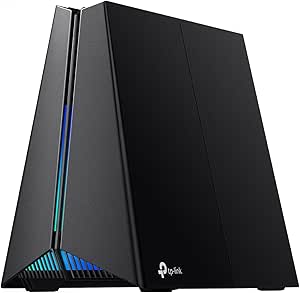 | Best for Gaming Traffic Control | Wi-Fi standard: Wi-Fi 7 | Bands: Tri-band: 6 GHz, 5 GHz, and 2.4 GHz | Advertised wireless speeds: Up to 5,764 Mbps (6 GHz), 4,320 Mbps (5 GHz), and 574 Mbps (2.4 GHz) | VIEW ON AMAZON | See Our Full Breakdown |
| ASUS RT-BE82U Dual-Band Wi-Fi 7 Router |  | Best for Multi-Gigabit Wired Setups | Wi-Fi standard: Wi-Fi 7 (802.11be) | Frequency bands: Dual-band | Maximum advertised speed: 6,500 Mbps | VIEW ON AMAZON | See Our Full Breakdown |
| TP-Link Archer BE260 Dual-Band Wi-Fi 7 Router (BE5000) |  | Best for Straightforward Dual-Band Wi-Fi 7 | Wi-Fi standard: Wi-Fi 7 | Bands: Dual-band: 2.4 GHz and 5 GHz | Maximum wireless speed: Up to 5,012 Mbps: 4,324 Mbps on 5 GHz and 688 Mbps on 2.4 GHz | VIEW ON AMAZON | See Our Full Breakdown |
| ASUS ROG Strix GS-BE12000 WiFi 7 Gaming Router |  | Best for Wired Gaming Setups | Wireless standard: Wi-Fi 7 (802.11be) | Bands: Tri-band: 2.4 GHz, 5 GHz, and 6 GHz | Maximum wireless speed: Up to 12,000 Mbps | VIEW ON AMAZON | See Our Full Breakdown |
| NETGEAR Nighthawk RS140 Dual-Band WiFi 7 Router |  | Best for Bigger Homes on a Dual-Band Router | Wi-Fi generation: Wi-Fi 7 | Bands: Dual-band: 2.4 GHz and 5 GHz | Maximum data rate: Up to 5 Gbps | VIEW ON AMAZON | See Our Full Breakdown |
| TP-Link Deco 7 BE23 Wi-Fi 7 Dual-Band Mesh Router |  | Best for Expanding a Deco Mesh | Wi-Fi standard: Wi-Fi 7 | Bands and combined speed: Dual-band; up to 3.6 Gbps | Band speeds: 5 GHz up to 2,882 Mbps; 2.4 GHz up to 688 Mbps | VIEW ON AMAZON | See Our Full Breakdown |
| NETGEAR Nighthawk RS90 Dual-Band WiFi 7 Router |  | Best for Straightforward Wi-Fi 7 Upgrades | Wi-Fi generation: Wi-Fi 7 | Bands: Dual-band: 2.4 GHz and 5 GHz | Maximum data rate: Up to 3.6 Gbps | VIEW ON AMAZON | See Our Full Breakdown |
| TP-Link Archer BE600 Tri-Band Wi-Fi 7 Router |  | Best for Multi-Gig Wired and Wireless Homes | Wi-Fi standard and bands: Wi-Fi 7; tri-band 2.4 GHz, 5 GHz, and 6 GHz | Maximum advertised speed: Up to 9.7 Gbps total | Band speeds: 6 GHz up to 5,765 Mbps; 5 GHz up to 2,882 Mbps; 2.4 GHz up to 1,032 Mbps | VIEW ON AMAZON | See Our Full Breakdown |
| wifi 7 routers for | Bands | Wi-Fi standard |
|---|---|---|
| TP-Link Archer BE700 Tri-Band | Tri-band: 6 GHz, 5 GHz, and 2.4 GHz | Wi-Fi 7 |
| eero Max 7 Mesh Wi-Fi 7 Router | — | Wi-Fi 7 (IEEE 802.11be) |
| ASUS RT-BE9700 WiFi 7 Router | Tri-band: 2.4 GHz, 5 GHz, and 6 GHz | Wi-Fi 7 (802.11be) |
| NETGEAR Nighthawk RS150 Dual-B | Dual-band: 2.4 GHz and 5 GHz | — |
| GL.iNet GL-BE9300 Flint 3 Tri- | Tri-band, including 6 GHz | Wi-Fi 7 (802.11be) |
| TP-Link Archer BE670 Tri-Band | Tri-band: 6 GHz, 5 GHz, and 2.4 GHz | Wi-Fi 7 (802.11be) |
| Amazon eero 7 Dual-Band Wi-Fi | Dual-band: 2.4 GHz and 5 GHz | Wi-Fi 7 (IEEE 802.11a/b/g/n/ac/ax/be) |
| TP-Link Archer GE650 Tri-Band | Tri-band: 6 GHz, 5 GHz, and 2.4 GHz | Wi-Fi 7 |
| ASUS RT-BE82U Dual-Band Wi-Fi | — | Wi-Fi 7 (802.11be) |
| TP-Link Archer BE260 Dual-Band | Dual-band: 2.4 GHz and 5 GHz | Wi-Fi 7 |
| ASUS ROG Strix GS-BE12000 WiFi | Tri-band: 2.4 GHz, 5 GHz, and 6 GHz | — |
| NETGEAR Nighthawk RS140 Dual-B | Dual-band: 2.4 GHz and 5 GHz | — |
| TP-Link Deco 7 BE23 Wi-Fi 7 Du | — | Wi-Fi 7 |
| NETGEAR Nighthawk RS90 Dual-Ba | Dual-band: 2.4 GHz and 5 GHz | — |
| TP-Link Archer BE600 Tri-Band | — | — |
More Details on Our Top Picks
TP-Link Archer BE700 Tri-Band Wi-Fi 7 Router
The Archer BE700 makes the most sense for households that want three Wi-Fi bands and a fast wired connection in one standalone router. Its advertised combined rate reaches 15 Gbps, with 6 GHz carrying the largest share; that gives compatible devices room to use wide 320 MHz channels while older devices can remain on 5 GHz or 2.4 GHz. The 10 Gbps WAN and 2.5 Gbps LAN port also give it more high-speed wired flexibility than the dual-band NETGEAR Nighthawk RS150, whose WAN tops out at 2.5 Gbps. EasyMesh can help extend coverage later, though that depends on compatible equipment. The tradeoff is that headline wireless capacity is not a guarantee of real-world speed, and this router needs a separate modem for most providers. I’d skip it if a basic dual-band setup would meet your needs.
Pros:- Tri-band Wi-Fi 7 includes 6 GHz and support for 320 MHz channels.
- 10 Gbps WAN port supports a high-speed incoming connection.
- 2.5 Gbps LAN port adds a faster wired option than standard gigabit Ethernet.
- EasyMesh support offers a route to compatible coverage expansion.
Cons:- A separate modem is required for most internet providers.
- Its advertised combined speed is a theoretical maximum, not a per-device speed.
- Three bands and high-speed ports may be unnecessary for homes with basic broadband needs.
Best for: Households with Wi-Fi 7 devices, a fast internet plan, and a need for tri-band capacity plus a high-speed wired connection.
Not ideal for: Small households with modest broadband or mostly older devices; they may not benefit enough from tri-band Wi-Fi 7 to justify choosing this over a simpler dual-band router.
- Wi-Fi standard:Wi-Fi 7
- Bands:Tri-band: 6 GHz, 5 GHz, and 2.4 GHz
- Advertised combined speed:Up to 15 Gbps
- Maximum band speeds:11,528 Mbps (6 GHz), 2,882 Mbps (5 GHz), 688 Mbps (2.4 GHz)
- Ports:1 × 10 Gbps WAN, 1 × 2.5 Gbps LAN, 3 × 1 Gbps LAN
- Antennas:6
- Mesh support:EasyMesh
- Setup app:TP-Link Tether
Our verdict“Choose the Archer BE700 if you want tri-band Wi-Fi 7 and a 10 Gbps WAN connection, but skip it if a dual-band router is enough for your devices and internet plan.”
eero Max 7 Mesh Wi-Fi 7 Router (1-Pack)
The eero Max 7 is a better fit for buyers who value simple mesh management and smart-home integration as much as raw Wi-Fi throughput. Its Thread, Matter, and Zigbee controller support can reduce the need for a separate hub for compatible devices, while two 10GbE ports give wired equipment room to connect at high speeds. The listed coverage is 2,500 square feet for this one-pack, and additional compatible eero units can serve a mesh setup. Compared with the TP-Link Archer BE700, the Max 7 puts more emphasis on ecosystem convenience than on advertised combined wireless speed: eero lists up to 4.3 Gbps wireless, while the BE700 advertises up to 15 Gbps across its bands. The eero’s tradeoffs include subscription-dependent advanced security and smart-home features that function as controllers, not full-featured hubs for every use.
Pros:- Two 10GbE ports support high-speed wired connections.
- Built-in controller support for Thread, Matter, and Zigbee devices.
- Designed for mesh use and lists coverage up to 2,500 square feet per unit.
- Three-year limited warranty.
Cons:- Advanced security features require a paid eero Plus subscription.
- Matter and Zigbee capabilities are controller functions, not unrestricted hub support.
- Its listed maximum wireless speed is lower than the Archer BE700’s advertised combined rate.
Best for: Smart-home households seeking a mesh-ready Wi-Fi 7 router with 10GbE wired ports and controller support for Thread, Matter, and Zigbee devices.
Not ideal for: Buyers who want the highest advertised wireless capacity, broad hands-on network controls, or advanced security features without an ongoing subscription.
- Wi-Fi standard:Wi-Fi 7 (IEEE 802.11be)
- Maximum wired speed:9.4 Gbps
- Maximum wireless speed:4.3 Gbps
- Coverage area:Up to 2,500 sq. ft.
- Device capacity:250+ devices
- Ethernet ports:2 × 10GbE, 2 × 2.5GbE
- Smart-home protocols:Thread, Matter controller, Zigbee controller
- Warranty:3-year limited warranty
Our verdict“Pick the eero Max 7 if smart-home integration and a straightforward mesh ecosystem matter more to you than maximum advertised wireless throughput.”
ASUS RT-BE9700 WiFi 7 Router
The RT-BE9700 stands out for buyers who want tri-band Wi-Fi 7 with security and VPN tools built into the router, rather than relying on a separate security subscription. ASUS lists AiProtection, WPA3, VPN support, and parental controls alongside AiMesh, which can help extend a compatible ASUS network. Its four 2.5G LAN ports are especially useful for homes with several fast-wired devices; the eero Max 7, by comparison, offers more 10GbE ports but fewer 2.5GbE LAN connections. At up to 9.7 Gbps, the ASUS has substantial advertised capacity, though that figure depends on compatible devices and conditions. This is a more control-oriented choice than the app-led eero, but its feature set may be excessive for basic browsing, and the supplied data does not specify the speed of its WAN ports.
Pros:- Tri-band Wi-Fi 7 includes 6 GHz support for 320 MHz channels.
- Four 2.5G LAN ports accommodate several fast-wired devices.
- AiProtection, WPA3, VPN, and parental-control features are listed without a required security subscription.
- AiMesh support allows compatible ASUS routers to extend the network.
Cons:- Advanced features may be unnecessary for households with basic networking needs.
- Wi-Fi 7’s maximum benefits require compatible client devices.
- The supplied specifications do not state the WAN port speeds.
Best for: Security-conscious households and advanced home-network users who want tri-band Wi-Fi 7, multiple 2.5G LAN ports, VPN features, and AiMesh expansion.
Not ideal for: Buyers seeking a very simple setup or homes without Wi-Fi 7 devices and multi-gigabit wired equipment to use its advanced capabilities.
- Wi-Fi standard:Wi-Fi 7 (802.11be)
- Advertised maximum speed:9.7 Gbps
- Bands:Tri-band: 2.4 GHz, 5 GHz, and 6 GHz
- Coverage area:Up to 2,750 sq. ft.
- Ports:4 × 2.5G LAN, 2 × WAN
- Memory:1 GB DDR4 RAM, 256 MB flash
- Security:AiProtection, WPA3, VPN
- Mesh support:AiMesh
Our verdict“Choose the RT-BE9700 if built-in security tools, VPN options, and several 2.5G LAN ports matter more than a simplified mesh-first experience.”
NETGEAR Nighthawk RS150 Dual-Band WiFi 7 Router
The Nighthawk RS150 is the clearest fit here for buyers who want a standalone Wi-Fi 7 router without paying for a third band they may not use. Its dual-band design reaches an advertised maximum of 5 Gbps and lists coverage up to 2,250 square feet, making it a more restrained choice than the tri-band Archer BE700 or ASUS RT-BE9700. A 2.5 Gig WAN port supports a faster incoming connection than standard gigabit, while three 1 Gig LAN ports cover common wired needs. The compromise is less wireless flexibility: there is no 6 GHz band, and its listed client capacity is 80 devices. It also requires an existing modem or gateway. NETGEAR includes built-in security features, but Armor requires a subscription after the trial period.
Pros:- Dual-band Wi-Fi 7 offers a simpler setup than tri-band alternatives.
- 2.5 Gig WAN port supports a faster incoming internet connection.
- Lists coverage up to 2,250 square feet and support for up to 80 devices.
- Includes WPA3, WPA2-PSK, and automatic firmware updates.
Cons:- A separate modem or gateway is required.
- No 6 GHz band for Wi-Fi 7 clients that could use it.
- NETGEAR Armor requires a paid subscription after its 30-day trial.
Best for: Households upgrading from an older router that want Wi-Fi 7, a 2.5 Gig WAN port, and a straightforward dual-band setup for a moderate number of devices.
Not ideal for: Homes with many Wi-Fi 7 clients needing 6 GHz capacity, users seeking tri-band performance, or buyers who do not already have a modem or gateway.
- Wi-Fi generation:Wi-Fi 7 (802.11be)
- Bands:Dual-band: 2.4 GHz and 5 GHz
- Maximum speed:Up to 5 Gbps
- Coverage:Up to 2,250 sq. ft.
- Maximum connected devices:80
- WAN port:2.5 Gig Ethernet
- LAN ports:3 × 1 Gig Ethernet
- Security protocols:WPA3, WPA2-PSK
Our verdict“Choose the RS150 for a practical dual-band Wi-Fi 7 upgrade, but look at the Archer BE700 or ASUS RT-BE9700 if you need a 6 GHz band.”
GL.iNet GL-BE9300 Flint 3 Tri-Band Wi-Fi 7 Router
The Flint 3 is the standout for buyers who want router-level VPN options and multi-gig ports across a wired home network. Five 2.5G ports give it an unusual amount of flexibility for connecting fast desktop computers, storage, or other wired equipment; the NETGEAR RS150, for example, has three 1 Gig LAN ports instead. Tri-band Wi-Fi 7, MLO support, and up to 9 Gbps advertised wireless speed round out the package, while WireGuard and OpenVPN support suit users who want VPN access built into their network. GL.iNet lists VPN speeds up to 680 Mbps, so it is worth separating that figure from the much higher wireless maximum. This router offers more network controls than the app-focused eero Max 7, but setup is a better match for hands-on owners, and the manufacturer recommends a firmware update at initial setup.
Pros:- Five 2.5G ports provide substantial multi-gig wired connectivity.
- Tri-band Wi-Fi 7 includes 6 GHz and MLO support.
- Supports WireGuard and OpenVPN, with listed VPN speeds up to 680 Mbps.
- Includes AdGuard Home and Bark parental-control support.
Cons:- The manufacturer recommends a firmware update during initial setup.
- Listed VPN throughput is far below the advertised maximum wireless speed.
- Coverage is listed up to 2,000 square feet, less than the eero Max 7’s stated single-unit area.
Best for: Technically confident households that need several 2.5G wired connections and want built-in WireGuard or OpenVPN options.
Not ideal for: Buyers seeking the simplest plug-and-play experience, relying on top wireless speeds through a VPN, or needing coverage beyond the listed 2,000 square feet from one router.
- Wi-Fi standard:Wi-Fi 7 (802.11be)
- Bands:Tri-band, including 6 GHz
- Maximum wireless speed:Up to 9 Gbps
- Ports:5 × 2.5G
- VPN support:WireGuard and OpenVPN; up to 680 Mbps listed
- Coverage:Up to 2,000 sq. ft.
- Memory and storage:1 GB DDR4 RAM, 8 GB eMMC
- Parental controls:Bark support
Our verdict“Pick the Flint 3 if VPN features and five 2.5G ports are priorities, but choose a simpler router if you want minimal setup and few wired devices.”
TP-Link Archer BE670 Tri-Band Wi-Fi 7 Router
The Archer BE670 is the clearest choice here for households that want three Wi-Fi bands rather than a lower-cost dual-band setup. Its 6 GHz and 5 GHz bands each advertise speeds up to 5,765 Mbps, while Multi-Link Operation can let compatible devices use multiple links. That extra band gives newer devices more room when many clients compete for airtime; compared with the TP-Link Archer BE260, it also adds 6 GHz support and a higher-capacity wired connection. The port mix is a practical strength: a 10 Gbps WAN/LAN port and 2.5 Gbps WAN/LAN port leave room for fast broadband and wired equipment. The tradeoff is that advertised speeds depend on conditions, and this router needs a separate modem. It supports EasyMesh, but not TP-Link Deco systems.
Pros:- Tri-band Wi-Fi 7 with Multi-Link Operation for compatible devices
- 10 Gbps and 2.5 Gbps WAN/LAN ports plus USB 3.0
- Advertised coverage up to 3,000 sq. ft. and capacity for up to 128 devices
- EasyMesh support and Tether app setup
Cons:- Requires a separate modem
- Advertised coverage and speeds vary with layout, distance, and interference
- Does not work with TP-Link Deco mesh systems
Best for: Households with compatible Wi-Fi 7 devices, many active clients, and multi-gigabit wired equipment that want tri-band capacity.
Not ideal for: Buyers seeking a modem-router combination or planning to expand with TP-Link Deco mesh units.
- Wi-Fi standard:Wi-Fi 7 (802.11be)
- Bands:Tri-band: 6 GHz, 5 GHz, and 2.4 GHz
- Maximum advertised speeds:5,765 Mbps (6 GHz), 5,765 Mbps (5 GHz), 688 Mbps (2.4 GHz)
- Ports:1 x 10 Gbps WAN/LAN, 1 x 2.5 Gbps WAN/LAN, 3 x 1 Gbps LAN, 1 x USB 3.0
- Coverage and capacity:Up to 3,000 sq. ft.; up to 128 devices
- Security:WPA3, HomeShield, parental controls
- Mesh compatibility:EasyMesh-compatible; not compatible with TP-Link Deco systems
- Antennas:6 fixed high-gain antennas
- Modem requirement:Separate modem required
Our verdict“Choose the Archer BE670 if you want tri-band Wi-Fi 7 and fast wired connections, and are comfortable supplying your own modem.”
Amazon eero 7 Dual-Band Wi-Fi 7 Mesh Router, 1-Pack
The eero 7 makes the most sense for buyers who value a simple, expandable eero setup more than a third Wi-Fi band. This single unit covers up to 2,000 sq. ft., supports more than 120 devices, and has two 2.5 GbE ports for a multi-gigabit internet connection or wired device. It can also join networks built with earlier eero generations, a useful advantage over the TP-Link Archer BE260 for households already invested in eero hardware. Its smart-home support—including Thread, Zigbee, Bluetooth LE, and Matter—adds appeal if the router will sit at the center of connected-home devices. The main compromise is its dual-band design and 1.8 Gbps advertised wireless speed: unlike the tri-band Archer BE670, it has no 6 GHz band. Setup also requires a supported iOS or Android device and an internet connection.
Pros:- Works with previous eero generations
- Two auto-sensing 2.5 GbE ports
- Supports more than 120 devices across up to 2,000 sq. ft.
- Includes Thread, Zigbee, Bluetooth LE, Matter, and Alexa support
Cons:- Dual-band design lacks a 6 GHz band
- Advertised wireless speed is up to 1.8 Gbps
- Setup requires a supported iOS or Android device and an internet connection
Best for: Existing eero users who want to add a Wi-Fi 7 node or replace a router while keeping their eero mesh and smart-home setup.
Not ideal for: Buyers who want tri-band Wi-Fi, 6 GHz access, or setup without a supported smartphone and internet connection.
- Wi-Fi standard:Wi-Fi 7 (IEEE 802.11a/b/g/n/ac/ax/be)
- Bands:Dual-band: 2.4 GHz and 5 GHz
- Wireless speed:Up to 1.8 Gbps
- Coverage:Up to 2,000 sq. ft.
- Internet plan support:Up to 2.5 Gbps
- Ethernet:Two auto-sensing 2.5 GbE ports
- Device capacity:120+ devices
- Smart-home support:Thread, Zigbee, Bluetooth LE 5.0, Matter, Alexa
- Dimensions:5.12 x 5.12 x 2.52 in.
Our verdict“Pick the eero 7 if compatibility with an existing eero network and connected-home support matter more than tri-band capacity.”
TP-Link Archer GE650 Tri-Band BE11000 Wi-Fi 7 Gaming Router
The Archer GE650 is aimed at players who want gaming traffic controls alongside Wi-Fi 7, not simply the highest advertised speed in a general-purpose router. Its tri-band setup includes 6 GHz, while game traffic acceleration and prioritization features are designed to give selected gaming traffic preference when the household network is busy. Compared with the ASUS RT-BE82U, the GE650 adds a third band and a more overt gaming focus; the ASUS, by contrast, offers five 2.5GbE ports and broader wired flexibility. The GE650’s 5 Gbps WAN and LAN ports plus three 2.5 Gbps LAN ports give gaming PCs and consoles room for fast wired links. Its specialized controls and angular gaming-oriented design may be unnecessary for mixed-use homes, and the advertised capacity is up to 100 devices. Some features also depend on compatible equipment or services.
Pros:- Tri-band Wi-Fi 7 includes 6 GHz
- 5 Gbps WAN and LAN ports plus three 2.5 Gbps LAN ports
- Game traffic acceleration and network prioritization features
- EasyMesh compatibility and Tether app management
Cons:- Gaming-focused design and controls may be unnecessary for general household use
- Supports up to 100 connected devices
- Some wired and wireless features depend on compatible equipment or services
Best for: Gamers with multi-gigabit broadband, wired gaming gear, and a busy home network who want traffic prioritization controls.
Not ideal for: Households seeking an understated everyday router or buyers who do not need gaming-specific network management.
- Wi-Fi standard:Wi-Fi 7
- Bands:Tri-band: 6 GHz, 5 GHz, and 2.4 GHz
- Advertised wireless speeds:Up to 5,764 Mbps (6 GHz), 4,320 Mbps (5 GHz), and 574 Mbps (2.4 GHz)
- WAN port:1 x 5 Gbps
- LAN ports:1 x 5 Gbps and 3 x 2.5 Gbps
- Processor:1.5 GHz quad-core CPU
- Maximum connected devices:Up to 100
- Mesh compatibility:EasyMesh
- Dimensions:9.33 x 7.6 x 5.1 in.
Our verdict“Choose the Archer GE650 if gaming traffic controls and multi-gigabit wired links matter more than a neutral design or general-purpose simplicity.”
ASUS RT-BE82U Dual-Band Wi-Fi 7 Router
The ASUS RT-BE82U stands apart for its five 2.5GbE ports, giving a home office or wired entertainment setup more multi-gigabit connections without leaning on a separate switch. Its dual-band Wi-Fi 7 and Multi-Link Operation support newer compatible devices, while AiMesh lets owners extend coverage with compatible ASUS routers. That makes it a different kind of pick from the tri-band TP-Link Archer BE670: the Archer offers an additional 6 GHz band and higher advertised combined wireless speeds, while the ASUS puts more emphasis on wired flexibility, VPN support, and AiProtection Pro security. The tradeoff is that the RT-BE82U is dual-band, so it lacks a dedicated 6 GHz band for compatible clients. Its four antennas are fixed, limiting how much buyers can adjust their orientation.
Pros:- Five 2.5GbE ports for multi-gigabit wired devices
- Wi-Fi 7 with Multi-Link Operation
- AiMesh support for extending a compatible ASUS network
- AiProtection Pro, parental controls, and VPN support
Cons:- Dual-band design has no 6 GHz band
- Four antennas are fixed and cannot be repositioned
Best for: Home-office users and wired-device households that need several 2.5GbE connections, VPN support, and the option to expand through AiMesh.
Not ideal for: Buyers who want a tri-band router with 6 GHz access or adjustable antennas.
- Wi-Fi standard:Wi-Fi 7 (802.11be)
- Frequency bands:Dual-band
- Maximum advertised speed:6,500 Mbps
- Ethernet ports:5 x 2.5GbE
- Mesh support:ASUS AiMesh
- Security:AiProtection Pro, firewall, WPA/WPA2/WPA3
- VPN support:Yes
- Antennas:4 fixed antennas
Our verdict“Choose the RT-BE82U if multiple 2.5GbE wired connections and ASUS network features matter more than tri-band wireless.”
TP-Link Archer BE260 Dual-Band Wi-Fi 7 Router (BE5000)
The Archer BE260 suits buyers who want Wi-Fi 7 and multi-gigabit Ethernet without stepping up to a tri-band router. Its 2.5 Gbps WAN and LAN ports can connect fast broadband and one high-speed wired device, while three additional gigabit LAN ports cover everyday equipment. Coverage is listed up to 2,400 sq. ft., with support for as many as 80 devices. Compared with the TP-Link Archer BE670, the BE260 costs less in complexity: it omits the 6 GHz band and its tri-band headroom, so it is a more restrained fit for homes with fewer compatible Wi-Fi 7 clients. EasyMesh-compatible range extenders can help expand coverage, though it does not work with Deco systems. A separate modem is commonly required, and the lack of 6 GHz limits its appeal for buyers specifically seeking access to all three Wi-Fi bands.
Pros:- Two 2.5 Gbps Ethernet ports, including one WAN and one LAN
- Advertised coverage up to 2,400 sq. ft. and support for up to 80 devices
- EasyMesh-compatible range extender support
- VPN support and Tether app or web management
Cons:- No 6 GHz band
- A separate modem is commonly required
- Not compatible with TP-Link Deco mesh systems
Best for: Households wanting a straightforward Wi-Fi 7 upgrade, two 2.5 Gbps Ethernet connections, and EasyMesh extender options without needing 6 GHz.
Not ideal for: Buyers with several 6 GHz-capable devices, a need for tri-band capacity, or a plan to extend coverage with TP-Link Deco units.
- Wi-Fi standard:Wi-Fi 7
- Bands:Dual-band: 2.4 GHz and 5 GHz
- Maximum wireless speed:Up to 5,012 Mbps: 4,324 Mbps on 5 GHz and 688 Mbps on 2.4 GHz
- Ethernet ports:1 x 2.5 Gbps WAN, 1 x 2.5 Gbps LAN, 3 x 1 Gbps LAN
- Coverage and device capacity:Up to 2,400 sq. ft.; up to 80 devices
- Antennas:5
- Mesh compatibility:EasyMesh-compatible range extenders; not compatible with Deco mesh systems
- Setup and management:TP-Link Tether app or web interface
- Dimensions:10.6 x 6 x 1.9 in.
Our verdict“Pick the Archer BE260 for a practical dual-band Wi-Fi 7 setup with two 2.5 Gbps ports, but choose the Archer BE670 if you need 6 GHz.”
ASUS ROG Strix GS-BE12000 WiFi 7 Gaming Router
The ROG Strix GS-BE12000 is the specialist pick here for players who want fast Wi-Fi and a rare amount of multi-gig wired capacity in one router. Its seven 2.5G LAN ports can connect gaming PCs, consoles, and other wired gear without relying on a bank of gigabit ports like the NETGEAR Nighthawk RS140. Tri-band Wi-Fi 7, 320 MHz channels, and Multi-Link Operation also give compatible wireless devices more room to perform, while ASUS gaming acceleration prioritizes latency-sensitive traffic. That focus comes with a tradeoff: its extensive hardware is more than most everyday households need, and the listed coverage is up to 3,000 square feet rather than a guarantee across every floor plan. I’d pick the GS-BE12000 for a dense gaming setup, not as a simple upgrade for basic browsing.
Pros:- Seven 2.5G LAN ports provide substantial multi-gig wired capacity.
- Tri-band Wi-Fi 7 includes 6 GHz, 320 MHz channels, and Multi-Link Operation.
- Gaming acceleration is designed to prioritize latency-sensitive traffic.
- AiProtection Pro, WPA3, and a firewall provide built-in network security.
Cons:- Its gaming-focused hardware may be excessive for routine home networking.
- The up-to-3,000-square-foot coverage figure can vary with building layout and interference.
- The 2.5G ports do not provide the 10G wired option listed for the TP-Link Archer BE600.
Best for: PC and console gaming households with several multi-gig wired devices and compatible Wi-Fi 7 clients.
Not ideal for: Smaller households with modest internet plans or mostly wireless devices; its gaming features and extensive multi-gig ports may go unused.
- Wireless standard:Wi-Fi 7 (802.11be)
- Bands:Tri-band: 2.4 GHz, 5 GHz, and 6 GHz
- Maximum wireless speed:Up to 12,000 Mbps
- Processor and memory:Quad-core 2.0 GHz CPU; 2 GB RAM
- Ethernet ports:1 × 2.5G WAN; 7 × 2.5G LAN
- Antennas:8 internal
- Coverage:Up to 3,000 sq. ft.
- Security and software:AiProtection Pro, WPA3, firewall, ASUSWRT
Our verdict“Choose the GS-BE12000 if multi-gig wired gaming and tri-band Wi-Fi matter more than keeping your router simple.”
NETGEAR Nighthawk RS140 Dual-Band WiFi 7 Router
The Nighthawk RS140 is a sensible step up for buyers who want Wi-Fi 7 and broader stated coverage without moving to a tri-band model such as the TP-Link Archer BE600. It supports up to 2,250 square feet and 80 devices, with a 2.5 Gig WAN port for a faster internet connection than its three gigabit LAN ports can deliver to wired clients. That makes it a better fit for homes with many everyday connected devices than the more modest RS90, though both are dual-band routers and need a separate modem or gateway. The RS140’s dual-band design also means it lacks the 6 GHz band offered by the GS-BE12000 and Archer BE600. I’d shortlist it for a busy household that values device capacity and straightforward app management over tri-band flexibility.
Pros:- Listed capacity of up to 80 devices suits connected households.
- Coverage is specified up to 2,250 square feet.
- A 2.5 Gig WAN port supports a multi-gig internet connection.
- App management, WPA3, and automatic firmware updates are included.
Cons:- Dual-band design has no 6 GHz band, unlike the Archer BE600.
- Only three gigabit LAN ports are provided for wired devices.
- Requires a separate modem or gateway, and NETGEAR Armor requires a subscription after its 30-day trial.
Best for: Households with many Wi-Fi devices that want a standalone Wi-Fi 7 router and have a separate modem or gateway.
Not ideal for: Buyers seeking a 6 GHz band, multiple multi-gig wired LAN connections, or an all-in-one modem-router.
- Wi-Fi generation:Wi-Fi 7
- Bands:Dual-band: 2.4 GHz and 5 GHz
- Maximum data rate:Up to 5 Gbps
- Coverage:Up to 2,250 sq. ft.
- Maximum connected devices:Up to 80
- Ethernet ports:1 × 2.5 Gig WAN; 3 × 1 Gig LAN
- Processor:Quad-core 2.0 GHz
- Setup requirement and security:Separate modem or gateway with RJ45 Ethernet; WPA3
Our verdict“Pick the RS140 for a device-heavy home that wants dual-band Wi-Fi 7 coverage without needing tri-band or multi-gig LAN ports.”
TP-Link Deco 7 BE23 Wi-Fi 7 Dual-Band Mesh Router
The Deco 7 BE23 makes the most sense when your priority is filling Wi-Fi dead zones with a system you can expand, rather than buying one high-speed standalone router. Its Deco mesh roaming and compatibility with other Deco products let you add units as your coverage needs change; the Nighthawk RS140, by contrast, is a single-router option with a higher stated maximum data rate. Each BE23 unit is rated for up to 2,500 square feet, but actual coverage depends on placement and home construction. Its dual-band design also shares the available bands between clients and backhaul, so it lacks the dedicated 6 GHz flexibility of the tri-band Archer BE600. Two 2.5 Gbps WAN/LAN ports offer useful wired options for a mesh setup. I’d choose it for whole-home expansion, not for maximum single-router throughput.
Pros:- Works with other Deco products for expandable mesh coverage.
- Supports wired or wireless backhaul and mesh roaming.
- Two 2.5 Gbps WAN/LAN ports allow multi-gig wired connections.
- Supports over 150 devices and Wi-Fi 7 features including Multi-Link Operation.
Cons:- Dual-band design does not include a 6 GHz band, unlike the Archer BE600.
- Maximum combined speed is lower than the listed figures for the RS140 and GS-BE12000.
- A modem is required for most internet service providers, and coverage varies by placement.
Best for: Deco owners and households with Wi-Fi dead zones who want to add mesh nodes and may use wired backhaul.
Not ideal for: Buyers focused on the highest single-router throughput or a tri-band 6 GHz network; most setups also need a separate modem.
- Wi-Fi standard:Wi-Fi 7
- Bands and combined speed:Dual-band; up to 3.6 Gbps
- Band speeds:5 GHz up to 2,882 Mbps; 2.4 GHz up to 688 Mbps
- Coverage:Up to 2,500 sq. ft. per unit
- Device capacity:Over 150 devices
- Ethernet:2 × 2.5 Gbps WAN/LAN
- Mesh and backhaul:Deco mesh roaming; wired and wireless backhaul
- Memory and security:512 MB memory; WPA3 and HomeShield features
Our verdict“Choose the Deco 7 BE23 when adding mesh coverage and keeping a Deco system are more important than tri-band speed.”
NETGEAR Nighthawk RS90 Dual-Band WiFi 7 Router
The Nighthawk RS90 is the simpler, lower-capacity alternative to the RS140 in this lineup. It offers dual-band Wi-Fi 7 at up to 3.6 Gbps, coverage up to 2,000 square feet, and support for up to 50 devices—enough for a smaller household that wants newer wireless features without prioritizing a large device count. Four gigabit LAN ports give it one more wired connection than the RS140, but its 2.5 Gig port is WAN-only, so wired clients do not get multi-gig speeds. For broader coverage and more connected devices, the RS140 is the better match; for 6 GHz and multi-gig LAN, consider the tri-band Archer BE600 instead. Like the other standalone Nighthawk here, the RS90 needs a separate modem or gateway. Its appeal is a straightforward fit, not a high-end feature set.
Pros:- Wi-Fi 7 speeds are listed up to 3.6 Gbps.
- Four gigabit LAN ports provide connections for wired home devices.
- Supports up to 50 devices across a stated coverage area of up to 2,000 square feet.
- Includes app management, WPA2/WPA3 security, and automatic firmware updates.
Cons:- Dual-band Wi-Fi has no 6 GHz band, unlike the Archer BE600.
- LAN ports are gigabit rather than multi-gig.
- Requires a separate modem or gateway; NETGEAR Armor requires a subscription after its 30-day trial.
Best for: Smaller households with up to 50 connected devices that want a standalone Wi-Fi 7 router and already have a modem or gateway.
Not ideal for: Large homes, device-heavy households, or users who need 6 GHz Wi-Fi or multi-gig Ethernet for wired clients.
- Wi-Fi generation:Wi-Fi 7
- Bands:Dual-band: 2.4 GHz and 5 GHz
- Maximum data rate:Up to 3.6 Gbps
- Coverage and device capacity:Up to 2,000 sq. ft.; up to 50 devices
- Ethernet ports:1 × 2.5 Gig WAN; 4 × 1 Gig LAN
- Processor:Quad-core 2.0 GHz
- Antennas:4 fixed antennas
- Management and security:NETGEAR Nighthawk app; WPA2 and WPA3
Our verdict“The RS90 suits smaller homes seeking a basic Wi-Fi 7 upgrade, while the RS140 is a better fit for more devices and wider stated coverage.”
TP-Link Archer BE600 Tri-Band Wi-Fi 7 Router
The Archer BE600 is the strongest all-round match in this group for buyers who want a fast tri-band router and substantial wired capacity, without the GS-BE12000’s specific gaming focus. Its 6 GHz band adds another lane for compatible Wi-Fi 7 devices, while the 10 Gbps WAN/LAN port and three 2.5 Gbps LAN ports make it better suited than the RS140 or RS90 to a home with multi-gig internet and wired workstations or storage. The 2.5 Gbps WAN/LAN port adds flexibility, and USB 3.0 and VPN support broaden its home-network role. Its stated coverage reaches up to 2,600 square feet and supports up to 120 devices, but those figures depend on the home and placement. I’d favor this over the BE23 when a single router and 6 GHz matter more than mesh expansion.
Pros:- Tri-band Wi-Fi 7 includes 6 GHz, with advertised combined speeds up to 9.7 Gbps.
- One 10 Gbps WAN/LAN port and three 2.5 Gbps LAN ports support multi-gig wired setups.
- USB 3.0, VPN client and server support, and app or web management add flexibility.
- Listed capacity reaches up to 120 devices and coverage up to 2,600 square feet.
Cons:- Advertised coverage and throughput depend on placement, client devices, and network conditions.
- Some HomeShield features may require a subscription.
- Unlike the Deco 7 BE23, it is not presented as an expandable Deco mesh unit.
Best for: Households with multi-gig internet, compatible Wi-Fi 7 clients, and several wired devices that need faster-than-gigabit connections.
Not ideal for: Buyers who mainly need expandable mesh coverage, a low-complexity dual-band router, or guaranteed whole-home coverage from one unit.
- Wi-Fi standard and bands:Wi-Fi 7; tri-band 2.4 GHz, 5 GHz, and 6 GHz
- Maximum advertised speed:Up to 9.7 Gbps total
- Band speeds:6 GHz up to 5,765 Mbps; 5 GHz up to 2,882 Mbps; 2.4 GHz up to 1,032 Mbps
- Coverage and device capacity:Up to 2,600 sq. ft.; up to 120 devices
- Ethernet ports:1 × 10 Gbps WAN/LAN; 1 × 2.5 Gbps WAN/LAN; 3 × 2.5 Gbps LAN
- USB:USB 3.0
- Processor and antennas:Quad-core CPU; 6 antennas
- Management and VPN:TP-Link Tether app or web interface; VPN client and server
Our verdict“Pick the Archer BE600 if you want tri-band Wi-Fi 7 and multiple multi-gig wired connections in one standalone router.”

How We Picked
I ranked these routers by how effectively each one serves a distinct buyer need: everyday home networking, mesh coverage, gaming, or more hands-on network management. I weighed band configuration, wired connectivity, practical usability, and flexibility alongside the kind of household each design suits. A router’s Wi-Fi 7 label alone does not tell a buyer whether it is a good fit; coverage layout, client devices, and the need for wired connections all affect its value.
The order favors products with a strong balance of capability and likely usefulness across common home setups, then places more specialized or simpler models where their tradeoffs are clearer. Tri-band hardware earns credit for added capacity, but it is not automatically ranked above dual-band routers when a smaller household may not benefit. Mesh systems are judged for their ability to extend coverage, gaming models for their specialized focus, and approachable options for setup and management. I also considered what buyers give up, including fewer bands, a narrower use case, or a greater need to manage the network themselves.
| wifi 7 routers for | Wi-Fi standard | Bands |
|---|---|---|
| TP-Link Archer BE700 Tri-Band | Wi-Fi 7 | Tri-band: 6 GHz, 5 GHz, and 2.4 GHz |
| eero Max 7 Mesh Wi-Fi 7 Router | Wi-Fi 7 (IEEE 802.11be) | — |
| ASUS RT-BE9700 WiFi 7 Router | Wi-Fi 7 (802.11be) | Tri-band: 2.4 GHz, 5 GHz, and 6 GHz |
| NETGEAR Nighthawk RS150 Dual-B | — | Dual-band: 2.4 GHz and 5 GHz |
| GL.iNet GL-BE9300 Flint 3 Tri- | Wi-Fi 7 (802.11be) | Tri-band, including 6 GHz |
| TP-Link Archer BE670 Tri-Band | Wi-Fi 7 (802.11be) | Tri-band: 6 GHz, 5 GHz, and 2.4 GHz |
| Amazon eero 7 Dual-Band Wi-Fi | Wi-Fi 7 (IEEE 802.11a/b/g/n/ac/ax/be) | Dual-band: 2.4 GHz and 5 GHz |
| TP-Link Archer GE650 Tri-Band | Wi-Fi 7 | Tri-band: 6 GHz, 5 GHz, and 2.4 GHz |
| ASUS RT-BE82U Dual-Band Wi-Fi | Wi-Fi 7 (802.11be) | — |
| TP-Link Archer BE260 Dual-Band | Wi-Fi 7 | Dual-band: 2.4 GHz and 5 GHz |
| ASUS ROG Strix GS-BE12000 WiFi | — | Tri-band: 2.4 GHz, 5 GHz, and 6 GHz |
| NETGEAR Nighthawk RS140 Dual-B | — | Dual-band: 2.4 GHz and 5 GHz |
| TP-Link Deco 7 BE23 Wi-Fi 7 Du | Wi-Fi 7 | — |
| NETGEAR Nighthawk RS90 Dual-Ba | — | Dual-band: 2.4 GHz and 5 GHz |
| TP-Link Archer BE600 Tri-Band | — | — |
Factors to Consider When Choosing 15 Best Wifi 7 Routers For
Before choosing a Wi-Fi 7 router, match its design to your home and devices rather than selecting by model number or advertised speed alone. These broader checks can help you avoid paying for capability you will not use—or buying a router that cannot solve your actual coverage problem.
Start With Your Coverage Problem
A single router and a mesh system solve different problems. If one central location can reach your main rooms, a standalone model may be simpler to position and manage. If walls, floors, or a long layout leave persistent dead zones, adding mesh nodes can be more useful than choosing a more powerful single unit. Think about where you use Wi-Fi, not just the size of your home: a back bedroom or detached workspace can be the deciding point. A mesh kit also needs sensible node placement and, where available, a wired connection between nodes to get the most from the system. Avoid buying a mesh option solely because it sounds more advanced if one well-placed router can cover your space.
Match Band Count to Network Demand
Tri-band and dual-band routers are not interchangeable choices. Extra band capacity can help when many devices are active at once or when you want more flexibility for demanding traffic, but it will not fix a weak internet plan or poor router placement. A smaller household with modest simultaneous use may be well served by a dual-band model. Count the devices that are active together—video calls, streaming, gaming, and large downloads matter more than a list of every smart bulb you own. Wi-Fi 7 benefits also depend on compatible client devices, so a new router may improve your network without changing every device’s connection speed. Choose added bands for a real capacity need, not as a substitute for checking your bottleneck.
Check Wired Ports Before You Buy
Wired connectivity can matter as much as wireless features for gaming consoles, desktop computers, network storage, or a wired access point. Check the number and type of ports against the devices you plan to connect, including whether your internet service can use a faster WAN connection. A router with impressive wireless capability may still force you to add a switch if you have several wired devices. That extra hardware can add clutter and another point of setup. If you rely on wired backhaul for mesh, confirm that the system’s port layout supports your home’s cabling plan. Make a quick inventory before buying; it is easier than discovering after setup that a key device has no convenient connection.
Choose How Much Control You Want
Router management ranges from app-led setup to a more hands-on collection of network settings. A simple interface can make guest access and routine maintenance easier for a household that wants Wi-Fi to run quietly in the background. More configurable hardware can suit buyers who want to adjust routing, security, or other network behavior themselves. Those extra controls can also mean more decisions and more responsibility for keeping settings current. Think about who will maintain the network after installation, not just who will buy the router. If you prefer a minimal setup, do not pay extra for controls you are unlikely to use; if you enjoy tuning your network, a simplified system may feel restrictive.
Pay for Gaming Features Only If They Fit Your Setup
Gaming-focused routers can offer dedicated tools and a design aimed at managing game traffic, but they cannot remove every source of lag. Your internet connection, server distance, household congestion, and whether you can connect the gaming device by Ethernet all matter. For a fixed console or PC, a wired connection may produce a more dependable result than buying specialized wireless hardware. A gaming router is easier to justify when you have multiple active users and will use its network controls. If gaming is occasional, a capable general-purpose router may cover your needs without a specialized feature set. Decide whether you want the gaming-specific management before paying for a gaming identity.
Plan Around Compatibility and Upgrades
Wi-Fi 7 is most useful when your internet service, router placement, and connected devices can take advantage of the network. Older phones and laptops can still connect, but they will not gain every Wi-Fi 7 feature simply because the router supports it. Check the capabilities of your most important devices and whether an upgrade is already planned. Also think about how long you expect to keep the router and whether you may add mesh nodes or wired equipment later. Buying for a future device can be sensible, but paying for a large capacity jump years before you need it may not be. A balanced match to current use with room for a realistic upgrade is often the more practical choice.
Frequently Asked Questions
Should I choose a tri-band Wi-Fi 7 router over a dual-band model?
Choose tri-band when your home has heavy simultaneous traffic, several demanding devices, or a reason to value the added band flexibility. It is not a guarantee of better coverage, and it will not make older client devices use Wi-Fi 7 features. For a smaller household with a limited number of active devices, a dual-band model may be a more sensible fit. Compare the router’s wired options and management features too, since those may matter more to your setup. In this lineup, the Archer BE700, BE670, BE600, GE650, and Flint 3 represent tri-band options, while several NETGEAR RS models are dual-band alternatives.
Will a Wi-Fi 7 router improve speeds on my current phone and laptop?
Older devices can connect to a Wi-Fi 7 router, but they will not gain all of the newer standard’s capabilities if their own wireless hardware does not support them. You may still see changes in the overall network experience from updated router hardware, but the result depends on the device, internet plan, signal conditions, and other traffic. Check the wireless specifications of the devices you use most before buying for a particular speed improvement. If you are not planning to replace devices soon, focus on coverage, ports, and reliability rather than assuming the Wi-Fi 7 label will transform every connection. A router upgrade is most compelling when it addresses a current network limitation or pairs with compatible devices.
Is a mesh Wi-Fi 7 system a better choice than one powerful router?
Mesh is a better fit when your main problem is reaching distant rooms or overcoming a difficult floor plan. A single router can be the simpler choice when it can sit centrally and provide usable coverage throughout your home. Mesh adds placement decisions and may involve multiple units, so it is not automatically easier or faster. If you can connect mesh nodes with Ethernet, that can help create a more reliable link between them. The eero Max 7, eero 7, and TP-Link Deco 7 BE23 give this roundup mesh-oriented paths, while the Archer and Nighthawk models are standalone router options. Base the decision on dead zones and layout, not the assumption that more units always mean better service.
Do I need a gaming router if I play online games?
Not necessarily. A reliable connection and a wired Ethernet link to your gaming device can matter more than gaming-focused branding, especially if your current router already handles household traffic well. Dedicated gaming models such as the TP-Link Archer GE650 and ASUS ROG Strix GS-BE12000 make more sense if you will use their specialized features or need to manage traffic across a busy home network. They cannot guarantee lower latency when the cause is your internet provider, a distant game server, or congestion outside your home. Consider how often you game, how many other users share the connection, and whether you want extra network controls. For occasional gaming, a general-purpose pick may be enough.
What should I check before replacing my current router?
First, identify the problem you want the new router to solve: dead zones, unreliable connections, limited wired ports, or congestion under load. Then check your internet plan, modem or gateway arrangement, existing Ethernet wiring, and the Wi-Fi capabilities of your key devices. If coverage is the problem, a mesh design or a change in placement may matter more than a higher-capacity standalone router. If wired devices are the issue, count the ports you need before choosing. Also consider how much setup and ongoing network management you are comfortable handling. These checks help keep you from buying a feature-rich router that leaves the real problem untouched.
Conclusion
For the broadest mix of home-network needs, I’d choose the TP-Link Archer BE700 as best overall, while buyers seeking a mesh-focused setup should compare the eero Max 7 and TP-Link Deco 7 BE23 against their home layout. For a value-minded choice, start with the TP-Link Archer BE260 and weigh its simpler dual-band design against what you actually need. The ASUS ROG Strix GS-BE12000 is my best premium pick for buyers who want a more specialized gaming router; the Amazon eero 7 is the best beginner-friendly route for those who prioritize straightforward mesh management. If you want advanced network control, look to the GL.iNet Flint 3; if gaming is the priority but you want a different dedicated option, consider the TP-Link Archer GE650. Choose based on your coverage, connected devices, and appetite for hands-on management—the best router here is the one that solves your particular network problem.
Halloween Picks
halloween
As an affiliate, we earn on qualifying purchases.