A rackmount KVM console with dual rails combines a rack-mounted screen, keyboard, and touchpad with access to one or more servers; the right fit depends on your video connections, rack depth, and management needs. My best overall pick is the Tripp Lite NetDirector 8-Port HDMI model, which stands out for HDMI support and IP remote access. The Tripp Lite 18.5-inch short-depth HDMI console is a strong alternative when rack depth is tight, while the 15.6-inch Yinker VGA console suits buyers seeking a smaller, straightforward local setup. The main tradeoffs are screen size versus rack clearance, modern video support versus legacy compatibility, and built-in remote access versus simpler operation. Read on for the full breakdown and selection advice.

Get business pricing on networking and server gear
- Business-only prices and quantity discounts
- Tax-exempt purchasing
- Multiple users, one account, clear invoices
Key Takeaways
- The HDMI NetDirector leads for mixed local and remote management: its IP access and eight-port switching set it apart from the listed VGA-focused consoles.
- Rack depth can outweigh screen size: the 18.5-inch short-depth Tripp Lite is aimed at tighter cabinets, but buyers still need to confirm rail travel and usable clearance.
- VGA remains common across the compact options: Yinker and MT-VIKI consoles may suit legacy servers, but they are less flexible if a fleet relies on HDMI or DisplayPort.
- A bigger LCD does not automatically mean a better fit: the 19-inch Tripp Lite and MT-VIKI models trade a larger viewing area for more attention to rack clearance and drawer ergonomics.
- Verify what “dual rail” means for the exact model: the lineup includes varied form factors and feature sets, so check the rail design, included cables, and mounting dimensions before ordering.


| rackmount kvm console with dual rail | Model | Switch ports | Display |
|---|---|---|---|
| Tripp Lite NetDirector 8-Port | B030-008-17-IP | 8 HDMI | — |
| 15.6" Rack Mount KVM Console 8 | — | 8 VGA | 15.6 inches |
| 1U Rackmount KVM Console for 2 | — | 8 | — |
| Tripp Lite 8-Port DisplayPort | — | 8 DisplayPort inputs | — |
| Tripp Lite NetDirector 8-Port | B020-U08-19-K | 8 | — |
| MT-VIKI 15.6" Rackmount KVM Co | 1568UL | — | 15.6-inch LCD |
| Tripp Lite Rackmount KVM Conso | B021-SWHD-K | — | 18.5-inch LCD |
| MT-VIKI 8 Port Rack Mount KVM | MT-1908UL | — | 19-inch LCD |
More Details on Our Top Picks
Tripp Lite NetDirector 8-Port Rackmount Console HDMI KVM Switch with 17″ LCD, IP Remote Access, Dual Rail, 1U, up to 64 Users
I rank this first for teams that need a dual-rail console and remote access in one 1U unit. Its eight HDMI ports and 17-inch 1080p screen suit newer servers better than the VGA-only Yinker or the 24-inch-deep VGA console. IP access adds a second way to reach connected systems when no one is at the rack, with support for up to 64 authorized users and 32 concurrent remote sessions. The tradeoff is weight: at 26 pounds, installation may call for extra care, and the required KVM cable kits are separate. Unlike the locally operated Tripp Lite DisplayPort model, this one prioritizes remote administration, but buyers should confirm its HDMI connections fit their equipment.
Pros:- Built-in IP remote access supports management over LAN or the Internet.
- Dual-rail 1U format combines the console and switch while conserving rack space.
- 17-inch LCD supports resolutions up to 1920 x 1080.
- Supports up to 64 authorized users and 32 concurrent remote users.
Cons:- At 26 pounds, it is relatively heavy to handle during rack installation.
- USB/HDMI KVM cable kits must be purchased separately.
Best for: IT teams managing HDMI-equipped servers across locations who need both a local dual-rail console and multi-user IP access.
Not ideal for: Installers seeking a lighter console, buyers whose servers use VGA or DisplayPort, or anyone who needs included KVM cable kits.
- Model:B030-008-17-IP
- Switch ports:8 HDMI
- LCD:17 inches
- Maximum resolution:1920 x 1080
- Mounting:1U rackmount, dual rail
- Authorized users:Up to 64
- Concurrent remote users:Up to 32
- Weight:26 lb
- Warranty:3-year limited
Our verdict“Choose this dual-rail console if remote access and HDMI server support matter more than minimizing installation weight or buying cables in the box.”
15.6″ Rack Mount KVM Console 8 Port VGA with LCD Drawer, Yinker
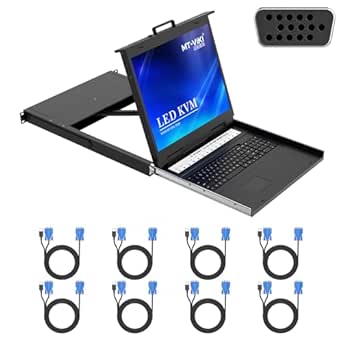
The Yinker makes a practical case for a VGA-based rack: it includes eight KVM cables, so a buyer can connect an eight-server group without sourcing those leads separately. Its 15.6-inch Full HD screen and 1U drawer combine display, keyboard, touchpad, and switching in a compact footprint. Compared with the Tripp Lite NetDirector HDMI model, it gives up IP remote access and HDMI support, but offers a more complete starting kit for local VGA administration. Daisy-chain support for as many as 64 servers may help as a system grows, though the supplied description does not clarify all chaining requirements. The external 12V power supply and sparse information about weight and build details make it a less documented choice than the Tripp Lite options.
Pros:- Includes eight VGA KVM cables for connecting the listed ports.
- Combines a 15.6-inch Full HD display, keyboard, touchpad, and switch in a 1U console.
- Supports daisy chaining for up to 64 servers.
- Adjustable rack depth is specified as 480–800 mm.
Cons:- VGA-only connectivity does not suit servers that rely on HDMI or DisplayPort.
- Requires an external 12V DC power supply.
- Product details do not specify weight or provide much information about construction.
Best for: Administrators outfitting a compact cabinet of VGA servers who want the eight KVM cables included and manage systems locally.
Not ideal for: Teams with HDMI or DisplayPort servers, remote administrators who need IP access, or buyers who require well-documented weight and construction details.
- Display:15.6 inches
- Switch ports:8 VGA
- Supported resolution:1920 x 1080 at 60 Hz
- Rack format:1U
- Adjustable rack depth:480–800 mm
- Daisy-chain capacity:Up to 64 servers
- Power supply:12V DC
- Power consumption:24 W
- Included KVM cables:8 VGA cables
Our verdict“Pick the Yinker for a local VGA rack where included cables and daisy-chain capacity matter more than remote access or newer video connections.”
1U Rackmount KVM Console for 24-Inch Deep Rack Cabinet, 8 Port Switch
This console’s defining advantage is its stated fit for a 24-inch-deep rack cabinet, making it a more targeted choice than the Yinker, whose adjustable depth starts at 480 mm. The 15.6-inch 1080p display and eight-port VGA switch cover local access to a small server group, with switching available through front-panel controls, hotkeys, or the on-screen menu. Its dual redundant, hot-pluggable power supplies offer an added layer of power continuity that the product details do not specify for the other VGA console here. That focus comes with clear limits: connections are VGA and USB, and there is no stated IP remote-management feature. Buyers should also verify physical access, since the console’s controls cannot replace remote administration.
Pros:- Designed for 24-inch-deep rack cabinets.
- Dual redundant, hot-pluggable power supplies support power continuity.
- Provides three local switching methods: front panel, hotkeys, and OSD.
- Heavy-duty steel construction is specified.
Cons:- VGA-only video limits compatibility with newer HDMI- or DisplayPort-based servers.
- No remote-management capability is specified.
- Local use requires physical access to the rack.
Best for: Data-center operators with 24-inch-deep cabinets, VGA servers, and a preference for redundant hot-pluggable power.
Not ideal for: Teams needing IP access, HDMI or DisplayPort support, or a console that can be managed without physical rack access.
- Rack depth fit:Designed for 24-inch-deep rack cabinets
- Rack format:1U
- Monitor:15.6-inch Full HD, 1920 x 1080
- Switch ports:8
- Connectivity:VGA and USB
- Power:Dual redundant, hot-pluggable
- Construction:Heavy-duty steel with protective coating
- Switching methods:Front panel, hotkeys, and OSD
Our verdict“Choose this model for a short-depth VGA rack where redundant power matters more than remote administration or modern video inputs.”
Tripp Lite 8-Port DisplayPort KVM Switch with 17-inch LCD, Rack-Mountable
For a rack built around DisplayPort machines, this Tripp Lite is the most direct fit in the group: it offers eight DisplayPort inputs and a 17-inch 1080p screen in a 1U rackmount format. Push buttons, hotkeys, and the OSD give operators several ways to switch locally, while multi-level password security and two-level logout support controlled console access. Compared with the HDMI NetDirector B030-008-17-IP, this model keeps to local DisplayPort switching rather than advertising IP remote sessions. It also lacks the Yinker’s included VGA cable bundle, and the required B019-000 mounting bracket is not included. It makes most sense when DisplayPort compatibility is the deciding factor, not when a buyer wants broad video flexibility or remote administration.
Pros:- Eight DisplayPort inputs support a dedicated DisplayPort server group.
- 17-inch display supports 1920 x 1080 at 60 Hz.
- Switching is available through push buttons, hotkeys, or OSD.
- Includes multi-level password security and two-level logout.
Cons:- DisplayPort-only inputs limit compatibility with HDMI and VGA equipment.
- No IP remote-management feature is specified.
- The B019-000 mounting bracket is sold separately.
Best for: Administrators with up to eight DisplayPort servers who want a 17-inch local console and multiple switching methods.
Not ideal for: Buyers with HDMI or VGA systems, those requiring built-in IP remote access, or installers who need the B019-000 bracket included.
- Switch ports:8 DisplayPort inputs
- Monitor:17 inches
- Maximum resolution:1920 x 1080 at 60 Hz
- Rack space:1U
- Mounting:Rack-mountable; brackets included
- Switching methods:Push buttons, hotkeys, and OSD
- Security:Multi-level password security and two-level logout
- Additional bracket:B019-000 sold separately
Our verdict“Select this Tripp Lite when your servers use DisplayPort and local 1U console control is enough.”
Tripp Lite NetDirector 8-Port Console KVM with 19-Inch LCD, 8 USB/PS2 Combo Cable Kits, 2-Level Password Security, 1U Rack Mount, 1-Year Warranty (B020-U08-19-K)
This NetDirector is the pick for buyers who value a 19-inch console screen and a ready-to-connect cable set over remote access or newer video standards. It includes eight USB/PS2 combo KVM cable kits, reducing the extra parts work required by the HDMI NetDirector, whose cable kits are separate. Its 1U drawer, keyboard, and touchpad serve local control, while push buttons, hotkeys, and OSD provide several switching paths. Daisy chaining can extend control to as many as 504 computers with additional B022-U16 switches, a far larger stated capacity than the Yinker’s 64-server chaining. The tradeoff is an older, local-console focus: no built-in IP access is specified, the listed cable kits are USB/PS2, and the warranty is one year.
Pros:- Largest listed LCD in this group at 19 inches.
- Includes eight USB/PS2 combo KVM cable kits.
- Daisy chaining with additional B022-U16 switches supports control of up to 504 computers.
- Offers push-button, OSD, and hotkey switching, plus two front USB ports.
Cons:- No built-in IP remote access is specified; a separate B051-000 unit is listed as an option.
- USB/PS2 cable kits do not provide the HDMI or DisplayPort connectivity featured by other roundup picks.
- One-year limited warranty is shorter than the three-year warranty listed for the HDMI NetDirector.
Best for: Administrators who want a larger 19-inch local display, included USB/PS2 cabling, and a path to manage many systems through daisy chaining.
Not ideal for: Teams needing built-in IP remote access, HDMI or DisplayPort connectivity, or a longer stated warranty.
- Model:B020-U08-19-K
- Switch ports:8
- LCD:19 inches
- Rack format:1U
- Included cables:8 USB/PS2 combo KVM cable kits
- Daisy-chain capacity:Up to 504 computers with additional B022-U16 switches
- Security:Two-level password security
- Warranty:1-year limited
Our verdict“Choose this model for a local rack console when a 19-inch screen and included USB/PS2 cables outweigh built-in remote access and modern video inputs.”
MT-VIKI 15.6″ Rackmount KVM Console with Monitor, Keyboard, and Touchpad – 8 Port VGA
The MT-VIKI 1568UL is a practical fit when your rack depth is the main constraint: its adjustable rails accommodate 18.9 to 31.5 inches, and the 1U drawer combines a monitor, keyboard, and touchpad. It handles up to eight systems and includes the VGA KVM cables, so the package suits a small server room that needs local access without separate console gear. Compared with the Tripp Lite B021-SWHD-K, this model has a stated rack-depth range and built-in eight-port switching, while Tripp Lite offers an 18.5-inch 1080p HDMI display. The tradeoff is the MT-VIKI’s VGA-only connection and smaller 15.6-inch screen. Its 1080p panel and external VGA output help with basic administration, but buyers should measure rack and cable clearance before installation.
Pros:- Adjustable rails fit rack depths from 18.9 to 31.5 inches
- Integrated 1U monitor, keyboard, and touchpad save rack space
- Includes eight USB-VGA KVM cables for connecting supported systems
- 1080p screen and external VGA output support local viewing
Cons:- VGA connectivity is a poor fit for systems without VGA output
- The 15.6-inch screen is smaller than the Tripp Lite B021-SWHD-K’s 18.5-inch display
- Rack depth and cable clearance need careful measurement before fitting
Best for: IT teams with racks of varying depths that need an integrated 1U console and direct control of up to eight VGA-equipped systems.
Not ideal for: Buyers standardizing on HDMI or DisplayPort servers, or those who need a larger built-in display.
- Model:1568UL
- Ports:8
- Display:15.6-inch LCD
- Resolution:1920 x 1080 at 60 Hz
- Interface:VGA
- Rack height:1U
- Rack depth compatibility:18.9–31.5 inches (480–800 mm)
- Included cables:8 USB-VGA KVM cables
- Construction:Aluminum interior with steel shell
Our verdict“Choose the MT-VIKI 1568UL when adjustable rail depth and integrated eight-port VGA switching matter more than newer video connections or a larger screen.”
Tripp Lite Rackmount KVM Console, 1U Short Depth, 18.5″ HD LCD, HDMI & USB
The Tripp Lite B021-SWHD-K stands out here for its 18.5-inch 1080p HDMI display, making it the clearest choice for buyers who want a larger integrated screen and a newer video connection than the VGA-based MT-VIKI 1568UL. Its short-depth format is intended to mount in front of KVM switches in a standard 19-inch rack, which can help preserve space in a crowded cabinet. The key distinction is that this is a console, not a built-in eight-port KVM switch: it requires a compatible switch with USB console connectors. Compared with the MT-VIKI MT-1908UL, it trades integrated multi-computer switching for HDMI connectivity and a stated 1080p panel. At 30.6 pounds, it also calls for solid rack support, and its listed dimensions are worth checking against the intended enclosure.
Pros:- 18.5-inch 1080p LCD provides a larger viewing area than the 15.6-inch MT-VIKI 1568UL
- HDMI and USB connectivity suit compatible modern KVM setups
- Short-depth design is intended to fit in front of rack-mounted KVM switches
- Supports Windows, macOS, Linux, and Sun operating systems
Cons:- Requires a compatible KVM switch with USB console connectors
- At 30.6 pounds, it needs sturdy rack support
- No rack-depth compatibility range is stated in the supplied specifications
Best for: Server administrators who already have a compatible USB KVM switch and want a larger 1080p HDMI console in a short-depth rack setup.
Not ideal for: Buyers who need an all-in-one console with an integrated eight-port switch, or whose rack cannot support a 30.6-pound drawer.
- Model:B021-SWHD-K
- Display:18.5-inch LCD
- Resolution:1920 x 1080 at 60 Hz
- Connectivity:HDMI, USB
- Rack height:1U
- Dimensions:26 x 32 x 5.51 inches
- Weight:30.6 lbs
- Compatibility:Windows, macOS, Linux, Sun
- Warranty:1 year
Our verdict“Pick the B021-SWHD-K if you already have a compatible USB KVM switch and value its larger HDMI display over an integrated eight-port switch.”
MT-VIKI 8 Port Rack Mount KVM Console with 19” LCD Monitor, VGA Switch, Keyboard, Touchpad, and 8 KVM Cables
For buyers who want more screen area without giving up an integrated eight-port switch, the MT-VIKI MT-1908UL pairs a 19-inch LCD with keyboard, touchpad, and OSD, hotkey, or button control. Its 110-degree adjustable monitor angle gives operators room to set the viewing position, while the multiple switching methods offer alternatives when keyboard shortcuts are inconvenient. Compared with the MT-VIKI 1568UL, this model has a larger display and several stated control methods, but its 1280 x 1024 resolution is lower than the 1568UL’s 1080p. The Tripp Lite B021-SWHD-K also provides 1080p and HDMI, though it needs a separate compatible KVM switch. This MT-VIKI makes more sense for VGA-based server rooms that want an all-in-one console than for users handling detailed graphics or seeking modern video input.
Pros:- 19-inch display is larger than the MT-VIKI 1568UL’s 15.6-inch panel
- Integrated switching supports up to eight computers
- OSD, hotkeys, and buttons provide multiple ways to change systems
- Monitor angle adjusts up to 110 degrees
Cons:- 1280 x 1024 resolution is lower than the 1080p panels in the other two products
- VGA switching limits compatibility with systems that lack VGA output
- Rack installation requires checking the stated 23.6–31.8-inch mounting depth
Best for: Operators managing up to eight VGA-equipped servers who prefer a 19-inch screen and want switching controls on the console itself.
Not ideal for: Buyers who need 1080p detail, HDMI or DisplayPort connectivity, or a console for high-end graphics work.
- Model:MT-1908UL
- Ports:8
- Display:19-inch LCD
- Resolution:1280 x 1024
- Rack height:1U
- Mounting depth:23.6–31.8 inches
- Control methods:OSD, hotkeys, buttons
- Monitor angle:Adjustable up to 110 degrees
- Power supply:12V, 2A
Our verdict“Choose the MT-1908UL for an integrated eight-port VGA setup where a larger screen and flexible controls matter more than 1080p resolution.”

How We Picked
I compared these eight consoles on the factors that affect everyday rack work: video compatibility, port count, remote management, screen usability, rack fit, and included accessories. I gave extra weight to clear advantages that change how a system administrator can work, such as IP access, short-depth construction, and support for newer video connections. I also treated cable kits and security features as practical benefits, since missing or mismatched accessories can complicate deployment.
The ranking favors the Tripp Lite HDMI NetDirector for its broader management options, then distinguishes models by specific needs rather than treating screen size as a stand-in for quality. The short-depth Tripp Lite ranks well for restricted cabinets, while DisplayPort and larger-screen options serve narrower connection or viewing needs. VGA-first consoles remain relevant for older hardware, but their narrower compatibility and less clearly differentiated management features keep them below the more versatile picks. Product names alone do not confirm identical rail mechanics, so buyers should verify dual-rail construction and dimensions on the exact listing.
Factors to Consider When Choosing Rackmount Kvm Console With Dual Rails
Before choosing a console, I would map the rack, servers, and maintenance workflow rather than shop by LCD size alone. These factors help avoid a console that technically mounts but is awkward to extend, connect, or use.
Match Video Connections to the Servers You Actually Manage
Start with the video outputs on the servers and switches that will connect to the console, not with the console’s most appealing screen. VGA remains useful in older racks, while HDMI and DisplayPort fit newer equipment and may reduce the need for adapters. A mixed environment can make adapters tempting, but each added conversion creates another compatibility point to diagnose. Check resolution support and cable type as well as connector shape, since a physical match does not guarantee the display behaves as expected. If your fleet is changing, favor the connection standard used by the servers you expect to keep rather than paying for flexibility you will not use. Keep one known-good spare cable in the rack for the chosen standard.
Measure Rack Depth and Rail Travel Before Buying
Rack compatibility involves more than whether the console is labeled 1U. Measure the cabinet’s usable front-to-back depth, including obstructions such as rear doors, cable managers, and equipment handles. Then compare that measurement with the console’s chassis depth and the rail’s supported adjustment range. A short-depth model can solve clearance problems, but it does not guarantee the drawer will extend far enough for comfortable access. Check whether the rails attach to the rack’s front and rear posts or use another mounting arrangement. Confirm the cabinet’s rack type and post spacing against the manufacturer’s mounting requirements before installation.
Treat Dual Rails as a Fit and Stability Question
“Dual rail” can describe a sliding console mechanism, but product listings may use the phrase inconsistently, so verify the actual included hardware. Look for documentation showing the rail layout, travel, locking positions, and supported rack depth. A stable extended drawer matters when you need to type while standing at the rack, while a secure closed position helps keep the console from creeping out during nearby work. Think about how often the drawer will be opened and whether the rack aisle leaves room for full extension. If the listing does not show the rail parts or dimensions, request confirmation before purchase. Do not assume a 1U label alone confirms rail compatibility.
Choose Port Count Around Growth and Cable Reach
An eight-port switch is a practical fit for a small rack or a defined server group, but count all systems you may need to reach, including appliances and test machines. Leave capacity for near-term additions if replacing the KVM later would mean recabling a live rack. Check whether the quoted port count refers to direct server connections and what cable kits are included. Cable length affects placement: a console may mount neatly while its server connections still fall short of distant equipment. Avoid buying extra ports as a substitute for checking switching workflow and cabling layout. Label each KVM cable at both ends to reduce mistakes during urgent maintenance.
Decide Whether Remote Access Is Worth the Extra Complexity
IP remote access can let authorized staff reach systems without standing in front of the rack, which is valuable for distributed operations and after-hours response. It also adds network configuration, credential management, and access-control work. If the console will serve only one nearby technician, those capabilities may go unused while adding setup overhead. For shared access, check how user permissions, authentication, and concurrent sessions work rather than relying on a headline user count. Separate management access from general traffic where your security policy calls for it. A local-only console may be the simpler choice for isolated labs or tightly controlled facilities.
Balance Screen Size Against Drawer Ergonomics
A larger panel can make text and diagnostics easier to read, but it does not automatically make the console more comfortable. Consider viewing distance, screen resolution, keyboard spacing, touchpad position, and how far the drawer extends when open. A compact 15.6-inch screen can suit occasional service work and tighter setups, while a larger panel may help technicians who spend longer sessions at the rack. Check whether the display angle can be adjusted and whether the keyboard layout suits your operators. If possible, compare the screen’s stated resolution with the operating systems and firmware tools you use. Prioritize a readable interface and usable controls over diagonal measurement alone.
Frequently Asked Questions
Can I use a VGA rack console with servers that have only HDMI or DisplayPort?
Possibly, but you will need an appropriate active or passive adapter based on the server output and console input, and some combinations may not work as expected. Adapters can also limit supported resolutions or create extra points of failure. Check the server’s video output behavior, the console’s supported display modes, and the adapter manufacturer’s compatibility details. For a rack with several newer servers, choosing a console with a matching native connection is usually simpler than adapting every cable. If the rack is mixed, confirm compatibility with the systems you cannot afford to lose access to.
How do I confirm that a console will fit my rack before ordering?
Measure usable depth between the rack posts and account for doors, cable management, and equipment behind the console. Compare that with the console’s chassis depth and the rail adjustment range in the product documentation. Check the rack’s post spacing and mounting style against the included hardware, and confirm how much clearance the drawer needs when extended. A product marked 1U can still be too deep or have rails that do not suit your cabinet. If rail measurements are missing, ask the seller or manufacturer for the installation drawing before committing.
Is IP remote access worth choosing over a local-only KVM console?
Remote access is most useful when technicians need to manage systems from another location or when reaching the rack during an outage is difficult. It may be unnecessary for a small, staffed room where all work happens locally. Remote capability also brings network setup and security responsibilities, so check authentication, user permissions, and access policies before enabling it. Consider whether the feature supports your actual incident-response workflow rather than relying on a maximum user figure. If remote use is occasional, compare the added management effort with the time it saves during maintenance.
Should I choose a 15.6-inch console or a larger 17- to 19-inch screen?
Choose based on viewing comfort, available rack space, and how long operators work at the console. A smaller screen can be easier to fit in a constrained setup and may be sufficient for brief maintenance tasks. Larger displays can make menus and diagnostic output easier to read, but they may require more attention to chassis depth and drawer ergonomics. Screen size alone does not tell you resolution, viewing angle, or keyboard comfort, so check those details too. If the console will see long sessions, prioritize an ergonomic drawer and readable display over the largest diagonal measurement.
What should I check about included KVM cables before installation?
Confirm the number of cables, their connector types, and their lengths against the servers you plan to connect. Some consoles include a cable kit, while others may require separate purchases, and the included set may not match every server’s video and USB or PS/2 connections. Measure the route from each server to the console to avoid cables that are too short or create excess clutter. Check whether keyboard and mouse signals travel through the same cable or require separate connections. Label the cables before connecting them so port changes are easier to track later.
Conclusion
For most buyers, I would choose the Tripp Lite NetDirector HDMI model as the best overall because its IP remote access and HDMI support offer the broadest stated management flexibility in this lineup. The Yinker 15.6-inch VGA console is my value-oriented pick for a basic local rack with compatible legacy equipment, while the Tripp Lite 18.5-inch short-depth model is the focused choice for cabinets where depth is the main constraint. Beginners managing a small, VGA-based setup may prefer the straightforward MT-VIKI 15.6-inch option, provided its connections and included cables match their servers. For a larger screen, compare the 19-inch Tripp Lite and MT-VIKI models against your rack clearance and connection needs; neither screen size nor the product name alone confirms dual-rail fit. Before ordering any model, verify rail construction, rack dimensions, and cable contents for the exact version.
Columbus Day / Indigenous Peoples' Day Picks
long weekend sales
As an affiliate, we earn on qualifying purchases.