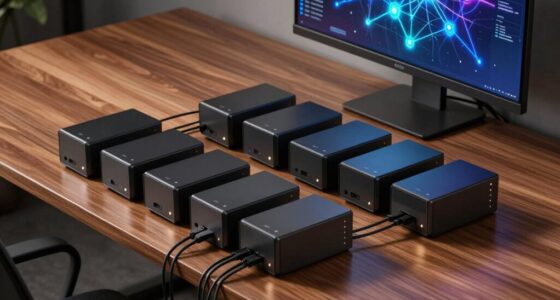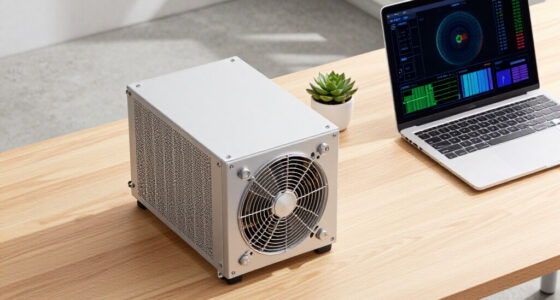

When searching for a tap device for network monitoring, the goal is to find a solution that offers reliable data capture without impacting network performance. The ETAP-XG 10G Network TAP stands out as the best overall choice thanks to its high throughput and robust build. For those seeking simplicity and affordability, the SharkTap Gigabit Network Sniffer is an excellent pick. Meanwhile, the SharkTapBYP Ethernet Sniffer offers a budget-friendly bypass option for critical network segments. Each option balances performance, ease of use, and price differently, creating common tradeoffs between speed, complexity, and cost. Keep reading to see how these options compare and which one fits your network monitoring needs best.

Get business pricing on networking and server gear
- Business-only prices and quantity discounts
- Tax-exempt purchasing
- Multiple users, one account, clear invoices
Key Takeaways
- High-speed 10G options like the ETAP-XG excel in environments with large data flows but come at a higher cost.
- BYPASSED solutions like SharkTapBYP are better suited for critical networks that require fail-safe operation.
- Ease of setup and use varies significantly; simpler devices often sacrifice some advanced features.
- Price generally correlates with performance and build quality; budget models may lack durability or speed.
- Compatibility with existing network hardware can limit options; ensure the tap device supports your network’s specifications.
| ETAP-XG 10G Network TAP |  | Best Overall for High-Speed, Versatile Monitoring | Supported Speeds: 100Mb/s to 10Gb/s | Connectivity: Copper and fiber Ethernet links, SFP+/SFP slots | Operating Temperature: -25°C to 85°C | VIEW ON AMAZON | See Our Full Breakdown |
| Dualcomm 10/100/1000Base-T Gigabit Ethernet Network TAP [ETAP-2003] | ” image=”https://m.media-amazon.com/images/I/71PCWZwmvyL._AC_SY300_SX300_QL70_ML2_.jpg” link=”0″] | Best Value for Reliable Gigabit Ethernet Monitoring | Network Standards: 10/100/1000Base-T | Power: USB powered, supports PoE | Maximum Cable Length: 200 meters | VIEW ON AMAZON | See Our Full Breakdown |
| SharkTap Gigabit Network Sniffer |  | Best for Laboratory and Troubleshooting Use | Number of Ports: 3 | Compatible Devices: Desktop | Data Transfer Rate: 1000 megabits per second | VIEW ON AMAZON | See Our Full Breakdown |
| SharkTapBYP Ethernet Sniffer | 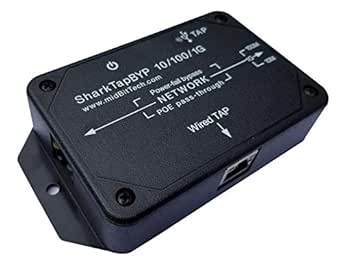 | Best for Embedded and Permanent Monitoring | Operation Mode: ON-NONE-ON or ON-ON-ON | Current Rating: 350 milliamps | Voltage: 5 volts | VIEW ON AMAZON | See Our Full Breakdown |
| ETAP-1000 Zero-Delay Fast Ethernet Copper Tap |  | Best for Fast Ethernet, Zero-Delay Monitoring | Network Type: 100Base-T Fast Ethernet | Packet Delay: Zero | Monitor Port: Gigabit | VIEW ON AMAZON | See Our Full Breakdown |
| Gigabit Ethernet/USB Bypass Network Tap |  | Best for Power-Resilient Gigabit Monitoring | Network Speed: 10/100/1000 Mbps | Power: 0.75A at 57VDC | Power Source: USB3 port or 5V wall transformer | VIEW ON AMAZON | See Our Full Breakdown |
| tap device for network monitoring | Power |
|---|---|
| ETAP-XG 10G Network TAP | — |
| Dualcomm 10/100/1000Base-T Gig | USB powered, supports PoE |
| SharkTap Gigabit Network Sniff | USB 5V |
| SharkTapBYP Ethernet Sniffer | — |
| ETAP-1000 Zero-Delay Fast Ethe | — |
| Gigabit Ethernet/USB Bypass Ne | 0.75A at 57VDC |
More Details on Our Top Picks
ETAP-XG 10G Network TAP
The ETAP-XG 10G Network TAP stands out for supporting both copper and fiber Ethernet links at speeds up to 10Gb/s, making it ideal for environments where flexible connectivity and high throughput matter most. Compared to the Dualcomm ETAP-2003, which offers excellent performance at gigabit speeds, the ETAP-XG’s support for fiber links expands its use cases in enterprise settings. Its rugged, metal housing ensures durability in harsh conditions, but the setup can be complex for users unfamiliar with high-speed network hardware. This tap provides real-time, zero-delay data monitoring, crucial for troubleshooting and security, though detailed compatibility specifics are limited. This device is best suited for network engineers managing high-bandwidth, mixed-media environments.
Pros:- Supports both copper and fiber Ethernet links at high speeds
- Reliable, zero-delay data monitoring ensures accurate real-time analysis
- Compact and durable, suitable for harsh environments
Cons:- Setup can be complex for users unfamiliar with network hardware
- Limited detailed specs on transceiver compatibility
Best for: Network professionals needing high-speed, versatile tap solutions in demanding environments
Not ideal for: Small offices or home users with simple gigabit networks, since its setup is more complex and geared toward enterprise use
- Supported Speeds:100Mb/s to 10Gb/s
- Connectivity:Copper and fiber Ethernet links, SFP+/SFP slots
- Operating Temperature:-25°C to 85°C
- Size:Approximately the size of a cigarette pack
- Housing Material:Metal
Our verdict“This tap makes the most sense for organizations requiring flexible, high-speed network monitoring in tough conditions.”
Dualcomm 10/100/1000Base-T Gigabit Ethernet Network TAP [ETAP-2003]
” image=”https://m.media-amazon.com/images/I/71PCWZwmvyL._AC_SY300_SX300_QL70_ML2_.jpg” link=”0″]Best Value for Reliable Gigabit Ethernet Monitoring
View on AmazonThe Dualcomm ETAP-2003 offers a compact, durable solution for monitoring 10/100/1000Base-T links, making it an excellent choice for small to medium networks. Unlike the SharkTap Gigabit Network Sniffer, which is more suited for lab environments, the ETAP-2003 is designed for real-world deployment with its rugged metal enclosure and PoE support. It can be powered via USB and supports long cable runs of up to 200 meters without packet loss, emphasizing its reliability. However, its monitor port blocks ingress traffic by default, limiting some analysis scenarios, and it’s only compatible with Ethernet networks. The device requires a certain level of technical knowledge to set up properly. This pick is ideal for IT teams seeking a reliable, affordable monitoring solution in operational environments.
Pros:- Supports 10/100/1000Base-T Ethernet with no packet loss at full speed
- Supports PoE for seamless power and data pass-through
- Compact, portable design with high performance
Cons:- Monitor port blocks ingress traffic by default, limiting some uses
- Limited to Ethernet, not suitable for other network types
- Requires technical expertise for proper setup
Best for: Small to medium-sized network administrators needing dependable Ethernet monitoring with easy power options
Not ideal for: Large enterprise networks or environments requiring multi-protocol monitoring, since it is Ethernet-specific and blocks ingress traffic by default
- Network Standards:10/100/1000Base-T
- Power:USB powered, supports PoE
- Maximum Cable Length:200 meters
- Packet Loss:No packet loss at full 1Gbps
- Enclosure:Metal
- Monitor Port:Blocks ingress traffic by default
Our verdict“This device provides a dependable, budget-friendly option for Ethernet-focused network monitoring in operational settings.”
SharkTap Gigabit Network Sniffer
The SharkTap Gigabit Network Sniffer is tailored for detailed network analysis in controlled environments. Its three-port design allows packet duplication for troubleshooting, with Power over Ethernet pass-through simplifying setup. Unlike the ETAP-XG 10G Network TAP, which supports fiber and high speeds, the SharkTap is focused on gigabit Ethernet, making it ideal for lab testing and protocol analysis. Its small, lightweight case and USB power make it portable but limit its deployment to non-production environments. It requires external analysis tools like Wireshark for packet inspection, and its design isn’t suited for live, large-scale network monitoring. This device is best for network technicians conducting detailed troubleshooting or protocol analysis in lab settings.
Pros:- Supports gigabit Ethernet for high-speed data transfer
- Allows packet duplication for detailed analysis without routing issues
- Power over Ethernet pass-through simplifies setup
Cons:- Designed mainly for lab use, not for live production networks
- Limited to Ethernet connections only
- Requires external tools like Wireshark for analysis
Best for: Network analysts and troubleshooters needing high-speed packet duplication in a lab or testing environment
Not ideal for: Large-scale live network monitoring or wireless network analysis, due to its lab focus and Ethernet-only support
- Number of Ports:3
- Compatible Devices:Desktop
- Data Transfer Rate:1000 megabits per second
- Power:USB 5V
- Weight:1.6 ounces
- Interface:10/100/1000Base-T
Our verdict“This sniffer is well-suited for detailed protocol analysis and troubleshooting in controlled, non-production environments.”
SharkTapBYP Ethernet Sniffer
The SharkTapBYP offers flexible Ethernet monitoring via standard RJ45 or USB 3 ports, making it suitable for embedded applications. Its power fail bypass feature ensures continuous monitoring even during power outages, a key advantage over simpler taps like the Dualcomm ETAP-2003. The device supports 10/100/1000Base-T links, but its technical complexity and need for compatible software like Wireshark mean it’s best for users with network experience. The USB 3 interface allows easy integration into embedded systems or permanent installations. However, detailed user feedback is limited, and setup requires familiarity with network hardware and software. This device is ideal for experienced network engineers deploying embedded, fail-safe monitoring solutions.
Pros:- Supports multiple speeds including 10/100/1000Base-T
- Features power fail bypass for fail-safe operation
- Supports USB 3 for easy integration into embedded systems
Cons:- Limited user feedback and detailed documentation
- Requires technical knowledge and compatible software
- Specific to Ethernet, not suitable for wireless or mixed environments
Best for: Embedded system developers and advanced network engineers needing reliable, permanent Ethernet monitoring
Not ideal for: Basic home or small office users without technical expertise or the need for embedded solutions
- Operation Mode:ON-NONE-ON or ON-ON-ON
- Current Rating:350 milliamps
- Voltage:5 volts
- Contact Type:Normally Open
- Connector Type:RJ45, USB-B
- Switch Type:Solid-state
Our verdict“This device is best for specialized, embedded monitoring solutions where reliability and fail-safe operation are critical.”
ETAP-1000 Zero-Delay Fast Ethernet Copper Tap
The ETAP-1000 is specialized for 100Base-T Fast Ethernet copper links, offering zero packet delay crucial for real-time monitoring. While it shares the same fundamental purpose as the Dualcomm ETAP-2003, which supports a broader range of speeds, the ETAP-1000’s focus on fast Ethernet ensures ultra-low latency, making it ideal for applications demanding immediate data insights. Its single gigabit monitor port and USB power supply simplify deployment, but the limited network compatibility restricts its use to older, specific network setups. It lacks features beyond delay-free operation and PoE support, which could be a drawback for users needing multi-protocol support. This device is most suitable for fast Ethernet environments where delay-free data capture is a priority.
Pros:- Zero packet delay for real-time monitoring
- Supports PoE for convenient power and data transfer
- USB powered with built-in current limiting
Cons:- Limited to 100Base-T Ethernet networks
- No support for fiber or gigabit connections
- Basic feature set focused solely on delay-free operation
Best for: Organizations running Fast Ethernet copper networks that require real-time, delay-free monitoring
Not ideal for: Networks utilizing gigabit or fiber connections, as this device is limited to 100Base-T and offers no multi-protocol support
- Network Type:100Base-T Fast Ethernet
- Packet Delay:Zero
- Monitor Port:Gigabit
- Power Source:USB
- PoE Support:Yes
- Fail-Safe:Yes
Our verdict“This tap is ideal for fast Ethernet environments where immediate data capture outweighs multi-protocol flexibility.”
Gigabit Ethernet/USB Bypass Network Tap
This Gigabit Ethernet/USB Bypass Network Tap stands out for its ability to support high-speed network monitoring with reliable network continuity. Compared with other options like the ETAP-XG 10G Network TAP, it offers gigabit speeds suitable for most standard networks, but it lacks the ultra-high capacity for 10G environments. Its automatic bypass feature is a key advantage, ensuring the network remains active during power failures—an essential feature for critical monitoring setups. The inclusion of PoE pass-through adds flexibility for deployments where power sourcing is limited. However, it depends on an external power supply to unlock full functionality, which could complicate portability. Limited detailed specs make it less ideal for users needing comprehensive technical data. This pick makes the most sense for network administrators seeking a reliable, high-speed tap that prioritizes uptime during power issues.
Pros:- Supports high-speed gigabit network traffic with ease
- Automatic bypass maintains network uptime during power failures
- PoE pass-through adds deployment versatility
Cons:- Requires external power source for full functionality, adding setup complexity
- Limited detailed specifications may hinder advanced troubleshooting
Best for: IT teams managing gigabit networks requiring reliable, power-fail resilient monitoring.
Not ideal for: High-throughput environments needing 10Gbps or more, where this tap’s speed limits are a bottleneck.
- Network Speed:10/100/1000 Mbps
- Power:0.75A at 57VDC
- Power Source:USB3 port or 5V wall transformer
- Consumption:~500mA
- Bypass:Automatic
- PoE Pass-through:Supported
Our verdict“This tap is best suited for organizations needing reliable gigabit network monitoring with built-in power fail protection.”

How We Picked
To evaluate these tap devices, I focused on key factors that matter most for network monitoring: performance in high-speed environments, build quality, ease of installation, reliability, and value for the price. Devices were ranked based on their throughput capabilities, especially in Gigabit and 10G contexts, as well as their ability to operate transparently without network disruption. Durability, ease of use, and feature set also played a role, with a preference for solutions that balance advanced functionality with straightforward deployment. The goal was to identify options suitable for both enterprise and smaller-scale setups, ensuring that each pick offers a clear advantage within its category.Factors to Consider When Choosing Tap Device For Network Monitoring
Choosing the right tap device for network monitoring requires understanding several critical factors. Not all taps are created equal; some prioritize speed, others focus on reliability or ease of use. Making a mistake like selecting a device that doesn’t support your network’s speed or lacks sufficient build quality can lead to data loss or costly downtime. This section explains the key considerations to help you match a tap device with your specific monitoring needs, avoiding common pitfalls and understanding the tradeoffs involved.Performance and Speed
Performance is the cornerstone of any tap device. In high-speed networks, especially those operating at 10G or higher, a tap must support the full bandwidth without introducing latency or packet loss. Devices like the ETAP-XG are designed for such environments, but they come at a higher price. For lower speeds, gigabit options like SharkTap are often sufficient and more budget-friendly. Always match the device’s throughput to your network’s maximum speed to prevent bottlenecks or data gaps.
Reliability and Uptime
Network monitoring depends on continuous, accurate data capture. Devices with robust construction and fail-safe features—such as bypass modes—ensure monitoring continues even if the tap malfunctions. Bypass taps like SharkTapBYP are essential for critical infrastructure where downtime is unacceptable. Consider the environment and how much resilience you need; cheaper, simpler devices may lack these fail-safe features, risking data loss during hardware failure.
Ease of Installation and Use
Some taps are plug-and-play, designed for quick setup, while others require more complex configurations. If you lack technical expertise, opting for a device with clear instructions and minimal setup steps can save time and frustration. However, more straightforward devices often omit advanced features like detailed traffic filtering or logging. Weigh your need for simplicity against the potential benefits of more configurable solutions.
Compatibility and Scalability
Ensure the tap device supports your network type, whether copper or fiber, and matches your existing hardware standards. Compatibility issues can lead to additional costs or the need for adapters. Additionally, consider future scalability—will the device support higher speeds or more ports as your network grows? Investing in a slightly more capable device now can save money and hassle later.
Cost and Value
Price varies widely among tap devices, often reflecting their performance and features. Cheaper models may be suitable for small, non-critical environments, but they might lack durability or high-speed support. Premium devices tend to offer better build quality, higher throughput, and additional features like advanced filtering. Balance your current needs with potential future requirements to choose a device that offers the best value without overspending.
Frequently Asked Questions
Can a tap device handle high traffic volumes without dropping packets?
Yes, high-quality tap devices like the ETAP-XG are designed specifically to support high traffic volumes at 10G or even higher speeds without dropping packets. These devices employ advanced hardware and buffering to ensure continuous data flow, making them suitable for enterprise environments where data integrity is critical. Cheaper models may struggle under heavy loads, leading to packet loss that can compromise monitoring accuracy.
Do I need a bypass tap for my network?
If your network requires continuous operation even when the tap device fails or is being maintained, a bypass tap becomes essential. Bypass models like SharkTapBYP are designed to automatically reroute traffic if the device encounters issues, preventing network downtime. For non-critical or testing environments, a standard tap might suffice, but for production networks, bypass capability adds a layer of reliability.
How easy is it to set up a typical network tap?
Setup complexity varies depending on the device. Plug-and-play models with straightforward instructions can typically be installed in minutes, suitable for users with limited technical experience. More advanced devices with additional features such as filtering or port aggregation may require configuration through web interfaces or command-line tools. Always check the manufacturer’s documentation to ensure compatibility with your technical skill level.
Will a cheaper tap device last in a demanding environment?
Cheaper tap devices may initially seem cost-effective but often lack durability and high-speed support, which can lead to early failure or unreliable monitoring. In demanding environments, investing in a well-built, enterprise-grade tap ensures longevity and consistent performance. Consider the total cost of ownership, including maintenance and potential downtime, when evaluating cheaper options.
What features should I prioritize for small or home networks?
For small or home networks, simplicity and affordability are key. Look for a device that supports your network speed, is easy to install, and offers basic monitoring capabilities. Many budget-friendly options provide sufficient data capture without complex features that are unnecessary at this scale. Prioritize reliability and ease of use to ensure your network remains monitored without added complexity.
Conclusion
Choosing the right tap device depends heavily on your environment and specific needs. For large, high-speed networks requiring top performance, the ETAP-XG provides unmatched throughput and reliability. Smaller networks or budget-conscious setups will find the SharkTap Gigabit Network Sniffer or SharkTapBYP to be more suitable, offering simplicity and affordability. For critical infrastructure where uptime is paramount, the bypass models are the best bet. If you’re just starting out or need a straightforward monitoring solution, opting for a device with easy setup and decent speed support makes the most sense. Ultimately, match your choice to your network’s scale, speed, and reliability demands to get the best value and performance.
As an affiliate, we earn on qualifying purchases.Halloween Picks
halloween