If you’re looking to enhance your cloud security and backup strategies in 2026, this checklist is designed for IT professionals, system administrators, and business owners who want reliable, up-to-date tools. We’ve organized this guide into key categories like storage solutions, networking hardware, and security devices, making it easier for you to identify what fits your needs. Use this checklist to compare offerings, understand essential features, and avoid common pitfalls when selecting new equipment or software.

Get business pricing on networking and server gear
- Business-only prices and quantity discounts
- Tax-exempt purchasing
- Multiple users, one account, clear invoices
Each section provides a detailed overview of why these tools matter, what to look for during your purchase, and practical advice to ensure compatibility and performance. Remember, choosing the right gear is critical for maintaining a secure and efficient cloud environment. Whether you’re upgrading existing infrastructure or building from scratch, this guide will help you make informed decisions.
Keep this checklist handy during your shopping trips or vendor consultations, and use it as a reference to stay focused on your priorities. Investing in quality tools now can save you time, money, and headaches down the road, so take your time to evaluate options carefully.
Cloud Storage Solutions
Cloud storage solutions are fundamental for securely backing up and sharing files across teams and devices. In 2026, the focus is on ease of use, security features, and scalability. When selecting a cloud storage service, consider how well it integrates with your existing infrastructure and whether it offers robust encryption both at rest and in transit. Many solutions now support multi-factor authentication and granular access controls, which are essential for safeguarding sensitive data.
One common mistake is choosing a storage solution based solely on capacity or cost, without evaluating its security features or compliance standards. It’s also important to verify compatibility with your operating systems and applications. Look for solutions that offer automatic backups, version history, and easy sharing options to streamline workflows. Pay attention to the provider’s data center locations and their disaster recovery protocols to ensure your data remains protected in emergencies.
Size and performance should align with your organization’s needs. For example, small teams might prioritize straightforward interfaces and quick setup, while larger enterprises need scalable options with advanced security controls. Always test the service with a trial period before committing to a long-term plan.
What to look for:
- End-to-end encryption
- Compatibility with existing systems
- Scalability options
- Automatic backup and recovery features
- Granular access controls
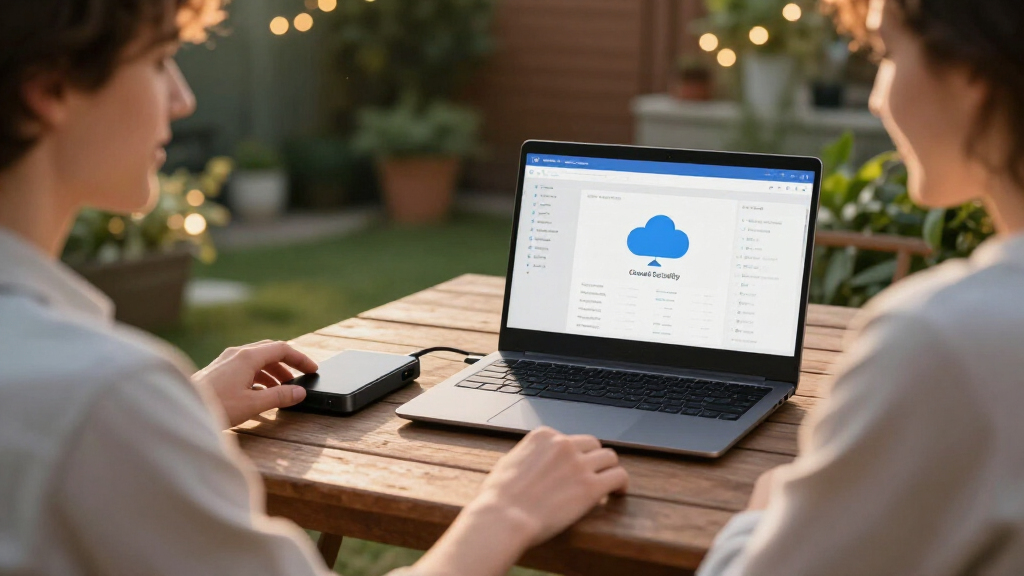
Cloud Storage Made Easy: Securely Backup and Share Your Files

This product offers a simple solution for securely backing up and sharing files through cloud storage. It is designed to enhance productivity by providing easy access and management of your files from any device.
Pros:
- Secure file backup and sharing
- User-friendly interface
- Accessible from multiple devices
Cons:
- Lacks detailed feature specifications
- No pricing information available
Best for: Organizations needing flexible file sharing
Not ideal for: Solutions lacking strong security features
Bottom line: Choose a storage service that prioritizes security and ease of use.
Server Monitoring Devices
While there are no specific products listed here, effective server monitoring is crucial for maintaining uptime and performance. Look for monitoring tools that provide real-time alerts, comprehensive dashboards, and historical data analysis. Compatibility with your existing hardware and software is essential, as well as the ability to customize alerts based on specific thresholds.
Common mistakes include ignoring monitoring during initial setup or relying solely on manual checks. Automated monitoring solutions can save you time and help prevent outages before they happen. Ensure the tools support remote access and mobile notifications for quick response, especially if your infrastructure spans multiple locations.
Regular review of monitoring parameters and logs will help you identify patterns and potential issues early. Integrate your monitoring tools with your incident management system for streamlined troubleshooting. The right solution should be scalable and adaptable as your infrastructure evolves.
What to look for:
- Real-time alerting
- Customizable dashboards
- Compatibility with hardware/software
- Remote access capabilities
- Historical data analysis
Networking Hardware
The network rack mount solution is an essential component for organizing and securing your networking equipment. The 19-inch, 1U rack mount designed for the TP-Link ER605 V2 VPN router and other compatible devices ensures a tidy, professional setup. Proper mounting not only improves airflow and cooling but also simplifies maintenance and troubleshooting.
When choosing networking hardware, avoid common mistakes like underestimating the space needed or selecting incompatible accessories. Verify that the rack mount supports your device’s dimensions and weight, and check for features like venting, locking mechanisms, and cable management options. Properly installed, this hardware can improve your network’s reliability and security.
Compatibility is key—ensure the rack mount fits your specific router model and any additional equipment. Consider future expansion needs; selecting a slightly larger rack or modular options can save you from costly upgrades later. Installation is straightforward but double-check for proper grounding and secure fastening to prevent accidents or damage.
What to look for:
- Compatibility with device dimensions
- Venting and cooling features
- Cable management options
- Locking mechanisms
- Ease of installation
Network Rack Mount, 19 inch 1U, for TP-Link ER605 V2 VPN Router and OC200 Omada
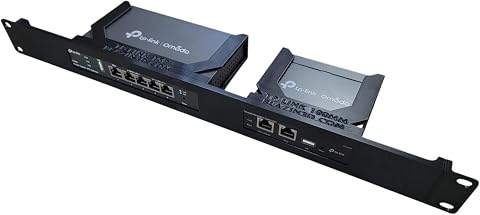
This 19-inch 1U rack mount is designed for TP-Link ER605 V2 VPN Router and OC200 Omada Controller, offering flexible port orientation and enhanced airflow for optimal thermal management. Its compact design allows efficient space utilization and easy installation in network setups.
Pros:
- Universal compatibility with TP-Link networking devices
- Flexible mounting options with port orientation
- Open design promotes better airflow and cooling
- Compact size for space-efficient installation
Cons:
- Network equipment not included
- Requires rack mount setup, which may need additional hardware
Best for: Securely housing network equipment
Not ideal for: Racks that do not support device size or airflow
Bottom line: A good rack mount keeps your network organized and accessible.
Data Backup Software
Firewall & Security Devices
Security is paramount, and the Firewall Mini PC Router J6412 offers a compact yet powerful solution for protecting your network perimeter. Featuring a 6-port 2.5GbE setup, 8GB RAM, and 128GB SSD, this device provides robust firewall capabilities, intrusion detection, and VPN support, making it suitable for small to medium-sized businesses.
Common mistakes include overlooking the importance of hardware specs or underestimating the need for future scalability. Ensure the device’s throughput and processing power match your network’s bandwidth demands, and check for compatibility with your existing security policies. The device’s management interface should be user-friendly, allowing quick configuration and updates.
Security devices should be regularly updated and monitored for performance. Look for features like built-in threat detection, automatic updates, and remote management options. Proper placement within your network topology is crucial to maximize protection without bottlenecks. Investing in a device with expandable features can help future-proof your security setup.
What to look for:
- High throughput capacity
- Compatibility with security policies
- User-friendly management interface
- Built-in threat detection
- Remote management capabilities
Firewall Mini PC Router J6412, 6-Port 2.5GbE Network, 8GB RAM, 128GB SSD, Suppor

This firewall mini PC features an Intel J6412 processor with low power consumption and high performance, supporting multi-WAN routing, VLAN segmentation, and VPN traffic. It includes six 2.5GbE ports, expandable memory and storage, and is compatible with various operating systems and firewall systems like pfSense and OPNsense.
Pros:
- High-performance multi-WAN routing with six 2.5GbE ports
- Fanless design for silent operation
- Flexible memory and storage expansion
- Supports multiple firewall and OS systems
Cons:
- Configuration must be completed by the user
- Limited to network security applications
Best for: Small-to-medium business networks
Not ideal for: Devices with limited processing power
Bottom line: A reliable firewall safeguards your network efficiently.
Virtualization Hardware
When building or upgrading your cloud security and backup toolkit, start with a clear understanding of your organization’s needs and growth plans. Prioritize solutions that offer security, scalability, and ease of use, and don’t hesitate to seek expert advice or demos before making a decision.
Remember, investing in the right tools today will help you maintain a secure, efficient, and resilient infrastructure tomorrow. Take your time to evaluate your options carefully, and you’ll be well on your way to a more protected and streamlined cloud environment.
Fall Picks
fall essentials
As an affiliate, we earn on qualifying purchases.