Welcome to the Cloud & Infrastructure Essentials 2026 Checklist, designed specifically for IT professionals, system administrators, and business owners looking to optimize their cloud and infrastructure setups. Whether you’re planning a new deployment or upgrading existing systems, this guide offers practical advice and key product picks to help streamline your decision-making process.
Our checklist is organized into distinct sections covering essential components like cloud servers, networking equipment, storage, and management tools. Each section provides insights into what to consider when choosing the right products, common pitfalls to avoid, and compatibility tips to ensure seamless integration. Use this guide as a quick reference to identify priorities and make informed purchases that align with your infrastructure goals.
To get the most out of this checklist, review each section carefully, paying attention to the highlighted features and recommendations. Remember, selecting the right hardware and tools is crucial to building a reliable, scalable, and efficient infrastructure. Take notes, compare options, and don’t hesitate to consult additional resources or vendors for specific needs.
Cloud Servers & VMs
This section emphasizes the importance of choosing cloud servers and virtual machines that match your workload requirements, budget, and scalability plans. When selecting cloud VMs, consider factors such as CPU performance, RAM, storage options, and network bandwidth. It’s common for buyers to overlook the importance of regional data centers, which can impact latency and compliance. Additionally, ensure that the VM specifications are compatible with your applications and future growth plans. Avoid over-provisioning, which can lead to unnecessary costs, or under-provisioning, which hampers performance. Regularly review your usage patterns and consider flexible plans that can scale up or down as needed.
Proper sizing and configuration are key to maximizing your cloud investments. Look for options that offer easy management, robust security features, and integration with existing systems. Keep in mind that some providers offer managed services, which can reduce administrative overhead but may come at a premium. Always verify compatibility with your existing infrastructure and consider the provider’s support options. Planning ahead ensures your cloud environment remains efficient, secure, and adaptable to future demands.
What to look for:
- Clear specifications matching workload needs
- Regional data center options for low latency
- Flexible and scalable plans
- Strong security and management features
- Compatibility with existing infrastructure
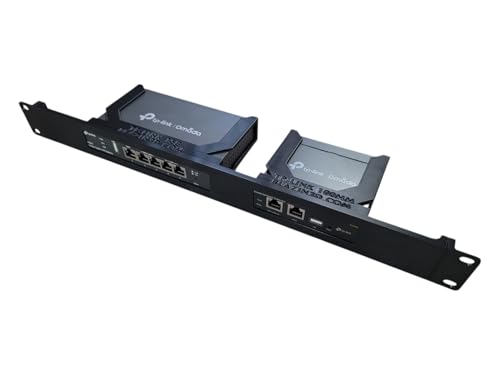
Network Rack Mount, 19 inch 1U, for TP-Link ER605 V2 VPN Router and OC200 Omada Controller (Black)
- Universal Compatibility: Fits TP-Link ER605 V2 and OC200
- Flexible Mounting: Adjustable port orientation for installation
- Enhanced Cooling: Open design for improved airflow
As an affiliate, we earn on qualifying purchases.
Dedicated Hardware
Dedicated hardware remains a vital component for organizations requiring customized performance, security, and control. When evaluating options, focus on server specifications such as CPU cores, RAM capacity, and storage type. It’s common to make the mistake of choosing hardware that’s either overpowered or underpowered for the intended workload. Proper sizing ensures optimal performance without unnecessary costs. Compatibility with your existing network and management tools is also crucial. Consider whether the hardware supports remote management features, redundant power supplies, and hardware RAID configurations to enhance reliability.
Another key point is to verify the form factor and compatibility with your rack setup. Ensure that the physical dimensions align with your data center’s infrastructure. Additionally, check for warranty and support options to minimize downtime. For sensitive applications, security features like TPM modules and hardware encryption can provide added peace of mind. Planning your hardware purchase carefully helps future-proof your infrastructure and supports your operational needs efficiently.
What to look for:
- High-performance CPU and RAM specs
- Compatibility with existing rack systems
- Remote management features
- Redundant power supplies and hardware RAID
- Security features like hardware encryption
Networking Equipment
The network rack mount equipment plays a crucial role in ensuring reliable connectivity and security across your infrastructure. The 19 inch 1U rack mount designed for the TP-Link ER605 V2 VPN Router and OC offers a compact, organized solution for managing network traffic. When selecting networking gear, consider compatibility with your existing devices and future expansion plans. It’s common to overlook the importance of proper mounting and ventilation, which can impact device longevity and performance. Make sure the rack mount supports the necessary weight capacity and offers sufficient space for airflow to prevent overheating.
Furthermore, check that the rack mount includes features such as easy access for maintenance, cable management options, and security locks if needed. Compatibility with your VPN routers and other networking equipment ensures seamless integration. Properly selected rack mounts help maintain an organized and efficient network environment, reducing downtime and simplifying troubleshooting. Investing in quality mounting hardware can significantly improve your overall network reliability and ease of maintenance.
What to look for:
- Compatibility with TP-Link ER605 V2 VPN Router
- Adequate weight capacity and ventilation
- Cable management features
- Ease of access for maintenance
- Security lock options

Asustor Drivestor 4 Gen 2 AS1204T, 4 Bay NAS, Quad-Core 1.7GHz CPU, 2.5GbE Port, 1GB DDR4, 3 USB 3.0, Best Budget Home Cloud, Small Office Backup, 4K Media Center, Network Attached Storage (Diskless)
- Processor: 1.7GHz Quad-Core CPU for smooth multitasking
- Memory: 1GB DDR4 RAM for efficient data management
- Network Speed: 2.5GbE port for faster file transfers
As an affiliate, we earn on qualifying purchases.
Network Rack Mount, 19 inch 1U, for TP-Link ER605 V2 VPN Router and OC200 Omada
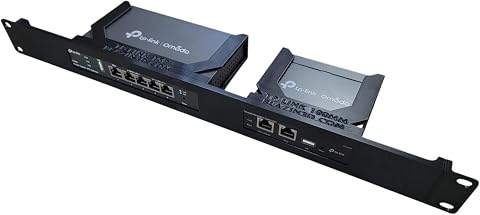
This 19-inch 1U rack mount is designed for TP-Link ER605 V2 VPN Router and OC200 Omada Controller, offering flexible port orientation and enhanced airflow for optimal thermal management. Its compact design allows efficient space utilization and easy installation in network setups.
Pros:
- Universal compatibility with TP-Link networking devices
- Flexible mounting options with port orientation
- Open design promotes better airflow and cooling
- Compact size for space-efficient installation
Cons:
- Network equipment not included
- Requires rack mount setup, which may need additional hardware
Best for: Network setups requiring organized hardware management
Not ideal for: Small or simple network environments
Bottom line: Choose rack mounts that support your hardware and maintenance needs
Storage Solutions
Monitoring & Management
An effective monitoring and management system is vital for maintaining the health and performance of your infrastructure. The Cloud Migration PM Bible provides a comprehensive framework to guide your cloud migration and ongoing management efforts. When selecting management tools, look for features such as real-time monitoring, alerting, and reporting capabilities. It’s common for organizations to underestimate the importance of proactive management, which can lead to unexpected downtime. Reliable tools should integrate seamlessly with your existing infrastructure and support automation where possible.
Additionally, consider the scalability of your management platform—ensure it can grow with your infrastructure. Compatibility with cloud environments and on-premises hardware is essential for a unified management approach. Proper management tools help you identify issues early, optimize resource utilization, and plan capacity effectively. Investing in a robust management framework ultimately reduces operational risks and supports your strategic growth initiatives.
What to look for:
- Real-time monitoring and alerting
- Compatibility with cloud and on-prem hardware
- Automation and reporting features
- Scalability to grow with infrastructure
- Ease of integration
Cloud Migration PM Bible: The Complete Framework for Running Successful Infrastr

This book provides a comprehensive framework for managing cloud, infrastructure, and application migrations. It offers practical guidance and best practices for project managers overseeing migration processes.
Pros:
- Comprehensive framework for cloud migrations
- Practical guidance for project managers
- Covers infrastructure and application migrations
Cons:
- No specific technical details included
- May be dense for beginners
Best for: Organizations managing complex cloud and on-prem environments
Not ideal for: Minimal infrastructure or simple setups
Bottom line: Select management tools that enhance visibility and control
Backup & Redundancy
Reliable backup and redundancy solutions are essential for safeguarding your data and ensuring business continuity. The Asustor Drivestor 4 Gen 2 AS1204T NAS offers a robust option for centralized storage with quad-core processing power and multiple drive bays. When choosing backup solutions, focus on capacity, ease of use, and compatibility with your existing storage systems. Avoid underestimating the importance of regular backups and redundancy configurations, which can prevent data loss in case of hardware failure or cyberattacks.
Consider whether the NAS supports features like RAID configurations, remote access, and automated backups. Compatibility with your backup software and network environment is key to seamless integration. Properly configured, a NAS device can serve as both a backup target and a redundancy solution, providing peace of mind. Investing in a reliable backup and redundancy setup helps protect your critical data and minimizes downtime during emergencies.
What to look for:
- Supports RAID configurations
- Ease of remote access and automation
- Compatibility with existing backup software
- Adequate capacity for data needs
- Robust hardware with reliable performance
Asustor Drivestor 4 Gen 2 AS1204T 4-Bay NAS with Quad-Core CPU and 2.5GbE

The Asustor Drivestor 4 Gen 2 AS1204T is a 4-bay network attached storage device featuring a quad-core processor, high-speed 2.5GbE network, and support for RAID configurations. It offers secure data protection with Btrfs snapshots, 4K media streaming, and personal cloud capabilities, ideal for home and small office use.
Pros:
- High-speed 2.5GbE network for faster file transfers
- Supports multiple RAID configurations for data redundancy
- Secure data protection with Btrfs snapshots and WORM technology
- Ideal for home media streaming and personal cloud storage
Cons:
- Limited 1GB RAM may affect performance with heavy multitasking
- No included drives, diskless setup requires additional purchase
- Basic hardware specs may not suit very large enterprise needs
Best for: Data-intensive environments requiring redundancy
Not ideal for: Light data storage needs or minimal backup requirements
Bottom line: Choose backup solutions that ensure data safety and resilience
Starting your cloud and infrastructure upgrade with a clear, prioritized plan can save you time and resources. Focus on identifying your most critical needs first—such as reliable networking and scalable cloud solutions—and then select products that align with those priorities. Remember, a well-organized infrastructure not only boosts performance but also simplifies future upgrades and maintenance.
Keep exploring, stay informed about new technologies, and don’t hesitate to seek expert advice when needed. Your investments today set the foundation for a resilient, efficient, and scalable infrastructure in 2026 and beyond. Happy building!