TL;DR
A November 19 comparison matches AI jobs to hardware: a Mac mini for always-on agents and small local models, a Mac Studio for very large open models, an Nvidia GPU PC for CUDA-focused tools, and cloud APIs for leading closed models. The recommendations are based on published specifications and software documentation, not independent performance tests.
A November 19 comparison of Apple and Nvidia hardware and AI software documentation maps common workloads to four options: a Mac mini for always-on agents and small local models, a Mac Studio for very large open models, an Nvidia GPU PC for CUDA-focused tools, and a cloud API for leading closed models. The guidance matters to people choosing equipment because memory capacity, software support, power use and whether a model is available locally can matter more than a machine’s general reputation.

Get business pricing on networking and server gear
- Business-only prices and quantity discounts
- Tax-exempt purchasing
- Multiple users, one account, clear invoices
The comparison says that an agent using a cloud model may need only a modest computer to keep its process, files and tools running. Apple lists the base Mac mini at 4 watts at idle. That figure describes idle power, not consumption while the machine is working. Since the model is accessed remotely, the mini’s local memory does not need to hold the model’s weights.
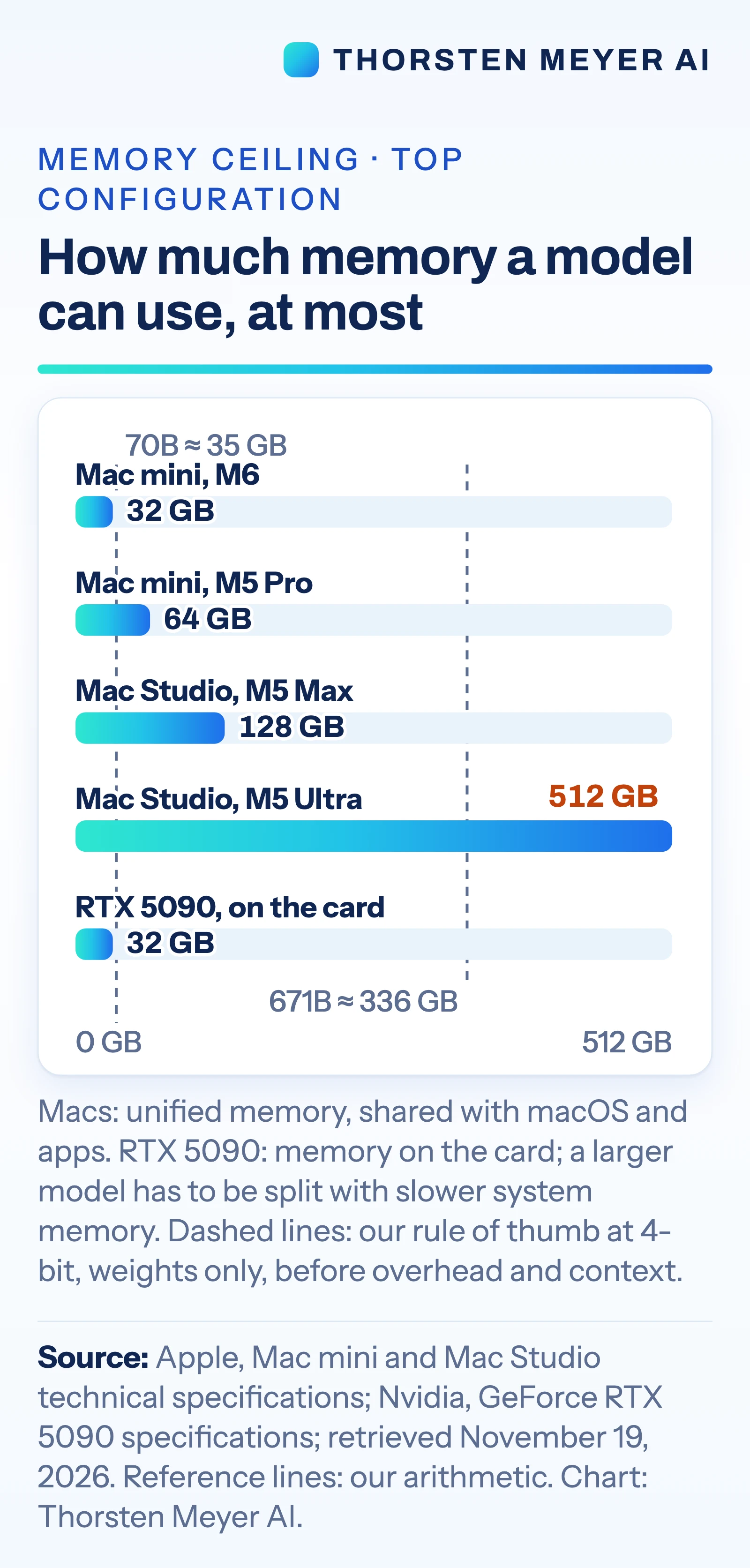
For local inference, the comparison puts memory capacity first. It lists the Mac mini with up to 64 GB of unified memory, Mac Studio configurations with up to 128 GB on M5 Max or 512 GB on M5 Ultra, and the GeForce RTX 5090 with 32 GB of card memory. It gives a rough estimate of about 0.5 GB per billion parameters for model weights at 4-bit precision, before overhead and conversation context. By that estimate, 70 billion parameters require about 35 GB for weights, while 671 billion require about 336 GB.
Software compatibility points some workloads toward Nvidia. The report says vLLM, a model-serving engine, distributes CUDA binaries and directs Apple silicon users to a community-maintained plugin. It also says Apple’s MLX tools support LoRA and QLoRA fine-tuning, while PyTorch’s Mac backend supports GPU training. Those capabilities do not establish that the systems perform equally well on a given task.
Memory and Software Set the Fit
The practical choice depends on where the model runs and which tools the workload needs. An always-on agent that sends requests to a cloud model may not benefit from a large local GPU. A private assistant running an open model locally needs enough memory for the weights, context and runtime overhead. If a workflow depends on CUDA-first serving or training software, a PC with an Nvidia GPU may be easier to configure.
Power and cost also affect the decision. The comparison lists the M5 Ultra Mac Studio at up to 385 watts for the whole system. Nvidia rates the RTX 5090 card alone at 575 watts and recommends a 1,000-watt power supply for the PC. These figures use different boundaries, so they should not be read as a direct system-to-system power test. The report lists the M5 Ultra Studio starting at $5,499 in US list pricing as of November 19, 2026, while cloud APIs charge by usage and can add recurring costs.
The comparison says its recommendations are an interpretation of specifications and documentation, not a buying recommendation. It cites no independent speed tests for very large models on the Mac Studio, and actual performance depends on model, software, settings and workload.
Products Worth Considering

Sony WH-1000XM4 Wireless Noise Cancelling Headphones (Silver)

Logitech MX Mechanical Mini for Mac Wireless Keyboard, Space Gray
Apple Watch Series 12 GPS 42mm Smartwatch
As an affiliate, we earn on qualifying purchases.
From Always-On Agents to Local Models
The source article says Apple launched a new Mac mini on August 25, 2026, describing it as a desktop for “always-on agentic computing.” The November comparison extends that framing into a broader choice among compact Macs, higher-memory workstations, GPU PCs and remote services. It follows an earlier piece, published three days before, about what models could run within a Mac mini’s 16 GB to 64 GB memory range.
The hardware comparison draws on Apple and Nvidia specification pages and documentation for AI tools, which it says were checked on November 19, 2026. A key distinction is between running an agent and running its model: an agent can operate on a small local computer while sending inference requests to a remote service. For local use, the model’s weights must fit in memory accessible to the processor or graphics card, with additional capacity needed for context and other overhead.
Performance Still Needs Testing
The comparison does not report independent benchmark results for the listed systems, including the M5 Ultra running models with hundreds of billions of parameters. Its job-to-machine matches are assessments based on specifications and software documentation. Real-world speed, supported model sizes and usability remain dependent on the specific model, quantization, context length and software configuration.
The reported memory estimates cover model weights only and use a rule of thumb for 4-bit precision; they do not account for all runtime needs. Prices and product specifications can change after the stated November 19 check. The source also does not provide a direct cost comparison between buying hardware and paying for cloud inference, which varies with usage and provider pricing.
Match the Workload Before Buying
The next step for a buyer is to identify whether the model must run locally or in the cloud, estimate memory needs including context, and check whether required tools support the chosen hardware. For a small fine-tune or local assistant, the comparison suggests checking the specific model and workflow against available memory rather than relying on parameter count alone.
For larger deployments, teams would need workload-specific tests and a cost estimate that includes power, setup and ongoing API or hosting charges. The source does not announce a follow-up benchmark or product milestone, so no additional testing date is confirmed.
Key Questions
Which machine does the comparison suggest for an always-on AI agent?
It suggests a Mac mini or an existing Mac when the agent calls a cloud model. In that setup, the computer runs the agent loop and its tools; the model itself runs remotely.
How much memory does a local model need?
It depends on model size, precision, context and software overhead. The source uses a rough estimate of about 0.5 GB per billion parameters for 4-bit weights alone, before additional memory needs.
When might a GPU PC be a better fit?
The comparison points to an Nvidia GPU PC for workloads built around CUDA tools, including some serving and training setups. Its cited software support does not prove that a PC will be faster for every model or task.
Can a Mac run fine-tuning workloads?
The source says Apple’s MLX tools support LoRA and QLoRA, and PyTorch’s Mac backend supports GPU training. Fine-tuning can need more memory than inference with the same model, so capacity and the specific workflow still matter.
What does the comparison say about the strongest models?
It says the leading closed models are available through cloud services rather than as downloadable models. Using a cloud API can involve per-token charges and sending prompts or data to a provider.
Source: Thorsten Meyer AI