
Cloud firewall appliances pair on-site network protection with cloud-based management, but the right choice depends on how much security depth, ongoing administration, and licensing flexibility you need. I’d put the Fortinet FortiGate 60F first for its balance of security capability and appliance-based control; the Meraki MX75 is a strong alternative for teams that prioritize centralized cloud management, while the SonicWall TZ280 suits buyers comparing newer-generation firewall options. The main tradeoff is between hands-on control and simpler remote administration, with subscription terms and throughput under security inspection also shaping fit. This lineup includes several similar Meraki MX75 listings, so bundle and license details matter as much as the hardware. Read on for the full comparison and guidance by network size and management needs.

Get business pricing on networking and server gear
- Business-only prices and quantity discounts
- Tax-exempt purchasing
- Multiple users, one account, clear invoices
Key Takeaways
- FortiGate 60F ranks first because it offers a strong balance of firewall capability and flexible appliance-based management; the FortiGate 40F is a better fit when a smaller port complement is enough.
- Meraki MX75 listings are not interchangeable purchases: the standalone appliance, hardware bundle, and bundle with a three-year Advanced Security license differ in what arrives and how licensing is handled.
- Cloud-managed convenience comes with a licensing check. The MX95 and MX85 listing explicitly notes that no license is included, so buyers should confirm the required subscription before planning deployment.
- SonicWall options serve different deployment needs: the TZ270W adds wireless, while the TZ270 package bundles a three-year Essential Edition and Cloud Secure Edge; TZ280 and TZ380 offer alternatives for buyers comparing newer-generation appliances.
- The smallest appliance is not automatically the best value. Match expected traffic, protected services, VPN use, and port needs to published performance under security inspection—not just headline firewall throughput.
| Fortinet FortiGate 60F Firewall Appliance (FG-60F) |  | Best for Flexible Wired Security | Model: FG-60F | Ports: 10 Gigabit Ethernet RJ45: 2 WAN, 1 DMZ, 7 internal | IPS throughput: Up to 1.4 Gbps | VIEW LATEST PRICE | See Our Full Breakdown |
| Meraki MX95-HW Cloud-Managed Security Appliance |  | Best for Larger Branch Networks | Model: MX95-HW | Throughput: 2 Gbps | Supported users: Up to 500 | VIEW LATEST PRICE | See Our Full Breakdown |
| Cisco Meraki MX75 Cloud-Managed Security and SD-WAN Appliance Bundle |  | Best Small-Branch Bundle | Firewall throughput: Up to 1 Gbps | VPN throughput: Up to 500 Mbps | Supported users: Up to 200 | VIEW LATEST PRICE | See Our Full Breakdown |
| Meraki MX85-HW Security Appliance | Cloud-Managed Firewall | 1Gbps Throughput | 8X GbE Ports | VPN & SD-WAN | Layer 7 Visibility | No License Included |  | Best for Copper-Port Branch Connectivity | Throughput: 1 Gbps | Ports: 8 Gigabit Ethernet ports in the title; additional information lists 10 ports | Features: VPN, SD-WAN, Layer 7 traffic shaping and visibility | VIEW LATEST PRICE | See Our Full Breakdown |
| Ubiquiti UniFi Security Gateway (USG), White |  | Best for UniFi-Based Small Networks | Model: USG | Connectivity: Wired Ethernet | Ports: 4 listed; product information notes inconsistent port counts | VIEW LATEST PRICE | See Our Full Breakdown |
| SonicWall TZ270W Gen 7 Wireless Firewall |  | Best for Small Offices That Need Built-In Wi-Fi | Model: TZ270W | Ports: 8 | LAN port bandwidth: 1000 Mbps | VIEW LATEST PRICE | See Our Full Breakdown |
| Meraki MX75-HW Cloud-Managed Security Appliance | | Best for Cloud-Managed Branch Deployments | Model: MX75-HW | Firewall throughput: Up to 1 Gbps | VPN throughput: Up to 500 Mbps | VIEW LATEST PRICE | See Our Full Breakdown |
| SonicWall TZ270 Gen7 Firewall – 3-Year Essential Edition with EPSS and Cloud Secure Edge (Trade Up) |  | Best for Buyers Wanting Included Security Services | Operating system: SonicOS 7 | Ports: 8 | Data transfer rate: 2000 Mbps | VIEW LATEST PRICE | See Our Full Breakdown |
| Fortinet FortiGate 40F Firewall Appliance, 5 Gigabit Ethernet Ports |  | Best Compact Fanless Wired Firewall | Model: FG-40F | Ports: 5 Gigabit Ethernet RJ45 (1 WAN, 4 internal) | IPS throughput: Up to 1 Gbps | VIEW LATEST PRICE | See Our Full Breakdown |
| Cisco Meraki MX75 Security Appliance Bundle with 3-Year Advanced Security License |  | Best Managed Bundle for Small Branches | Throughput: Up to 1 Gbps | WAN ports: 3 (1 SFP, 2 Gigabit Ethernet) | Connectivity: Ethernet, SD-WAN, VPN | VIEW LATEST PRICE | See Our Full Breakdown |
| Cisco Meraki MX67 Wired Network Security Appliance |  | Best for Centrally Managed Small Sites | Model: MX67-HW | Firewall throughput: Up to 450 Mbps | Recommended maximum clients: 50 | VIEW LATEST PRICE | See Our Full Breakdown |
| SonicWall TZ280 Next-Gen Firewall Appliance |  | Best Port Selection for a Small Office | Model: TZ280 | Operating system: SonicOS 8 | Ports: 8 x 1GbE, 2 x 1G SFP | VIEW LATEST PRICE | See Our Full Breakdown |
| SonicWall TZ380 Next-Generation Firewall Appliance | 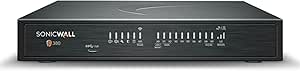 | Best for Higher-Throughput Branches | Model: TZ380 | Operating system: SonicOS 8 | Firewall inspection throughput: Up to 3.5 Gbps | VIEW LATEST PRICE | See Our Full Breakdown |
| Fortinet FortiGate-60F Network Security Appliance with 1-Year UTP and FortiCare Premium |  | Best Bundled Security Coverage | Model: 60F-1YR-UTP | Model number: FG-60F-BDL-950-12 | Operating system: FortiOS | VIEW LATEST PRICE | See Our Full Breakdown |
| cloud firewall appliance | Ports | Model | Operating system |
|---|---|---|---|
| Fortinet FortiGate 60F Firewal | 10 Gigabit Ethernet RJ45: 2 WAN, 1 DMZ, 7 internal | FG-60F | FortiOS |
| Meraki MX95-HW Cloud-Managed S | Dual 10GbE SFP+, dual 2.5GbE WAN, multiple Gigabit LAN | MX95-HW | — |
| Cisco Meraki MX75 Cloud-Manage | 1 SFP, 2 GbE | — | Meraki OS |
| Meraki MX85-HW Security Applia | 8 Gigabit Ethernet ports in the title; additional information lists 10 ports | — | — |
| Ubiquiti UniFi Security Gatewa | 4 listed; product information notes inconsistent port counts | USG | — |
| SonicWall TZ270W Gen 7 Wireles | 8 | TZ270W | — |
| Meraki MX75-HW Cloud-Managed S | — | MX75-HW | — |
| SonicWall TZ270 Gen7 Firewall | 8 | — | SonicOS 7 |
| Fortinet FortiGate 40F Firewal | 5 Gigabit Ethernet RJ45 (1 WAN, 4 internal) | FG-40F | FortiOS |
| Cisco Meraki MX75 Security App | — | — | — |
| Cisco Meraki MX67 Wired Networ | 5 | MX67-HW | — |
| SonicWall TZ280 Next-Gen Firew | 8 x 1GbE, 2 x 1G SFP | TZ280 | SonicOS 8 |
| SonicWall TZ380 Next-Generatio | 8 x 1GbE, 2 x 1G SFP | TZ380 | SonicOS 8 |
| Fortinet FortiGate-60F Network | 13 | 60F-1YR-UTP | FortiOS |
More Details on Our Top Picks
Fortinet FortiGate 60F Firewall Appliance (FG-60F)
The FortiGate 60F suits buyers who want a wired appliance with room to separate internet, exposed services, and internal traffic: its 10 Gigabit Ethernet ports include two WAN connections, a DMZ port, and seven internal ports. Its listed 1.4 Gbps IPS throughput and SSL inspection make it a stronger fit for layered security than the simpler Ubiquiti USG, while SD-WAN adds options for managing multiple links. FortiOS and Fortinet Security Fabric integration also make it more compelling in an existing Fortinet environment. The tradeoff is ongoing service planning: no subscription is included, so buyers should confirm which threat-intelligence and security services they need. It is wired only, and the Meraki MX75 is easier to approach if cloud dashboard management and a bundled first-year security license matter more.
Pros:- Ten Gigabit Ethernet ports include dedicated dual WAN and DMZ connections.
- Listed IPS throughput of up to 1.4 Gbps supports more demanding inspection needs than entry-level gateway options.
- SSL inspection and SD-WAN add security and multi-link controls.
- FortiOS supports network automation and Fortinet Security Fabric integration.
Cons:- A security subscription is not included, so service coverage needs to be planned separately.
- Wired-only appliance; wireless access points are not built in.
- Its Fortinet-specific management and service ecosystem may be a poor fit for organizations standardized on Meraki.
Best for: Small and midsize offices that need multiple wired network zones, WAN flexibility, and already use or plan to deploy Fortinet security services.
Not ideal for: Buyers seeking wireless access, an included security-service subscription, or a cloud-dashboard-first management model.
- Model:FG-60F
- Ports:10 Gigabit Ethernet RJ45: 2 WAN, 1 DMZ, 7 internal
- IPS throughput:Up to 1.4 Gbps
- Threat protection throughput:Up to 700 Mbps
- Security features:SSL inspection, SD-WAN, FortiGuard threat intelligence
- Operating system:FortiOS
- Connectivity:Wired Ethernet
- Subscription:Not included
Our verdict“Choose the FortiGate 60F for a port-rich wired network with Fortinet security needs, but skip it if you want bundled services or cloud-first Meraki management.”
Meraki MX95-HW Cloud-Managed Security Appliance
The Meraki MX95-HW is the scale-oriented choice here: its stated 2 Gbps throughput and capacity for up to 500 users put it above the small-branch MX75 in the lineup. Dual 2.5GbE WAN ports and two 10GbE SFP+ ports give network teams more flexibility for uplinks and resilient connections, while Meraki Dashboard management supports remote monitoring across sites. VPN, SD-WAN, and Layer 7 traffic visibility make it suited to branches where administrators need centralized control without managing each appliance locally. Compared with the FortiGate 60F, it leans more heavily on cloud management and higher-capacity uplinks rather than a broad set of RJ45 internal ports. The main drawbacks are practical: the license is not included, and it has no specified built-in wireless connectivity.
Pros:- Listed throughput of 2 Gbps and support for up to 500 users suit larger branch deployments.
- Dual 10GbE SFP+ and dual 2.5GbE WAN ports offer flexible uplink and WAN design.
- Meraki Dashboard enables centralized monitoring and remote troubleshooting.
- VPN, SD-WAN, and Layer 7 traffic visibility cover common multi-site management needs.
Cons:- License is not included, adding a separate service-planning requirement.
- No built-in wireless connectivity is specified.
- Its rack-mountable 1U design and capacity may be unnecessary for a small branch that could use the MX75.
Best for: IT teams supporting medium-sized branches with many users, centralized Meraki management, and 10GbE uplink requirements.
Not ideal for: Smaller offices that do not need its stated user capacity, or buyers who need an included license, built-in Wi-Fi, or a larger set of copper LAN ports.
- Model:MX95-HW
- Throughput:2 Gbps
- Supported users:Up to 500
- Ports:Dual 10GbE SFP+, dual 2.5GbE WAN, multiple Gigabit LAN
- Features:VPN, Auto VPN, SD-WAN, Layer 7 traffic shaping
- Management:Meraki Dashboard cloud management
- Form factor:Rack-mountable 1U
- License:Not included
Our verdict“Pick the MX95-HW for a larger, centrally managed Meraki branch network that can use its 10GbE uplinks and user capacity.”
Cisco Meraki MX75 Cloud-Managed Security and SD-WAN Appliance Bundle
The Meraki MX75 bundle stands out for small branches that want cloud-managed security without sourcing the initial security license separately: this package includes one year of Advanced Security, with intrusion prevention, malware protection, and content filtering listed. Its zero-touch provisioning and centralized dashboard can reduce setup work for teams supporting sites remotely. Throughput is rated up to 1 Gbps for firewall traffic and 500 Mbps for VPN, with support for up to 200 users. That makes it a more ready-to-deploy small-site option than the MX85-HW, which is listed without a license, though the MX95-HW offers twice the stated throughput and greater user capacity. The MX75’s clearest limit is its scale: it is aimed at smaller branches, and buyers must plan for the license period ending after one year.
Pros:- Includes a one-year Advanced Security license with intrusion prevention, malware protection, and content filtering.
- Cloud management and zero-touch provisioning simplify remote branch setup.
- Supports SD-WAN, site-to-site VPN, and automatic failover.
- Firewall throughput up to 1 Gbps is suited to smaller branch workloads.
Cons:- Advanced Security licensing is included for one year only.
- VPN throughput is limited to a listed maximum of 500 Mbps.
- Its 200-user target is below the MX95-HW’s stated capacity for larger branches.
Best for: Small branch offices with up to 200 users that want Meraki cloud management, remote provisioning, and an initial year of advanced security services.
Not ideal for: Larger branches needing more than 1 Gbps firewall throughput, or organizations unwilling to plan for security licensing after the included year.
- Firewall throughput:Up to 1 Gbps
- VPN throughput:Up to 500 Mbps
- Supported users:Up to 200
- Ports:1 SFP, 2 GbE
- Connectivity:Ethernet
- Operating system:Meraki OS
- Included license:1-year Advanced Security
- Warranty:3-year seller-backed warranty
Our verdict“Choose the MX75 bundle for a smaller branch that values easy Meraki deployment and an included first year of advanced security.”
Meraki MX85-HW Security Appliance | Cloud-Managed Firewall | 1Gbps Throughput | 8X GbE Ports | VPN & SD-WAN | Layer 7 Visibility | No License Included
The Meraki MX85-HW is a straightforward fit for sites that want Meraki cloud management and several copper connections in one appliance. Its listed eight Gigabit Ethernet ports, VPN, SD-WAN, and Layer 7 visibility can help a branch connect local equipment and manage application traffic without adding a separate switch for every device. Its stated 1 Gbps throughput places it closer to the MX75 than to the higher-capacity MX95-HW, but the MX85 description emphasizes port count and branch connectivity rather than a larger user limit. Dashboard-based remote monitoring is useful for distributed teams. The central tradeoff is that no license is included, so it lacks the initial licensed-security package offered with the MX75 bundle. Product information also lists both eight and ten ports, so buyers should verify the exact hardware configuration before planning a port-dependent deployment.
Pros:- Cloud-managed through Meraki Dashboard for centralized configuration and remote troubleshooting.
- Eight Gigabit Ethernet ports are listed for connecting wired branch equipment.
- Supports VPN, SD-WAN, and Layer 7 traffic shaping and visibility.
- Rack-mountable design fits network closets and branch equipment racks.
Cons:- No license is included, unlike the MX75 bundle with one year of Advanced Security.
- Listed throughput is 1 Gbps, below the MX95-HW’s stated 2 Gbps.
- Product details conflict on port count, listing eight ports in the title and ten in additional information.
Best for: Branch IT teams that need multiple Gigabit Ethernet connections, Meraki cloud administration, and VPN or SD-WAN functions in a wired appliance.
Not ideal for: Buyers who need an included security license, higher listed throughput than 1 Gbps, or certainty about port count without confirming the hardware configuration.
- Throughput:1 Gbps
- Ports:8 Gigabit Ethernet ports in the title; additional information lists 10 ports
- Features:VPN, SD-WAN, Layer 7 traffic shaping and visibility
- Management:Meraki Dashboard cloud management
- Form factor:Rack-mountable
- Interface:RJ45
- Voltage:12 V
- License:Not included
Our verdict“Choose the MX85-HW when copper-port capacity and Meraki cloud management matter, but confirm the port configuration and license requirements first.”
Ubiquiti UniFi Security Gateway (USG), White
The Ubiquiti UniFi Security Gateway is the simplest fit in this group for a small wired network already managed through the UniFi Controller. Its firewall policies, VLAN segmentation, QoS, and VPN support cover practical needs such as separating devices or prioritizing enterprise voice traffic. Compared with the FortiGate 60F, it does not offer the same listed IPS throughput, dedicated WAN and DMZ port layout, or stated SSL inspection and SD-WAN capabilities; it is better viewed as a basic gateway for a UniFi environment than as a feature-rich security appliance. The controller-based approach can keep administration alongside other UniFi equipment, but buyers should check whether its capabilities match their threat-protection requirements. Product information gives inconsistent port counts, and the wired-only design leaves wireless access to separate equipment.
Pros:- UniFi Controller management can centralize gateway administration with compatible UniFi equipment.
- VLAN support helps separate guest, business, and device traffic.
- VPN and firewall policies cover core wired-network security tasks.
- Gigabit Ethernet connectivity and wall or desktop mounting suit compact installations.
Cons:- Product information lists inconsistent port counts, complicating network planning.
- The supplied data does not specify IPS or threat-protection throughput comparable to the FortiGate 60F.
- Wired-only gateway with no built-in wireless access.
Best for: Small offices or technically confident home-network administrators already using UniFi Controller who need VLANs, VPN, and wired firewall routing.
Not ideal for: Organizations needing documented advanced threat-inspection throughput, a clear port layout, built-in wireless, or a cloud-managed security subscription model.
- Model:USG
- Connectivity:Wired Ethernet
- Ports:4 listed; product information notes inconsistent port counts
- LAN port bandwidth:10/100/1000 Mbps
- Data transfer rate:3 Gbps
- Installed RAM:512 MB
- Mounting:Wall or desktop
- Management:UniFi Controller
Our verdict“Choose the USG for a modest wired network already using UniFi, but select a FortiGate or Meraki option for more explicitly specified security throughput and branch features.”
SonicWall TZ270W Gen 7 Wireless Firewall
The SonicWall TZ270W combines a next-generation firewall and dual-band Wi-Fi 5 in one appliance, making it a practical fit for a small office or clinic that wants fewer separate network devices. Its Capture ATP sandboxing, intrusion prevention, and anti-malware scanning add layered defenses, while VPN and SD-WAN support cover remote access and multiple uplinks. Compared with the wired FortiGate 40F, the TZ270W can serve wireless clients without a separate access point; the FortiGate, by contrast, is a quieter, fanless wired option. The main catch is that this listing includes no service subscription, so access to subscription-dependent protection may require a separate purchase. Its Wi-Fi is also Wi-Fi 5 rather than a newer standard, which may matter in a network with newer wireless clients.
Pros:- Combines firewall security and dual-band 802.11ac Wi-Fi
- Includes Capture ATP, intrusion prevention, and anti-malware capabilities
- Supports VPN and SD-WAN
- Rated for up to 750,000 concurrent connections
Cons:- No service subscription is included with this appliance listing
- Wi-Fi 5 may not suit buyers building around newer wireless standards
- Wireless security specifications list WPA-PSK and WPA2-PSK
Best for: Small clinics and offices that want firewall functions and basic wireless access in a single appliance, and can budget separately for security services.
Not ideal for: Businesses that need a current-generation Wi-Fi standard or an appliance bundle with security subscriptions already included.
- Model:TZ270W
- Ports:8
- LAN port bandwidth:1000 Mbps
- Wi-Fi:Dual-band 802.11ac (Wi-Fi 5)
- Antennas:2 internal
- Maximum upstream data transfer rate:750 Mbps
- Concurrent connections:Up to 750,000
- Included subscription:None
Our verdict“Choose the TZ270W if built-in Wi-Fi is more useful than the FortiGate 40F’s fanless wired design, and you are prepared to obtain any needed subscriptions separately.”
Meraki MX75-HW Cloud-Managed Security Appliance
The Meraki MX75-HW is a strong match for small branches where centralized oversight matters more than minimizing ongoing licensing requirements. Its cloud dashboard and zero-touch provisioning let teams stage and monitor deployments remotely, while application-aware traffic shaping can give business-critical software priority over less urgent traffic. The appliance supports up to 200 users, with listed throughput of up to 1 Gbps for firewall traffic and 500 Mbps for VPN. Compared with the SonicWall TZ270W, it favors branch management and wired WAN flexibility over built-in Wi-Fi. Three WAN ports, including one SFP, give it room for varied uplinks and failover. The key tradeoff is that the license is not included; buyers should account for licensing before choosing it, especially if they want a ready-to-operate bundle like the licensed MX75 option.
Pros:- Cloud management supports zero-touch provisioning and remote troubleshooting
- Three WAN ports include one SFP and two Gigabit Ethernet ports
- Application-aware traffic shaping can prioritize selected network traffic
- Supports intrusion prevention, malware protection, content filtering, SD-WAN, and VPN
Cons:- License is not included
- VPN throughput is listed at up to 500 Mbps, below its firewall throughput
- Designed for deployments of up to 200 users
Best for: IT teams managing small branch offices remotely that need cloud-based provisioning, traffic controls, and multiple WAN connection options.
Not ideal for: Small sites seeking built-in wireless or a complete security-and-management license in the box.
- Model:MX75-HW
- Firewall throughput:Up to 1 Gbps
- VPN throughput:Up to 500 Mbps
- Supported users:Up to 200
- WAN ports:3 (1 SFP, 2 Gigabit Ethernet)
- LAN port bandwidth:1 Gbps
- Management:Cloud-based
- License:Not included
Our verdict“Pick the MX75-HW for remotely managed branches that value cloud provisioning and flexible WAN connections, but choose the licensed MX75 bundle if an included license matters more.”
SonicWall TZ270 Gen7 Firewall – 3-Year Essential Edition with EPSS and Cloud Secure Edge (Trade Up)
This SonicWall TZ270 Gen7 bundle stands apart from appliance-only options by including a three-year Essential Protection Service Suite, along with EPSS and Cloud Secure Edge in the product title. For a small business or remote office, that packaged protection makes it easier to plan a deployment than the subscription-free FortiGate 40F or the appliance-only TZ270W. SonicOS 7, integrated SD-WAN, and zero-touch deployment target compact sites that need managed security without a larger branch appliance. The listed data transfer rate is 2000 Mbps, but that figure should not be read as a guarantee of inspected firewall throughput; the supplied product data does not give a separate firewall-throughput figure. Unlike the TZ270W, this model has no built-in Wi-Fi, so wireless users need a separate access point. The bundle’s service term is finite, too.
Pros:- Includes a three-year Essential Protection Service Suite
- Supports integrated SD-WAN and zero-touch deployment
- Eight ports suit compact wired network layouts
- SonicOS 7 platform supports advanced threat inspection technologies
Cons:- No built-in Wi-Fi; a separate wireless access point is needed
- Security service coverage is limited to the included three-year term
- The supplied data does not specify a separate firewall-throughput figure
Best for: Small businesses and remote offices that want a compact SonicWall appliance bundled with three years of security services and can provide separate Wi-Fi.
Not ideal for: Buyers who need integrated wireless, or who want to avoid planning for service renewal after the included three-year term.
- Operating system:SonicOS 7
- Ports:8
- Data transfer rate:2000 Mbps
- LAN port bandwidth:1000 Mbps
- Maximum upstream data transfer rate:2000 Mbps
- Security service:Essential Protection Service Suite, 3 years
- Wireless:No built-in Wi-Fi
Our verdict“Choose this TZ270 bundle over the subscription-free FortiGate 40F if included security services matter more than built-in wireless or a fanless design.”
Fortinet FortiGate 40F Firewall Appliance, 5 Gigabit Ethernet Ports
The FortiGate 40F is the straightforward pick here for buyers who want a compact, quiet wired firewall rather than an all-in-one wireless device or a cloud-managed branch platform. Its fanless desktop design suits small offices where appliance noise and placement are practical concerns, while five Gigabit Ethernet ports provide one WAN connection and four internal connections. The listed figures—up to 1 Gbps IPS throughput and up to 600 Mbps threat protection throughput—help distinguish inspection capacity from a headline firewall rate. Compared with the SonicWall TZ270W, the 40F gives up built-in Wi-Fi and its listed concurrent-connection capacity, but offers fanless operation and a simple wired layout. It is sold without a subscription, so buyers should check which Fortinet services they need and what requires separate licensing.
Pros:- Compact, fanless design supports quiet placement
- Five Gigabit Ethernet ports: one WAN and four internal
- Up to 1 Gbps IPS throughput
- Up to 600 Mbps threat protection throughput
Cons:- Subscription is not included
- Wired Ethernet only, with no built-in Wi-Fi
- Five ports may limit expansion in more segmented networks
Best for: Small businesses and branch offices that need a quiet, compact wired firewall with five Gigabit Ethernet ports.
Not ideal for: Wireless-first sites or organizations seeking an appliance bundle with security subscriptions included.
- Model:FG-40F
- Ports:5 Gigabit Ethernet RJ45 (1 WAN, 4 internal)
- IPS throughput:Up to 1 Gbps
- Threat protection throughput:Up to 600 Mbps
- Operating system:FortiOS
- Form factor:Compact, fanless desktop
- Weight:1.58 kg
- Subscription:Not included
Our verdict“Choose the FortiGate 40F for a quiet, compact wired site, but favor the TZ270W if integrated Wi-Fi is a priority.”
Cisco Meraki MX75 Security Appliance Bundle with 3-Year Advanced Security License
This Meraki MX75 bundle pairs cloud-managed firewall hardware with a three-year Advanced Security License, intrusion prevention, malware protection, content filtering, firmware updates, and 24/7 support. That makes it a more ready-to-deploy choice than the license-free MX75-HW, which otherwise targets similar small-branch deployments. Its Meraki cloud dashboard, SD-WAN, and Auto VPN or IPsec support suit teams overseeing several sites without putting an administrator at each location. Three WAN ports—including one SFP and two Gigabit Ethernet ports—also give network teams flexible uplink choices. The tradeoff is a defined license term: service coverage is included for three years, not indefinitely. Buyers who prefer a wired firewall without cloud-management licensing considerations may find the FortiGate 40F a simpler fit, though it does not offer the same bundled Meraki management package.
Pros:- Includes a three-year Advanced Security License
- Bundle includes firmware updates and 24/7 support
- Meraki cloud dashboard supports centralized management
- Three WAN ports support varied uplink setups alongside SD-WAN and VPN
Cons:- Advanced Security License coverage is limited to three years
- Cloud management may not fit buyers seeking a standalone, locally managed approach
- The supplied product data does not specify VPN throughput
Best for: Organizations opening or managing small branches that want Meraki cloud administration, security services, and support bundled for a defined three-year term.
Not ideal for: Buyers who want to avoid cloud licensing or service-term renewals, or who need a firewall appliance without reliance on Meraki management.
- Throughput:Up to 1 Gbps
- WAN ports:3 (1 SFP, 2 Gigabit Ethernet)
- Connectivity:Ethernet, SD-WAN, VPN
- VPN protocols:IPsec, Auto VPN
- LAN port bandwidth:10/100/1000 Mbps
- License term:3 years
- Management:Meraki cloud dashboard
- Included services:Advanced Security, firmware updates, and 24/7 support
Our verdict“Choose this MX75 bundle over the license-free MX75-HW if you want three years of Meraki security services and support included with the cloud-managed appliance.”
Cisco Meraki MX67 Wired Network Security Appliance
The Meraki MX67 is the most management-focused choice in this group: its centralized web console and Layer 7 visibility help an IT team apply consistent policies across distributed offices without managing each appliance separately. Application prioritization and traffic shaping add practical control when a small site shares limited bandwidth. Its stated 450 Mbps firewall throughput and 50-client recommendation put it well below the SonicWall TZ280 and TZ380 on capacity, so I would reserve it for modest branches rather than growing, traffic-heavy networks. Unlike those SonicWall appliances, the supplied details emphasize cloud-based administration rather than high inspection figures or port flexibility. It is also wired only, so wireless access requires separate equipment. This is a fit when simple remote oversight matters more than headroom.
Pros:- Centralized web management suits distributed locations with limited local IT support.
- Layer 7 application visibility helps identify how site bandwidth is being used.
- Traffic shaping and application prioritization let administrators favor selected traffic.
- Compact, lightweight chassis is suited to small branch deployments.
Cons:- 450 Mbps stated firewall throughput offers less capacity than the SonicWall TZ280 and TZ380.
- Recommended maximum of 50 clients limits suitability for larger or expanding sites.
- Wired Ethernet only; Wi-Fi requires a separate access point.
Best for: IT teams managing small, wired branch offices with up to 50 clients that want centralized policy administration and application-level traffic controls.
Not ideal for: Businesses expecting heavy inspection or VPN traffic, more than 50 clients, or an all-in-one wireless appliance.
- Model:MX67-HW
- Firewall throughput:Up to 450 Mbps
- Recommended maximum clients:50
- Ports:5
- Connectivity:Wired Ethernet
- Management:Centralized web management
- Dimensions:9.4 x 5.1 x 1.1 inches
- Weight:1.54 lbs (700 g)
Our verdict“Choose the MX67 for centrally managed, smaller wired branches; choose a SonicWall TZ model when higher stated throughput is the priority.”
SonicWall TZ280 Next-Gen Firewall Appliance
The SonicWall TZ280 pairs meaningful inspection capacity with a generous spread of wired connections: eight 1GbE ports and two 1G SFP ports give small offices room to attach local equipment or use fiber links. Its stated 2.5 Gbps firewall inspection, 1 Gbps threat-prevention, and 1.2 Gbps IPsec VPN figures make it a more throughput-oriented fit than the Meraki MX67, whose listed firewall throughput is 450 Mbps. Zero-touch deployment and cloud management also suit branch rollouts. The main buying catch is that this is hardware only: security services, firmware updates, and support are not included, and advanced threat protection needs an active subscription. Compared with the TZ380, it has lower stated inspection and VPN throughput, but the decision between them should include the separate service commitment, not just appliance specifications.
Pros:- Eight 1GbE ports and two 1G SFP ports support varied wired office layouts.
- Up to 2.5 Gbps firewall inspection throughput is well above the MX67’s stated figure.
- Listed IPsec VPN capacity supports remote and branch connectivity.
- Zero-touch deployment and cloud management can simplify multi-site setup.
Cons:- Security services, firmware updates, and support are separate purchases.
- Advanced threat protection features require an active service subscription.
- Lower stated inspection and VPN throughput than the TZ380.
Best for: Small-business IT teams that need multiple Ethernet and SFP connections, branch deployment features, and higher stated throughput than the MX67.
Not ideal for: Buyers seeking an out-of-box protected appliance with security services, firmware updates, and support already included.
- Model:TZ280
- Operating system:SonicOS 8
- Ports:8 x 1GbE, 2 x 1G SFP
- Firewall inspection throughput:Up to 2.5 Gbps
- Threat prevention throughput:Up to 1 Gbps
- IPsec VPN throughput:Up to 1.2 Gbps
- Included:Hardware appliance only; subscription and support not included
- Weight:1.8 pounds
Our verdict“Pick the TZ280 when port flexibility and strong stated inspection capacity matter, provided you have budgeted separately for services and support.”
SonicWall TZ380 Next-Generation Firewall Appliance
The SonicWall TZ380 is the performance step-up among the two hardware-only SonicWall picks here. Its listed inspection throughput reaches 3.5 Gbps, with up to 1.5 Gbps for threat prevention and 1.6 Gbps for IPsec VPN—higher figures than the TZ280 offers. That extra capacity makes it the stronger fit for a branch carrying heavier traffic or more VPN activity, while the same eight 1GbE and two 1G SFP ports preserve useful connection flexibility. VPN and Secure SD-WAN features, plus on-box or cloud management, support distributed deployments. The tradeoff is not subtle: subscriptions, firmware updates, and support are excluded, and threat protection requires an active service subscription. The MX67 includes centralized management in its product description, but its lower stated throughput makes it a different choice for smaller sites.
Pros:- Highest stated firewall inspection throughput among these four products.
- Higher listed threat-prevention and IPsec VPN throughput than the TZ280.
- Eight 1GbE ports and two 1G SFP ports provide wired expansion options.
- Supports VPN, Secure SD-WAN, zero-touch deployment, and cloud or on-box management.
Cons:- Security services, firmware updates, and support are sold separately.
- Threat protection features require an active subscription.
- Its higher capacity may be unnecessary for a small, lightly used office.
Best for: Small organizations and branch offices with heavier inspection or VPN demands that can manage separate security-service and support subscriptions.
Not ideal for: Small sites with light traffic that want included threat protection, updates, and support rather than a hardware-only purchase.
- Model:TZ380
- Operating system:SonicOS 8
- Firewall inspection throughput:Up to 3.5 Gbps
- Threat prevention throughput:Up to 1.5 Gbps
- IPsec VPN throughput:Up to 1.6 Gbps
- Ports:8 x 1GbE, 2 x 1G SFP
- Dimensions:5.1 x 7.5 x 1.4 inches
- Weight:1.81 pounds
- Included:Hardware appliance only; subscription sold separately
Our verdict“Choose the TZ380 over the TZ280 when its higher stated inspection and VPN capacity is useful and separate service costs are acceptable.”
Fortinet FortiGate-60F Network Security Appliance with 1-Year UTP and FortiCare Premium
The FortiGate-60F bundle stands apart because it includes one year of FortiGuard UTP and FortiCare Premium, rather than asking the buyer to source security services and support separately as the SonicWall TZ280 and TZ380 do. Listed protections include web filtering and anti-botnet protection, making this a clearer package for a medium-sized business that wants those services and support paired with the appliance. Ethernet and Wi-Fi connectivity also give it a different role from the wired-only Meraki MX67, though its wireless specification is limited to single-band 5 GHz 802.11ac. The product data does not provide firewall throughput, so I would not rank it against the SonicWall models on performance. Its stated weight of 0.27 g looks questionable for an appliance; I would verify that figure before using it for installation planning.
Pros:- Includes one year of FortiGuard Unified Threat Protection and FortiCare Premium.
- Web filtering and anti-botnet protection address common web and botnet risks.
- Ethernet and Wi-Fi connectivity can suit sites wanting wireless in the appliance.
- Thirteen listed ports offer multiple wired connection points.
Cons:- Single-band 5 GHz 802.11ac wireless lacks the flexibility of dual-band Wi-Fi.
- No firewall throughput figure is supplied for direct capacity comparison with the SonicWall models.
- The listed 0.27 g weight appears potentially inaccurate and needs confirmation.
Best for: Medium-sized businesses that want a Fortinet appliance bundled with a year of threat protection and premium support, plus basic integrated Wi-Fi.
Not ideal for: Buyers comparing devices primarily by published firewall throughput, or offices that need dual-band wireless or a clearly verified weight specification.
- Model:60F-1YR-UTP
- Model number:FG-60F-BDL-950-12
- Operating system:FortiOS
- Ports:13
- Connectivity:Ethernet, Wi-Fi
- Wireless:802.11ac, single-band 5 GHz
- Data transfer rate:1 Gbps
- Included services:1 year of FortiGuard UTP and FortiCare Premium
- Dimensions:6.3 x 8.5 x 1.5 inches
Our verdict“Choose this FortiGate-60F bundle when included Fortinet services and support matter more than a published throughput comparison or dual-band Wi-Fi.”

How We Picked
I ranked these cloud firewall appliances by how well their stated capabilities match common small and midsize network needs: security and VPN functions, management approach, connectivity, product generation, and the clarity of the included license or service package. I also weighed the operational work each approach can imply. Centralized cloud management can make distributed administration easier, while a more appliance-focused setup may suit teams that want greater control over configuration and security services.
The order reflects the strength of the overall fit, not a claim that every model has been independently tested. I gave more weight to clear, practical differences than to repeated hardware listings: the three MX75 offers are separated by bundle and license, and the two FortiGate 60F offers by included support and security services. Buyers should verify current vendor specifications, subscription requirements, and performance figures for their intended configuration before purchase; those details can change the effective cost and suitability of any pick.
Factors to Consider When Choosing Cloud Firewall Appliances
Before choosing a model, I’d map the appliance to the network you need to protect and the work your team can maintain. Product names alone can obscure the differences that matter most: inspected traffic capacity, license coverage, management workflow, and the cost of adding services later.
Size for Inspected Traffic, Not Just Internet Speed
A firewall’s headline throughput may not reflect performance when intrusion prevention, malware inspection, VPN, or other security features are active. Start with peak internet traffic, then account for encrypted connections, remote users, and the services you intend to enable. A common mistake is buying to today’s circuit speed while overlooking growth or busy periods. Ask vendors for performance figures under the specific security profile you plan to run, since test conditions can vary. A smaller appliance can be a sensible fit for a branch, but not if inspection slows critical applications during peak use.
Compare Cloud Management With Day-to-Day Control
Cloud management is most useful when administrators need to monitor or change policies across multiple sites without visiting each location. It can also create a dependency on a vendor portal and its subscription model, so confirm which tasks remain available if a license expires or internet access to the management service is interrupted. Teams with limited firewall experience may value guided workflows and a shared dashboard; experienced administrators may prefer more direct control over configuration. Consider who will handle alerts, policy changes, and troubleshooting after installation. The easiest interface is not always the best fit if it hides controls your team relies on.
Read the License and Bundle Details Before Comparing Models
Hardware listings can bundle very different support, security, and cloud services, even when the appliance model is the same. Confirm the license duration, included security features, support level, and renewal requirements in writing before you compare offers. A listing that says no license is included may still require an active subscription for the management or security functions you expect. Avoid assuming that a hardware bundle contains every service needed for deployment. For a multi-year network plan, compare the full ownership commitment rather than treating the appliance and its ongoing services as separate afterthoughts.
Plan Ports, Wireless, and Site Connectivity
Count the wired connections needed for internet circuits, switches, servers, and network segments, leaving room for planned expansion. If wireless is built into the firewall, decide whether combining those roles suits your security and support plan; separate access points may be easier to manage in a larger or changing environment. Multi-WAN, VPN, and SD-WAN features matter most when they match a real need such as site-to-site connectivity or circuit failover. Buyers sometimes focus on port count while overlooking whether the ports support the desired topology. Draw a simple network map before selecting a model, especially for sites with guest, voice, and business networks.
Match Security Features to the Team That Will Maintain Them
More security services can improve visibility and threat filtering, but they also add configuration choices, alerts, and subscription dependencies. Decide which functions you will actively use, who will review warnings, and whether the organization has staff or a managed provider to tune policies. A long feature list offers limited value if settings remain at defaults or alerts go unanswered. Simpler deployments may benefit from a package with clearly defined support and services, while security teams may want more control over individual protections. Ask what happens to each feature at renewal or license expiry so the appliance does not lose an expected capability unexpectedly.
Check Lifecycle, Support, and Replacement Plans
A firewall is part of the network’s operational foundation, so confirm the vendor’s support term, update policy, and product lifecycle status before committing. Older or lower-capacity models may still suit a small site, but a short remaining support window can make them a poor long-term choice. Consider how quickly the device can be replaced and whether configuration backups can be restored to a spare appliance. Buyers often compare only initial hardware specifications and miss the effort involved in migration. If the network cannot tolerate extended downtime, support availability and recovery planning deserve as much attention as port count.
Frequently Asked Questions
Do cloud-managed firewall appliances need an active subscription?
Often, cloud management, security services, or support depend on a paid license, but the exact requirements vary by vendor and package. Check whether the appliance can still enforce its existing rules if a subscription expires, and which functions stop working. The MX85 listing here explicitly states that no license is included, while the MX75 offers include different bundle arrangements. Confirm the service term and renewal scope before ordering so your expected management and protection features remain available.
How should I choose between a FortiGate and a Meraki MX appliance?
Start with how your team wants to administer security, not the brand name. FortiGate models may appeal when you want appliance-based control and a choice of security-service packages, while Meraki MX models are aimed at centralized cloud management across sites. Compare the required subscriptions, policy workflow, support arrangements, and inspected-traffic capacity for the exact configurations you plan to use. If staff need a shared remote dashboard, cloud management may reduce routine work; if your team wants more direct control, examine the FortiGate management and service model closely.
Is the Meraki MX75 bundle with a three-year license a better choice than the hardware-only listing?
It can simplify procurement if the included Advanced Security license matches the features and term your network needs. A hardware-only or differently bundled listing may be a better fit when you already have licensing arranged or need another service package. Compare what is included, the license start date, support coverage, and renewal terms rather than treating the shared MX75 model name as proof that the offers are equivalent. Ask the seller to confirm the exact hardware and license entitlement in writing. This prevents gaps between delivery and activation.
Should I choose a wireless firewall or keep Wi-Fi on separate access points?
An appliance with integrated wireless, such as the SonicWall TZ270W, can reduce the number of devices at a small site. Separate access points may suit locations that need broader coverage, easier wireless upgrades, or independent troubleshooting. Consider where the firewall will sit, how many users need Wi-Fi, and whether one device’s placement can serve both wired security and radio coverage. Also check whether wireless management and security policies fit the rest of your network. The compact approach saves equipment, but it can limit placement and upgrade options.
What performance information should I ask for before buying?
Request throughput figures for the security services you plan to enable, not only basic firewall throughput. Ask how VPN traffic, intrusion prevention, application control, and encrypted traffic affect the figure, and whether the test assumes a particular mix of connections. Compare that with peak usage and likely growth, leaving room for busy periods rather than sizing exactly to average traffic. If multiple internet circuits or many remote users are involved, ask for those use cases separately. Published results are only useful when the test conditions resemble your deployment.
Conclusion
For most small and midsize networks seeking a balance of capability and flexibility, I’d start with the FortiGate 60F as the best overall pick. The FortiGate 40F is my value-oriented choice when a smaller port count and site footprint meet the need; for cloud-first administration, choose the Meraki MX75, checking the bundle and license before buying. Beginners who want centralized administration should look closely at a properly licensed Meraki package, while buyers who want wireless integrated into the firewall can favor the SonicWall TZ270W. For a more service-rich FortiGate package, compare the FortiGate 60F with one-year UTP and FortiCare Premium; for a newer SonicWall option, examine the TZ280 or TZ380 against your required capacity and support term. The best choice is the one whose licensed services, inspected-traffic performance, and management workflow match the people who will run it.
Halloween Picks
halloween
As an affiliate, we earn on qualifying purchases.