
When managing multiple servers, a reliable rackmount KVM switch is essential for seamless control and efficient setup. The best options balance performance, ease of installation, and expandability, but they vary widely in features and price. The TESmart USB 3.0 HDMI KVM Switch 8 Port stands out for its 4K support and extensive connectivity, making it ideal for high-resolution setups. Meanwhile, the MT-VIKI 16 Port KVM Switch offers a budget-friendly, scalable solution for larger racks. Still, tradeoffs often involve resolution limits, port counts, or complexity of setup. Continue reading for a detailed breakdown of the top choices to help you find the best fit for your server management needs.

Get business pricing on networking and server gear
- Business-only prices and quantity discounts
- Tax-exempt purchasing
- Multiple users, one account, clear invoices
Key Takeaways
- The highest port count doesn’t always mean better scalability—consider your actual needs before paying for extras.
- 4K support is becoming standard but may impact performance or compatibility with older hardware.
- Built-in displays and control interfaces simplify management but often add to the size and cost.
- Ease of installation and cable management are critical for long-term maintenance and reliability.
- Higher-end models tend to offer more advanced features like remote management and OSD, but at a premium price.
| TESmart USB 3.0 HDMI KVM Switch 8 Port 4K@60Hz with Rackmount, EDID Emulator, Remote, LAN, RS232, Auto Scan, 8 KVM Cables |  | Best Overall – High-Resolution HDMI Control with Versatile Switching | Number of Ports: 8 IN 1 OUT | Resolution Support: 4K@60Hz | USB Ports: 2 USB 3.0 ports | VIEW ON AMAZON | See Our Full Breakdown |
| MT-VIKI 16 Port KVM Switch, Rackmount VGA, Includes 16 Cables & Remote |  | Best Value – High Port Count with Complete Package | Number of Ports: 16 | Connection Type: VGA, USB 2.0 | Supported Resolutions: 1920×1440 | VIEW ON AMAZON | See Our Full Breakdown |
| TRENDnet 8-Port USB/PS2 Rack Mount KVM Switch, TK-803R, VGA & USB Connection |  | Best for Legacy Systems – High-Resolution VGA with Flexible Management | Number of Ports: 8 | Video Resolution: 2048 x 1536 | Interface: USB and PS/2 | VIEW ON AMAZON | See Our Full Breakdown |
| TESmart 8X1 HDMI KVM Switch 8 Port 4K@30Hz, USB2.0 Rackmount with EDID Emulator, Remote, LAN, RS232, Auto Scan, 8 KVM Cables |  | Best for Standard HDMI 4K Control – Reliable with 4K@30Hz Support | Number of Ports: 8 HDMI inputs, 1 HDMI output | Resolution Support: 4K@30Hz | USB Ports: 2 USB 2.0 hub ports | VIEW ON AMAZON | See Our Full Breakdown |
| MT-Viki 17” Rack Mount KVM Switch VGA 8 Port with Keyboard, Touchpad, Drawer, and 8 KVM Cables |  | Best for Space-Saving Integrated Control – Compact 17” Rackmount | Display Size: 17 inches | Number of Ports: 8 | Mounting Type: Rackmount 1U | VIEW ON AMAZON | See Our Full Breakdown |
| 8-Port HDMI KVM Switch with Cables, Remote, and Rack Mount |  | Best Overall for Versatile HDMI Control | Number of Ports: 8 | Resolution Support: 4K@30Hz | Connectivity: HDMI, USB | VIEW ON AMAZON | See Our Full Breakdown |
| MT-VIKI Rack Mount KVM with 15.6″ LCD Monitor, 8-Port VGA Switch, 1080p@60Hz, 1U Rackmount Console with Keyboard and Cables |  | Best for Integrated Rackmount Console Management | Display: 15.6″ 1920×1080@60Hz LCD | Number of Ports: 8 | Supported Resolutions: 1080p@60Hz | VIEW ON AMAZON | See Our Full Breakdown |
| TESmart USB 3.0 HDMI KVM Switch 8 Port 4K@60Hz with 8 Cables |  | Best for High-Resolution, Fast Switching | Number of Ports: 8 | Resolution Support: 4K@60Hz | USB Ports: 2 USB 3.0 hub ports | VIEW ON AMAZON | See Our Full Breakdown |
| 16 Port HDMI KVM Switch Console with 4K@30Hz Support and 16 Cables for Data Center and IT Rack Management |  | Best for Large-Scale Rack Management | Number of Ports: 16 | Resolution Support: 3840×2160@30Hz | Included Cables: 16 HDMI + USB cables | VIEW ON AMAZON | See Our Full Breakdown |
| 17-inch LCD KVM Console 8-Port VGA Rackmount Switch with Touchpad and Cables |  | Best for High-Compatibility Legacy Management | Display Size: 17 inches | Resolution: 1280×1024@30Hz | Ports: 8 VGA | VIEW ON AMAZON | See Our Full Breakdown |
| MT-VIKI Rack Mount KVM Console with 15.6″ LCD Monitor, 8-Port HDMI Switch, 1920×1080@60Hz, 1U Rackmount, Includes 8 Cables | 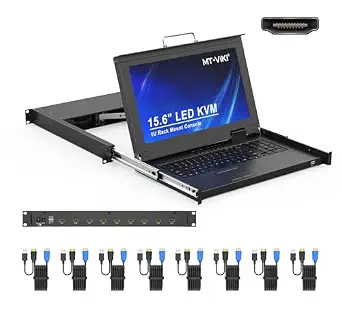 | Best Overall for Space-Efficient Server Management | Display: 15.6″ LCD, 1920×1080@60Hz | Number of Ports: 8 | Resolution: 1920×1080 | VIEW ON AMAZON | See Our Full Breakdown |
| 1U Rack Mount KVM with 15.6″ Monitor, 16-Port VGA Switch, Keyboard, Touchpad, Support Hot-Key, OSD, 1080P, Fits 19–31.5″ Depth |  | Best for High-Density Server Environments with Versatile Management | Number of Ports: 16 | Monitor Size: 15.6 inches | Resolution: 1920x1080p | VIEW ON AMAZON | See Our Full Breakdown |
| MT-VIKI 8-Port KVM Switch, Rackmount VGA, Includes 8 Cables & Power Adapter |  | Best Budget-Friendly 8-Port Rackmount KVM Switch | Ports: 8 | Connection Type: VGA, USB 2.0 | Form Factor: Rackmount 1U 19″ | VIEW ON AMAZON | See Our Full Breakdown |
| rackmount kvm switch for multiple server | Number of Ports | Included Cables |
|---|---|---|
| TESmart USB 3.0 HDMI KVM Switc | 8 IN 1 OUT | — |
| MT-VIKI 16 Port KVM Switch | 16 | — |
| TRENDnet 8-Port USB/PS2 Rack M | 8 | — |
| TESmart 8X1 HDMI KVM Switch 8 | 8 HDMI inputs, 1 HDMI output | 8 x 5ft KVM cables |
| MT-Viki 17” Rack Mount KVM Sw | 8 | 8 VGA KVM cables |
| 8-Port HDMI KVM Switch with Ca | 8 | 8 KVM cables |
| MT-VIKI Rack Mount KVM with 15 | 8 | 8 cables |
| TESmart USB 3.0 HDMI KVM Switc | 8 | — |
| 16 Port HDMI KVM Switch Consol | 16 | 16 HDMI + USB cables |
| 17-inch LCD KVM Console 8-Port | — | 8 cables |
| MT-VIKI Rack Mount KVM Console | 8 | — |
| 1U Rack Mount KVM with 15.6" M | 16 | — |
| MT-VIKI 8-Port KVM Switch | — | 8 KVM cables (4x 5ft, 4x 6ft) |
More Details on Our Top Picks
TESmart USB 3.0 HDMI KVM Switch 8 Port 4K@60Hz with Rackmount, EDID Emulator, Remote, LAN, RS232, Auto Scan, 8 KVM Cables
This TESmart model stands out for supporting 4K@60Hz, making it ideal for high-quality video setups, especially when compared to the TESmart 8X1 HDMI KVM Switch 8 Port 4K@30Hz, which offers a slightly lower resolution at 30Hz. Its multiple switching options, including LAN and RS232, provide flexible management that appeals to enterprise environments. The inclusion of 8 dedicated KVM cables simplifies installation, but reliance on HDMI limits compatibility with non-HDMI devices. The remote control’s need for AAA batteries adds a small inconvenience, and the switch’s HDMI-only design could restrict users with diverse setups. This pick makes the most sense for users needing high-res display output and multiple control methods in a rackmount form factor.
Pros:- Supports 4K resolution at 60Hz for crisp, high-quality visuals
- Multiple switching methods including LAN, IR remote, and hotkeys
- Includes 8 pre-connected KVM cables for quick deployment
Cons:- Remote control batteries are not included, adding extra cost
- Limited to HDMI connections only, reducing device compatibility
Best for: IT professionals or media production teams requiring 4K resolution and multi-switching options in a rackmount setup
Not ideal for: Home users with mixed device connections or those needing HDMI support for 4K at 60Hz without enterprise features
- Number of Ports:8 IN 1 OUT
- Resolution Support:4K@60Hz
- USB Ports:2 USB 3.0 ports
- Cable Length:5 ft (per cable)
- Switching Methods:IR remote, front panel, hotkeys, mouse wheel, RS232, LAN, auto detect
- Additional Features:EDID emulator, auto switching, rackmount design
Our verdict“This model is best suited for high-end setups demanding 4K@60Hz and versatile control options in a rackmount form factor.”
MT-VIKI 16 Port KVM Switch, Rackmount VGA, Includes 16 Cables & Remote
This 16-port VGA KVM switch offers a generous port capacity for larger setups, outperforming the MT-VIKI 8-Port VGA Switch in scale, but with a focus on VGA rather than HDMI or DisplayPort. Its inclusion of 16 cables and a remote makes it a cost-effective choice for those needing to control many servers from a single console, though the VGA-only interface limits resolution to 1920×1440, which may be less suitable for high-resolution displays. The rackmount design helps organize space efficiently, but the need for longer cables in some environments could be a drawback. This option makes sense for large server rooms or data centers with legacy VGA equipment.
Pros:- Supports up to 16 computers, ideal for large-scale management
- Includes all necessary cables and remote control for ease of use
- Rackmount design helps organize and save space
Cons:- Limited to VGA connection, not suitable for high-res digital displays
- Remote control does not include batteries, which hampers immediate use
Best for: Data centers or enterprise environments managing multiple VGA-based servers needing scalable control
Not ideal for: Modern office setups or home labs that require HDMI or higher resolutions for newer devices
- Number of Ports:16
- Connection Type:VGA, USB 2.0
- Supported Resolutions:1920×1440
- Compatibility:Windows 10/8/7/XP, Mac, Linux, DOS, Unix
- Cable Length:15 ft
- Power:Included power adapter
Our verdict“This switch is perfect for environments with many VGA-based servers where cost-effective scalability is a priority.”
TRENDnet 8-Port USB/PS2 Rack Mount KVM Switch, TK-803R, VGA & USB Connection
The TRENDnet TK-803R provides solid VGA support up to 2048 x 1536, surpassing some VGA-only switches like the MT-VIKI 8-Port VGA Switch. Its flexible hot-key and push-button controls give users multiple ways to switch between connected servers, but it lacks included cables, unlike other models, which can increase initial setup costs. Its compatibility with PS/2 and USB makes it adaptable for various legacy and modern systems, yet it doesn’t support HDMI or DisplayPort, limiting its use for newer high-definition devices. The 1U rack mount design is straightforward and space-efficient. This pick is ideal for organizations with existing VGA and PS/2 hardware needing reliable, high-res access.
Pros:- Supports high-resolution VGA video up to 2048 x 1536
- Flexible control via hot-key or push button operation
- Rack mountable in a standard 19-inch rack
Cons:- Cables are sold separately, increasing total cost
- Limited to VGA and USB/PS2, no HDMI support
Best for: IT managers maintaining legacy infrastructure requiring high-resolution VGA and flexible control methods
Not ideal for: Modern setups with HDMI or DisplayPort devices seeking high-definition digital video
- Number of Ports:8
- Video Resolution:2048 x 1536
- Interface:USB and PS/2
- Rack Mount:Yes, 19-inch
- Cables Included:None
- Supported OS:Windows, Linux, Unix, Mac OS
Our verdict“This switch delivers high-res VGA support with versatile control, best suited for legacy system environments.”
TESmart 8X1 HDMI KVM Switch 8 Port 4K@30Hz, USB2.0 Rackmount with EDID Emulator, Remote, LAN, RS232, Auto Scan, 8 KVM Cables
The TESmart 8X1 HDMI KVM switch excels in delivering 4K video at 30Hz, making it suitable for general high-quality display needs, but falls short of the 60Hz support offered by the TESmart USB 3.0 HDMI KVM Switch 8 Port 4K@60Hz. Its extensive control options, including LAN and RS232, cater to enterprise and remote management, while the included 8 cables streamline setup. The EDID emulator maintains display consistency during switching, but the lack of remote control batteries and external power specifications could hinder immediate deployment. Its VGA counterpart may offer higher resolution, but for HDMI environments, this model provides dependable performance at a slightly lower refresh rate. This device suits users prioritizing HDMI compatibility and stable 4K at 30Hz for typical office or server room environments.
Pros:- Supports 4K resolution at 30Hz with EDID emulators for display stability
- Multiple control methods including LAN, IR remote, and RS232
- Includes 8 KVM cables for quick setup
Cons:- Remote control batteries are not included, adding extra hassle
- Limited to 30Hz at 4K, not suitable for applications needing higher refresh rates
Best for: Businesses or server rooms needing reliable HDMI control with multiple switching options at 4K@30Hz
Not ideal for: High-end video editing or gaming setups requiring 60Hz at 4K resolution
- Number of Ports:8 HDMI inputs, 1 HDMI output
- Resolution Support:4K@30Hz
- USB Ports:2 USB 2.0 hub ports
- Included Cables:8 x 5ft KVM cables
- Switching Methods:IR remote, front panel, hotkeys, mouse wheel, RS232, LAN, auto scan
- Warranty:3 years
Our verdict“This switch is well-suited for environments that need reliable HDMI 4K control at 30Hz with flexible management options.”
MT-Viki 17” Rack Mount KVM Switch VGA 8 Port with Keyboard, Touchpad, Drawer, and 8 KVM Cables
This 17-inch rackmount KVM switch combines monitor, keyboard, and touchpad into a compact 1U drawer, offering an all-in-one solution that is ideal for tight server rooms, unlike standalone units such as the 8-Port HDMI KVM Switch with Cables. Its support for 8 VGA ports makes it suitable for legacy systems, but the VGA-only interface means it isn’t suitable for high-resolution or modern digital setups. The integrated design reduces clutter but requires specific rack depths (23.6 to 31.8 inches), which could limit compatibility. The included cables and security features, like password protection, add value, but additional longer cables might be necessary for certain rack configurations. This solution is best for those seeking a space-efficient, all-in-one control station for VGA-based servers.
Pros:- Space-saving 1U rackmount with integrated monitor, keyboard, and touchpad
- Supports 8 computers with multiple switching methods
- Includes 8 KVM cables and security features like password protection
Cons:- Requires specific rack depth, which may not fit all racks
- Limited to VGA interface, not suitable for high-res digital displays
Best for: Data centers or server rooms with limited space needing integrated monitor and control for VGA servers
Not ideal for: Modern offices or data centers with HDMI/DisplayPort servers requiring higher resolution or digital connectivity
- Display Size:17 inches
- Number of Ports:8
- Mounting Type:Rackmount 1U
- Mount Depth:23.6 to 31.8 inches
- Included Cables:8 VGA KVM cables
- Compatibility:Windows, DOS, Linux, Mac OS
Our verdict“This all-in-one rackmount solution is ideal for space-constrained environments managing VGA-based servers needing integrated control.”
8-Port HDMI KVM Switch with Cables, Remote, and Rack Mount
This 8-port HDMI KVM switch stands out for offering 4K resolution at 30Hz, making it suitable for high-quality video management across multiple servers. Unlike the TESmart USB 3.0 HDMI KVM Switch 8 Port 4K@60Hz, it supports slightly lower refresh rates but compensates with included cables and multiple switching options, including a remote and wired selector. Its hardware-focused operation ensures reliability, but the lack of software control and the need for an external power adapter can be drawbacks for those seeking seamless integration. This model is ideal for users prioritizing straightforward, high-resolution switching without complex software dependencies.
Pros:- Supports 4K resolution at 30Hz for clear video quality
- Multiple switching methods including remote control
- Includes all necessary cables and rackmount ears
Cons:- Limited to 30Hz at 4K, which may affect fast-moving visuals
- Requires an external power adapter, adding setup complexity
Best for: IT professionals managing multiple servers who need reliable, straightforward 4K HDMI access.
Not ideal for: Users requiring 60Hz refresh rates at 4K or software-based control for automation.
- Number of Ports:8
- Resolution Support:4K@30Hz
- Connectivity:HDMI, USB
- Included Cables:8 KVM cables
- Switching Methods:Panel button, IR remote, wired selector
- Compatibility:Windows, Mac OS, Linux
Our verdict“This switch is best for users needing reliable 4K HDMI switching with multiple control options in a rackmount setup.”
MT-VIKI Rack Mount KVM with 15.6″ LCD Monitor, 8-Port VGA Switch, 1080p@60Hz, 1U Rackmount Console with Keyboard and Cables
The MT-VIKI 1568UL offers a compact, all-in-one solution with a 15.6-inch Full HD LCD monitor, keyboard, and touchpad integrated into a 1U rackmount. Compared with the 8-Port HDMI KVM Switch with Cables, it emphasizes physical console management over high-resolution video, with a focus on space efficiency and security features like password protection. Its VGA-only support limits its compatibility with newer hardware, but for legacy systems or environments where space-saving is critical, this model provides a sturdy, secure solution. Its main tradeoff is the limited resolution and lack of HDMI, which impacts visual fidelity.
Pros:- Integrated 15.6-inch full HD monitor and keyboard in a compact 1U form factor
- Supports secure password protection and administrator levels
- Durable aluminum and steel construction for industrial use
Cons:- Limited to VGA connections, not suitable for HDMI-based systems
- Requires measuring rack depth before installation for compatibility
Best for: Data centers and server rooms needing a space-saving, secure console with VGA support.
Not ideal for: Environments requiring HDMI or higher resolutions for modern high-definition displays.
- Display:15.6″ 1920×1080@60Hz LCD
- Number of Ports:8
- Supported Resolutions:1080p@60Hz
- Rack Compatibility:18.9″ to 31.5″ deep racks
- Connectivity:USB 2.0, VGA
- Included Cables:8 cables
Our verdict“Ideal for legacy systems or secure environments where an all-in-one rackmount console is preferred over high-res video output.”
TESmart USB 3.0 HDMI KVM Switch 8 Port 4K@60Hz with 8 Cables
This TESmart USB 3.0 HDMI KVM Switch delivers impressive 4K@60Hz support, making it a prime choice for users needing ultra-smooth visuals and fast switching. Its USB 3.0 ports facilitate high-speed data transfer, outperforming older USB standards used in some competitors like the 16 Port HDMI KVM Switch Console. The inclusion of 8 dedicated cables simplifies setup, and multiple switching options—including remote control, IR, RS232, LAN, and auto scan—offer flexibility. However, reliance on AAA batteries for remote operation and the absence of an external power adapter may limit continuous use. Its exclusive HDMI support narrows compatibility for users with DVI or VGA systems.
Pros:- Supports ultra-high 4K@60Hz resolution for crisp visuals
- Includes 8 dedicated high-quality HDMI cables for quick setup
- Multiple switching methods including remote, LAN, and RS232
Cons:- Remote control requires AAA batteries, which are not included
- Limited to HDMI connections only, no VGA or DVI support
Best for: Professionals requiring high-res, high-speed switching with minimal setup fuss in modern environments.
Not ideal for: Users working with legacy VGA or DVI systems needing broader connection options.
- Number of Ports:8
- Resolution Support:4K@60Hz
- USB Ports:2 USB 3.0 hub ports
- Cable Length:5 ft
- Switching Methods:IR remote, front panel, hot keys, mouse wheel, RS232, LAN
- EDID Emulator:Yes
Our verdict“Best suited for high-performance environments demanding fast, high-resolution switching with flexible control options.”
16 Port HDMI KVM Switch Console with 4K@30Hz Support and 16 Cables for Data Center and IT Rack Management
The 16 Port HDMI KVM Switch excels at managing up to 16 servers with 4K@30Hz support, making it suitable for extensive data centers. Compared to the 8-Port HDMI KVM Switch, it offers greater expansion but at the expense of a lower refresh rate at high resolution. Its comprehensive cable set and rackmount design provide a clean, ready-to-deploy solution, though the 30Hz refresh rate might feel limiting for fast-paced visuals. The need for a 12V power supply adds some complexity, but the broad compatibility with operating systems and the inclusion of basic remote controls make it versatile for large setups.
Pros:- Supports 4K resolution for high-quality video output
- Includes 16 HDMI + USB cables for straightforward installation
- Controls up to 16 servers from a single console
Cons:- Limited to 30Hz refresh rate at 4K, which can impact fast-moving visuals
- Requires external 12V power, adding to setup complexity
Best for: Data centers and IT environments with numerous servers requiring centralized control.
Not ideal for: Users needing higher refresh rates at 4K or simpler, smaller-scale setups.
- Number of Ports:16
- Resolution Support:3840×2160@30Hz
- Included Cables:16 HDMI + USB cables
- Mounting Type:Rackmount (1U)
- Power Supply:12V
- Switching Method:Push Button, IR remote
Our verdict“Designed for large-scale server environments where extensive control and reliable video output are priorities over refresh rate speed.”
17-inch LCD KVM Console 8-Port VGA Rackmount Switch with Touchpad and Cables
The 17-inch LCD KVM Console offers a large display and VGA support, making it suitable for legacy systems or environments where high-resolution displays are unnecessary. While it provides a decent 1280×1024 resolution at 30Hz—far below modern standards—it excels in managing up to 8 computers from a single console with multiple switching options, including hotkeys and OSD. Compared with HDMI-based options like the 8-Port HDMI KVM Switch with Cables, this model emphasizes compatibility and ease of use in legacy setups, but the lower resolution and lack of remote control limits its appeal for high-end or modern systems.
Pros:- Large 17-inch display for comfortable management
- Supports up to 8 computers with multiple switching options
- Compatible with various operating systems and rack setups
Cons:- Display resolution limited to 1280×1024@30Hz
- No remote access features, relying solely on local controls
Best for: Organizations with legacy VGA equipment needing a simple, large-display console management.
Not ideal for: Modern setups requiring high-res, fast-refresh video or HDMI connectivity.
- Display Size:17 inches
- Resolution:1280×1024@30Hz
- Ports:8 VGA
- Compatibility:Windows, DOS, Linux, Mac OS
- Rack Compatibility:1U, 23.6” – 31.8” depth
- Included Cables:8 cables
Our verdict“Best for legacy environments where high-resolution output is less critical than simple, reliable VGA control.”
MT-VIKI Rack Mount KVM Console with 15.6″ LCD Monitor, 8-Port HDMI Switch, 1920×1080@60Hz, 1U Rackmount, Includes 8 Cables
This model stands out for combining a full HD 15.6-inch LCD monitor with an 8-port HDMI switch in a slim 1U rackmount form factor, making it ideal for environments where space is tight. Compared to the MT-VIKI 16 Port KVM Switch, this option offers a more integrated solution without requiring separate monitor setups, but it sacrifices some expandability. Its durable aluminum and steel construction ensures longevity, yet its shorter cables may limit flexibility unless extended. The secure switching and adjustable rack rails cater well to professional data centers, though the lack of audio support might be a drawback for multimedia tasks. This pick makes the most sense for professionals needing a compact, all-in-one console.
Pros:- Space-saving 1U design with integrated monitor and keyboard
- Supports up to 8 computers with secure switching
- Adjustable rack rails for various depths
Cons:- Requires measuring rack depth for proper fit
- Includes only 5ft cables, which may be short for some setups
- No built-in audio support
Best for: IT professionals managing multiple servers in limited rack space who need an integrated console
Not ideal for: Users requiring audio support or longer cable options for complex setups
- Display:15.6″ LCD, 1920×1080@60Hz
- Number of Ports:8
- Resolution:1920×1080
- Rack Depth Compatibility:18.9″ to 31.5″
- Dimensions:18.9″ x 23.6″ x 1.77″
- Weight:Lightweight aluminum interior with steel shell
Our verdict“This model is perfect for space-conscious environments where an all-in-one KVM console is needed for up to 8 servers.”
1U Rack Mount KVM with 15.6″ Monitor, 16-Port VGA Switch, Keyboard, Touchpad, Support Hot-Key, OSD, 1080P, Fits 19–31.5″ Depth
Compared with the HDMI-based MT-VIKI console, this VGA model emphasizes managing larger server groups—up to 16—through a single console, making it well-suited for high-density data centers. Its universal fit for racks from 19 to 31.5 inches and support for multiple switching methods, including hotkeys and OSD, provide flexible control. However, the use of VGA might be limiting for modern high-res displays, and it lacks HDMI or DisplayPort options, unlike some higher-end models. Its enterprise-grade security, with dual password protection, adds a layer of safety for sensitive environments, but the absence of detailed specs on weight and cable length could be a hurdle during setup. This pick is ideal for IT teams managing large server farms requiring extensive control options.
Pros:- Supports managing up to 16 servers from a single console
- Universal rack fit with adjustable rails
- Multiple switching methods including hotkeys and OSD
Cons:- Limited to VGA connections, not suitable for high-res modern displays
- No specific weight or cable length info provided
Best for: System administrators overseeing extensive server racks needing scalable management with versatile switching
Not ideal for: Those seeking HDMI or 4K support, or users with modern high-resolution display needs
- Number of Ports:16
- Monitor Size:15.6 inches
- Resolution:1920x1080p
- Rack Compatibility:19–31.5 inches depth
- Dimensions:18.9″ x 16.2″ x 1.7″
Our verdict“This KVM switch is best suited for large-scale server environments where managing many units from a single console is essential.”
MT-VIKI 8-Port KVM Switch, Rackmount VGA, Includes 8 Cables & Power Adapter
This model offers a straightforward, cost-effective solution for controlling up to 8 computers with a VGA connection, making it ideal for small server rooms or budget-conscious setups. Its plug-and-play design simplifies installation, and including all necessary cables reduces additional costs. Unlike HDMI-based switches, it limits users to VGA output, which might affect display quality on modern monitors. The manual button switching, while simple, can slow down operations compared to remote or hotkey options. Its lack of audio support and the need to manually press buttons may not satisfy users needing quick, multimedia-capable control. This choice is best for small-scale or legacy systems where cost and simplicity are priorities.
Pros:- Supports multiple OS including Windows, Linux, and Novell
- Easy to install with included cables
- Rackmount design saves space
Cons:- Limited to VGA, not suitable for high-resolution displays
- Switching requires manual button press
Best for: Small server setups or legacy system environments where budget constraints matter
Not ideal for: Large data centers or users requiring HDMI/DisplayPort and audio support
- Ports:8
- Connection Type:VGA, USB 2.0
- Form Factor:Rackmount 1U 19″
- Included Cables:8 KVM cables (4x 5ft, 4x 6ft)
- Power Supply:Plug and play, no power supply required
Our verdict“This switch provides a simple, affordable 8-port control solution for legacy or small-scale server environments.”

How We Picked
The products were evaluated based on performance, build quality, ease of installation, expandability, and feature set. Priority was given to models that offer reliable switching, solid connectivity options, and user-friendly controls suitable for professional server environments. Cost and scalability were also key factors, with a preference for solutions that balance value and capability. The ranking reflects a combination of technical specs and practical usability, ensuring each pick serves a specific user need—from small data centers to large enterprise racks.Factors to Consider When Choosing Rackmount Kvm Switch For Multiple Servers
Choosing a rackmount KVM switch involves balancing several key factors to match your server environment. Understanding these considerations can help prevent costly mistakes and ensure your investment meets your current and future needs. The right switch should offer reliable performance, easy management, and scalability without overextending your budget or complicating maintenance.Port Count and Expansion
Determine how many servers you need to connect now and in the future. While higher port counts provide scalability, they often come with increased complexity and cost. Consider models that support daisy-chaining or stacking if you anticipate expanding your rack over time, rather than overspending on a very high port count from the start. Remember, a switch with more ports than needed can be a waste if it isn’t scalable or if management becomes cumbersome.
Video Resolution and Display Support
Higher resolution support, such as 4K, ensures clarity and compatibility with modern high-res monitors. However, this can sometimes impact switching speed or introduce latency. If your setup is mostly standard HD, lower resolutions might suffice and save costs. For environments requiring detailed graphics or high-quality video, prioritize switches that explicitly support 4K at appropriate refresh rates to avoid display issues.
Connectivity and Compatibility
Check whether your servers use VGA, HDMI, or USB connections and choose a switch that matches or offers versatile ports. Compatibility with different operating systems and peripherals also matters, especially if you plan to control servers remotely or use specialized input devices. Avoid switches with limited connectivity options if you plan to integrate diverse hardware, as this can lead to additional adapters or complex setups.
Ease of Management and User Interface
Look for features like on-screen display (OSD), remote control, or hotkey switching to streamline server management. Built-in touchscreens or LCD panels can simplify control but may add to the unit’s size and cost. Consider your level of technical expertise—more advanced management features benefit experienced users, while plug-and-play models suit beginners better. Think about maintenance and how intuitive the interface will be over time.
Build Quality and Reliability
Invest in a switch with robust construction, especially if it will operate in a demanding environment. Metal enclosures and quality connectors reduce the risk of failure and improve longevity. Also, verify if the device supports features like hot-swappable modules or redundant power supplies, which can prevent downtime. A dependable switch minimizes troubleshooting and replacement costs over its lifespan.
Frequently Asked Questions
Can I connect different types of servers (VGA and HDMI) with a single KVM switch?
Yes, many modern rackmount KVM switches support multiple connection types or come with adapters to accommodate both VGA and HDMI interfaces. However, not all switches are multi-protocol, so confirm compatibility before purchasing. Using adapters can sometimes introduce latency or degrade signal quality, so choosing a switch that natively supports your server types often results in more reliable performance. When mixing connection types, ensure the switch’s specifications explicitly support all your hardware to avoid compatibility issues.
Is it better to choose a KVM switch with a built-in display or one that relies on external monitors?
Built-in displays or integrated consoles simplify management by combining controls and monitoring into a single unit, which is especially useful in tight rack spaces. They reduce clutter and make troubleshooting faster. However, these units tend to be more expensive and may add to the size and weight of the switch. External monitors give you more flexibility and are often more cost-effective, but they require additional space and cabling. Your choice depends on your management style and space constraints.
How important is remote management support in a rackmount KVM switch?
Remote management features are highly valuable in large or dispersed server environments, allowing administrators to control servers without physically accessing the rack. They typically include network access, virtual media, and remote console capabilities, which can significantly reduce downtime and maintenance costs. For smaller setups, remote features might be less critical, but they still add flexibility and future-proofing. Consider your operational needs and whether remote access aligns with your management workflows.
What should I consider regarding cable management and installation?
Simplified cable management reduces clutter and improves airflow, which can extend hardware lifespan. Look for switches that include cable organizers or support cable routing features. Also, check if the switch’s dimensions and mounting hardware fit your rack’s size and configuration. Proper installation minimizes wear on connectors and simplifies troubleshooting, making long-term maintenance more straightforward and less time-consuming.
Is it worth investing in a high-port-count KVM switch if I only have a few servers now?
Investing in a high-port-count switch can be beneficial if you anticipate expanding your server setup soon. However, if your current needs are modest, a smaller switch might be more cost-effective and easier to manage. Over-specifying can lead to unnecessary expense and complexity, so consider your growth plans carefully. Modular or stackable switches offer a flexible path to scale without replacing the entire system later.
Conclusion
For small to medium server environments, the TESmart USB 3.0 HDMI KVM Switch 8 Port offers a great balance of high-resolution support and connectivity. Larger data centers or enterprises should consider the MT-VIKI 16 Port KVM Switch for its scalability and robust build. Beginners or those with limited space might prefer models with integrated displays like the 17-inch LCD KVM Console. Budget-conscious buyers will find value in simpler VGA models, while premium users should look at units offering remote management and advanced features. Your choice ultimately depends on your current setup, future growth, and specific management needs.
Fall Picks
fall essentials
As an affiliate, we earn on qualifying purchases.