Choosing the best rack LCD console for small server rooms involves balancing space constraints, ease of access, and functionality. The MT-Viki 17” Rack Mount KVM Switch stands out as the overall best for its combination of size and features. The Tripp Lite 19-inch Rack Mount KVM Console offers a larger display for those prioritizing screen real estate, while the MT-VIKI 15.6″ Rack Mount KVM Console makes a compelling case for budget-conscious setups. As options vary from compact units to feature-rich solutions, understanding the key tradeoffs—such as size versus functionality—is essential. Keep reading for a detailed breakdown of each product to find the perfect fit for your small server room.

Get business pricing on networking and server gear
- Business-only prices and quantity discounts
- Tax-exempt purchasing
- Multiple users, one account, clear invoices
Key Takeaways
- Size and space efficiency are primary considerations, with compact models fitting better in tight environments.
- Display quality and size significantly impact ease of management, especially for frequent remote access.
- Port versatility and cable compatibility are crucial for seamless integration with existing hardware.
- Build quality and warranty support vary, affecting long-term reliability and maintenance costs.
- Features like touchpads and OSD controls improve usability but may add to the cost or complexity.



| rack LCD console for small server room | Display Size | Included Cables |
|---|---|---|
| MT-Viki 17” Rack Mount KVM Sw | 17 inches | 8 KVM VGA cables |
| MT-VIKI Rack Mount KVM Console | — | 8 KVM HDMI cables |
| 15.6-inch LCD 8-Port VGA KVM S | 15.6 inches | 8 VGA cables |
| Tripp Lite Rack Mount KVM Cons | 19 inches | — |
| MT-VIKI 8 Port Rack Mount KVM | 19 inches | 8 KVM cables |
| 1U Rack Mount KVM Console with | — | — |
| Rack Mount KVM Console 8 Port | — | — |
More Details on Our Top Picks
MT-Viki 17” Rack Mount KVM Switch VGA 8 Port with Keyboard, Touchpad, Drawer, and 8 KVM Cables
This model stands out for its space-efficient design, integrating monitor, keyboard, and touchpad into a single 1U rackmount drawer. Compared with the MT-VIKI 15.6″ model, its larger 17-inch display offers better visibility for server management, though it requires a deeper rack depth (23.6″ to 31.8″) and only supports VGA connections, limiting compatibility with newer displays. Its lightweight aluminum and steel build ensures durability without adding weight, making it suitable for professional server rooms that prioritize space savings. The included 8 KVM VGA cables facilitate quick setup, but users must ensure proper mounting and compatible rack space. This pick makes sense for environments needing a compact solution with multiple switching options and VGA support, especially where rack space is at a premium.
Pros:- Space-saving 1U rackmount design with integrated monitor, keyboard, and touchpad
- Supports up to 8 computers with multiple switching methods
- Includes durable, pre-connected KVM VGA cables
Cons:- Limited to VGA connections, not compatible with HDMI or DisplayPort
- Requires specific rack depth (23.6″ to 31.8″) which might not fit all setups
- Some users may need longer cables for extended configurations
Best for: Small server rooms with limited rack space that still require managing multiple VGA-based servers efficiently.
Not ideal for: Environments using HDMI or DisplayPort servers, or those needing modern high-resolution displays, as this model is VGA-only and limited in resolution.
- Number of Ports:8
- Display Size:17 inches
- Mounting Type:Rackmount 1U
- Mount Depth:23.6″ to 31.8″
- Dimensions:18.9×22.1×1.77 inches
- Included Cables:8 KVM VGA cables
Our verdict“Ideal for small server rooms needing a compact, VGA-only console with multiple port management capabilities.”
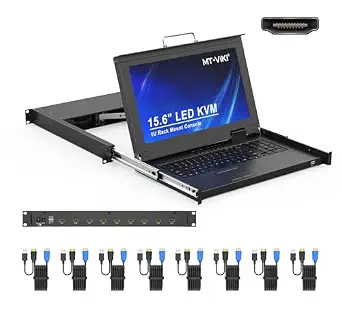
MT-VIKI Rack Mount KVM Console with 15.6″ LCD Monitor, 8-Port HDMI Switch, 1920×1080@60Hz, 1U Rackmount, Includes 8 Cables
This pick excels for its crisp 15.6-inch full HD display, offering clearer visuals than the 17-inch VGA model from the previous line, especially compared when managing high-resolution servers. Unlike the MT-Viki 17″ model, it supports HDMI instead of VGA, making it more suitable for modern hardware. Its adjustable rack depth (18.9″ to 31.5″) and lightweight aluminum and steel construction enhance compatibility and ease of installation. The inclusion of 8 cables simplifies setup, and the support for multiple OS (Windows, Linux, Mac) adds flexibility. However, its slightly smaller display may be a drawback for users who prefer larger screens, and the need to measure rack depth carefully is essential. This model makes the most sense for those seeking high-definition visuals and HDMI compatibility in a compact 1U form factor.
Pros:- Full HD 15.6-inch LCD for sharp visuals
- Supports HDMI, suitable for modern server hardware
- Includes 8 cables, supports multiple OS
Cons:- Smaller display size than 17-inch models
- Requires measurement of rack depth for proper fit
- Limited to HDMI connections, not VGA
Best for: Small server rooms requiring high-definition display management with HDMI support and flexible switching options.
Not ideal for: Those with legacy VGA-only setups or racks with limited depth, as it requires compatibility with HDMI and specific rack dimensions.
- Display:15.6″ LCD, 1920×1080@60Hz
- Number of Ports:8
- Rack Compatibility:18.9″ to 31.5″ deep
- Dimensions:18.9″ x 23.6″ x 1.77″
- Material:Aluminum and steel
- Included Cables:8 KVM HDMI cables
Our verdict“A smart choice for users needing high-res visuals and HDMI compatibility in a compact rackmount KVM console.”
15.6-inch LCD 8-Port VGA KVM Switch with Rack Mount, Hot-key/OSD/Button Control, Includes 8 VGA Cables
This model emphasizes security and durability, featuring a 15.6-inch LCD with 1920x1080p resolution and two-level password protection, making it suitable for environments with sensitive data. Its heavy-duty metal housing outperforms lighter plastic options like the MT-Viki models, providing enhanced durability in demanding conditions. While it supports flexible switching via hotkeys, OSD, or physical buttons, it doesn’t include modern features like HDMI or remote management, limiting its relevance for newer hardware. Its standard 19″ rack compatibility makes it straightforward to install but may lack the advanced features some users desire for remote access or higher resolution. This unit is best for those prioritizing security and rugged build quality over modern connectivity features.
Pros:- Supports secure two-level password protection
- Heavy-duty metal housing for rugged environments
- Supports flexible switching options (hotkeys, OSD, buttons)
Cons:- Limited to VGA connections, not suitable for newer hardware
- Resolution capped at 1920x1080p, outdated for some uses
- No remote access or advanced management features
Best for: Organizations needing a secure, durable VGA console for mission-critical environments with standard rack compatibility.
Not ideal for: Users with modern HDMI or DisplayPort servers or those seeking advanced remote management features, as this is a basic VGA solution.
- Display Size:15.6 inches
- Resolution:1920×1080
- Supported Racks:19 inch
- Included Cables:8 VGA cables
- Security:Two-level password
- Material:Heavy-duty metal
Our verdict“Best suited for highly secure, durable VGA environments where ruggedness outweighs modern connectivity needs.”
Tripp Lite Rack Mount KVM Console, 19 inch LCD Display, Touch Pad, 0-9 Numeric Keypad, 1URM, 120/240 VAC, 1-Year Warranty
Compared to smaller display options, the Tripp Lite 19-inch LCD console offers a larger screen, which benefits users managing multiple servers needing detailed visuals, but it sacrifices some space efficiency. Its 1280 x 1024 resolution is lower than some 15.6-inch options, which might impact clarity for detailed tasks, yet it supports most KVM switches via USB or PS/2 connections and includes a USB pass-through for peripherals. Its 1U form factor fits standard racks, but its resolution may be considered outdated for those expecting high-definition displays. This choice makes the most sense for users on a budget who prioritize a larger screen and broad compatibility over ultra-high resolution or advanced features.
Pros:- Larger 19-inch display for easier server management
- Supports most KVM switches with USB and PS/2 compatibility
- Includes USB pass-through for peripherals
Cons:- Lower resolution (1280×1024) compared to newer displays
- Limited to older resolution standards, may impact clarity
- No remote management or advanced features
Best for: Budget-conscious small server rooms seeking a larger 19-inch display for basic management tasks.
Not ideal for: High-resolution or modern HDMI users, since it only offers 1280×1024 resolution and lacks HDMI support.
- Display Size:19 inches
- Resolution:1280 x 1024
- Compatibility:Most PS/2 and USB KVM switches
- Voltage:120/240 VAC
- Warranty:1 year
Our verdict“A solid budget option for those needing a larger screen to manage multiple servers on a tight budget.”
MT-VIKI 8 Port Rack Mount KVM Console with 19” LCD Monitor, Keyboard, Touchpad, and 8 KVM Cables
This product combines a sizable 19-inch LCD with a classic 1280×1024 resolution, similar to the Tripp Lite but with a focus on managing up to 8 computers efficiently within a 1U rack. Its adjustable monitor angle (110°) and included 8 cables simplify installation, aligning well with environments that need a larger display but don’t require ultra-high resolution. Its support for multiple operating systems and secure password protection makes it versatile, although the resolution may be considered low compared to newer 1080p or 4K displays. The unit’s depth compatibility (23.6″ to 31.8″) allows flexible rack fitting. This model is suitable for users prioritizing a larger screen in a space-efficient form factor, with the tradeoff being resolution quality.
Pros:- Large 19-inch LCD for easier server management
- Includes 8 KVM cables for ready setup
- Supports multiple OS with secure password protection
Cons:- Resolution limited to 1280×1024, lower than modern standards
- No HDMI or DVI support, VGA only
- Some users may prefer higher resolution displays
Best for: Small server rooms that need a larger, clear display for management without the need for high-definition resolution.
Not ideal for: Those who require ultra-high resolution or HDMI/DisplayPort support, as this is a VGA-based, standard resolution solution.
- Display Size:19 inches
- Resolution:1280×1024
- Mounting:1U Rackmount
- Included Cables:8 KVM cables
- Monitor Angle:110°
- Supported Operating Systems:DOS, Windows, Linux, Unix, Mac OS
Our verdict“A practical choice for managing multiple servers with a larger screen in space-constrained environments, accepting resolution limitations.”
1U Rack Mount KVM Console with 19″ LCD Monitor, Keyboard, Touchpad, and HDMI
This 1U KVM console stands out for its high-resolution 19″ LCD, making it ideal for detailed server management in small rack environments. Compared with the MT-VIKI 8 Port Rack Mount KVM Console, it offers a larger, sharper display, which benefits users needing precise visuals. However, its limited control to a single computer means it’s less suited for multi-server setups. The compact 1U design ensures it fits standard racks without sacrificing usability, but it requires careful measurement of rack depth for proper installation. Its integrated keyboard and touchpad streamline control, and compatibility across multiple operating systems adds versatility. The main tradeoff is that it doesn’t support multiple computers simultaneously, so it’s best for dedicated control stations rather than dense server environments. This pick makes the most sense for small server rooms needing high-res visuals in a limited space.
Pros:- High-resolution 19″ LCD with vibrant display for detailed visuals
- Compact 1U design fits standard racks efficiently
- Integrated keyboard and touchpad for all-in-one control
- Supports multiple operating systems
Cons:- Limited to controlling one server at a time, restricting multi-server management
- Requires precise measurement of rack depth for proper installation
- No remote management capabilities included
Best for: Small server room operators who need detailed, high-resolution local console control for one server at a time.
Not ideal for: Organizations managing multiple servers simultaneously, as it controls only a single computer and lacks multi-port switching.
- Display Resolution:1280×1024@60Hz
- Display Colors:16.7M
- Contrast Ratio:1000:1
- Monitor Size:19 inches
- Dimensions:17.6×19.9×1.67 inches (W×D×H)
- Mounting Compatibility:Fits 1U 19″ rack, depth 27.6″ to 28.2″ or 19.7″ to 20.7″
Our verdict“This console is ideal for small server rooms needing high-res, local control for a single server in a compact form.”
Rack Mount KVM Console 8 Port HDMI KVM Switch with 15.6″ 1080p LCD Monitor
This 1U rack-mount KVM console is tailored for environments with multiple servers, supporting up to 8 HDMI-connected computers. Compared with the 1U Rack Mount KVM Console with 19″ LCD, it offers a smaller display but provides the flexibility to switch between multiple servers directly from the console, making it ideal for dense rack setups. Its space-efficient design combines a 15.6″ Full HD monitor with a keyboard and touchpad, enabling quick toggling via hotkeys or on-screen controls. The hardware-level emulation ensures reliable switching across various operating systems, but the 8-port limit restricts scalability for larger setups. Installation requires precise measurement of rack depth (16.36 inches), and it lacks remote management features, making it less suited for remote access. This makes it a strong choice for users managing multiple servers in a tight space, prioritizing local control over remote capabilities.
Pros:- Supports up to 8 HDMI-connected servers for multi-system control
- Compact 1U rack-mount design with integrated 15.6″ 1080p display
- Hardware-level emulation provides reliable, multi-OS switching
- Easy hotkey, button, and OSD controls for fast device switching
Cons:- Limited to 8 ports, unsuitable for larger server environments
- Requires careful measurement of rack depth (16.36 inches) for proper fit
- No remote management or remote access features included
Best for: IT teams managing multiple servers in dense rack environments that need quick, reliable local switching between several systems.
Not ideal for: Users needing remote management or control of more than 8 servers, as the unit is limited in port count.
- Display:15.6″ 1080p LCD
- Number of Ports:8
- Mounting Type:Rack Mount
- Depth:16.36 inches
- Brightness:250 cd/m²
- Supported Systems:Windows, Linux, Mac, Sun
Our verdict“This console is best suited for small server rooms with multiple servers needing quick, reliable local switching in limited space.”
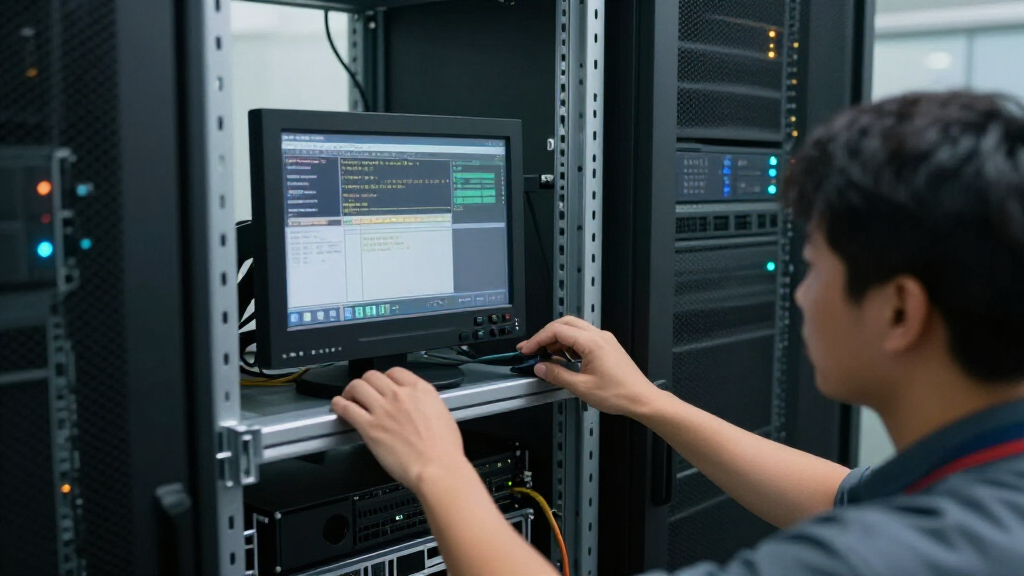
How We Picked
These products were selected based on their suitability for small server rooms, focusing on size, ease of installation, user interface, and connectivity options. We prioritized models that balance compact design with reliable performance, emphasizing build quality and ease of maintenance. The ranking considers user-friendly features, compatibility with common server hardware, and overall value, ensuring each option offers a distinct advantage for different user needs. Cost-effectiveness was also evaluated, with a preference for solutions that deliver robust features without unnecessary extras, making the list practical for small-scale setups.Factors to Consider When Choosing Best Rack LCD Console For Small Server Rooms
When selecting the best rack LCD console for small server rooms, several factors come into play. Beyond basic size and cost, understanding how features like display quality, connectivity options, and usability impact your daily operations can make a significant difference. A well-chosen console can streamline management, reduce clutter, and improve your workflow, but a poor fit might lead to frustration and additional expenses. Carefully evaluating these considerations can help you avoid common pitfalls and select a solution tailored to your specific environment.Size and Space Efficiency
For small server rooms, space is often at a premium. Opting for a slim, 1U rack mount console minimizes footprint while providing essential access. However, overly compact units may sacrifice screen size or features, so consider your workspace constraints against the need for comfortable viewing. Some models incorporate fold-away screens or sliding drawers to optimize space usage without compromising accessibility.
Display Quality and Size
The monitor’s size and resolution directly influence ease of management. Larger, full HD screens reduce eye strain and improve multitasking, especially if you access servers frequently or remotely. Conversely, smaller displays save space but may hinder detailed work. Think about your typical use case—if you need detailed views or multitasking, prioritize higher resolution and larger screens, even if it means slightly larger units.
Connectivity and Compatibility
Ensure the console supports the ports and cables compatible with your existing hardware, whether HDMI, VGA, or USB. Versatile units with multiple port options can adapt to various server configurations, reducing the need for additional adapters. Also, consider whether the console provides hotkey or OSD controls for quick access, which can streamline management even in tight setups.
Build Quality and Reliability
A durable construction and solid warranty support long-term operation, especially in environments where equipment is accessed frequently. Cheaper models may skimp on materials, leading to issues like screen flicker or loose connections over time. Investing in a well-made unit can reduce maintenance costs and downtime, making it worth paying a premium for quality.
Features and User Interface
Features like touchpads, ergonomic keyboards, and on-screen display (OSD) controls enhance usability, especially when managing multiple servers or during troubleshooting. However, added features often come with a higher price tag. Consider your level of technical comfort—if you prefer straightforward operation, simpler models may suffice, but power users will benefit from advanced controls.
Frequently Asked Questions
Can I install a rack LCD console in a small server room with limited space?
Yes, many models are designed specifically for tight spaces, offering 1U or even slimmer profiles that fit into standard racks without occupying much room. Compact models often feature fold-away or sliding screens, which maximize available space while maintaining access. Just ensure the chosen console’s dimensions match your rack’s specifications to avoid installation issues.
What is the best way to connect my existing servers to a rack LCD console?
Most rack LCD consoles support common connection types such as HDMI, VGA, or USB. Check your server hardware for compatible ports, and opt for a console that matches these interfaces. If your setup uses different ports, adapters can bridge the gap, but choosing a console with multiple port options reduces complexity and potential points of failure.
Are touchscreen features worth paying extra for in a rack LCD console?
Touchscreens can streamline server management by enabling quick navigation and control, especially when combined with on-screen menus. However, they increase the cost and may be less durable over time. Consider your workflow—if frequent, rapid access is needed and your environment can support the extra cost, a touchscreen model can improve efficiency. For occasional use, traditional controls may suffice.
How important is monitor resolution in a rack LCD console for small server rooms?
Higher resolution enhances clarity, reducing eye strain and making it easier to read detailed information. For small server rooms where remote access is common, a full HD (1080p) or higher display can significantly improve usability. However, higher resolution units tend to be more expensive and may consume more power, so balance your need for clarity against budget constraints.
Should I prioritize a larger monitor or a more compact design?
This depends on your specific needs. Larger monitors improve visibility and ease of management but take up more space, which may be limited in small server rooms. Compact designs save space but may compromise on screen size or features. Consider how often you need to interact directly with the console versus remote management, and choose accordingly to strike the right balance.