This checklist is for teams preparing the hardware and connections around a Kubernetes cluster. Use it to review the parts that support compute, networking, storage, and hands-on server access, with compatibility in mind at each step.

Get business pricing on networking and server gear
- Business-only prices and quantity discounts
- Tax-exempt purchasing
- Multiple users, one account, clear invoices
The sections follow the path from rackmount hardware through network links and storage, then cover KVM access and fiber modules. Each product pick is a starting point for checking whether a component fits your server, switch, and deployment needs.
Before buying, confirm the exact model requirements in your system documentation. Check physical dimensions, ports, interfaces, and supported media together; a complete compatibility check can help prevent a part from being unsuitable for its intended slot.
Rackmount Kubernetes Servers
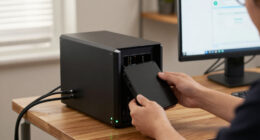
A rackmount server is a foundation for cluster workloads, but the product name alone does not establish whether it can run a particular Kubernetes setup. The listed pick is a diskless ZFS storage server, so treat it as a hardware candidate and verify its compute resources, expansion options, and supported operating systems against your plan.
A common buying mistake is to assume that rackmount form factor means a server will fit any rack or meet any workload requirement. Check the chassis dimensions and mounting needs, then compare available memory, processor, drive bays, and network interfaces with the demands of your intended cluster. Since this unit is diskless, plan the storage devices separately and confirm that the drive type and capacity you choose are supported. Also verify how the server connects to the switch and whether its ports match the adapters or transceivers in your design. Check the full configuration before treating the pick as ready for deployment.
What to look for:
- Confirm rack dimensions and mounting requirements.
- Check processor and memory against intended workloads.
- Verify supported drive types and bay configuration.
- Plan storage separately for this diskless pick.
- Match network interfaces to the cluster design.
TrueNAS Mini R Rackmount ZFS Storage Server (Diskless)

This rackmount ZFS storage server features 12 hot-swap drive bays, 32GB ECC RAM, and an 8-core Intel Atom CPU. Designed for quiet performance, it supports dual 1/10 Gigabit networking, remote IPMI management, and extensive file-sharing protocols including NFS, SMB, and iSCSI.
Pros:
- High-capacity storage with 12 hot-swap drive bays and ZFS file system support
- Robust performance with 32GB ECC RAM and an 8-core Intel Atom CPU
- Flexible connectivity with dual 1/10 Gigabit Ethernet ports and broad protocol support (NFS, SMB, iSCSI, S3)
- Versatile form factor suitable for both rackmount and desktop use with included rails and feet
Cons:
- Sold diskless, requiring separate purchase of hard drives
- Heavy at 41.7 lbs, making it less portable than smaller NAS units
- Limited to 12 drive bays, which may not scale for large enterprise needs
Best for: Teams evaluating a rackmount ZFS storage server.
Not ideal for: Buyers who need a confirmed, fully configured Kubernetes node.
Bottom line: Verify compute, drive, and network compatibility before selecting this diskless server.
Managed Network Switches
A managed switch connects cluster nodes and gives administrators control over network configuration. The listed UniFi pick names eight ports and Gigabit and 2.5G PoE+ capabilities, but the title alone does not establish whether those ports or features match every device in your cluster. Check the port requirements for servers, access equipment, and any other devices you intend to attach.
One common mistake is to choose a switch based on a headline port count without checking link speeds, power needs, or management compatibility. Confirm which ports support the speeds your endpoints require and whether the switch’s PoE+ capability is relevant to your connected devices. Verify the uplink plan as well: a switch can fit a local node layout but still be a mismatch for the upstream connection. Check management requirements and how the switch will be configured alongside the rest of your network. Compare the exact model specifications with your network diagram before buying, especially if a setup depends on specific transceiver types or higher-speed links. A port-by-port review helps uncover mismatches early.
What to look for:
- Confirm the exact port speeds and count.
- Check whether connected devices need PoE+ power.
- Verify uplink speed and connection type.
- Match switch management features to your network plan.
- Confirm compatibility with planned transceivers and cables.
Ubiquiti UniFi Switch Enterprise 8-Port Gigabit and 2.5G PoE+ Managed Switch

The Ubiquiti UniFi Switch Enterprise 8-PoE is a managed network switch featuring eight ports with support for both Gigabit and 2.5G speeds. It provides PoE+ power delivery and SFP+ uplinks, housed in a durable metal case suitable for enterprise networking environments.
Pros:
- Supports high-speed 2.5G and Gigabit connections
- Includes PoE+ for powering devices over Ethernet
- Durable metal construction suitable for enterprise use
- Managed switch capabilities for advanced network control
Cons:
- Limited to 8 ports, which may not suit larger networks
- Requires specific UniFi software ecosystem for full management
Best for: Teams whose port and speed needs match the named switch.
Not ideal for: Deployments requiring unverified port counts or uplink capabilities.
Bottom line: Compare every endpoint and uplink against the exact switch specifications.
10GbE Network Adapters
A 10GbE adapter can provide a network connection for a server when its built-in ports do not match the cluster design. The listed card is described as a two-port PCIe 2.0 adapter compatible with BCM57810S. Confirm the exact host compatibility before selecting it, including whether the server has a suitable PCIe slot and supports the card.
A frequent mistake is to assume that a card advertised as compatible with a chipset will work in every system or with every operating system. Check the card’s physical fit, slot requirements, driver support, and connection type. The title specifies SFP+, so confirm that the switch side and chosen transceivers or cables use compatible interfaces. Also consider how many ports your design needs and how you intend to configure them; two ports do not by themselves establish a particular redundancy or throughput outcome. Verify the server’s available slots and clearance, and compare the product’s documented requirements with the switch and fiber or cabling plan. Check end-to-end compatibility before installation.
What to look for:
- Confirm PCIe slot type and available clearance.
- Verify support for the server and operating system.
- Match SFP+ interfaces to switch ports.
- Check transceiver or cable compatibility at both ends.
- Confirm the number of ports fits the network plan.
10GbE SFP+ Network Card Compatible with BCM57810S 2-Port PCIe 2.0 Adapter
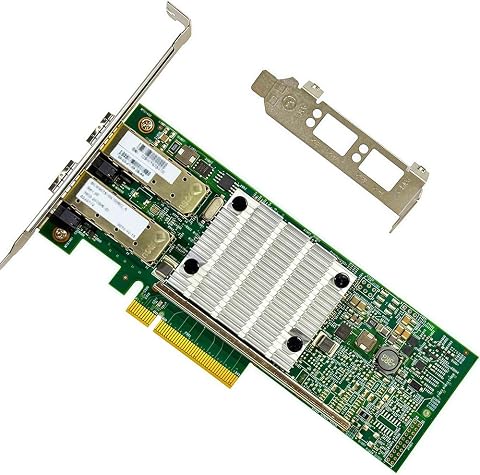
This dual-port 10GbE SFP+ network card features SFP+ ports supporting 10GBASE-SR/LR modules, ideal for high-speed server and NAS connections. It offers virtualization, jumbo frames, PXE/iSCSI boot, and flexible deployment options for enterprise and data center use.
Pros:
- Supports high-speed 10GbE SFP+ connectivity for servers and NAS devices
- Flexible deployment with full-height and low-profile brackets
- Features advanced virtualization and offload capabilities
Cons:
- Requires compatible SFP+ modules (not included)
- Limited warranty period of 3 months
- Requires specific SFP+ modules for RJ45 connections
Best for: Systems confirmed to support this PCIe adapter.
Not ideal for: Servers without a compatible slot or SFP+ connection plan.
Bottom line: Verify host, driver, and link compatibility before ordering the card.
NVMe SSD Storage
Storage planning affects how cluster nodes hold data, but this pick’s name does not establish a complete storage design. The listed Micron drive is a 6.4TB NVMe U.2 enterprise SSD. Confirm the U.2 and NVMe support in the server before selecting it, including the physical bay, connector, and required cabling.
A common mistake is to treat capacity and interface labels as proof that a drive will fit or be usable in a particular chassis. Check the server documentation for supported U.2 drives, NVMe support, available bays, and any firmware or configuration requirements. Confirm whether the planned server can provide the correct power and connection, and whether the drive is intended for the role you have in mind. If buying for multiple nodes, verify the same fit and support on each system rather than assuming every chassis is identical. Compare the drive’s exact model details with the host documentation and planned storage configuration. Validate the host first so the capacity and interface match a supported installation.
What to look for:
- Confirm U.2 bays and connector support.
- Verify NVMe support in the server.
- Check physical clearance and drive mounting.
- Review host requirements for power and configuration.
- Confirm the drive’s intended role in the storage plan.
Micron 9300 Max 6.4TB NVMe U.2 Enterprise SSD

The Micron 9300 Max is a 6.4TB NVMe solid-state drive designed for enterprise data centers and high-performance computing. It uses a PCIe U.2 interface and delivers sequential read and write speeds of up to 3,500 MB/s.
Pros:
- High 6.4TB storage capacity
- NVMe and PCIe connectivity for enterprise workloads
- Sequential speeds of up to 3,500 MB/s
- Designed for data centers and high-performance computing
Cons:
- Requires a compatible 2.5-inch U.2 PCIe connection
- Designed for internal use rather than portable storage
Best for: Servers documented to support U.2 NVMe drives.
Not ideal for: Systems without a matching bay, connector, or NVMe support.
Bottom line: Check the exact host requirements before choosing this 6.4TB drive.
Server KVM Consoles
A KVM console provides a way to interact with server systems during setup and maintenance. No product is specified for this slot, so use it as a planning checkpoint: determine how you will reach each server’s keyboard, video, and mouse interfaces when network access is unavailable or initial configuration is still underway. Access planning is part of a workable deployment checklist.
A common buying mistake is to select a console without first checking the server interfaces, rack layout, and number of systems that need access. Inventory the video and USB connections on the hardware, then consider whether you need direct access at a rack or a way to switch among multiple systems. Check cable lengths and mounting constraints against the physical layout. If remote access is part of the plan, verify the required network and security arrangements in your environment rather than assuming a console provides them. Document who can access the equipment and how recovery access will be handled. These checks help define the right category and setup before you compare specific models; fit the console to the rack and server inventory.
What to look for:
- Inventory server video and USB interfaces.
- Decide how many systems need console access.
- Check rack mounting and available space.
- Confirm cable lengths for the physical layout.
- Document any network and access requirements.
Fiber Optic Transceivers
Transceivers connect compatible fiber links between network devices. The listed product is a 10-pack of 10GBase-SR SFP+ multimode LC Ethernet transceivers. Check that the switch and network adapter support the 10GBase-SR SFP+ type and that the fiber path uses compatible multimode LC connections.
A common mistake is to assume that matching connector shapes guarantee a working link. Verify the supported transceiver types for both endpoints, the fiber type already installed or planned, and the connection requirements for the distance involved. Confirm that you need a pack of ten and that the quantity aligns with the number of links and any spares you intend to keep. Also check the precise product compatibility documentation for your switch and adapter; product titles alone do not confirm support across every brand or model. Keep the full path in view, including the transceiver at each end and the cable between them. A link-by-link check can help avoid mismatched optics.
What to look for:
- Confirm both endpoints support 10GBase-SR SFP+.
- Verify multimode fiber and LC connector compatibility.
- Check the planned link distance against requirements.
- Confirm the 10-pack quantity fits the number of links.
- Review compatibility documentation for each device.
10-Pack 10GBase-SR SFP+ Module, Multi-Mode LC Ethernet Transceiver, 10G 850nm MM

This 10-pack of 10GBase-SR SFP+ modules provides high-speed 10Gbps data transmission over multi-mode fiber up to 400 meters. Compatible with a wide range of network devices, these plug-and-play transceivers are suitable for data centers, enterprise networks, and home setups, offering reliable and scalable connectivity.
Pros:
- High-speed 10Gbps data transfer over short distances
- Compatible with a wide range of network equipment
- Plug-and-play, hot-swappable design for easy installation
- Durable construction with low power consumption
Cons:
- Limited to multi-mode fiber applications
- Requires compatible fiber infrastructure for optimal performance
Best for: Links confirmed to support 10GBase-SR multimode LC optics.
Not ideal for: Fiber paths or devices requiring a different optic type.
Bottom line: Verify both endpoints and the fiber path before selecting this transceiver pack.
Build your buying order around dependencies: first confirm the server and rack requirements, then settle the switch and host interfaces, and finally select storage, adapters, and optics that match those systems. Leave compatibility checks ahead of quantity decisions so each part fits the planned configuration.
A Kubernetes setup comes together through many small decisions, and a checklist makes them easier to review in sequence. Compare the exact model documentation with your deployment plan, record any open requirements, and work through them one at a time. Careful planning helps you move forward with confidence.
Evergreen bestsellers Picks

Dyson V12 Detect Slim Absolute Cordless Stick Vacuum

Ninja Crispi Microwave and Air Fryer with FusionCrisp, Silver, MW101

De'Longhi La Specialista Arte Evo Espresso Machine with Grinder
As an affiliate, we earn on qualifying purchases.