To build a reliable time sync strategy, you should synchronize your hardware clocks with trusted sources like GPS or NTP servers. Always use UTC as your standard timezone and set your systems to record timestamps consistently. Regularly monitor synchronization status and drift, and implement redundancy with multiple time sources for resilience. Combining hardware and network time protocols helps guarantee accuracy across your infrastructure. Keep these practices in mind, and you’ll discover effective ways to maintain dependable logs and audits.
Key Takeaways
- Use UTC as the standard timezone across all systems to ensure consistency in logs and audits.
- Implement NTP or PTP protocols for continuous, automated synchronization of system clocks.
- Regularly calibrate hardware clocks against trusted time sources like GPS or atomic clocks.
- Monitor synchronization status and logs to detect and address drift or failures proactively.
- Incorporate redundant time sources and hardware to enhance reliability and prevent single points of failure.

Establishing a reliable time sync strategy is essential for guaranteeing your systems operate smoothly and accurately. When it comes to managing logs and audits, precise timestamps are indispensable for troubleshooting, compliance, and security. Without consistent time synchronization, logs can become unreliable, making it difficult to trace events or detect anomalies. To achieve this, you need a solid plan that addresses timezone management and hardware synchronization, ensuring all your systems share the same temporal reference.
Reliable time synchronization ensures accurate logs crucial for troubleshooting, compliance, and security across your systems.
First, focus on timezone management. Different servers and devices often operate across various regions, which can cause discrepancies in timestamps if not properly managed. Implement a unified timezone setting, ideally coordinating everything to Coordinated Universal Time (UTC). UTC provides a standard reference point, eliminating confusion caused by daylight saving changes or regional differences. Using UTC helps prevent issues like logs appearing out of order or audit trails becoming inconsistent, especially when systems span multiple geographic locations. Make sure your operating systems and applications are configured to record timestamps in UTC and convert to local time zones only when displaying data to users, not in stored logs. Additionally, proper timezone management can help prevent errors in log analysis caused by inconsistent regional settings.
Next, hardware synchronization plays a critical role. Relying solely on software-based time synchronization, such as Network Time Protocol (NTP), is common, but it’s equally important to guarantee your hardware clocks are accurate and stable. Hardware synchronization involves setting the internal clocks of your servers and devices to a trusted time source, which reduces drift and maintains consistency. This is especially essential for high-precision environments where even milliseconds matter, such as financial transactions or security logs. Use hardware timestamping features where available and regularly calibrate your system clocks against reliable time sources. Combining hardware synchronization with NTP or PTP enhances accuracy and resilience. Additionally, hardware clock accuracy is a crucial factor in maintaining reliable synchronization over time, especially for systems that require precise timestamping.
Implementing a layered approach is the best way to develop your reliable time sync strategy. Start by configuring your servers to use UTC and guarantee their hardware clocks are synchronized with a trusted time source. Then, deploy NTP or PTP to keep all devices in sync continuously. Regularly monitor synchronization status and logs to detect any drift or failures early. Consider redundant time sources to avoid single points of failure—multiple NTP servers or GPS-based time sources can increase reliability. Ensuring time source redundancy can significantly improve the robustness of your synchronization setup.
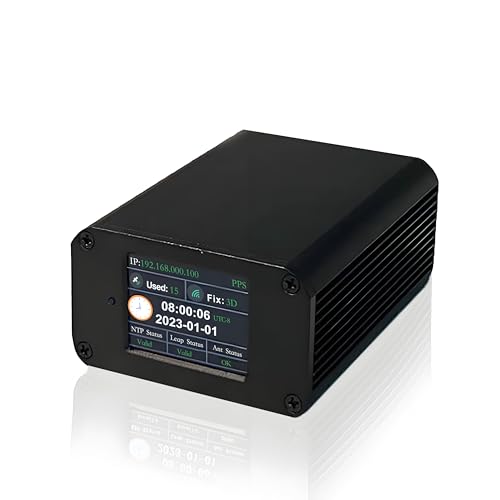
GPS-Synced NTP Server – High-Precision Network Time Protocol Device for Enterprise Data Centers – Reliable Global Satellite Time Synchronization Solutio(32ft Portable Antenna)
- GPS Satellite Time Sync: Global satellite signals for nanosecond accuracy
- High-Precision NTP Service: Supports SNTP and NTP protocols for precise timing
- Low Latency Performance: Ensures millisecond-level multi-device synchronization
As an affiliate, we earn on qualifying purchases.
As an affiliate, we earn on qualifying purchases.
Frequently Asked Questions
How Often Should Time Synchronization Be Reviewed or Updated?
You should review and update your synchronization frequency regularly, ideally weekly or monthly, depending on your system’s needs. Ensuring time accuracy is essential for reliable logs and audits. If your systems experience frequent changes or network issues, increase synchronization checks. Consistent reviews help prevent time drift, maintaining precise time stamps and data integrity. Adjust your schedule based on system stability, but never let the synchronization lag too long.
What Are Common Challenges Faced in Time Sync Implementation?
Oh, the delightful chaos of clock synchronization—like herding cats with tiny watches. Common challenges include jitter, network delays, and hardware discrepancies, all threatening timestamp consistency. You’ll find that achieving perfect clock sync is a quest filled with setbacks, as every device seems to have a mind of its own. These issues compromise log integrity and audit reliability, making consistent, accurate time stamps an ongoing battle worth fighting.
How Does Time Drift Affect Log Accuracy Over Time?
Time drift causes clock skew, which disrupts timestamp consistency in your logs over time. As clocks fall out of sync, log entries become inaccurate, making it harder to trace events precisely. This inconsistency hampers your ability to perform reliable audits and troubleshoot issues. To maintain accuracy, you need a solid time sync strategy that minimizes clock skew and guarantees timestamps stay consistent across all systems.
What Tools Are Best for Monitoring Time Sync Health?
You should use tools like NTP monitoring utilities or network management platforms to track time sync health. These tools check your NTP configurations and alert you if there’s drift or failure. Make certain you implement time server redundancy to maintain accuracy during outages or disruptions. Regular monitoring helps you catch issues early, keeps your logs consistent, and ensures compliance with audit requirements, making your time sync strategy robust.
How to Handle Time Zone Discrepancies in Logs?
To handle time zone discrepancies in logs, you should standardize log timestamp consistency by converting all timestamps to a single time zone, like UTC. Implement automated time zone conversions during log collection to guarantee uniformity. This approach minimizes confusion during analysis, making it easier to correlate events across systems. Consistent use of UTC for log timestamps helps maintain accurate records, simplifying troubleshooting and compliance efforts.
GPS-Synced NTP Server – High-Precision Network Time Protocol Device for Enterprise Data Centers – Reliable Global Satellite Time Synchronization Solutio(32ft Portable Antenna)
- GPS Satellite Time Sync: Global satellite signals for nanosecond accuracy
- High-Precision NTP Service: Supports SNTP and NTP protocols for precise timing
- Low Latency Performance: Ensures millisecond-level multi-device synchronization
As an affiliate, we earn on qualifying purchases.
As an affiliate, we earn on qualifying purchases.
Conclusion
In the end, a solid time sync strategy isn’t just a technical necessity—it’s the heartbeat of trustworthy logs and audits. Remember, without synchronized clocks, your data’s story becomes a tangled web of confusion, like trying to read a map in a fog. So, embrace the tools and practices we’ve discussed; let them be your compass. When your time is aligned, your logs tell a clear, truthful story—one that stands the test of scrutiny and time.

EASYERA 15'' Large Digital Atomic Wall Clock Battery Operated, Auto DST
- Radio-controlled atomic clock: Automatically syncs with WWVB signal
- Indoor climate monitor: Displays temperature and humidity levels
- Large 15-inch display: Features up to 4.3-inch jumbo digits
As an affiliate, we earn on qualifying purchases.
As an affiliate, we earn on qualifying purchases.
As an affiliate, we earn on qualifying purchases.