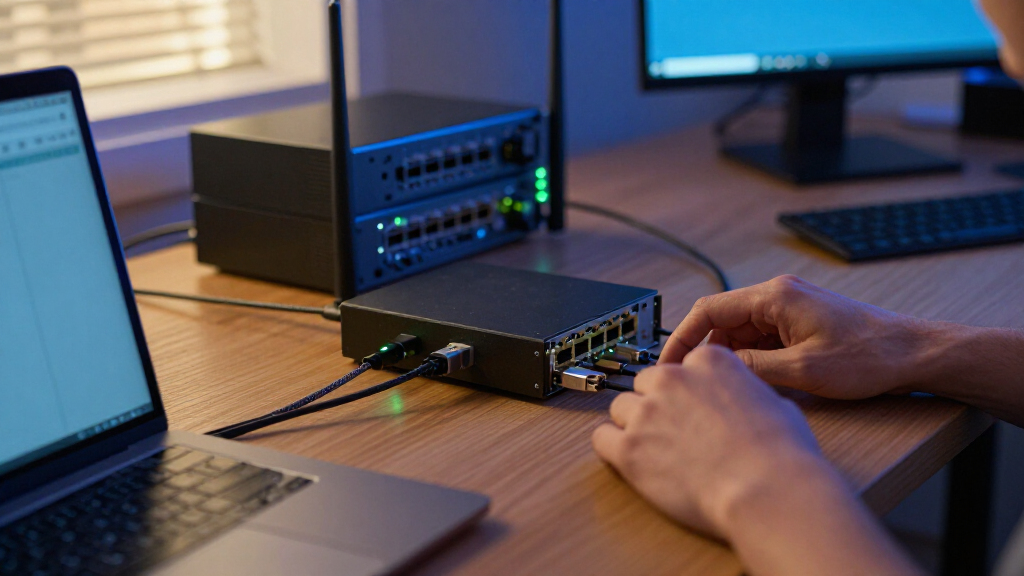

2.5GbE network adapters add a faster wired connection to a compatible computer, but the right choice depends on whether you need a PCIe card or a USB adapter. I rank the TP-Link TX201 as the best overall for a desktop PCIe upgrade, while the Plugable 2.5Gbps USB-A and USB-C Adapter stands out for flexible port compatibility and the SABRENT NT-25GA for a straightforward USB-C setup. PCIe cards suit desktops with an available slot; USB models are easier to move between computers but depend on a suitable USB port and may add cable clutter. Driver support, port type, and the rest of your network can matter as much as the adapter’s headline speed. Read on for the full breakdown and help matching an adapter to your equipment.

Get business pricing on networking and server gear
- Business-only prices and quantity discounts
- Tax-exempt purchasing
- Multiple users, one account, clear invoices
Key Takeaways
- The shortlist divides into two clear groups: PCIe cards such as the TP-Link TX201 and TRENDnet TEG-25GECTX suit desktops, while most of the roundup’s other options connect over USB.
- Dual-connector USB models offer wider device flexibility: Plugable’s USB-A and USB-C adapter can serve computers with either port type, while single-connector models call for a closer port check.
- USB-C is not a guarantee of full performance: The computer’s USB data interface, cable, and adapter compatibility all matter; a connector that fits may still be a poor match for the intended speed.
- PCIe and USB solve different problems: Internal cards avoid occupying a USB port and are suited to fixed desktop setups, while USB adapters are easier to move and install.
- A 2.5GbE adapter only helps when the rest of the path can keep up: A suitable router or switch, cabling, and destination device are needed to benefit beyond a 1GbE link.
| TRENDnet TEG-25GECTX 2.5GBase-T PCIe Network Adapter |  | Best for Windows Desktop Upgrades | Model: TEG-25GECTX | Interface: PCIe 2.0 or later | Ethernet speeds: 2.5Gbps, 1Gbps, 100Mbps | VIEW LATEST PRICE | See Our Full Breakdown |
| SABRENT USB-C to 2.5GbE Ethernet Adapter (NT-25GA) |  | Best for Cross-Platform USB-C Use | Model: NT-25GA | Connection: USB-C to RJ45 Ethernet | Maximum network speed: 2.5Gbps | VIEW LATEST PRICE | See Our Full Breakdown |
| Cable Matters USB to 2.5Gb Ethernet Adapter, USB-A to RJ45 Network Adapter |  | Best for USB-A Laptops | Interface: USB 3.0 Type-A to RJ45 | Maximum speed: 2.5Gbps | Backward-compatible Ethernet speeds: 10Mbps, 100Mbps, 1Gbps | VIEW LATEST PRICE | See Our Full Breakdown |
| TP-Link USB-C to 2.5 Gigabit Ethernet Adapter (UE302C) |  | Best Compact Travel Adapter | Model: UE302C | Connector: USB-C to RJ45 Ethernet | Maximum speed: 2.5Gbps | VIEW LATEST PRICE | See Our Full Breakdown |
| Vogzone 2.5GbE PCIe Network Card with Realtek RTL8125BG Controller |  | Best for Mixed OS and Virtualization Setups | Controller: Realtek RTL8125BG | Port: 1 x RJ45 | Data rates: 100MbE, 1GbE, 2.5GbE | VIEW LATEST PRICE | See Our Full Breakdown |
| ULANSeN 2.5Gb PCIe Ethernet Network Adapter with RTL8125B |  | Best for Desktop Upgrades | Model: RTL8125B | Interface: PCIe x1, x4, x8, or x16 | Network speeds: 2.5Gbps, 1Gbps, or 100Mbps | VIEW LATEST PRICE | See Our Full Breakdown |
| SABRENT USB-A to 2.5Gbps Ethernet Adapter (NT-UA25) |  | Best for a Compact USB-A Setup | Model: NT-UA25 | Interface: USB 3.0 Type-A | Ethernet speeds: 10/100/1000/2500 Mbps | VIEW LATEST PRICE | See Our Full Breakdown |
| Plugable 2.5Gbps USB-A and USB-C to Ethernet Adapter |  | Best for Durable Dual-Connector Flexibility | Model: ES-C2500B | Maximum network speed: 2.5Gbps | Connectivity: USB-A 3.0 and USB-C | VIEW LATEST PRICE | See Our Full Breakdown |
| StarTech.com 2.5GbE USB-A to Ethernet Adapter |  | Best for Network Feature Controls | Model: US2GA30 | Interface: USB 3.0/3.1 Type-A | Network port: 1 × RJ45 | VIEW LATEST PRICE | See Our Full Breakdown |
| Plugable 2.5Gbps USB-C and USB-A to Ethernet Adapter |  | Best for Broad Device Compatibility | Maximum Ethernet speed: 2.5Gbps | Connectors: USB-C and USB-A to RJ45 | USB requirement for full performance: USB 3.0 | VIEW LATEST PRICE | See Our Full Breakdown |
| UGREEN USB-C to 2.5Gb Ethernet Adapter | 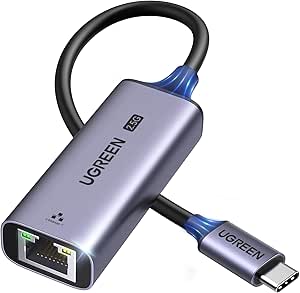 | Best for USB-C Devices and Android | Connector: USB-C to RJ45 | Maximum data rate: Up to 2.5 Gbps | Chip: Realtek RTL8156BG | VIEW LATEST PRICE | See Our Full Breakdown |
| TP-Link TX201 2.5 Gigabit PCIe Network Card | 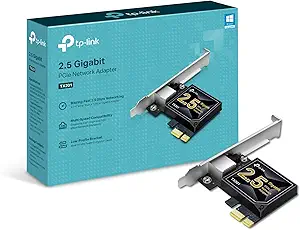 | Best for Desktop Upgrades | Interface: PCIe | Maximum network speed: Up to 2.5 Gbps | Supported data rates: 2.5 Gbps, 1 Gbps, 100 Mbps | VIEW LATEST PRICE | See Our Full Breakdown |
| WAVLINK USB-C to 2.5 Gbps Ethernet Adapter |  | Best for Mixed USB-C and USB-A Setups | Model: NWU330GCA | Connection: USB-C to USB-A and RJ45 Ethernet | Maximum Ethernet speed: 2.5 Gbps | VIEW LATEST PRICE | See Our Full Breakdown |
| Cable Matters USB-C to 2.5Gb Ethernet Adapter |  | Best for Thunderbolt and Broad OS Support | Model: 201485 | Interface: USB-C | Maximum network speed: Up to 2.5 Gbps | VIEW LATEST PRICE | See Our Full Breakdown |
| UGREEN USB 3.0 to 2.5Gb Ethernet Adapter | 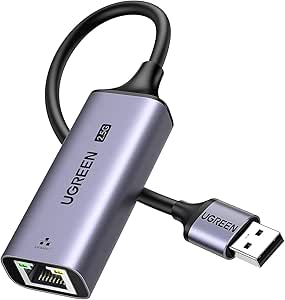 | Best for USB-A Computers | Interface: USB 3.0 Type-A to RJ45 | Maximum data rate: 2.5 Gbps | Chipset: Realtek RTL8156BG | VIEW LATEST PRICE | See Our Full Breakdown |
| 2.5GbE network adapter | Model | Interface | Warranty |
|---|---|---|---|
| TRENDnet TEG-25GECTX 2.5GBase- | TEG-25GECTX | PCIe 2.0 or later | 3 years |
| SABRENT USB-C to 2.5GbE Ethern | NT-25GA | — | 2 years |
| Cable Matters USB to 2.5Gb Eth | — | USB 3.0 Type-A to RJ45 | — |
| TP-Link USB-C to 2.5 Gigabit E | UE302C | — | — |
| Vogzone 2.5GbE PCIe Network Ca | — | PCIe 2.0 x1 | — |
| ULANSeN 2.5Gb PCIe Ethernet Ne | RTL8125B | PCIe x1, x4, x8, or x16 | 180 days |
| SABRENT USB-A to 2.5Gbps Ether | NT-UA25 | USB 3.0 Type-A | 1 year limited; 2 years with registration |
| Plugable 2.5Gbps USB-A and USB | ES-C2500B | — | — |
| StarTech.com 2.5GbE USB-A to E | US2GA30 | USB 3.0/3.1 Type-A | 2 years |
| Plugable 2.5Gbps USB-C and USB | — | — | 2 years |
| UGREEN USB-C to 2.5Gb Ethernet | — | — | — |
| TP-Link TX201 2.5 Gigabit PCIe | — | PCIe | 2 years |
| WAVLINK USB-C to 2.5 Gbps Ethe | NWU330GCA | — | 2 years |
| Cable Matters USB-C to 2.5Gb E | 201485 | USB-C | — |
| UGREEN USB 3.0 to 2.5Gb Ethern | — | USB 3.0 Type-A to RJ45 | — |
More Details on Our Top Picks
TRENDnet TEG-25GECTX 2.5GBase-T PCIe Network Adapter
The TRENDnet TEG-25GECTX is a straightforward choice for adding 2.5GbE to a Windows desktop with an available PCIe slot. Unlike USB adapters such as the SABRENT NT-25GA, it installs inside the computer, leaving external ports free and avoiding a dangling adapter. Its support for Cat5e cabling up to 100 m can also make an upgrade easier if you already have suitable wiring. Jumbo frames and 802.1Q VLAN tagging add useful options for managed networks and larger file transfers. The tradeoff is its stated Windows and Windows Server compatibility, which is narrower than the SABRENT’s cross-platform support. Standard and low-profile brackets help it fit different desktop cases, but it is not a portable solution for laptops.
Pros:- Adds a dedicated 2.5GbE RJ45 port through PCIe
- Works with Cat5e cable for links up to 100 m
- Includes standard and low-profile brackets for different desktop cases
- Supports jumbo frames up to 9KB and IEEE 802.1Q VLAN tagging
Cons:- Compatibility is listed for Windows and Windows Server, not a broad range of operating systems
- Requires an available PCIe slot and installation inside a desktop
- No USB connection for laptops or portable use
Best for: Windows desktop owners with an open PCIe slot who want a permanent 2.5GbE port and may need VLAN or jumbo-frame support.
Not ideal for: Mac, Linux, or laptop users who need broad operating-system support or an adapter they can carry between devices.
- Model:TEG-25GECTX
- Interface:PCIe 2.0 or later
- Ethernet speeds:2.5Gbps, 1Gbps, 100Mbps
- Maximum cable distance:100 m over Cat5e
- Jumbo frame support:Up to 9KB
- VLAN support:IEEE 802.1Q tagging
- Compatible operating systems:Windows, Windows Server
- Included brackets:Standard and low-profile
- Warranty:3 years
Our verdict“Choose the TRENDnet for a Windows desktop with a free PCIe slot, but pick a USB adapter such as the SABRENT NT-25GA for cross-platform portability.”
SABRENT USB-C to 2.5GbE Ethernet Adapter (NT-25GA)
The SABRENT NT-25GA is a versatile pick for people who move between Windows, macOS, ChromeOS, and Linux systems and want one USB-C adapter for wired networking. Its support for 2.5G, 1G, and 100M auto-negotiation lets it work with older network gear while providing room for a faster setup. Compared with the PCIe-based TRENDnet TEG-25GECTX, SABRENT is easier to share among devices and needs no desktop installation; the TRENDnet is the better fit for a permanent Windows workstation connection. Wake-on-LAN and PXE support add value in managed or remotely administered environments. Its key limitation is dependence on a sufficiently fast USB-C data port: a charge-only port, USB 2.0 path, or unsuitable converter can prevent full throughput. The aluminum housing is compact, but its two-year warranty is shorter than TRENDnet’s three-year coverage.
Pros:- Supports Windows, macOS, ChromeOS, and Linux
- Negotiates 2.5G, 1G, and 100M Ethernet connections
- Includes Wake-on-LAN, PXE boot support, and status LEDs
- Aluminum housing and compact USB-C connection suit portable setups
Cons:- Full speed depends on a USB-C data port rated for USB 3.0 or faster and compatible network equipment
- Older operating systems may require a driver, and power settings may need adjustment after long idle periods
- Two-year warranty is shorter than the TRENDnet TEG-25GECTX’s three-year warranty
Best for: Laptop and small-form-factor PC owners who use a USB-C data port and want one 2.5GbE adapter across several operating systems.
Not ideal for: Users with only USB-A or USB 2.0 ports, or buyers seeking an internal desktop card that stays installed.
- Model:NT-25GA
- Connection:USB-C to RJ45 Ethernet
- Maximum network speed:2.5Gbps
- Auto-negotiated speeds:2.5G, 1G, 100M
- Controller:Realtek RTL8156BG
- Required host port:USB-C data port with USB 3.0 / 3.2 Gen 1 (5Gbps) or faster
- Compatible operating systems:Windows, macOS, ChromeOS, Linux
- Features:Wake-on-LAN, PXE boot, status LEDs
- Warranty:2 years
Our verdict“Choose the SABRENT NT-25GA if you need a portable, multi-OS USB-C adapter with Wake-on-LAN and PXE support.”
Cable Matters USB to 2.5Gb Ethernet Adapter, USB-A to RJ45 Network Adapter
This Cable Matters USB-A adapter is aimed at computers that have a fast USB-A port but no convenient built-in 2.5GbE connection. Its Realtek RTL8156BG controller supports 2.5Gbps networking while retaining compatibility with 10/100/1000Mbps Ethernet, making it a practical bridge to newer switches or routers. Compared with the USB-C-based TP-Link UE302C, this model suits older laptops and desktops with USB-A ports; the TP-Link is the more natural fit for USB-C devices and adds a foldable travel design. Cable Matters pairs its adapter with an aluminum housing and braided cable, but the fixed USB-A format limits its usefulness as devices shift to USB-C. The provided information also flags incompatibility with Nintendo Switch, Wii, and TV devices, so this is best treated as a computer accessory rather than a universal network adapter.
Pros:- Adds up to 2.5Gbps Ethernet through USB-A
- Works with Windows, macOS, Linux, and ChromeOS
- Backward-compatible with 10/100/1000Mbps Ethernet
- Aluminum housing and braided cable are suited to regular handling
Cons:- USB-A-only connection excludes devices without a suitable USB-A port
- Not compatible with Nintendo Switch, Wii, or TV devices
- Older operating systems may require a driver update
Best for: Owners of Windows, macOS, Linux, or ChromeOS computers with a USB 3.0 Type-A port who want wired 2.5GbE.
Not ideal for: USB-C-only laptop users or people looking to connect consoles, televisions, or other unsupported devices.
- Interface:USB 3.0 Type-A to RJ45
- Maximum speed:2.5Gbps
- Backward-compatible Ethernet speeds:10Mbps, 100Mbps, 1Gbps
- Controller chipset:Realtek RTL8156BG
- Supported operating systems:Windows, macOS, Linux, ChromeOS
- Housing material:Aluminum
- Cable type:Braided RJ45 cable
- Unsupported devices:Nintendo Switch, Wii, TV devices
Our verdict“Pick Cable Matters over the USB-C-only TP-Link UE302C when your computer has USB-A but lacks a built-in 2.5GbE port.”
TP-Link USB-C to 2.5 Gigabit Ethernet Adapter (UE302C)
The TP-Link UE302C prioritizes a portable, low-fuss connection: it has a foldable design, aluminum body, and plug-and-play setup across a wide set of listed systems. Its support for USB-C and Thunderbolt 3/4 devices makes it a flexible match for newer laptops and tablets, including iPadOS and iOS devices. Compared with the SABRENT NT-25GA, TP-Link emphasizes travel convenience and broad device compatibility, while SABRENT specifies Wake-on-LAN, PXE boot, status LEDs, and a Realtek controller. The UE302C is a simpler choice if those management features are not needed. It still requires a compatible USB-C host and 2.5GbE network equipment to reach its maximum speed, and the supplied details do not list a cable length, chipset, or advanced network features. Buyers who need USB-A should choose a different adapter.
Pros:- Foldable design is suited to carrying with a laptop
- Supports USB-C and Thunderbolt 3/4 devices
- Lists compatibility with Windows, macOS, iPadOS, Chrome OS, Linux, and iOS
- Aluminum alloy body offers a durable, portable enclosure
Cons:- Requires a compatible USB-C host port
- Full 2.5Gbps speed depends on compatible network equipment
- Provided specifications do not identify a controller or advanced features such as PXE and Wake-on-LAN
Best for: Frequent travelers using USB-C or Thunderbolt 3/4 laptops, tablets, or phones who want a foldable wired-network adapter.
Not ideal for: People with USB-A-only devices or network administrators who specifically need documented PXE, Wake-on-LAN, or VLAN features.
- Model:UE302C
- Connector:USB-C to RJ45 Ethernet
- Maximum speed:2.5Gbps
- Device compatibility:USB-C and Thunderbolt 3/4 devices
- Supported operating systems:Windows, macOS, iPadOS, Chrome OS, Linux, iOS
- Material:Aluminum alloy
- Setup:Plug and play
- Design:Foldable
Our verdict“Choose the UE302C for a foldable, broadly compatible USB-C adapter, and choose the SABRENT NT-25GA if you need specified PXE or Wake-on-LAN support.”
Vogzone 2.5GbE PCIe Network Card with Realtek RTL8125BG Controller
The Vogzone PCIe card stands apart from the TRENDnet TEG-25GECTX by listing a wider range of operating systems and deployment features. Its Realtek RTL8125BG controller supports Windows, Linux distributions, DOS, macOS, OpenWrt, and selected ESXi versions, while PXE, WOL, VLAN, and DPDK support speak to more technical setups than a basic home desktop upgrade. A PCIe 2.0 x1 connection can fit into x1, x4, x8, or x16 slots, giving desktop builders flexibility when assigning a slot. The tradeoff is a clearly defined virtualization compatibility gap: it does not support ESXi 7.0 or 6.5, so users of those versions should avoid assuming compatibility from the broader list. It includes a low-profile bracket, but the supplied details do not state a warranty or cable-distance limit.
Pros:- Supports 100MbE, 1GbE, and 2.5GbE connections
- Lists compatibility with Windows, Linux, macOS, OpenWrt, DOS, and selected ESXi versions
- Includes PXE, DPDK, WOL, VLAN, and jumbo-frame support
- PCIe x1 card can fit x1, x4, x8, or x16 slots and includes a low-profile bracket
Cons:- Does not support ESXi 7.0 or ESXi 6.5
- Requires an available PCIe slot and is not suitable for portable laptop use
- Provided product details do not specify a warranty or maximum cable distance
Best for: Desktop builders and administrators who need 2.5GbE plus PXE, WOL, VLAN, or DPDK support across listed operating systems.
Not ideal for: VMware ESXi 7.0 or 6.5 users, laptop owners, or buyers who need a stated warranty and cable-distance specification.
- Controller:Realtek RTL8125BG
- Port:1 x RJ45
- Data rates:100MbE, 1GbE, 2.5GbE
- Interface:PCIe 2.0 x1
- Compatible PCIe slots:x1, x4, x8, x16
- Features:Jumbo frames, PXE, DPDK, WOL, VLAN
- Supported operating systems:Windows, Windows Server, Linux (RHEL, Ubuntu), DOS, macOS, OpenWrt, ESXi 6.7 and 8.0
- Included bracket:Low-profile
- ESXi exclusions:ESXi 7.0 and 6.5
Our verdict“Choose Vogzone over the Windows-focused TRENDnet if you need broader listed OS support and management features, provided your ESXi version is supported.”
ULANSeN 2.5Gb PCIe Ethernet Network Adapter with RTL8125B
The ULANSeN RTL8125B is the PCIe pick here for desktop owners who want a built-in wired connection rather than a dongle occupying a USB port. Its 2.5Gbps RJ45 port also negotiates down to 1Gbps or 100Mbps, so it can work with existing slower network gear while leaving room for a faster switch or router later. The included standard and low-profile brackets make it easier to fit different desktop cases; by contrast, the SABRENT NT-UA25 is a simpler route for a computer without an available PCIe slot. Wake on LAN, PXE boot, and VLAN tagging add useful network controls, but some systems need separate driver installation. I would skip it for ESXi 7.0 setups, which are not supported, and its 180-day warranty is shorter than the coverage listed for several USB options.
Pros:- Supports wired speeds up to 2.5Gbps and falls back to 1Gbps or 100Mbps
- Includes both standard and low-profile brackets for different desktop cases
- Offers Wake on LAN, PXE boot, and VLAN tagging
- Lists compatibility with Windows, Linux, and Mac OS
Cons:- Some systems require a separate driver download
- Does not support ESXi 7.0
- The 180-day warranty is limited compared with the stated coverage on several USB adapters
Best for: Desktop owners with an available PCIe slot who want a permanent 2.5GbE port, flexible bracket height, and features such as PXE boot or VLAN tagging.
Not ideal for: ESXi 7.0 users, laptop owners, or anyone who wants to avoid opening a desktop and installing drivers.
- Model:RTL8125B
- Interface:PCIe x1, x4, x8, or x16
- Network speeds:2.5Gbps, 1Gbps, or 100Mbps
- Network connector:RJ45
- Operating systems:Windows 11/10/8.1/8/7, Linux, Mac OS
- Additional features:Wake on LAN, PXE boot, VLAN tagging
- Brackets:Standard and low-profile
- Warranty:180 days
Our verdict“Choose the ULANSeN for a desktop PCIe installation with flexible bracket fit, but not for ESXi 7.0 or a driver-free setup.”
SABRENT USB-A to 2.5Gbps Ethernet Adapter (NT-UA25)
The SABRENT NT-UA25 is a compact way to add 2.5GbE to a computer that already has a suitable USB-A port. Its aluminum housing and integrated cable keep the setup self-contained, while the USB-powered design avoids a separate power supply. It supports Windows, macOS, and Linux, plus Wake-on-LAN and PXE boot. Compared with the dual-connector Plugable ES-C2500B, though, this model is less adaptable when moving between USB-A and USB-C-only devices. Full 2.5Gbps also depends on the rest of the link: the router or switch must support that speed, and the Ethernet cable must be Cat5e or better. That makes this a practical laptop or desktop add-on, not a way to speed up a network whose equipment still tops out at 1Gbps.
Pros:- Adds Ethernet speeds up to 2.5Gbps through USB-A
- Aluminum housing and integrated cable make for a compact, self-contained setup
- Supports 10/100/1000/2500 Mbps connections
- Includes Wake-on-LAN and PXE boot support
Cons:- USB-A connection is unsuitable for devices with only USB-C ports
- Full 2.5Gbps requires a compatible router or switch and Cat5e-or-better cable
Best for: Windows, macOS, or Linux users with a USB-A port who want a small, bus-powered adapter for a 2.5GbE-capable network.
Not ideal for: Owners of USB-C-only devices or buyers whose router, switch, or cabling cannot support a 2.5Gbps link.
- Model:NT-UA25
- Interface:USB 3.0 Type-A
- Ethernet speeds:10/100/1000/2500 Mbps
- Chipset:Realtek RTL8156BG
- Supported operating systems:Windows, macOS, Linux
- Housing:Aluminum
- Dimensions:2.87 × 0.98 × 0.65 in
- Warranty:1 year limited; 2 years with registration
Our verdict“Pick the SABRENT NT-UA25 for a compact USB-A adapter, but choose a dual-connector model such as the Plugable ES-C2500B if you need USB-C flexibility.”
Plugable 2.5Gbps USB-A and USB-C to Ethernet Adapter
The Plugable ES-C2500B suits buyers who move between USB-A and USB-C hosts and want one adapter for both. Its USB-A and USB-C connectivity avoids the port limitation of the SABRENT NT-UA25, while the aluminum shell and braided cable are designed for a more durable portable setup. A Realtek RTL8156BG chipset provides the 2.5Gbps link, but the adapter cannot overcome limits elsewhere in the chain: Plugable specifies a USB 3.0-or-higher port, a 2.5Gbps-capable network, and Cat6-or-better Ethernet cable for maximum speed. That cable requirement is stricter than the Cat5e guidance listed for the older Plugable USB-C/USB-A model B084L4JL9K. This newer option makes sense for buyers who value its reinforced construction, but less so if existing Cat5e cabling is a priority.
Pros:- Provides both USB-A 3.0 and USB-C connections
- Supports network speeds up to 2.5Gbps
- Aluminum alloy shell helps dissipate heat
- Braided nylon cable and reinforced connector are designed for durability
Cons:- Maximum speed calls for Cat6-or-better cabling and compatible 2.5Gbps network equipment
- Requires a USB 3.0-or-higher host port for full performance
Best for: People who use both USB-A and USB-C laptops or tablets and want a portable adapter with a braided cable and aluminum shell.
Not ideal for: Buyers relying on Cat5e cabling for a full-speed link, or anyone whose host lacks USB 3.0 or faster.
- Model:ES-C2500B
- Maximum network speed:2.5Gbps
- Connectivity:USB-A 3.0 and USB-C
- Chipset:Realtek RTL8156BG
- Shell:Aluminum alloy
- Cable:Braided nylon
- Compatibility:Thunderbolt 3/4, MacBook, iPad, Windows
Our verdict“Choose the ES-C2500B for durable USB-A/USB-C flexibility, but favor the Plugable B084L4JL9K if Cat5e cable compatibility is a deciding factor.”
StarTech.com 2.5GbE USB-A to Ethernet Adapter
The StarTech.com US2GA30 stands apart from the simpler USB adapters with network-focused features including VLAN support, Wake-on-LAN, auto-negotiation, and 16K jumbo frames. That makes it a better fit for users managing segmented networks or large local transfers than a basic plug-in adapter such as the SABRENT NT-UA25. It is USB-powered and supports 2.5Gbps, 1Gbps, and 100Mbps links, with stated compatibility across Windows, Linux, and selected macOS releases. Its clearest limitation is the USB-A-only connection, which rules out direct use with USB-C-only devices. The listed macOS range ends at 10.14, so newer Mac users should check compatibility before buying rather than assume the broader macOS support claimed by other options applies here.
Pros:- Supports VLAN, Wake-on-LAN, auto-negotiation, and 16K jumbo frames
- Offers 2.5Gbps, 1Gbps, and 100Mbps link speeds
- USB-powered design needs no separate power adapter
- Works with Cat5e cabling and supports Windows, Linux, and listed macOS versions
Cons:- Requires a USB-A port
- Listed macOS compatibility only extends through version 10.14
Best for: IT users and technically minded home-network owners with USB-A computers who need VLAN, Wake-on-LAN, or jumbo-frame support.
Not ideal for: USB-C-only device owners and Mac users on versions newer than the listed macOS 10.11–10.14 range who cannot verify support.
- Model:US2GA30
- Interface:USB 3.0/3.1 Type-A
- Network port:1 × RJ45
- Network speeds:2.5Gbps, 1Gbps, 100Mbps
- Chipset:Realtek RTL8156
- Features:NBASE-T, 2.5GBASE-T, auto-negotiation, 16K jumbo frames, Wake-on-LAN, VLAN
- Compatibility:Windows 7/8.1/10, Windows Server 2008 R2/2012 R2/2016/2019, Linux kernel 4.19+, macOS 10.11–10.14
- Warranty:2 years
Our verdict“Choose the StarTech.com adapter for its network controls and USB-A systems, but verify Mac compatibility if you use a newer macOS release.”
Plugable 2.5Gbps USB-C and USB-A to Ethernet Adapter
The Plugable B084L4JL9K is the lineup’s more compatibility-focused choice: it connects through USB-C or USB-A and lists support for Windows, macOS, ChromeOS, and select iPhones running iOS 17 or later. That range gives it an advantage over the StarTech.com US2GA30, whose listed macOS support stops at 10.14, and over USB-A-only adapters such as the SABRENT NT-UA25 when the host has only USB-C. It also works with Cat5e or better cabling, which can suit an existing wired setup without the Cat6 requirement specified for the newer Plugable ES-C2500B. The tradeoff is that 2.5Gbps still depends on the host’s USB 3.0 port and compatible network equipment; listed compatibility does not make every device or link run at the maximum rate.
Pros:- Provides both USB-C and USB-A connections to an RJ45 network
- Supports Ethernet speeds up to 2.5Gbps with compatible equipment
- Works with Cat5e or better Ethernet cabling
- Lists compatibility with Windows, macOS, ChromeOS, and select iPhones on iOS 17 or later
Cons:- Full performance requires USB 3.0 and compatible network equipment
- Actual speed depends on the host device, cable, network, and internet service
Best for: Households or small teams sharing one adapter across USB-C and USB-A computers, Chromebooks, Macs, and supported iPhones.
Not ideal for: Buyers who need a built-in Ethernet port, a PCIe desktop card, or 2.5Gbps performance from a USB port below USB 3.0.
- Maximum Ethernet speed:2.5Gbps
- Connectors:USB-C and USB-A to RJ45
- USB requirement for full performance:USB 3.0
- Cable compatibility:Cat5e or better
- Operating systems:Windows, macOS, ChromeOS, and select iPhones with iOS 17 or later
- Warranty:2 years
- Support:Lifetime
Our verdict“Pick the Plugable B084L4JL9K if you need one adapter across varied USB-A and USB-C devices and value Cat5e compatibility.”
UGREEN USB-C to 2.5Gb Ethernet Adapter
For a buyer who wants one small adapter for a USB-C laptop, tablet, or supported phone, this UGREEN model stands out for its 2.5GbE link and support for Android 13 and Windows 11. Its aluminum housing and reinforced ports give it a sturdier feel than a bare-plastic dongle, while status lights make it easier to check the connection at a glance. Compared with the WAVLINK adapter, it has a clearer fit for Android smartphones, but WAVLINK offers USB-A flexibility and lists broader operating-system support. The tradeoff here is its narrower stated OS compatibility: buyers using macOS, Linux, or older Windows versions should check their device support before choosing it. Reaching full speed also requires compatible 2.5GbE networking equipment.
Pros:- Supports Ethernet speeds up to 2.5 Gbps
- Compatible with USB-C and Thunderbolt 3/4 devices
- Aluminum housing with reinforced ports
- Indicator lights show transmission status
Cons:- Listed minimum OS versions are Windows 11 and Android 13
- Full 2.5GbE speed requires compatible network equipment
Best for: Windows 11 laptop and Android 13 device owners who want a compact USB-C adapter for wired networking.
Not ideal for: Mac, Linux, or older-OS users who need clearly listed compatibility across those systems.
- Connector:USB-C to RJ45
- Maximum data rate:Up to 2.5 Gbps
- Chip:Realtek RTL8156BG
- Hardware interface:USB 3.0 Type-C
- Housing:Aluminum
- Compatible operating systems:Android, Windows
- Minimum OS versions:Android 13.0, Windows 11
- Dimensions:2.4 × 1 × 0.6 in
Our verdict“Choose this UGREEN adapter for a supported USB-C Windows or Android device, but pick a broader-OS option if your setup includes macOS or Linux.”
TP-Link TX201 2.5 Gigabit PCIe Network Card
The TX201 is the desktop-focused pick in this group: it installs in a PCIe slot rather than occupying a USB port, making it a natural fit for a PC that will stay in place. Support for 2.5 Gbps, 1 Gbps, and 100 Mbps lets it work with older network gear while leaving room for a faster switch or router later. TP-Link also includes standard and low-profile brackets, so it can fit more desktop cases than a fixed-bracket card. Wake-on-LAN and QoS add useful network-management options. Compared with the TRENDnet TEG-25GECTX PCIe adapter, the TX201 makes its Linux and Windows support and bracket options explicit in the supplied details. Its main limitation is physical: unlike the USB adapters here, it cannot serve a laptop and needs an available desktop expansion slot.
Pros:- Adds Ethernet speeds up to 2.5 Gbps
- Falls back to 1 Gbps and 100 Mbps networks
- Includes standard and low-profile brackets
- Supports Wake-on-LAN and QoS
Cons:- Requires an available PCIe slot in a desktop PC
- Cannot be moved between computers as easily as a USB adapter
Best for: Desktop PC owners upgrading a workstation or home server who have an open PCIe slot and want support for multiple link speeds.
Not ideal for: Laptop users or desktop owners without an available PCIe slot, since this is an internal card rather than a portable adapter.
- Interface:PCIe
- Maximum network speed:Up to 2.5 Gbps
- Supported data rates:2.5 Gbps, 1 Gbps, 100 Mbps
- Operating systems:Windows 11/10/8.1/8/7, Windows Server 2022/2019/2016, Linux
- Features:Wake-on-LAN, QoS
- Included brackets:Standard and low-profile
- Warranty:2 years
Our verdict“Choose the TX201 for a permanent desktop upgrade with flexible case fit; pick a USB adapter if portability matters.”
WAVLINK USB-C to 2.5 Gbps Ethernet Adapter
WAVLINK’s strongest differentiator is its USB-C-to-USB-A flexibility, which gives this adapter a broader role across computers with different port types than the UGREEN USB-C model. It supports up to 2.5 Gbps and falls back to 10, 100, or 1,000 Mbps Ethernet, so it can work with older network equipment as well as a faster LAN. The ventilated aluminum shell and LED indicators add practical cues for a compact adapter, while its listed support for Windows, macOS, iPadOS, Linux, and Chrome OS covers a wider mix of systems than UGREEN’s stated Windows and Android support. The tradeoff is setup: some systems may need drivers, and WAVLINK says it is not compatible with smartphones. That makes it less suitable for phone use than the Android-compatible UGREEN.
Pros:- Supports Ethernet speeds up to 2.5 Gbps
- Connects USB-C or USB-A devices
- Lists compatibility with Windows, macOS, iPadOS, Linux, and Chrome OS
- Aluminum shell includes ventilation holes and LED indicators
Cons:- Not compatible with smartphones
- Some systems may require driver installation
Best for: Households or small offices with USB-C and USB-A computers running a mix of Windows, macOS, Linux, Chrome OS, or iPadOS.
Not ideal for: Smartphone owners seeking wired networking, or buyers who need a guaranteed driver-free setup on every supported system.
- Model:NWU330GCA
- Connection:USB-C to USB-A and RJ45 Ethernet
- Maximum Ethernet speed:2.5 Gbps
- Ethernet compatibility:10/100/1000 Mbps
- Materials:Aluminum shell
- Compatible operating systems:Windows, macOS, iPadOS, Linux, Chrome OS
- Warranty:2 years
- Included items:Adapter, quick start guide, driver CD
Our verdict“Choose WAVLINK when one adapter must serve USB-C and USB-A computers across several operating systems, but not for smartphone use.”
Cable Matters USB-C to 2.5Gb Ethernet Adapter
This Cable Matters adapter is a practical match for buyers whose computers span USB-C and Thunderbolt generations: its listed compatibility includes Thunderbolt 3, 4, and 5, along with Windows, macOS, Linux, Chrome OS, and iOS. A braided pigtail offers a flexible connection between the adapter body and host port, while the aluminum housing keeps the design compact. Compared with the UGREEN USB-C model, it lists a wider range of computer operating systems and newer Thunderbolt compatibility, but it gives up Android support. Setup is plug-and-play on most systems, though some may need a Realtek driver for best performance. That caveat matters for buyers who want a completely hands-off install; the stated USB-C and Thunderbolt compatibility also does not remove the need to check OS and device support.
Pros:- Supports network speeds up to 2.5 Gbps
- Compatible with USB-C and Thunderbolt 3/4/5 devices
- Braided pigtail and aluminum housing
- Broad listed operating-system support
Cons:- Does not support Android devices
- Some systems may require a Realtek driver for best performance
Best for: Owners of USB-C or Thunderbolt laptops and tablets who want a compact 2.5GbE adapter across Windows, macOS, Linux, Chrome OS, or iOS.
Not ideal for: Android users or buyers who need an adapter with no possibility of installing a driver.
- Model:201485
- Interface:USB-C
- Maximum network speed:Up to 2.5 Gbps
- Compatible operating systems:Linux, Windows, macOS, Chrome OS, iOS
- Device compatibility:USB-C and Thunderbolt 3/4/5 devices
- Housing:Aluminum
- Cable:Braided pigtail
- Weight:0.03 kg
Our verdict“Choose Cable Matters for a broad USB-C and Thunderbolt computer setup, but select the UGREEN USB-C model if Android support is required.”
UGREEN USB 3.0 to 2.5Gb Ethernet Adapter
This UGREEN model is the straightforward choice for a computer with a free USB-A port: it adds an RJ45 connection rated up to 2.5 Gbps without requiring an internal PCIe slot. Its aluminum housing, reinforced ports, and indicator lights mirror the practical build features of the USB-C UGREEN adapter, but the connector changes who can use it. Choose this one for a desktop or older laptop with USB 3.0 Type-A; choose the USB-C version for newer laptops, tablets, or supported Android devices. The listing names Windows, macOS, ChromeOS, and Linux, giving it broader stated OS coverage than the USB-C UGREEN. Compatibility is not universal, though: certain Nintendo Switch, TV, Synology NAS, and Wii devices are excluded, and full speed depends on compatible 2.5GbE network equipment.
Pros:- Supports data rates up to 2.5 Gbps
- Works with listed Windows, macOS, ChromeOS, and Linux systems
- Aluminum housing with reinforced ports
- Indicator lights show transmission status
Cons:- Requires compatible 2.5GbE equipment to reach its maximum speed
- Not compatible with some Nintendo Switch, TV, Synology NAS, and Wii devices
Best for: Owners of Windows, macOS, ChromeOS, or Linux computers with a USB 3.0 Type-A port who want wired networking without opening the computer.
Not ideal for: People with USB-C-only devices or buyers planning to connect one of the listed unsupported Nintendo Switch, TV, Synology NAS, or Wii devices.
- Interface:USB 3.0 Type-A to RJ45
- Maximum data rate:2.5 Gbps
- Chipset:Realtek RTL8156BG
- Compatible operating systems:ChromeOS, Linux, macOS, Windows
- Housing:Aluminum
- Dimensions:2.45 × 1 × 0.6 in
- Weight:60 g
- Color:Grey
Our verdict“Choose this UGREEN adapter for a USB-A computer with broad desktop OS support, and choose its USB-C sibling for newer port layouts.”

How We Picked
I compared these 15 adapters around the practical questions that shape a buying decision: whether each is a PCIe or USB device, which host connector it requires, how easy it is to add to a desktop or laptop, and how much flexibility it offers across computers. I also weighed the value of a familiar, straightforward setup against the extra versatility offered by adapters with both USB-A and USB-C connectivity. Because product-level performance can depend on the host system and network, I did not treat a 2.5GbE label alone as proof of a faster real-world connection.
The ranking gives priority to options with a clear fit for common buyer needs, then separates them by installation and connection flexibility. The TP-Link TX201 leads for a permanent desktop upgrade; Plugable’s dual-connector model earns a strong place for mixed-port computers; and USB-C and USB-A single-port choices follow for buyers who already know their host connection. Other PCIe cards remain relevant for desktop shoppers who want an internal option, while the many similar USB adapters are distinguished by connector type and intended setup rather than claims that their core job is different.
Factors to Consider When Choosing 2.5GbE Network Adapters
Before choosing among these adapters, check the whole connection path rather than shopping by the 2.5GbE label alone. The best fit depends on your computer’s ports or expansion slots, your network gear, and whether you value a permanent installation or an adapter you can carry between devices.
Match the adapter type to the computer
A PCIe card is generally the cleaner choice for a desktop that has an available compatible slot and room for installation. It remains attached to that computer, so it does not occupy a USB port or hang from a cable. USB adapters make more sense for laptops, compact PCs, and anyone who may move the adapter between systems. Before buying an internal card, check the case clearance and slot availability rather than assuming an open-looking space is usable. For USB, confirm the computer has the required USB-A or USB-C port and that its data capability suits the adapter. Choosing the wrong connection type can turn a simple speed upgrade into a return or a new-hardware purchase.
Check the USB data path, not just the connector
USB-C describes the shape of a plug, not the data speed available from the computer. A USB-C adapter connected through a slower port, hub, dock, or cable may not deliver the connection you expect. The same principle applies to USB-A models: port generations and system configuration affect the available bandwidth. If you plan to use a hub, check its specifications and the other devices sharing its connection. A direct connection to the computer is often the simplest way to rule out a bottleneck. For a laptop with only one suitable port, a dual-connector model can add flexibility, but it does not remove the need to verify that port’s capabilities.
Check the whole network for 2.5GbE support
An adapter can negotiate a faster link only if the other end of the connection supports it. Check the Ethernet ports on your router, switch, or directly connected device; many home networks still have 1GbE ports. Also consider the network path between the devices you actually use, since a faster adapter cannot make a slower link elsewhere run faster. Existing Ethernet cabling often works at these speeds over typical home distances, but cable condition, length, and installation quality can affect link stability. A sensible upgrade plan starts with identifying where data travels and which link is currently the limit. Buying an adapter before checking your network hardware can leave you with a 2.5GbE-capable computer connected at 1GbE.
Confirm operating-system and driver compatibility
Driver support can shape setup as much as the physical connection, especially on an older operating system or a less common computer. Read the product’s current compatibility notes for your exact system rather than assuming that every adapter works identically across Windows, macOS, and Linux. PCIe cards may call for a driver installation, while USB models can still require system-specific support. If the computer is managed by an employer or school, you may not have permission to install drivers or change network settings. Check whether the manufacturer provides current downloads and setup instructions before choosing. This step is more useful than relying on a chipset name alone, since support can vary by product revision and software version.
Decide whether portability is worth the extra clutter
A USB adapter is easy to move, but that convenience means an extra device and cable to carry, connect, and store. A small adapter may suit a travel laptop, while a permanently connected desktop may benefit more from an internal card. If you work across computers with different ports, a model supporting both USB-A and USB-C can reduce the chance of arriving without a usable connection. That flexibility can matter more than choosing the smallest body or the fewest accessories. On a desk, cable strain and the adapter’s placement may affect daily use, so allow room for it rather than letting it hang unsupported. Think about where and how often you will connect it before paying for portability you may rarely use.
Pay for the capability your setup can use
A 2.5GbE adapter is most useful when faster local file transfers, a compatible NAS, or a faster-than-gigabit internet connection are part of your setup. For ordinary browsing on a 1GbE network, it may not change everyday performance. Buyers who want a fixed desktop connection can prioritize a PCIe card and avoid spending extra for portability. Laptop owners who share an adapter across machines may get more value from USB flexibility than from an internal-style installation. Before moving beyond a basic single-port model, identify a real need for features such as a second host connector or more adaptable placement. This keeps the purchase tied to a usable network upgrade rather than a specification that the rest of the system cannot exploit.
Frequently Asked Questions
Will a 2.5GbE adapter make my internet faster?
Only if your internet plan, modem or router, and the connection between them can exceed 1Gbps. If any part of that path tops out at 1GbE, the adapter will not raise the internet speed past that limit. It may still help with faster transfers to a compatible local device, such as a NAS, when the relevant network links also support 2.5GbE. Check the speed of the Ethernet port you plan to use before buying. The adapter upgrades one connection, not the entire network.
Should I choose a PCIe card or a USB adapter?
Choose PCIe for a desktop with a compatible open slot when you want a fixed connection that does not use a USB port. Choose USB for laptops, compact computers, or setups where you want to move the adapter between devices. A USB model is simpler to add physically, but its performance depends on the host port and any hub or dock in the path. A PCIe card requires opening the computer and checking fit and slot availability. Your computer type and willingness to install hardware should decide this before brand or appearance.
Can I use a USB-C 2.5GbE adapter with any USB-C port?
Not necessarily. USB-C is a connector shape, and the port’s data capabilities depend on the computer and its implementation. A port that provides charging or display output is not automatically suited to every networking adapter’s bandwidth needs. Check the adapter’s compatibility requirements against the computer’s specifications, and include any dock, hub, or cable in that check. When performance matters, testing the adapter directly in the computer’s port removes one potential bottleneck.
Do I need to replace my Ethernet cables for 2.5GbE?
Not automatically; existing Ethernet cabling may support a 2.5GbE link, depending on its condition, length, and installation. If the connection negotiates at only 1GbE or drops intermittently, the cable and any wall jacks or patch panels are worth checking. The router or switch port must also support 2.5GbE, since a suitable cable cannot upgrade a 1GbE port. Start by checking the negotiated link speed and replacing or testing one cable at a time. This helps isolate a cabling issue without replacing parts that are already working.
Is a dual USB-A and USB-C adapter worth choosing over a single-connector model?
It can be worthwhile if you regularly connect to computers with different port types or want one adapter for more than one device. A single-connector model may be the simpler fit when you know exactly which port you will use and do not need that flexibility. Dual connectivity does not guarantee better network performance; the computer’s USB data path still sets the practical limit. Check how the adapter connects and whether using it leaves the ports you need for other devices. Choose versatility when it solves a real compatibility problem, not just because it sounds like a higher specification.
Conclusion
For a fixed desktop upgrade, I recommend the TP-Link TX201 as the best overall because its PCIe format suits a permanent internal connection. The best value is a basic USB adapter that matches a port your computer already supports; among the listed options, the SABRENT NT-UA25 is a sensible USB-A direction, while the TP-Link UE302C fits a USB-C setup. For a more versatile, premium-style pick, choose the Plugable dual USB-A and USB-C adapter if you share one adapter across different computers. Beginners should favor the connector that clearly matches their computer and verify software compatibility before ordering; a straightforward USB model can be easier than installing a PCIe card. For a desktop with an available slot, compare the TX201 with the TRENDnet TEG-25GECTX; for a laptop, focus on USB-A or USB-C fit, and confirm that the router or switch supports 2.5GbE before expecting a faster link.
Halloween Picks
halloween
As an affiliate, we earn on qualifying purchases.