If you’re setting up a quiet office environment, a fanless managed switch can provide reliable network performance without added noise. The TP-Link Omada 5 Port 2.5G Switch stands out as the best overall due to its robust features and silent operation. For more budget-conscious options, the NETGEAR GS316PP offers PoE capabilities at a competitive price, while the Zyxel 12 Port Multi-Gigabit Switch caters to users needing higher port-density. The main tradeoffs in this category involve balancing port count, management features, and noise levels. Keep reading for a detailed breakdown to find the perfect fit for your office setup.

Get business pricing on networking and server gear
- Business-only prices and quantity discounts
- Tax-exempt purchasing
- Multiple users, one account, clear invoices
Key Takeaways
- Higher port counts typically mean more versatility but can lead to increased size and complexity.
- Managed switches with VLAN and loop prevention features help optimize network performance and security in office environments.
- Fanless design is consistent across top picks, but some models offer PoE for powering devices, which adds cost but increases functionality.
- Durability and build quality vary; metal cases tend to last longer and dissipate heat better, which is important for long-term reliability.
- Ease of setup and management interfaces are a common differentiator, especially for users new to network management.
| TP-Link Omada 5 Port 2.5G Switch, Managed, VLAN, Fanless, Cloud Managed (ES206X-M2) |  | Best Overall for Small Offices Needing Quiet, Managed Network Control | Number of Ports: 5 | Port Types: RJ45, SFP+ | Data Transfer Rate: 15 gigabits per second | VIEW ON AMAZON | See Our Full Breakdown |
| 8 Port 2.5Gb Web Managed Ethernet Network Switch with 8 x 2.5 Gigabit Ports, 1 x 10G SFP+ Port, Fanless Metal Design |  | Best for Growing Small Networks Needing High-Speed, Quiet Management | Number of Ports: 8 | Compatible Devices: Camera, Desktop, Gaming Console, Laptop, Printer | Upper Temperature Rating: 50 °C | VIEW ON AMAZON | See Our Full Breakdown |
| TP-Link 16 Port Gigabit Easy Managed Switch, VLAN, Auto Loop Prevention, IGMP Snooping, Fanless, Managed by Omada, Durable Metal with Shielded Ports | 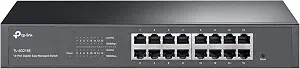 | Best for Small to Medium Networks Requiring Advanced Management & Silence | Number of Ports: 16 | Compatible Devices: Desktop, Laptop, Printer | Upper Temperature Rating: 40 °C | VIEW ON AMAZON | See Our Full Breakdown |
| NETGEAR 16 Port PoE+ Gigabit Switch – Unmanaged Ethernet Switch (GS316PP) |  | Best for Power-Driven Devices in Quiet, Unmanaged Setups | Number of Ports: 16 | Port Speed: 1.0Gbps | PoE+ Support: Yes | VIEW ON AMAZON | See Our Full Breakdown |
| NETGEAR 8-Port Gigabit Ethernet Easy Smart Managed Switch (GS308E) |  | Best for Basic Managed Networking in Small Offices or Homes | Number of Ports: 8 | Port Speed: Gigabit Ethernet (1Gbps) | Management: Web GUI | VIEW ON AMAZON | See Our Full Breakdown |
| 8 Port Gigabit PoE Switch with 2 Gigabit Uplink, 120W Built-in Power, Managed, Fanless, Desktop/Wall Mount |  | Best Overall for Small Business and Power-Driven Networks | Number of Ports: 8 | PoE Power: 120W total, 30W per port | Uplink Ports: 2 Gigabit | VIEW ON AMAZON | See Our Full Breakdown |
| TP-Link 5 Port Gigabit Managed Switch with VLAN, Loop Prevention, IGMP Snooping, and Metal Shielded Ports |  | Best for Compact, Centralized Management in Small Networks | Ports: 5 Gigabit | Management: Omada SDN Controller and Omada App | Features: VLAN, Loop Prevention, IGMP Snooping, QoS | VIEW ON AMAZON | See Our Full Breakdown |
| TP-Link 8 Port Gigabit Managed Switch with VLAN, Loop Prevention, IGMP Snooping, and Metal Durability |  | Best for Larger Small Networks Needing Robust Management | Ports: 8 Gigabit | Management: Omada SDN Controller and Omada App | Features: VLAN, Loop Prevention, IGMP Snooping, QoS | VIEW ON AMAZON | See Our Full Breakdown |
| Zyxel 12 Port Network Switch | 2.5Gb Multi-Gigabit, Web Managed, Fanless, Desktop |  | Best for High-Speed, Quiet Home or Office Networks | Ports: 8x 1G, 2x 2.5G, 2x 10G SFP+ | Switching Capacity: 66 Gbps | Forwarding Rate: 49 Mpps | VIEW ON AMAZON | See Our Full Breakdown |
| fanless managed switch for a quiet office | Number of Ports | Management |
|---|---|---|
| TP-Link Omada 5 Port 2.5G Swit | 5 | — |
| 8 Port 2.5Gb Web Managed Ether | 8 | — |
| TP-Link 16 Port Gigabit Easy M | 16 | — |
| NETGEAR 16 Port PoE+ Gigabit S | 16 | — |
| NETGEAR 8-Port Gigabit Etherne | 8 | Web GUI |
| 8 Port Gigabit PoE Switch with | 8 | Managed with web, software, and mobile app |
| TP-Link 5 Port Gigabit Managed | — | Omada SDN Controller and Omada App |
| TP-Link 8 Port Gigabit Managed | — | Omada SDN Controller and Omada App |
| Zyxel 12 Port Network Switch | | — | Web-based interface |
More Details on Our Top Picks
TP-Link Omada 5 Port 2.5G Switch, Managed, VLAN, Fanless, Cloud Managed (ES206X-M2)
This compact switch stands out for offering 2.5 Gbps ports and cloud management in a fanless design, making it ideal for small offices that prioritize silence without sacrificing speed. Compared to the NETGEAR GS308E, it provides managed features that support VLANs and advanced control, whereas the GS308E is unmanaged and simpler to set up. The tradeoff here is that the ES206X-M2’s limited port count may restrict growth, and it requires some network knowledge for configuration. Its durable metal case and wall-mount options add flexibility, but it lacks PoE support, which could matter for some setups. This switch makes the most sense for small business environments where quiet operation and centralized management are priorities.
Pros:- High-speed 2.5 Gbps ports for rapid data transfer
- Fanless design ensures silent, unobtrusive operation
- Supports centralized cloud management via Omada app or web
Cons:- Limited to only 5 ports, restricting scalability
- No PoE support, limiting device powering options
Best for: Small businesses or home offices seeking managed, cloud-controlled network with silent operation
Not ideal for: Larger networks or users needing PoE support or more than five ports
- Number of Ports:5
- Port Types:RJ45, SFP+
- Data Transfer Rate:15 gigabits per second
- Platform:No
- Operating System:Switch
- Switch Type:Managed, Fixed, PoE
Our verdict“This switch is best for small office setups that need managed, quiet, high-speed connectivity without expanding beyond five ports.”
8 Port 2.5Gb Web Managed Ethernet Network Switch with 8 x 2.5 Gigabit Ports, 1 x 10G SFP+ Port, Fanless Metal Design
This 8-port switch offers more flexibility with its additional ports and a 10G SFP+ uplink, making it compatible with expanding networks. It surpasses the 5-port TP-Link ES206X-M2 in scalability and advanced management features like VLAN and QoS, though setup might be more complex for non-technical users. Its fanless metal case ensures quiet operation, but full speed requires compatible 2.5G network cards, which could be an extra cost. This model makes sense for users who need a quiet, managed switch that can handle multiple devices and future growth.
Pros:- More ports (8) for greater device connectivity
- Supports 2.5G speeds and a 10G uplink for future expansion
- Fanless design keeps operation silent and durable metal housing adds longevity
Cons:- Requires compatible 2.5G network cards for full speed
- Setup and management might be complex for beginners
Best for: Small business or home office users with multiple devices and a need for higher bandwidth and future-proofing
Not ideal for: Users with very limited technical experience or those who only need basic, unmanaged switching
- Number of Ports:8
- Compatible Devices:Camera, Desktop, Gaming Console, Laptop, Printer
- Upper Temperature Rating:50 °C
- Interface:RJ45, SFP+
- Data Transfer Rate:60 gigabits per second
- Switch Type:managed
Our verdict“This switch suits growing environments needing managed, high-speed connectivity with quiet operation and room for expansion.”
TP-Link 16 Port Gigabit Easy Managed Switch, VLAN, Auto Loop Prevention, IGMP Snooping, Fanless, Managed by Omada, Durable Metal with Shielded Ports
This 16-port switch provides ample gigabit connections with advanced features like VLAN, IGMP snooping, and loop prevention, making it suitable for small to medium-sized networks. Unlike the NETGEAR GS316PP, which is unmanaged, this model offers centralized cloud management for greater control, albeit with a steeper learning curve. Its fanless metal construction ensures silent operation, but the number of ports might be overkill for very small setups. It’s well-suited for users comfortable with network configuration who need reliable, managed connectivity in a silent environment.
Pros:- 16 gigabit ports for extensive device connection
- Managed with VLAN, IGMP snooping, and loop detection for robust control
- Fanless, durable metal design ensures silent operation
Cons:- Potentially excessive for very small networks
- Requires some knowledge to optimize advanced features
Best for: Small businesses or tech-savvy users managing medium-sized networks with a need for advanced features
Not ideal for: Users seeking plug-and-play simplicity or with very limited technical skills
- Number of Ports:16
- Compatible Devices:Desktop, Laptop, Printer
- Upper Temperature Rating:40 °C
- Interface:RJ45
- Data Transfer Rate:1 gigabits per second
- Switch Type:managed
Our verdict“This switch is ideal for medium-sized networks where centralized management and silence are as important as port count.”
NETGEAR 16 Port PoE+ Gigabit Switch – Unmanaged Ethernet Switch (GS316PP)
This 16-port unmanaged switch excels in environments where PoE+ powering of devices like cameras or VoIP phones is needed, all while maintaining silent operation thanks to its fanless design. Compared to managed options like the TP-Link ES206X-M2, it offers plug-and-play simplicity but lacks the advanced network controls. Its energy-efficient design and easy setup make it appealing for straightforward deployments, although the absence of management features limits customization. It’s suitable for users who prioritize ease and power delivery over network configurability.
Pros:- 16 Gigabit Ethernet ports for high-speed connectivity
- PoE+ support with ample power budget for devices
- Fanless design for silent operation
Cons:- Unmanaged, lacks advanced management features
- Regional restrictions may limit deployment outside US & CA
Best for: Offices or installations needing PoE+ power without complex management, in a silent environment
Not ideal for: Users who need detailed network control or plan to expand with managed features
- Number of Ports:16
- Port Speed:1.0Gbps
- PoE+ Support:Yes
- Total Power Budget:183W
- Design:Fanless
- Mounting Options:Desktop or wall-mount
Our verdict“This switch is best for PoE-powered setups that prioritize simplicity and quiet operation over advanced network management.”
NETGEAR 8-Port Gigabit Ethernet Easy Smart Managed Switch (GS308E)
This 8-port switch offers straightforward, web-based management with VLAN, QoS, and IGMP snooping, making it suitable for small office or home networks. It surpasses unmanaged options in control but doesn’t match the features or port density of larger managed switches like the TP-Link 16 Port. Its silent, durable metal housing and energy-efficient features make it a practical choice for users who want reliable, manageable connectivity without complexity. However, the limited port count and basic management features restrict its use in larger or more complex setups.
Pros:- Web GUI management for easy setup
- Supports VLANs, QoS, and network security features
- Silent operation with durable metal housing
Cons:- Limited to 8 ports, less scalable
- No app-based management or advanced automation
Best for: Home users or small office owners needing manageable, quiet, gigabit connectivity
Not ideal for: Large networks or users requiring advanced features like extensive VLAN segmentation
- Number of Ports:8
- Port Speed:Gigabit Ethernet (1Gbps)
- Management:Web GUI
- VLAN Support:Up to 64 VLANs
- Loop Detection:Yes
- Housing:Fanless metal
Our verdict“This switch is well-suited for small, quiet environments that need manageable gigabit connectivity with minimal fuss.”
8 Port Gigabit PoE Switch with 2 Gigabit Uplink, 120W Built-in Power, Managed, Fanless, Desktop/Wall Mount
This switch stands out for combining robust PoE+ support with comprehensive management features, making it ideal for small offices with IP cameras and VoIP phones. Its fanless design ensures silent operation, comparable to the Zyxel 12-port switch, but with the added advantage of delivering up to 120W power, supporting demanding PoE devices. While its advanced features like VLAN and QoS give excellent control, the complexity may challenge users unfamiliar with network management. Compared to the TP-Link 5-port, it offers more ports and PoE capacity but at a higher cost and slightly larger footprint. This pick makes the most sense for those needing reliable PoE power alongside flexible installation options in a silent environment.
Pros:- Supports high-power PoE+ for demanding IP devices
- Managed with VLAN, QoS, and advanced network controls
- Fanless operation ensures silent, maintenance-free use
- Flexible installation with desktop and wall mounting
Cons:- Can be complex for users unfamiliar with network management
- Limited to small network environments, not scalable for large setups
- No built-in Wi-Fi or wireless features
Best for: Small business owners or home office setups requiring PoE for multiple devices with managed network control
Not ideal for: Users seeking simple, unmanaged switches or those with minimal PoE needs, as the management complexity may be unnecessary
- Number of Ports:8
- PoE Power:120W total, 30W per port
- Uplink Ports:2 Gigabit
- Management:Managed with web, software, and mobile app
- Mounting Options:Desktop and wall mount
- Protection Features:Overcurrent, overload, short-circuit, 4KV lightning protection
Our verdict“Ideal for small offices that need reliable PoE power and managed network features without noise, but not suited for large or unmanaged networks.”
TP-Link 5 Port Gigabit Managed Switch with VLAN, Loop Prevention, IGMP Snooping, and Metal Shielded Ports
This 5-port switch excels in environments where space is tight and centralized management is needed, thanks to Omada SDN integration. Its metal housing and shielded ports boost durability, comparable to the 8-port TP-Link model, but with fewer ports—making it better suited for small, manageable networks rather than larger setups. The absence of PoE limits its use case to standard networking devices, but its VLAN, IGMP snooping, and loop prevention features provide reliable performance for small office LANs. The need to use Omada management platform might be a hurdle for less technical users, but it offers seamless control for those who prefer centralized network management.
Pros:- Easy centralized management via Omada platform
- Durable metal construction with shielded ports for added longevity
- Supports advanced features like VLAN and IGMP snooping
- Fanless for silent operation
Cons:- Limited to 5 ports, not suitable for expanding networks
- No PoE support, restricting device compatibility
- Requires Omada platform for full feature access, which might be complex for some users
Best for: Small offices or home networks requiring centralized management and compact design
Not ideal for: Larger networks or setups needing PoE support, as this switch lacks power over Ethernet capabilities
- Ports:5 Gigabit
- Management:Omada SDN Controller and Omada App
- Features:VLAN, Loop Prevention, IGMP Snooping, QoS
- Design:Fanless metal housing
- Protection:Shielded ports
- Form Factor:Desktop
Our verdict“Best suited for small, managed networks where space and noise are concerns, but not for PoE-dependent setups or large environments.”
TP-Link 8 Port Gigabit Managed Switch with VLAN, Loop Prevention, IGMP Snooping, and Metal Durability
This 8-port switch offers a good balance between port count and advanced management features, making it suitable for growing small office networks. Its fanless design ensures silent operation similar to the Zyxel 12-port, but with more ports for expansion. It supports VLAN, IGMP snooping, and QoS, aligning with network control needs, though it still relies on Omada for full management. Compared to the 5-port model, it provides more connectivity options but requires a bit more space and management setup. It’s a reliable choice for those wanting a durable, fully managed switch without noise or PoE support, but may be overkill for very small or unmanaged needs.
Pros:- Eight ports for scalable network expansion
- Fanless, silent operation with durable metal build
- Supports VLAN, IGMP snooping, QoS for fine network control
- Easy centralized management via Omada
Cons:- No PoE support, limiting device compatibility
- Requires Omada platform for full management capabilities
- Larger footprint than smaller switches, may not fit all spaces
Best for: Small to medium-sized offices needing more ports and managed features without noise
Not ideal for: Home users with minimal network complexity or those needing PoE support, as this model lacks power over Ethernet
- Ports:8 Gigabit
- Management:Omada SDN Controller and Omada App
- Features:VLAN, Loop Prevention, IGMP Snooping, QoS
- Build:Durable metal with shielded ports
- Fanless:Yes
- Form Factor:Desktop
Our verdict“A solid choice for expanding small networks in need of silent, managed connectivity, but not suitable for PoE-dependent devices or minimal setups.”
Zyxel 12 Port Network Switch | 2.5Gb Multi-Gigabit, Web Managed, Fanless, Desktop
This Zyxel model offers high throughput with 12 ports, including 2.5G Multi-Gigabit and 10G SFP+ uplinks, making it ideal for modern, high-demand environments. Its fanless design ensures silent operation, similar to the other switches, but with the added advantage of multi-gig support, which is especially beneficial as network speeds increase. Compared to the smaller 8-port switches, this model provides more bandwidth options for future-proofing, though its desktop-only form factor limits rack-mount flexibility. The web management interface makes configuration straightforward, but advanced features may require some technical knowledge. Overall, this switch suits those needing high-speed, silent, and reliable connectivity in a compact form.
Pros:- Fanless, silent operation suitable for quiet environments
- Supports multi-gigabit speeds including 2.5G and 10G SFP+
- Web-based management with VLAN and QoS support
- Plug-and-play setup with easy configuration
Cons:- Desktop-only form factor limits mounting options
- No PoE support, restricts device powering
- Advanced features might be challenging for non-technical users
Best for: Home offices or small businesses needing high-speed connections and quiet operation
Not ideal for: Large office environments or setups requiring rack-mounting, as it is desktop-only and not scalable beyond 12 ports
- Ports:8x 1G, 2x 2.5G, 2x 10G SFP+
- Switching Capacity:66 Gbps
- Forwarding Rate:49 Mpps
- Fan:Fanless
- Management:Web-based interface
- Form Factor:Desktop
Our verdict“Perfect for high-speed, quiet networks in small office or home environments where future bandwidth demands are expected to grow.”

How We Picked
These switches were evaluated based on a combination of performance, noise levels, build quality, management features, and value. Priority was given to products explicitly designed with fanless operation, ensuring silent performance in office settings. We also considered ease of installation, interface usability, and expandability options like VLAN support and PoE. Each product was ranked to reflect its suitability for a typical quiet office environment, balancing features against price and complexity to help users find the best overall, budget, and specialized options.| fanless managed switch for a quiet office | Management |
|---|---|
| TP-Link Omada 5 Port 2.5G Swit | — |
| 8 Port 2.5Gb Web Managed Ether | — |
| TP-Link 16 Port Gigabit Easy M | — |
| NETGEAR 16 Port PoE+ Gigabit S | — |
| NETGEAR 8-Port Gigabit Etherne | Web GUI |
| 8 Port Gigabit PoE Switch with | Managed with web, software, and mobile app |
| TP-Link 5 Port Gigabit Managed | Omada SDN Controller and Omada App |
| TP-Link 8 Port Gigabit Managed | Omada SDN Controller and Omada App |
| Zyxel 12 Port Network Switch | | Web-based interface |
Factors to Consider When Choosing Fanless Managed Switch For A Quiet Office
Choosing the right fanless managed switch for a quiet office involves more than just noise levels. It’s essential to consider factors such as port count, management features, power options, and build quality. Understanding these considerations can help you avoid common pitfalls, like underestimating future expansion needs or choosing a switch that’s difficult to configure. Here are key aspects to keep in mind when selecting a switch for your office.Port Count and Network Needs
Assess your current network size and potential growth. A switch with too few ports can limit expansion, while an excess might be unnecessary and add cost. For most small to medium offices, 8 to 16 ports strike a good balance, but larger setups may require 24 or more. Consider future-proofing by selecting switches with additional ports or stacking capabilities if your needs are likely to grow.
Management Features and Ease of Use
Managed switches offer features like VLAN segmentation, loop prevention, and traffic prioritization, which improve network performance and security. However, more advanced options can complicate setup for beginners. Look for models with intuitive management interfaces or cloud-based controls if quick setup and ongoing administration are priorities. Overly complex switches may require specialized knowledge, so match the feature set to your technical comfort level.
Power over Ethernet (PoE)
If you plan to power VoIP phones, security cameras, or wireless access points directly from your switch, PoE support is essential. Fanless switches with PoE tend to be more expensive but add significant convenience and reduce clutter. Be mindful of the power budget and ensure it aligns with your device requirements to avoid underpowered ports or unnecessary extra costs.
Build Quality and Thermal Management
Since fanless switches rely on passive cooling, a sturdy metal case helps dissipate heat effectively. Cheaper plastic models may overheat or be less durable over time. Long-term reliability also depends on resistance to dust and physical stress, which is especially important in busy or cluttered office environments. Investing in well-built units can save costs on replacements and repairs later.
Size and Installation Flexibility
Consider the physical footprint of your switch—compact models fit better in tight spaces, while larger units can support more ports and features. Wall-mountable options provide flexibility for clean desk setups, and desktop units are easier to access for troubleshooting. Match your choice to your space constraints and management preferences, avoiding models that are either too bulky or too limited for your needs.
Frequently Asked Questions
Can I add PoE to a fanless managed switch later?
Adding PoE capabilities typically requires purchasing a dedicated PoE switch or an external PoE injector. Most fanless switches with PoE are designed with these features built-in, so retrofitting PoE onto a non-PoE switch isn’t feasible. If powering devices like cameras or phones is a priority, it’s best to choose a switch with PoE support from the start to ensure compatibility and sufficient power delivery.
Is a managed switch necessary for a small office?
While unmanaged switches are simpler and cheaper, managed switches provide enhanced control, security, and traffic management, which can improve network stability. For small offices with basic needs, a managed switch might seem excessive, but it offers flexibility for future expansion and better performance management. If your network is growing or requires segmentation, opting for a managed switch makes more sense long-term.
What’s the main benefit of fanless switches in an office?
Fanless switches operate silently, making them ideal for environments where noise is disruptive, such as open-plan offices or sound-sensitive spaces. They also tend to have fewer moving parts, which can translate into lower maintenance and higher longevity. The downside is that they may have less efficient thermal dissipation, so choosing a well-built model is important to avoid overheating.
How important is build quality for a fanless switch?
Build quality directly impacts the switch’s durability and thermal management. Metal cases typically provide better heat dissipation and resistance to physical damage compared to plastic ones. In a busy office, a sturdy, well-made switch minimizes the risk of failure and extends the device’s lifespan, making it a worthwhile investment even if the initial cost is higher.
Should I prioritize port speed or port quantity?
Both are important, but the decision depends on your network requirements. If you need to support high-bandwidth applications or multiple 2.5Gb or 10Gb devices, prioritizing faster port speeds makes sense. However, if you have many devices, a higher port count will be more beneficial. Ideally, choose a switch with a balance — multiple ports with high-speed options — to future-proof your setup.
Conclusion
For those seeking the best overall experience, the TP-Link Omada 5 Port 2.5G Switch offers a reliable blend of performance, management, and silent operation. Budget-conscious buyers will find the NETGEAR GS316PP a compelling choice with PoE features at a lower price point. For users needing higher port density and multi-gig support, the Zyxel 12 Port Multi-Gigabit Switch provides excellent expandability. Beginners or small office setups should look for models with intuitive interfaces, while larger or more demanding environments benefit from metal construction and advanced management features. Your choice should align with your current needs and future plans, ensuring a quiet, efficient, and scalable network environment.
Fall Picks
fall essentials
As an affiliate, we earn on qualifying purchases.