
If you’re looking for an IP KVM switch for remote server access, you’re seeking a reliable way to manage servers from anywhere. The best models, like the PiKVM V4 Mini, offer compact design and straightforward setup, perfect for small setups. For high-performance needs, the Raritan Dominion KX IV-101 stands out with 4K support and robust security. The main tradeoffs include balancing features like resolution, security, and ease of use against cost and complexity. Keep reading to find out which options fit your specific server management needs.

Get business pricing on networking and server gear
- Business-only prices and quantity discounts
- Tax-exempt purchasing
- Multiple users, one account, clear invoices
Key Takeaways
- High-resolution support (4K) is common among top-tier IP KVM switches, but it often comes at a higher price.
- Security features like encryption and BIOS-level access are critical for enterprise environments but may be overkill for small setups.
- Ease of setup and management varies significantly, with some options offering plug-and-play and others requiring technical expertise.
- Network flexibility is a key factor—Wi-Fi-enabled models are more portable but may sacrifice some stability compared to wired options.
- Value is driven by a balance of features versus cost; premium models offer advanced features but may be unnecessary for basic needs.
| PiKVM V4 Mini IP KVM |  | Best Budget-Friendly Remote KVM for Basic Management | Fanless design: Yes | Heatsink: Passive | Mass storage device emulation: Yes | VIEW ON AMAZON | See Our Full Breakdown |
| Raritan Dominion KX IV-101 Ultra High Performance 1-Port 4K KVM-Over-IP Switch |  | Best for High-Performance, Multi-User Environments | Weight: 3.1 lbs | Operation Mode: ON-NONE-ON | Control Method: Remote | VIEW ON AMAZON | See Our Full Breakdown |
| GL.iNet Comet GL-RM1 Remote KVM, 4K 30Hz, BIOS Control, Tailscale |  | Best for High-Resolution Remote Access with Easy Setup | Hardware Interface: Ethernet, HDMI, USB 2.0, USB Type C | Resolution: 4K at 30Hz | Data Transfer Rate: 1000 Mbps | VIEW ON AMAZON | See Our Full Breakdown |
| Lantronix SecureLinx Spider / SpiderDuo KVM-Over-IP |  | Best for Secure, Enterprise-Grade Remote Management | Number of Ports: 2 | Compatible Devices: Server, Personal Computer | Color: black | VIEW ON AMAZON | See Our Full Breakdown |
| Remote KVM Over IP 4K Support for PC, Server, and Streaming Devices |  | Best for Versatile, High-Resolution Remote Control | Resolution: 3840×2160@60Hz | Latency: below 60 milliseconds | Compatibility: Windows, macOS, Linux, Android | VIEW ON AMAZON | See Our Full Breakdown |
| TESmart 8X1 HDMI KVM Switch 8 Port 4K@30Hz, USB2.0 Rackmount with EDID Emulator, Remote, LAN, RS232, Auto Scan, 8 KVM Cables |  | Best for Multi-Device Control with Versatile Access Options | Resolution Support: 4K@30Hz | Number of Ports: 8 HDMI inputs, 1 HDMI output | USB Ports: 2 USB 2.0 hubs | VIEW ON AMAZON | See Our Full Breakdown |
| GL.iNet Comet PoE Remote KVM GL-RM1PE with Tailscale 4K Streaming |  | Best for Remote BIOS Access and Flexible Network Control | Connectivity Technology: Ethernet, HDMI | Controller Type: Wi-Fi | PoE Compatible Devices: Computer, Server | VIEW ON AMAZON | See Our Full Breakdown |
| ATEN Technology KN1116VA 16-Port Cat5 KVM Over IP Switch with Virtual Media |  | Best for Data Center Environments Requiring Secure Remote Access | Operation Mode: KVM | Number of Ports: 16 | Control Method: Remote | VIEW ON AMAZON | See Our Full Breakdown |
| GL.iNet GL-RM10 Comet Pro Remote KVM Over Wi-Fi 6 Dual Band 4K Passthrough | 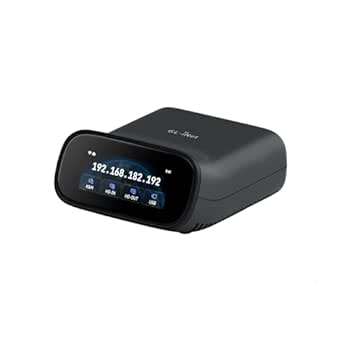 | Best for Home Labs and IT Support with Wireless Flexibility | Operation Mode: ON-ON | Connectivity Protocol: Wi-Fi | Control Method: App | VIEW ON AMAZON | See Our Full Breakdown |
| TinyPilot Voyager 3 KVM Over IP & Console Server |  | Best for Hardware-Based, BIOS-Level Remote Management | Package Dimensions: 14 x 7 x 2 inches | Item Weight: 2 pounds | Manufacturer: TinyPilot | VIEW ON AMAZON | See Our Full Breakdown |
| TESmart 16 Ports HDMI KVM Switch 4K@30Hz, 16×1 Rack Mount with EDID Emulator and Cables |  | Best for Large Rack Environments | Number of Ports: 16 HDMI inputs | Resolution Support: 4K@30Hz | Rack Mount: Yes, 1U standard | VIEW ON AMAZON | See Our Full Breakdown |
| JetKVM IP KVM, KVM Over IP, Ethernet Control for Remote Computer Access |  | Best for Tech-Savvy Remote Management | Operating System: Linux | Hardware Interface: HDMI, USB Type C | Video Output Interface: USB-C (DisplayPort Alt Mode) | VIEW ON AMAZON | See Our Full Breakdown |
| AweSun IPKVM Switch Q1, KVM Over IP Device with HDMI & USB & Ethernet Ports, 4K Remote Access, BIOS-Level Control, Secure Encryption, Server Management, Plug-and-Play |  | Best for Easy Deployment and BIOS-Level Access | Operation Mode: Offline Remote Access | Control Method: Ethernet Remote Connectivity Protocol | Connector Type: HDMI | VIEW ON AMAZON | See Our Full Breakdown |
More Details on Our Top Picks
PiKVM V4 Mini IP KVM
The PiKVM V4 Mini stands out for its compact, cost-effective design, making it ideal for small-scale remote management. Unlike the larger, more feature-rich Raritan Dominion KX IV-101, this model offers essential BIOS access and remote power control without the complexity or higher price point. Its fanless, passive heatsink ensures quiet operation, perfect for quiet office environments. However, the limited detailed specs mean it may require some technical knowledge to set up properly, especially for users unfamiliar with Raspberry Pi-based devices. It’s well-suited for IT professionals managing a handful of servers or PCs but might fall short in environments demanding extensive network management or detailed device compatibility.
Pros:- Compact and budget-friendly design
- Supports remote BIOS and system management
- Fanless operation with passive heatsink for quiet use
- Includes mass storage emulation and remote power control
Cons:- Limited detailed specifications in the description
- Requires technical knowledge for setup and use
- No explicit network compatibility details
Best for: Small IT teams or hobbyists seeking an affordable, straightforward IP KVM solution for basic remote server access.
Not ideal for: Large enterprise data centers needing extensive device management and multi-user support, as this device lacks scalability and advanced features.
- Fanless design:Yes
- Heatsink:Passive
- Mass storage device emulation:Yes
- Remote power control:Yes
- UEFI/BIOS access:Yes
- Item Weight:0.35 kg
Our verdict“This pick is perfect for small-scale setups where affordability and simplicity outweigh advanced features.”
Raritan Dominion KX IV-101 Ultra High Performance 1-Port 4K KVM-Over-IP Switch
The Raritan Dominion KX IV-101 offers a high-performance, BIOS-level KVM-over-IP experience tailored for professional data centers or enterprise racks. Compared with the PiKVM V4 Mini, it supports up to 8 users simultaneously, making it ideal for collaborative troubleshooting. Its rack-mount design and Ethernet connectivity ensure seamless integration into existing infrastructure. However, being a single-port device limits flexibility for multi-server setups, and its complexity may require dedicated IT staff for setup and maintenance. Despite these tradeoffs, it excels in environments where multi-user access and high reliability are critical.
Pros:- High-performance BIOS-level access
- Supports multiple users remotely
- Rack mountable for professional setups
Cons:- Limited to a single port
- Requires Ethernet and USB connectivity
- No detailed user interface description provided
Best for: IT professionals managing multiple servers in enterprise or data center environments who need high-performance, BIOS-level remote access.
Not ideal for: Small offices or individual hobbyists needing a simple, low-cost IP KVM, as its enterprise focus and cost may be overkill.
- Weight:3.1 lbs
- Operation Mode:ON-NONE-ON
- Control Method:Remote
- Connectivity Protocol:Ethernet
- Mounting Type:Rack Mount
- Compatible Devices:Ethernet-enabled devices, USB devices
Our verdict“This device is ideal for organizations that need reliable, multi-user server management with a focus on performance and security.”
GL.iNet Comet GL-RM1 Remote KVM, 4K 30Hz, BIOS Control, Tailscale
The GL.iNet Comet GL-RM1 is tailored for remote workers and IT pros who need 4K visuals at 30Hz combined with BIOS-level control. Its simple, one-click app connection surpasses more complex setups like the Lantronix SecureLinx Spider by offering quick deployment without extensive configuration. It supports common interfaces such as HDMI and USB 2.0, making it compatible with many devices, but its reliance on specific hardware compatibility can be limiting. The device’s lightweight design is perfect for remote office use, yet it may not support large enterprise-scale deployments or extensive device management, providing a good balance for individual users or small teams.
Pros:- Supports 4K resolution at 30Hz
- Easy setup with one-click app connection
- Enables BIOS-level control and file transfer
- Compact, lightweight design
Cons:- Limited hardware compatibility may exclude some devices
- Cannot use PD adapters
- Interfaces limited to Ethernet, HDMI, USB 2.0, and USB Type C
Best for: Remote workers or small IT teams needing high-quality visuals and BIOS access without the complexity of larger systems.
Not ideal for: Large data centers or setups requiring multiple simultaneous device connections, as it supports only one device at a time.
- Hardware Interface:Ethernet, HDMI, USB 2.0, USB Type C
- Resolution:4K at 30Hz
- Data Transfer Rate:1000 Mbps
- Enclosure Material:Plastic
- Item Dimensions:3.15″L x 2.36″W x 0.68″H
- Item Weight:85 g
Our verdict“This device is well-suited for remote professionals needing high-res visuals and simple BIOS access without extensive setup complexity.”
Lantronix SecureLinx Spider / SpiderDuo KVM-Over-IP
The Lantronix SecureLinx Spider / SpiderDuo offers a robust solution for organizations prioritizing security and scalability. Its dual-port design allows managing multiple servers simultaneously, making it more versatile than single-port options like the Raritan Dominion KX IV-101. With hardware AES encryption, it provides enterprise-grade security, critical for sensitive environments. However, the device’s complexity and the need for technical expertise can pose challenges for smaller teams or less experienced users. Its higher price point and limited port count mean it’s best suited for large-scale deployments with strict security requirements.
Pros:- Secure remote management with BIOS-level access
- Hardware AES encryption for data security
- Supports multiple device connections
Cons:- Limited to 2 ports
- Requires technical knowledge for setup
- No specific price information available
Best for: Large enterprises or government agencies needing secure, multi-server remote management with enterprise-grade encryption.
Not ideal for: Small businesses or individual users seeking a simple, low-cost remote KVM, as it’s designed for complex, high-security environments.
- Number of Ports:2
- Compatible Devices:Server, Personal Computer
- Color:black
- Item Weight:1.3 pounds
Our verdict“This device is best for security-conscious organizations managing multiple servers in enterprise environments requiring high-grade encryption.”
Remote KVM Over IP 4K Support for PC, Server, and Streaming Devices
This Remote KVM Over IP system excels in providing 4K resolution at 60Hz with low latency, suitable for remote workstations, streaming, or server management. Unlike the PiKVM V4 Mini, which is more basic, it supports multiple operating systems and offers remote power control for desktops, making it versatile for diverse environments. Its integrated ZeroTier feature enhances security and ease of remote access, but setup can be complex for users unfamiliar with network configurations. It’s ideal for IT teams or power users needing seamless high-definition remote control across various devices without sacrificing performance.
Pros:- Supports 4K resolution at 60Hz
- Low latency below 60 milliseconds
- Compatible with Windows, macOS, Linux, Android
- Includes ZeroTier for secure remote access
Cons:- Remote power on/off not supported for laptops
- Setup may be complex for non-technical users
- Requires online upgrade for ZeroTier features
Best for: IT professionals or remote users needing high-res visuals and low latency for multiple OS environments and streaming tasks.
Not ideal for: Larger data centers or users seeking multi-device support beyond a single system, as it focuses on one device at a time and has complex setup requirements.
- Resolution:3840×2160@60Hz
- Latency:below 60 milliseconds
- Compatibility:Windows, macOS, Linux, Android
- Remote Power Control:Yes (desktop only)
- Package Contents:IP KVM, USB A-C Cable, Power Adapter, HDMI Cable, Ethernet Cable, Phoenix Connector, Dupont Wire, User Manual
Our verdict“This device is suited for high-end remote control tasks demanding high resolution and low latency, especially in professional streaming or remote workstation scenarios.”
TESmart 8X1 HDMI KVM Switch 8 Port 4K@30Hz, USB2.0 Rackmount with EDID Emulator, Remote, LAN, RS232, Auto Scan, 8 KVM Cables
This TESmart 8-port HDMI KVM switch excels for users managing multiple servers or workstations that require high-quality 4K video at 30Hz. Its multiple switch methods—remote, hotkeys, LAN, RS232—offer flexibility, but this complexity can overwhelm those seeking simplicity. Compared to the ATEN KN1116VA, it provides a more straightforward user experience for smaller setups, though its resolution limit to 4K@30Hz might be a drawback for high-refresh-rate needs. The included 8 KVM cables streamline deployment, and EDID emulators help maintain display consistency across devices. However, reliance on AAA batteries for the remote and the multiple control options may complicate setup for less experienced users.
Pros:- Supports 4K resolution at 30Hz for crisp video quality
- Multiple switching methods including LAN, IR, and hotkeys
- Includes 8 KVM cables for rapid deployment
Cons:- Remote control needs AAA batteries, not included
- Limited to 4K@30Hz, not 60Hz, which may affect fast-paced workflows
Best for: IT professionals managing up to 8 computers needing high-resolution, flexible switching, and quick setup.
Not ideal for: Small offices or home labs requiring simple, plug-and-play solutions without multiple control options.
- Resolution Support:4K@30Hz
- Number of Ports:8 HDMI inputs, 1 HDMI output
- USB Ports:2 USB 2.0 hubs
- Included Cables:8 x 5ft KVM cables
- Switching Methods:IR remote, front panel, hotkeys, mouse wheel, RS232, LAN, auto detect
- Power:Requires AAA batteries for remote (not included)
Our verdict“This switch is ideal for users needing versatile control methods and high-quality video in a moderate multi-device environment.”
GL.iNet Comet PoE Remote KVM GL-RM1PE with Tailscale 4K Streaming
The GL.iNet Comet PoE Remote KVM is tailored for remote management scenarios, especially where PoE simplifies deployment. Its support for 4K streaming at 30FPS ensures high-quality video during remote sessions, and the compact design makes it suitable for tight spaces or portable setups. Compared to the TinyPilot Voyager 3, it offers a more network-centric approach, leveraging Wi-Fi and Ethernet for flexible connectivity. The built-in storage and Tailscale integration enhance remote access security and management. However, its feature set requires some technical setup, and detailed compatibility info remains limited, making it less ideal for less experienced users or those seeking plug-and-play options.
Pros:- Supports 4K video at 30FPS with low latency
- Dual power options with PoE and Type-C flexibility
- Compact, lightweight design ideal for remote setups
Cons:- Limited user reviews for comprehensive assessment
- Requires network setup for remote access
Best for: Remote IT teams needing BIOS reinstallation and device control over Wi-Fi or PoE with high-quality video.
Not ideal for: Home users or small office environments without technical expertise in network configuration.
- Connectivity Technology:Ethernet, HDMI
- Controller Type:Wi-Fi
- PoE Compatible Devices:Computer, Server
- Built-in Storage:32GB eMMC
- Streaming Resolution:4K at 30FPS
- Power Supply:PoE and Type-C dual power
Our verdict“This pick is suited for remote management professionals prioritizing flexible connectivity and high-resolution streaming.”
ATEN Technology KN1116VA 16-Port Cat5 KVM Over IP Switch with Virtual Media
Compared to the smaller TESmart switch, the ATEN KN1116VA offers 16 ports for larger server racks, making it suitable for data centers or extensive server farms. Its high-resolution support up to 1920 x 1200 at 60Hz ensures clear visuals during critical management tasks, and the web-based management supports secure, out-of-band BIOS troubleshooting. Nonetheless, its dependence on a 208V power supply limits compatibility outside specialized setups, and the more complex installation process demands technical familiarity. This switch is less suited for small offices or home labs due to its size and power requirements but excels where scalable, secure remote access is essential.
Pros:- Supports high-resolution video up to 1920 x 1200 at 60Hz
- Secure, web-based management with out-of-band BIOS access
- Power management features for data center control
Cons:- Requires 208V power supply, limiting flexibility
- Setup complexity may challenge less experienced technicians
Best for: Large-scale data centers or enterprise environments needing secure, high-resolution remote management across many servers.
Not ideal for: Small businesses or home users with limited technical support or power infrastructure.
- Operation Mode:KVM
- Number of Ports:16
- Control Method:Remote
- Resolution Support:1920 x 1200 at 60Hz
- Connector Type:RJ45
- Mounting Type:Panel Mount
Our verdict“This model fits large, security-conscious server environments demanding scalable, high-quality remote KVM access.”
GL.iNet GL-RM10 Comet Pro Remote KVM Over Wi-Fi 6 Dual Band 4K Passthrough
The GL.iNet GL-RM10 Comet Pro stands out in scenarios where wireless and wired flexibility are needed, such as home labs or small office setups. Its support for Wi-Fi 6 ensures smooth 4K video passthrough at 30FPS with minimal latency, complemented by a touchscreen interface that simplifies local control. Unlike the other Wi-Fi-based option, this device emphasizes dual-band Wi-Fi for enhanced stability. However, it requires some technical knowledge to set up securely and optimally, and its desktop-only placement limits portability. It is best suited for environments where wireless connectivity is prioritized over mobility.
Pros:- Supports dual-band Wi-Fi 6 for reliable, flexible connectivity
- Delivers 4K video passthrough at low latency
- User-friendly touchscreen interface
Cons:- Requires technical setup for secure operation
- Limited portability due to desktop placement
Best for: IT professionals and hobbyists managing remote servers or devices in fixed locations needing wireless or dual-mode connectivity.
Not ideal for: Mobile users or those seeking portable, battery-powered remote KVM solutions.
- Operation Mode:ON-ON
- Connectivity Protocol:Wi-Fi
- Control Method:App
- Control Type:full
- Maximum Resolution:4K
- Mounting Type:Desktop
Our verdict“This device is well-suited for fixed locations where wireless high-resolution management enhances convenience.”
TinyPilot Voyager 3 KVM Over IP & Console Server
The TinyPilot Voyager 3 offers a straightforward, hardware-centric approach similar to the PiKVM V4 Mini but with a focus on BIOS-level access, virtual media, and multi-user collaboration. Its plug-and-play design simplifies deployment compared to network-dependent devices like the GL.iNet Comet models, making it ideal for users needing reliable, hardware-based control. While detailed reviews are scarce, its ability to support multiple users and manage network devices via console port is a significant advantage for system administrators. However, its lack of detailed specs and price transparency might deter smaller operations or those seeking more integrated solutions.
Pros:- Easy hardware setup with no complex software required
- Supports BIOS-level access and virtual media for comprehensive control
- Multi-user support for collaborative management
Cons:- Limited detailed user feedback available
- No explicit pricing info, potentially limiting budget planning
Best for: System administrators and small IT teams requiring reliable, BIOS-level remote access with minimal setup fuss.
Not ideal for: Home users or those needing advanced networking features or extensive virtual media options.
- Package Dimensions:14 x 7 x 2 inches
- Item Weight:2 pounds
- Manufacturer:TinyPilot
Our verdict“This device is best for those seeking a simple, reliable hardware solution for BIOS-level remote management.”
TESmart 16 Ports HDMI KVM Switch 4K@30Hz, 16×1 Rack Mount with EDID Emulator and Cables
This TESmart 16-port HDMI KVM switch stands out for managing multiple servers or computers in a professional rack setup, supporting high-resolution 4K at 30Hz. Compared to smaller switches like the 8-port models, its extensive port count makes it ideal for data centers or labs with many servers. The inclusion of EDID emulators ensures stable display settings across multiple devices, a feature not always found in budget options. Its control versatility—via IR, LAN, hotkeys, and mouse wheel—provides flexible operation, though it requires rack space and doesn’t support 4K at higher refresh rates. The bundle includes 8 cables for quick deployment, but the absence of remote control batteries and the need for rack installation are common tradeoffs in professional environments.
Pros:- Supports 4K resolution at 30Hz for crisp display clarity
- Includes EDID emulators for consistent display output
- Multiple control methods for flexible operation
- Rack mountable with included cables
Cons:- No batteries included for remote control operation
- Limited to 30Hz at 4K, not suitable for high-frame-rate applications
- Requires rack space and physical installation
Best for: IT professionals managing large server racks needing high-resolution, multi-device control
Not ideal for: Small office setups or individual developers who prefer portable, plug-and-play solutions
- Number of Ports:16 HDMI inputs
- Resolution Support:4K@30Hz
- Rack Mount:Yes, 1U standard
- USB Ports:2 USB 2.0 ports
- Cable Length:8 x 5ft cables
- EDID Emulator:Yes
- Control Methods:IR remote, LAN, front panel, hotkeys, mouse wheel, RS232
Our verdict“This switch is best suited for large-scale, professional rack environments where high resolution and multiple control options are essential.”
JetKVM IP KVM, KVM Over IP, Ethernet Control for Remote Computer Access
The JetKVM IP KVM offers low latency, high flexibility, and extensive remote access options, making it a standout choice for technical teams needing real-time control. Unlike the AweSun IPKVM Switch Q1, which emphasizes BIOS-level access during crashes, JetKVM is designed for continuous, low-latency streaming over Ethernet, supporting cloud and Wake on LAN integrations. Its open-source software allows for extensive customization, appealing to users comfortable with Linux and software tinkering. However, its limited hardware interface options and the need for technical setup distinguish it from more plug-and-play models like AweSun. This device is ideal for those with network expertise who require flexible, remote, real-time control of multiple servers.
Pros:- Ultra-low latency video streaming with adjustable quality
- Supports multiple remote access modes including cloud and Wake on LAN
- Open-source software enables extensive customization
- Remote system recovery reduces on-site visits
Cons:- Setup and customization require technical knowledge
- Limited hardware interfaces may restrict compatibility for some users
Best for: System administrators and developers with network skills needing customizable, low-latency remote control
Not ideal for: Less technical users or small teams seeking simple, out-of-the-box remote KVM solutions
- Operating System:Linux
- Hardware Interface:HDMI, USB Type C
- Video Output Interface:USB-C (DisplayPort Alt Mode)
- Dimensions:2.36 x 1.77 x 1.38 inches
- Memory Cache:32 GB
- Processor Speed:1 GHz
- Max Memory Size:1 GB RAM
Our verdict“This pick makes the most sense for experienced users needing highly customizable, low-latency remote server management over Ethernet.”
AweSun IPKVM Switch Q1, KVM Over IP Device with HDMI & USB & Ethernet Ports, 4K Remote Access, BIOS-Level Control, Secure Encryption, Server Management, Plug-and-Play
The AweSun IPKVM Switch Q1 provides a straightforward, secure remote control solution with BIOS-level access, making it ideal for quick deployment and troubleshooting. Its compact design and plug-and-play setup make it accessible for users who want immediate remote management without deep technical configurations. Compared to JetKVM, which targets users with network expertise, AweSun’s focus on security with 2048-bit RSA and AES encryption offers peace of mind for sensitive environments. Its support for BIOS control during crashes and its simple push-button switching make it suitable for small to medium setups, though it lacks detailed device compatibility info and requires a 12V power supply. This device is perfect for users who prioritize security and ease of use.
Pros:- Supports BIOS-level control during system crashes
- Compact and portable design for flexible deployment
- Secure encryption with RSA and AES
- Plug-and-play setup with no drivers needed
Cons:- Limited details on device compatibility
- Requires 12V power supply
- No information on pricing or subscription fees
Best for: Small IT teams or remote administrators seeking quick, secure BIOS-level remote access
Not ideal for: Highly technical environments requiring extensive customization or multi-user control
- Operation Mode:Offline Remote Access
- Control Method:Ethernet Remote Connectivity Protocol
- Connector Type:HDMI
- Mounting Type:Surface Mount
- Voltage:12V
- Encryption:RSA 2048-bit and AES
Our verdict“This device is ideal for small teams or remote admins needing secure, BIOS-level access with quick setup in a compact form factor.”

How We Picked
To evaluate these IP KVM switches, I focused on performance, security, ease of use, connectivity options, and build quality. I considered how well each product supports remote access, including resolution capabilities and latency. Ease of installation and management was also critical, especially for users without extensive technical experience. Cost was a factor but balanced against feature set and reliability. The ranking reflects a combination of these criteria, aiming to recommend options suitable for different user needs and budgets.Factors to Consider When Choosing Ip Kvm Switch For Remote Server Access
Choosing the right IP KVM switch for remote server access requires understanding several key factors. The ideal model depends on your specific environment, technical proficiency, and security requirements. Considering these factors carefully can prevent costly mistakes and ensure smooth remote management of your servers.Performance and Resolution
Performance, including latency and resolution, directly impacts your remote management experience. If high-definition video and fast response times are priorities, look for switches supporting 4K at 30Hz or higher. Cheaper models may only support lower resolutions, which can hinder tasks like troubleshooting or detailed monitoring. Balance your need for clarity with network stability, especially if working over slower connections.
Security Features
Security should be a top concern, especially for enterprise or sensitive data environments. Features like encrypted connections, BIOS-level access, and user authentication help protect against unauthorized access. Keep in mind, however, that enhanced security often increases complexity and cost. For smaller setups, simpler security measures may suffice, but larger networks benefit from comprehensive security protocols.
Connectivity and Compatibility
Ensuring the switch integrates seamlessly with your existing network and hardware is essential. Check compatibility with your server types, and consider whether you need wired Ethernet, Wi-Fi, or both. Wired connections offer greater stability, but Wi-Fi models provide flexibility and easier placement. Also, verify support for your operating systems and BIOS compatibility to avoid setup issues.
Ease of Use and Management
User-friendly interfaces and management tools can save time, especially if multiple users need access. Some options include web-based management, remote firmware updates, and auto-discovery features. Advanced models might require more technical knowledge but offer greater control. For those new to remote server management, a plug-and-play design can reduce setup time and frustration.
Cost and Value
Price varies widely based on features, security, and performance. While premium models deliver advanced capabilities, they may be unnecessary for basic remote management needs. Conversely, budget options might lack essential features like high resolution or security. Assess your requirements carefully and choose a model that offers the best value—balancing feature set with your budget constraints.
Frequently Asked Questions
Can I use an IP KVM switch over my existing network?
Yes, most IP KVM switches are designed to work over standard Ethernet networks. They typically connect via RJ45 ports and communicate using network protocols. However, ensure that your network infrastructure supports the bandwidth and security features needed for smooth remote access, especially if multiple users will connect simultaneously or if you require high-resolution video.
What security features should I look for in an IP KVM switch?
Security features such as encrypted data transmission, BIOS-level access, and user authentication are vital for protecting sensitive server environments. Some models include VPN support or integration with existing security protocols. Evaluate your security needs based on your environment’s sensitivity level, and prioritize switches that offer robust encryption and access controls to guard against unauthorized intrusion.
Is Wi-Fi connectivity reliable enough for remote server management?
Wi-Fi-enabled IP KVM switches offer flexibility and easier placement, but may introduce latency or stability issues compared to wired connections. For critical or high-precision tasks, wired Ethernet is generally more reliable. If you opt for Wi-Fi, choose models with dual-band support and good signal strength, and consider wired backup options to ensure consistent access.
How difficult is it to set up an IP KVM switch for a non-technical user?
Setup complexity varies across models. Some switches are designed for plug-and-play operation with intuitive web interfaces, making them accessible for users without extensive technical background. Others require network configuration and firmware updates, which may need more advanced knowledge. For non-technical users, selecting a model with straightforward setup and comprehensive documentation is advisable.
When should I consider investing in a high-end IP KVM switch?
If you manage multiple servers, require high-resolution video, or need advanced security features, investing in a premium model makes sense. Enterprise environments benefit from features like BIOS-level control, encryption, and multi-user access. However, if your needs are basic—such as occasional remote management or a small number of servers—a more affordable, simpler switch may suffice without sacrificing essential functionality.
Conclusion
For small setups or those just starting out, the PiKVM V4 Mini offers simplicity and affordability. Enterprise users managing multiple servers with high security demands should consider the Raritan Dominion KX IV-101 or ATEN KN1116VA. Budget-conscious buyers seeking value without sacrificing essential features will find the TESmart 8X1 HDMI KVM Switch to be a balanced choice. Beginners will appreciate models with straightforward setup, while large organizations should prioritize advanced security and management capabilities. Determine your priorities—whether ease of use, security, or performance—and select the model that best fits your remote server management needs.
Columbus Day / Indigenous Peoples' Day Picks
long weekend sales
As an affiliate, we earn on qualifying purchases.