

Choosing among the best data center cooling systems comes down to three questions: how much heat your rack generates, how much rack space you can sacrifice for fans, and whether you want automated temperature control. The AC Infinity CLOUDPLATE T7-N stands out as my top overall pick because it balances high CFM airflow with a programmable thermostat and USB connectivity in a 2U footprint. If budget is the deciding factor, the AC Infinity CLOUDPLATE T1-N delivers reliable 1U airflow at the lowest cost of the lineup, while the AC Infinity CLOUDPLATE T9-N is the move when you need maximum intake airflow and can spare 3U of rack space. The main tradeoff across this category is airflow versus noise versus rack units — bigger panels move more air but sound like it, and smarter controls cost more up front. Read on for the full breakdown of each system and who each one is actually for.

Get business pricing on networking and server gear
- Business-only prices and quantity discounts
- Tax-exempt purchasing
- Multiple users, one account, clear invoices
Key Takeaways
- The T7-N earned best overall because its thermostat automation and USB controller add hands-free cooling that the nearly identical standard T7 lacks — for buyers who don’t want to babysit rack temperatures.
- Size class predicts performance more than brand: 1U panels (T2, T1-N) suit low-density racks, 2U panels (T7, T7-N, ProCool) handle mid-range loads, and only the 3U T9-N belongs in high-heat racks.
- The ProCool TV480-E trades smart features for raw industrial fan power, making it the pick for enclosed closets where airflow matters more than quiet operation or programmability.
- The generic 1U adjustable-temperature panel is the only non-AC Infinity option with a built-in digital display and thermal control at a budget price, but its build quality and fan longevity trail the branded alternatives.
- Every panel in this lineup is either intake or exhaust oriented — matching panel direction to your rack’s existing airflow path mattered more for real cooling results than raw CFM numbers.
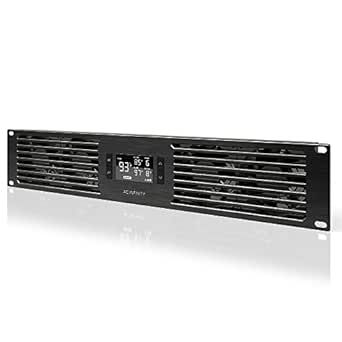


| data center cooling system | Airflow | Design | Noise |
|---|---|---|---|
| AC Infinity CLOUDPLATE T7 2U R | 50–220 CFM | Exhaust | — |
| AC Infinity CLOUDPLATE T7-N 2U | 50–220 CFM | Intake | 10–36 dBA |
| AC Infinity CLOUDPLATE T2 1U R | 60–300 CFM | Top exhaust | 12–38 dBA |
| AC Infinity CLOUDPLATE T9-N 3U | 60–300 CFM | Intake | 12–38 dBA |
| ProCool TV480-E 2U Rack Mount | 212 CFM | Exhaust | — |
| AC Infinity CLOUDPLATE T1-N 1U | 20 to 60 CFM | — | 8 to 28 dBA |
| 1U 19-Inch Rack Mount Fan with | Top exhaust | — | — |
More Details on Our Top Picks
AC Infinity CLOUDPLATE T7 2U Rack Mount Exhaust Fan Panel
The CLOUDPLATE T7 is my strongest all-around pick for a standard 19-inch rack that needs managed exhaust cooling. Its programmable thermostat varies fan speed with temperature, helping avoid constant full-speed noise, while alarms and backup memory add useful monitoring if conditions change. Airflow ranges from 50 to 220 CFM, giving buyers room to tune cooling around their equipment. Compared with the ProCool TV480-E, the T7 trades the ProCool’s fixed 212 CFM for automatic control and a quieter 10 dBA minimum. Its three dual-ball-bearing fans and flexible mounting orientation make it adaptable, though the panel still consumes 2U of rack space and can reach 36 dBA at higher speeds. Choose it for balanced, adjustable exhaust; skip it if every rack unit is needed.
Pros:- Thermostat adjusts fan speed automatically across six settings
- Airflow can be tuned from 50 to 220 CFM
- Alarm alerts and backup memory support temperature monitoring
- Dual-ball-bearing fans allow horizontal or vertical mounting
Cons:- Uses 2U of rack space
- Noise can reach 36 dBA at maximum speed
Best for: Owners of 19-inch server, network, or AV racks who want temperature-responsive exhaust and alarm alerts.
Not ideal for: Operators with a tightly packed rack who cannot spare 2U, or buyers seeking an intake panel.
- Rack space:2U
- Compatibility:19-inch racks
- Design:Exhaust
- Airflow:50–220 CFM
- Noise level:10–36 dBA
- Fans:Three dual-ball-bearing fans
- Material:Anodized aluminum
- Mounting:Horizontal or vertical
Our verdict“Pick the CLOUDPLATE T7 for adjustable, monitored exhaust in a rack with 2U available.”
AC Infinity CLOUDPLATE T7-N 2U Rack Mount Fan Panel
The CLOUDPLATE T7-N suits racks that need cool air pushed into equipment rather than warm air pulled out. Its intake design pairs with a programmable thermostat, alarms, and backup memory, so buyers get active airflow control and status alerts in one panel. At up to 220 CFM, it shares a ceiling with the exhaust-oriented CLOUDPLATE T7, but serves the opposite airflow job; these models are not interchangeable without planning the rack’s airflow path. Four dual-ball-bearing fans and a stated 67,000-hour lifespan support sustained operation, while the 10 W draw is modest. The main limitation is that it is intake-only, so it may need an exhaust solution elsewhere in the enclosure. It also occupies 2U and can reach 36 dBA.
Pros:- Programmable thermostat provides automatic speed control
- Alarm alerts, fan-failure triggers, and backup memory are included
- Four dual-ball-bearing fans support horizontal or vertical mounting
- Anodized aluminum construction with CNC-machined detailing
Cons:- Intake-only design may require a separate exhaust fan
- Uses 2U of rack space
- Noise can reach 36 dBA
Best for: IT and AV rack owners who need controlled intake to feed cool air toward equipment and already have a clear exhaust path.
Not ideal for: Buyers looking for a single panel to exhaust hot air, or rack operators unable to spare 2U.
- Model:AI-CP2H
- Rack mount size:2U
- Design:Intake
- Airflow:50–220 CFM
- Noise:10–36 dBA
- Static pressure:2.56 mm-H₂O
- Fans:Four dual-ball-bearing fans
- Power:10 W
- Fan lifespan:67,000 hours
Our verdict“Choose the T7-N when your rack needs monitored intake and you can manage exhaust separately.”
AC Infinity CLOUDPLATE T2 1U Rack-Mount Cooling Fan
For a rack with only one unit to spare, the CLOUDPLATE T2 offers a useful mix of compact fit and higher stated airflow. It occupies 1U yet reaches 300 CFM, above the 220 CFM ceiling of the 2U CLOUDPLATE T7 and T7-N. That makes it a stronger fit where airflow capacity matters but rack space is scarce. Its thermostat, alarms, and backup memory bring control features similar to those larger panels, and it can mount horizontally or vertically. The compromise is sound: its range reaches 38 dBA, two decibels above the T7’s stated maximum. Buyers should also confirm that its top-exhaust airflow matches their rack layout; it does not provide the intake function of the T7-N.
Pros:- Fits in 1U of rack space
- Provides up to 300 CFM airflow
- Thermostat, alarm alerts, and backup memory support automated operation
- Can be mounted horizontally or vertically
Cons:- Noise can reach 38 dBA
- Top-exhaust design does not replace an intake panel
Best for: Rack owners short on space who need an exhaust panel with airflow capacity up to 300 CFM.
Not ideal for: Noise-sensitive installations or racks that specifically need intake airflow rather than top exhaust.
- Rack size:1U
- Design:Top exhaust
- Airflow:60–300 CFM
- Noise:12–38 dBA
- Fans:Three dual-ball-bearing fans
- Dimensions:19 × 1.75 × 13.5 in.
- Power:12 W
- Mounting positions:Horizontal or vertical
Our verdict“Choose the T2 when 1U is all you can spare and its top-exhaust airflow suits your rack.”
AC Infinity CLOUDPLATE T9-N 3U Rack Mount Fan Panel, Intake
The CLOUDPLATE T9-N is the intake choice for a rack where a larger panel and greater stated airflow take priority over conserving rack space. Its 60–300 CFM range exceeds the T7-N’s 50–220 CFM, giving it more headroom for installations that need stronger intake. Like the smaller intake panel, it brings programmable temperature control, alarm warnings, and backup memory, so airflow can respond to changing equipment heat. The difference is footprint: the T9-N occupies 3U, one more unit than the T7-N. Its noise can also reach 38 dBA, while the T7-N tops out at 36 dBA. This makes the T9-N a focused fit for larger or hotter racks, not a space-saving default.
Pros:- Airflow range reaches 300 CFM
- Programmable thermostat provides automated speed control
- Alarm warnings and backup memory support monitoring
- Anodized aluminum construction with CNC-machined detailing
Cons:- Uses 3U of rack space
- Noise can reach 38 dBA
- Intake design requires a separate plan for exhausting warm air
Best for: Operators of larger 19-inch equipment racks who need intake airflow up to 300 CFM and have 3U available.
Not ideal for: Small or densely populated racks, and installations that need exhaust rather than intake airflow.
- Rack space:3U
- Design:Intake
- Airflow:60–300 CFM
- Noise:12–38 dBA
- Bearings:Dual ball
- Controller:Programmable thermostat with automated speed control, alarm warnings, and backup memory
- Construction:Anodized aluminum with CNC-machined detailing
Our verdict“Pick the T9-N for higher-capacity intake when its 3U footprint fits your rack plan.”
ProCool TV480-E 2U Rack Mount Exhaust Fan
The ProCool TV480-E is the straightforward exhaust option for buyers who want a stated 212 CFM without a programmable controller. That fixed-output approach is simpler than the thermostat-driven CLOUDPLATE T7, but it gives operators less ability to adapt airflow to temperature or quiet the system when cooling demand drops. Its 2U format fits standard 19-inch rack cabinets, and the airflow figure is close to the T7’s 220 CFM maximum. The tradeoff is substantial in a quiet room: 45 dBA is higher than the T7’s 36 dBA maximum and the T2’s 38 dBA. With no alarm or automatic speed features listed, this panel makes most sense where basic exhaust and a direct spec sheet matter more than monitoring or noise control.
Pros:- Provides 212 CFM airflow
- Fits standard 19-inch rack cabinets
- Exhaust design removes warm rack air
- Uses a 2U rack format
Cons:- Produces 45 dBA of noise
- No thermostat, speed automation, or alarms are listed
- Airflow is specified as a fixed 212 CFM
Best for: Rack operators who want a simple 2U exhaust fan with stated airflow and do not need thermostat control.
Not ideal for: Quiet offices, noise-sensitive studios, or buyers who want automatic fan-speed adjustment and alarms.
- Rack size:2U
- Dimensions:19 × 3.5 × 2.5 in.
- Airflow:212 CFM
- Noise level:45 dBA
- Compatibility:19-inch rack cabinets
- Design:Exhaust
Our verdict“Choose the TV480-E for uncomplicated 212 CFM exhaust if its 45 dBA noise level is acceptable.”
AC Infinity CLOUDPLATE T1-N 1U Rack Mount Fan Panel
The CLOUDPLATE T1-N earns its place for racks that need controlled intake rather than a basic always-on fan panel. Its programmable thermostat adjusts fan speed as temperatures change, while alarm warnings and backup memory help operators keep settings and spot heat concerns. The stated 20–60 CFM airflow gives buyers a defined range to compare with the CLOUDPLATE T2, though airflow alone cannot predict cooling in a loaded rack. At 1U, it fits where rack space is tight; its intake design also differs from exhaust-focused options such as the CLOUDPLATE T7. The tradeoff is that this panel is a targeted airflow aid, not a complete room cooling system, and the available specs do not describe its compatibility with every rack layout.
Pros:- Programmable thermostat varies fan speed with temperature.
- Alarm warnings can flag temperature concerns.
- Backup memory retains settings after power interruption.
- Anodized aluminum housing with CNC-machined detailing.
Cons:- Its 1U panel provides localized rack airflow rather than room-level cooling.
- The listed airflow range alone does not establish performance in a specific rack configuration.
Best for: IT and AV operators with a standard rack who want thermostat-based intake control and alarm alerts in a single rack unit.
Not ideal for: Data center teams cooling high-density racks or entire rooms, since this panel’s stated airflow does not establish capacity for those loads.
- Rack space:1U
- Airflow design:Intake
- Airflow:20 to 60 CFM
- Noise:8 to 28 dBA
- Bearings:Dual ball
- Control:Programmable thermostat with automated speed control
- Alerts and memory:Alarm warnings and backup memory
- Housing:Anodized aluminum with CNC-machined detailing
Our verdict“Choose the CLOUDPLATE T1-N for compact, thermostat-controlled intake with alerts; look to a larger or room-level system for broader cooling demands.”
1U 19-Inch Rack Mount Fan with 4 Fans, Adjustable Temperature Control, and Digital Display
This 1U four-fan panel is a straightforward fit for operators who want temperature control and a visible readout in a standard 19-inch cabinet. Its LCD digital display makes the control setting easier to check at the rack than a panel without a screen. Compared with the AC Infinity CLOUDPLATE T1-N, however, its product data does not specify airflow or noise figures, and it does not list alarm warnings or backup memory. That makes it harder to judge cooling capacity or match the panel to a heat load before installation. The listing identifies top exhaust, so buyers should plan airflow around that direction; it is not a substitute for intake cooling or facility-level thermal management.
Pros:- Fits standard 19-inch rack cabinets.
- Uses only 1U of rack space.
- Adjustable temperature control.
- LCD digital display provides a visible readout.
Cons:- No airflow performance figures are provided for capacity planning.
- Top-exhaust airflow may not suit racks configured for intake cooling.
- Rack-cabinet design limits use outside standard rack setups.
Best for: AV, music, and network rack owners with a 19-inch cabinet who want adjustable temperature control and an LCD readout at the rack.
Not ideal for: Data center teams selecting cooling for a known equipment heat load, because the supplied product data gives no airflow performance figures.
- Fan count:4
- Rack size:19-inch
- Rack height:1U
- Temperature control:Adjustable
- Display:LCD digital display
- Airflow:Top exhaust
- Fan noise:Noise-controlled; no numeric level specified
Our verdict“Pick this panel for basic temperature control and an easy-to-read display in a 19-inch rack, provided its unspecified airflow capacity fits your needs.”

How We Picked
I evaluated each cooling system on four buyer-facing criteria. Airflow and cooling capacity came first: I compared rated CFM, fan count, and panel size to determine what rack density each unit can realistically handle. Control and automation was next — a panel with a programmable thermostat that ramps fan speed with temperature protects equipment far better than a dumb on/off switch, so automated models ranked above manual ones at equal airflow. Form factor and rack cost mattered because every rack unit a fan panel consumes is a rack unit unavailable for servers, so I weighed whether each 1U, 2U, or 3U design earns its footprint.
Finally, I considered build quality, noise, and value over time, including bearing type, replacement fan availability, and how each model compares to its closest sibling in the lineup. This last point explains the ranking: the CLOUDPLATE family dominates because its variants are differentiated meaningfully (smart vs. manual, intake vs. exhaust, 1U vs. 3U), while the ProCool and generic options earn their spots by serving buyers the AC Infinity models don’t — those who need industrial-grade airflow or the cheapest possible thermal control.
| data center cooling system | Design |
|---|---|
| AC Infinity CLOUDPLATE T7 2U R | Exhaust |
| AC Infinity CLOUDPLATE T7-N 2U | Intake |
| AC Infinity CLOUDPLATE T2 1U R | Top exhaust |
| AC Infinity CLOUDPLATE T9-N 3U | Intake |
| ProCool TV480-E 2U Rack Mount | Exhaust |
| AC Infinity CLOUDPLATE T1-N 1U | — |
| 1U 19-Inch Rack Mount Fan with | — |
Factors to Consider When Choosing Best Data Center Cooling Systems
A fan panel is only as effective as the airflow strategy around it. Before picking a model from the lineup above, think through these broader factors — they determine whether even the best panel will actually cool your equipment.Match Panel Direction to Your Rack’s Airflow Path
The single most common mistake I see is mounting an exhaust panel on the front of a rack or mixing intake and exhaust panels in the same column. Servers pull air front-to-back, so your rack has a defined cold side and hot side, and fan panels must reinforce that path rather than fight it. An exhaust panel at the rear top of the rack pulls hot air out; an intake panel at the front bottom pushes cool air in — reversing them creates recirculation that can make temperatures worse than no fans at all. The CLOUDPLATE T9-N exists specifically as an intake model, which tells you how differently these two roles perform. Before buying, open your rack, confirm where air enters and exits, and buy the panel orientation that matches. If you can only add one panel, exhaust at the top rear usually delivers the biggest temperature drop because hot air naturally rises and pools there.
Calculate Your Heat Load Before Choosing a Size Class
Buyers routinely over- or under-buy airflow because they never estimate their actual heat output. A rough rule: every watt a server draws becomes a watt of heat, and you need enough airflow to move that heat out faster than it accumulates. A single 1U panel can handle a lightly loaded rack with a few network switches, but a rack with multiple power-hungry servers, a NAS, and a UPS needs a 2U or 3U solution. The cost of under-buying is thermal throttling and shortened component life; the cost of over-buying is wasted rack space and unnecessary fan noise. Sizing up one class from your estimate is usually the smarter spend because fans running at low speed last longer and run quieter than small fans pushed to maximum. Also check whether the panel supports adjustable speed — a 3U panel dialed down often sounds better than a 1U panel at full tilt.
Decide Whether You Need Automation or Manual Control
A manual fan panel runs at a fixed speed all day, whether your rack is idle at 3 a.m. or under full load at noon. Automated panels with thermostats ramp fan speed based on probe readings, which reduces noise during quiet periods and extends fan bearing life. The price gap between a manual model and its smart sibling is usually small relative to the convenience gained, which is why I ranked the T7-N above the standard T7. That said, automation only helps if you place the thermal probe correctly — near the hot exhaust zone, not in open air at the bottom of the rack where it will read cool and under-drive the fans. If your rack load is constant (always-on network gear, for example), a manual panel at a set medium speed may be perfectly adequate and simpler to maintain. Variable workloads benefit most from thermal control.
Plan for Noise and Placement
Fan panels are often the loudest thing in a home lab or small server closet, and buyers underestimate this until the first night. Multi-fan 2U and 3U panels at full speed can produce conversation-level noise that carries through walls, which matters if the rack lives in an office corner or bedroom-adjacent closet. Smaller 1U panels with fewer fans run quieter but move less air, so you’re trading cooling headroom for peace. Placement also affects perceived noise — a panel exhausting into a confined wall cavity will resonate more than one with open air behind it. If noise sensitivity is high, choose a panel with speed control or automation so fans loaf when demand is low, and consider acoustic treatment around the rack rather than settling for inadequate cooling.
We Rack Space Cost Into the Price
Every rack unit consumed by a fan panel is capacity you can’t use for equipment, and in a full 12U or 18U cabinet that opportunity cost is real. A 3U intake panel like the T9-N can eat a quarter of a small rack’s capacity, which only makes sense if your heat load genuinely demands it. In tight racks, a single efficient 2U exhaust panel is usually the better compromise than stacking multiple 1U units. Think about future growth too: if you plan to add servers, buying a slightly larger panel now avoids ripping out a 1U solution in a year. The cheapest panel isn’t the best value if it forces a second purchase later, and the most powerful panel isn’t premium if half its airflow is wasted on a rack that never gets warm.
Check Power Delivery and Connector Compatibility
Fan panels differ in how they draw power — standard wall adapters, USB power, or rack power strips — and mismatched expectations cause frustrating returns. USB-powered panels like the smart CLOUDPLATE variants are convenient for home labs but may not fit a data center power distribution setup, while adapter-based industrial models need an available outlet inside or near the rack. Check cable length as well, since a short power lead can dictate panel placement independent of your airflow plan. Also verify the mounting hardware matches your rack: most panels fit standard 19-inch rails, but hole spacing and included screws vary between brands. If you’re mixing brands in one rack, standardize power where possible so a single strip or UPS can feed everything.
Frequently Asked Questions
Is a 1U fan panel enough for my server rack, or do I need 2U or 3U?
It depends entirely on your heat load. A 1U panel like the CLOUDPLATE T2 or T1-N handles racks with light-duty equipment — network switches, a single NAS, patch panels, or a modest home server. Once you add power-hungry components like multiple servers, a UPS, or storage arrays, a 1U panel will struggle to move enough air and you’ll see temperatures climb under load. 2U panels roughly double the fan count and airflow, making them the default choice for mixed home lab racks. The 3U T9-N is best reserved for genuinely hot racks, because consuming three rack units in a small cabinet is a real cost. When in doubt, size up one class and run the fans at lower speed — you’ll get similar airflow with less noise and longer fan life.
What’s the actual difference between the CLOUDPLATE T7 and T7-N?
These two panels share the same 2U form factor, fan count, and airflow potential, so the difference comes down to control rather than cooling muscle. The T7-N includes programmable thermal automation, letting fans ramp up and down based on a temperature probe rather than running at whatever speed you set manually. For racks with variable workloads — equipment that idles at night and heats up during work hours — that automation meaningfully reduces average noise and fan wear. If your rack runs a constant load around the clock, the standard T7 does the same job for less money with no downside. My ranking reflects this: variable-use buyers should default to the T7-N, while steady-load buyers can save with the T7 and lose nothing.
Should I mount my fan panel at the front (intake) or rear (exhaust) of the rack?
Follow your equipment’s airflow direction, which for standard servers is front-to-back. An exhaust panel belongs at the rear top of the rack, pulling hot air out at the point where it naturally accumulates — this is why most of the lineup, including the T7 and ProCool models, is exhaust-oriented. An intake panel like the T9-N mounts at the front and pushes cool air in, which helps when your rack sits in a cool room but equipment intake fans struggle to pull enough air through dense configurations. The worst setup mixes orientations randomly, creating short-circuit airflow where hot exhaust gets pushed back into cold intakes. If adding only one panel, exhaust at the top rear gives most racks the largest measurable temperature drop.
How loud are rack fan panels, and can I make them quieter?
Noise scales with fan count and speed, so a 3U panel at full power is noticeably louder than a 1U unit at low speed — expect anything from a soft hum to a sound you’ll hear through a closed door. The most effective noise reduction is buying more airflow capacity than you need and running it at reduced speed: a 2U panel at 40 percent often moves the same air as a 1U panel at 100 percent while sounding far quieter. Automation helps too, since thermostatic models like the T7-N idle down when the rack is cool, which matters a lot for racks in living spaces. Placement matters as well — avoid exhausting into enclosed wall cavities that resonate. If a panel is loud because it’s running flat-out constantly, the real fix is more cooling capacity, not quieter fans.
Are generic fan panels with digital displays a good alternative to brand-name models?
The generic 1U panel in this lineup earns its place by offering something unusual at its price: an adjustable temperature controller with a digital display, which most budget panels skip entirely. For buyers who want basic thermal automation without paying brand pricing, it’s a legitimate option and I ranked it accordingly. The tradeoffs are in the details — fan bearings tend to be lower grade, replacement parts are harder to source, and long-term reliability is less proven than AC Infinity’s ecosystem, which offers replaceable fans and consistent firmware across its product line. For a hobby rack that’s easy to access and monitor, the generic panel is a reasonable gamble. For equipment you can’t afford to have overheating unattended, the branded alternatives’ track record justifies the premium.
Conclusion
The right pick here depends less on which panel is objectively best and more on what your rack demands. For best overall, the AC Infinity CLOUDPLATE T7-N combines strong 2U airflow with thermostat automation and USB control, making it the safest choice for most mixed-use racks. The best value is the AC Infinity CLOUDPLATE T1-N, which covers basic exhaust needs for light racks at the lowest entry point in the lineup. Best premium goes to the CLOUDPLATE T9-N — its 3U intake design delivers the highest airflow of the group for genuinely hot, densely packed racks where you’ve confirmed front-intake cooling is the gap.
For beginners setting up a first home lab rack, the CLOUDPLATE T2 is the easiest starting point: simple mounting, straightforward operation, and enough airflow for typical starter equipment without overwhelming configuration options. The ProCool TV480-E serves a specific need — buyers with enclosed closets or industrial setups who want raw fan power and don’t care about smart features or quiet operation. And if you want thermal control on a tight budget, the generic 1U panel with digital display is the wildcard worth a look. Match the panel to your heat load, airflow direction, and rack space budget, and any of these seven will do its job well.
Fall Picks
fall essentials
As an affiliate, we earn on qualifying purchases.